> ## Documentation Index
> Fetch the complete documentation index at: https://cometchat-22654f5b-feature-react-native-sdk-quotedmessage-a.mintlify.site/llms.txt
> Use this file to discover all available pages before exploring further.
# AI Bots
AI Bots in CometChat are designed to facilitate conversations with users. Each AI Bot is associated with a specific [AI Instruction](/ai/instructions).
## Before you begin
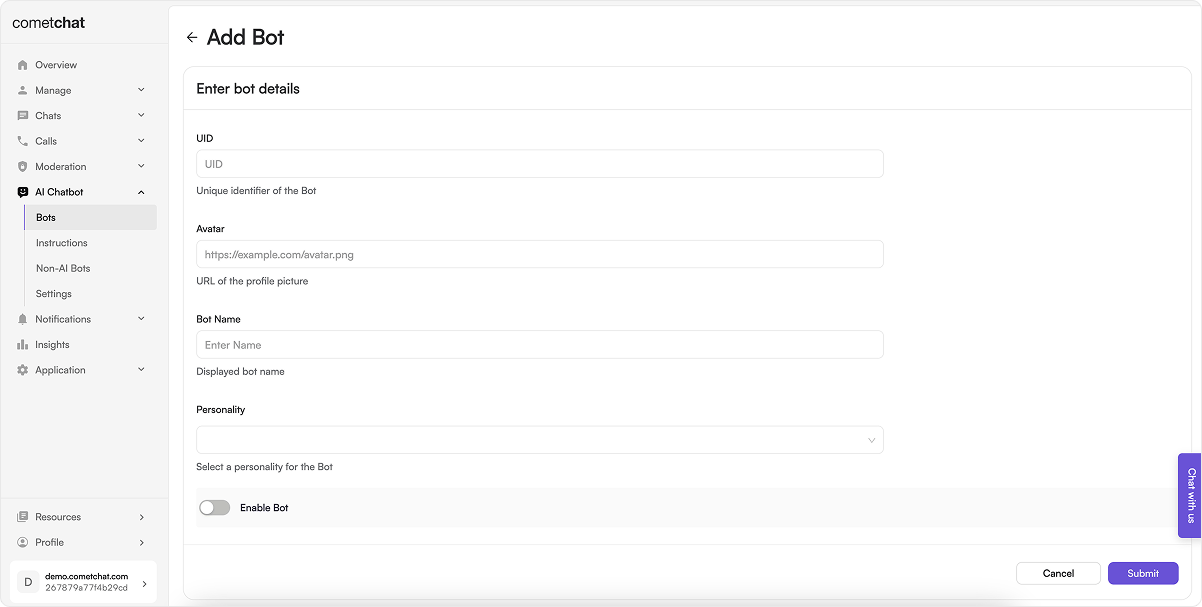 1. Configure the AI settings through the CometChat dashboard as detailed in the [Overview section](/ai-chatbots/overview).
2. Navigate to AI Bots section and add a new bot by clicking on the **"+"** button.
3. Enter bot details like `UID`, `Avatar`, `Bot name` and assign a `Instruction` from the dropdown. Then "Enable" the bot.
4. These details can be edited by clicking on the three dots. Similarly, you can also delete a bot.
## How does it work?
### Direct Conversation
Users can engage in direct conversations with bots by typing messages or asking questions. Bots respond in real-time, providing relevant information or responses based on their configured personality.
### Ask for Suggestions in a Conversation
Users can also request suggestions or recommendations from bots. Bots analyze user input and provide suggestions accordingly. For example, a user may ask a bot for movie recommendations, and the bot will respond with a list of movie suggestions.
Bots Suggestion are request-response based, so they will not know about the previous questions asked when asking for a suggestion. However, an end-user can converse with a Bot in a Direct Conversation.
CometChat AI Bot goes through the messages of a conversation to understand the context of a conversation & answer a question asked to the Bot. The CometChat SDK has a method to ask a question to the CometChat AI Bot. It returns a string response.
The number of messages to be fetched to generate relevant suggestion is configurable. By default the CometChat AI Bot takes the recent `1000` messages of a conversation. It can be configured to timestamp specific or for unread messages only.
| Configuration | Value |
| ------------- | ------------------------------------------------------ |
| lastNMessages | This will fetch specific number of messages. |
| fromTimestamp | This will fetch messages from a particular timestamp. |
| toTimestamp | This will fetch messages until a particular timestamp. |
| unreadOnly | This will fetch only the unread messages. |
While using any configuration mentioned above a maximum of **only** `1000` messages will be fetched.
## Implementation
### SDKs
To implement AI Bots in the platform of your choice, you may utilize the following code samples:
```js theme={null}
const receiverId = "UID/GUID";
const receiverType = "user/group";
const botUid = "UID";
const question = "Question for Bot";
const configuration = { lastNMessages: 100 };
CometChat.askBot(
receiverId,
receiverType,
botUid,
question,
configuration
).then(
(answer) => {
console.log("Bot Reply", answer);
},
(error) => {
console.log("An error occurred while fetching bot response.", error);
}
);
```
```java theme={null}
String receiverId = 'UID/GUID';
String receiverType = CometChatConstants.RECEIVER_TYPE_USER; //'user/group'
String bootId = ""; //'user/group'
String question = "";
JSONObject configuration = new JSONObject();
try {
configuration.put("lastNMessages", 100);
} catch (JSONException e) {
throw new RuntimeException(e);
}
CometChat.askBot(receiverId, receiverType, bootId, question, configuration, new CometChat.CallbackListener() {
@Override
public void onSuccess(String s) {
Logger.error(TAG, "aiFeature: " + s);
}
@Override
public void onError(CometChatException e) {
Logger.error(TAG, e.getMessage());
}
});
```
```kotlin theme={null}
val receiverId = "UID/GUID"
val receiverType = CometChatConstants.RECEIVER_TYPE_USER // 'user/group'
val bootId = ""
val question = ""
val configuration = JSONObject()
try {
configuration.put("lastNMessages", 100)
} catch (e: JSONException) {
throw RuntimeException(e)
}
CometChat.askBot(receiverId, receiverType, bootId, question, configuration,
object : CometChat.CallbackListener() {
override fun onSuccess(s: String) {
Log.e(TAG, "aiFeature: $s")
}
override fun onError(e: CometChatException) {
Log.e(TAG, e.localizedMessage)
}
})// Click to edit code
```
```dart theme={null}
String receiveId = "";
String receiverType = CometChatConversationType.user;
String question = "";
String botID = "";
Map configuration = { "lastNMessages": 100 };
CometChat.askBot(receiveId, receiverType, botID, question, configuration: configuration, onSuccess: (String assistance) {
debugPrint("askBot assistance success: ==>>> 3.1: $assistance");
}, onError: (CometChatException e) {
debugPrint("askBot assistance failed: ==>>> 4: $e");
});
```
```swift theme={null}
let receiverId = ""
let receiverType = CometChat.ReceiverType.group
let configuration = [ "lastNMessages": 100 ]
let botId = ""
let question = ""
CometChat.askBot(receiverId: receiverId, receiverType: receiverType, botID: botId, question: question, configuration: configuration) { suggestion in
print("askBot Success: \(suggestion)")
} onError: { error in
print("askBot error")
}
```
### UI Kits
Assuming the necessary pre-requisites are met, AI Bots function seamlessly in the latest v4 Chat UI Kits.
1. Configure the AI settings through the CometChat dashboard as detailed in the [Overview section](/ai-chatbots/overview).
2. Navigate to AI Bots section and add a new bot by clicking on the **"+"** button.
3. Enter bot details like `UID`, `Avatar`, `Bot name` and assign a `Instruction` from the dropdown. Then "Enable" the bot.
4. These details can be edited by clicking on the three dots. Similarly, you can also delete a bot.
## How does it work?
### Direct Conversation
Users can engage in direct conversations with bots by typing messages or asking questions. Bots respond in real-time, providing relevant information or responses based on their configured personality.
### Ask for Suggestions in a Conversation
Users can also request suggestions or recommendations from bots. Bots analyze user input and provide suggestions accordingly. For example, a user may ask a bot for movie recommendations, and the bot will respond with a list of movie suggestions.
Bots Suggestion are request-response based, so they will not know about the previous questions asked when asking for a suggestion. However, an end-user can converse with a Bot in a Direct Conversation.
CometChat AI Bot goes through the messages of a conversation to understand the context of a conversation & answer a question asked to the Bot. The CometChat SDK has a method to ask a question to the CometChat AI Bot. It returns a string response.
The number of messages to be fetched to generate relevant suggestion is configurable. By default the CometChat AI Bot takes the recent `1000` messages of a conversation. It can be configured to timestamp specific or for unread messages only.
| Configuration | Value |
| ------------- | ------------------------------------------------------ |
| lastNMessages | This will fetch specific number of messages. |
| fromTimestamp | This will fetch messages from a particular timestamp. |
| toTimestamp | This will fetch messages until a particular timestamp. |
| unreadOnly | This will fetch only the unread messages. |
While using any configuration mentioned above a maximum of **only** `1000` messages will be fetched.
## Implementation
### SDKs
To implement AI Bots in the platform of your choice, you may utilize the following code samples:
```js theme={null}
const receiverId = "UID/GUID";
const receiverType = "user/group";
const botUid = "UID";
const question = "Question for Bot";
const configuration = { lastNMessages: 100 };
CometChat.askBot(
receiverId,
receiverType,
botUid,
question,
configuration
).then(
(answer) => {
console.log("Bot Reply", answer);
},
(error) => {
console.log("An error occurred while fetching bot response.", error);
}
);
```
```java theme={null}
String receiverId = 'UID/GUID';
String receiverType = CometChatConstants.RECEIVER_TYPE_USER; //'user/group'
String bootId = ""; //'user/group'
String question = "";
JSONObject configuration = new JSONObject();
try {
configuration.put("lastNMessages", 100);
} catch (JSONException e) {
throw new RuntimeException(e);
}
CometChat.askBot(receiverId, receiverType, bootId, question, configuration, new CometChat.CallbackListener() {
@Override
public void onSuccess(String s) {
Logger.error(TAG, "aiFeature: " + s);
}
@Override
public void onError(CometChatException e) {
Logger.error(TAG, e.getMessage());
}
});
```
```kotlin theme={null}
val receiverId = "UID/GUID"
val receiverType = CometChatConstants.RECEIVER_TYPE_USER // 'user/group'
val bootId = ""
val question = ""
val configuration = JSONObject()
try {
configuration.put("lastNMessages", 100)
} catch (e: JSONException) {
throw RuntimeException(e)
}
CometChat.askBot(receiverId, receiverType, bootId, question, configuration,
object : CometChat.CallbackListener() {
override fun onSuccess(s: String) {
Log.e(TAG, "aiFeature: $s")
}
override fun onError(e: CometChatException) {
Log.e(TAG, e.localizedMessage)
}
})// Click to edit code
```
```dart theme={null}
String receiveId = "";
String receiverType = CometChatConversationType.user;
String question = "";
String botID = "";
Map configuration = { "lastNMessages": 100 };
CometChat.askBot(receiveId, receiverType, botID, question, configuration: configuration, onSuccess: (String assistance) {
debugPrint("askBot assistance success: ==>>> 3.1: $assistance");
}, onError: (CometChatException e) {
debugPrint("askBot assistance failed: ==>>> 4: $e");
});
```
```swift theme={null}
let receiverId = ""
let receiverType = CometChat.ReceiverType.group
let configuration = [ "lastNMessages": 100 ]
let botId = ""
let question = ""
CometChat.askBot(receiverId: receiverId, receiverType: receiverType, botID: botId, question: question, configuration: configuration) { suggestion in
print("askBot Success: \(suggestion)")
} onError: { error in
print("askBot error")
}
```
### UI Kits
Assuming the necessary pre-requisites are met, AI Bots function seamlessly in the latest v4 Chat UI Kits.