> ## Documentation Index
> Fetch the complete documentation index at: https://cometchat-22654f5b-feature-react-native-sdk-quotedmessage-a.mintlify.site/llms.txt
> Use this file to discover all available pages before exploring further.

# Voice & Video Calling

> Add real-time chat, voice & video calling to your apps in minutes. Choose your path: UI Kits, SDKs, or Widgets.

<div className="relative w-full flex items-center justify-center" style={{ height: '20rem', overflow: 'hidden' }}>
  <div className="absolute inset-0 bg-primary dark:bg-primary-light" style={{ opacity: 0.05 }} />

  <div style={{maxWidth: '70rem', marginLeft: 'auto', marginRight: 'auto', paddingLeft: '1.25rem', paddingRight: '1.25rem' }}>
    <Columns cols={2} className="items-center gap-x-12">
      <div className="flex flex-col justify-center h-full text-center md:text-left">
        <h1 className="text-gray-700 dark:text-white" style={{ fontSize: '2.2rem', fontWeight: '600' }}>Voice & Video Calling</h1>

        <p className="text-lg text-gray-600">
          Integrate high-quality voice and video calling into your app with ease.
        </p>
      </div>

      <div className="flex flex-col items-center justify-center h-full">
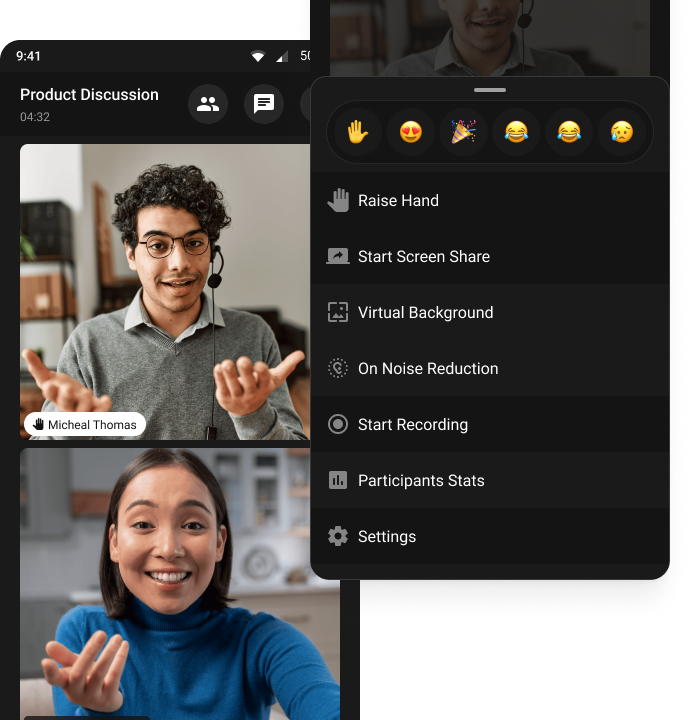
        <img src="https://mintcdn.com/cometchat-22654f5b-feature-react-native-sdk-quotedmessage-a/sGES4ruFz8w2SaXH/images/voice-video-banner.png?fit=max&auto=format&n=sGES4ruFz8w2SaXH&q=85&s=ccf27e26e92d3610cce790b36a2073f7" alt="Voice & Video Calling UI Preview" className="w-full max-w-[380px]" width="694" height="720" data-path="images/voice-video-banner.png" />
      </div>
    </Columns>
  </div>
</div>

<div style={{marginTop: '2rem', marginBottom: '2rem', maxWidth: '70rem', marginLeft: 'auto', marginRight: 'auto', paddingLeft: '1.25rem', paddingRight: '1.25rem' }}>
  <h3 className="text-2xl font-semibold mb-6 mt-8">
    <span className="inline-flex items-center px-4 py-1.5 rounded-full bg-emerald-100 text-emerald-700 dark:bg-emerald-900/30 dark:text-emerald-300 uppercase tracking-wide text-sm">Step 1</span>
  </h3>

  <div className="mb-12">
    <h2 className="text-gray-700 dark:text-white text-2xl font-semibold">Add CometChat to Your Frontend</h2>
    <p className="text-gray-600 dark:text-gray-300">Use our pre-built SDKs to add calls and Voice to your website or mobile app instantly.</p>
  </div>

  <div className="mb-12">
    <h3 className="text-xl font-semibold text-gray-700 dark:text-white mb-4">
      SDKs (Includes UI)
    </h3>

    <p className="text-gray-600 dark:text-gray-300 mb-4">
      Access every calling capability with our SDKs. The Calls SDK ships with a drop‑in UI so you can go live fast.
    </p>

    <AccordionGroup>
      <Accordion title="How It Works">
        <Steps>
          <Step title="Integrate the SDK">
            Initialize and connect to CometChat in your frontend application.
          </Step>

          <Step title="Build every screen">
            Create UI and flows from the ground up—exactly how you want them.
          </Step>

          <Step title="Customize everything">
            Full control over every aspect of the chat experience.
          </Step>
        </Steps>
      </Accordion>

      <Accordion title="Why It's Great">
        <Steps>
          <Step title="Fastest time‑to‑value">Live in minutes, not days.</Step>
          <Step title="Works anywhere">No framework lock‑in or build steps.</Step>
          <Step title="Easy to customize">Configure without code; theme when needed.</Step>
        </Steps>
      </Accordion>
    </AccordionGroup>

    <CardGroup cols={4}>
      <Card title="JavaScript" icon={<img src="/images/icons/js.svg" alt="JavaScript" />} href="/sdk/javascript/calling-overview" horizontal />

      <Card title="React Native" icon={<img src="/images/icons/react.svg" alt="React Native" />} href="/sdk/react-native/calling-overview" horizontal />

      <Card title="iOS" icon={<img src="/images/icons/swift.svg" alt="iOS" />} href="/sdk/ios/calling-overview" horizontal />

      <Card title="Android" icon={<img src="/images/icons/android.svg" alt="Android" />} href="/sdk/android/calling-overview" horizontal />

      <Card title="Flutter" icon={<img src="/images/icons/flutter.svg" alt="Flutter" />} href="/sdk/flutter/calling-overview" horizontal />

      <Card title="Ionic" icon={<img src="/images/icons/ionic.svg" alt="Ionic" />} href="/sdk/ionic/calling-overview" horizontal />
    </CardGroup>
  </div>

  <h3 className="text-2xl font-semibold mb-6 mt-8">
    <span className="inline-flex items-center px-4 py-1.5 rounded-full bg-emerald-100 text-emerald-700 dark:bg-emerald-900/30 dark:text-emerald-300 uppercase tracking-wide text-sm">Step 2</span>
  </h3>

  <div className="mb-12">
    <h2 className="text-gray-700 dark:text-white text-2xl font-semibold mb-6 mt-8">
      Sync Your Users
    </h2>

    <p className="text-gray-600 mb-4">
      Sync your user database with CometChat for a seamless experience.
    </p>

    <Columns cols={2}>
      <Card title="CometCalls Dashboard" href="https://app.cometchat.com/">
        <ul className="list-disc ml-4">
          <li>Add users directly from the CometChat Dashboard.</li>
          <li>Ideal for quick testing or small teams.</li>
        </ul>
      </Card>

      <Card title="SDK (In-App Provisioning)" href="/sdk/javascript/user-management">
        <ul className="list-disc ml-4">
          <li>Create users via the SDK methods.</li>
          <li>Perfect for auto-provisioning during sign-up or login.</li>
        </ul>
      </Card>

      <Card title="REST API (Backend)" href="/rest-api/users/create">
        <ul className="list-disc ml-4">
          <li>Create users using the REST API.</li>
          <li>Best for batch imports or admin workflows.</li>
        </ul>
      </Card>
    </Columns>
  </div>

  <div className="mb-12">
    <h2 className="text-gray-700 dark:text-white text-2xl font-semibold mb-4">
      Sample Apps & Demos
    </h2>

    <p className="text-gray-600 dark:text-gray-300 mb-6">
      See CometChat in action. Clone these sample apps to get started quickly.
    </p>

    <CardGroup cols={4}>
      <Card title="React Chat App" href="https://github.com/cometchat/cometchat-uikit-react/tree/v6/sample-app" cta="Clone on GitHub" horizontal />

      <Card title="React Native Chat App" href="https://github.com/cometchat/cometchat-uikit-react-native/tree/v5/examples" cta="Clone on GitHub" horizontal />

      <Card title="iOS Chat App (Swift)" href="https://github.com/cometchat/cometchat-sample-app-ios" cta="Clone on GitHub" horizontal />

      <Card title="Android Chat App (Java)" href="https://github.com/cometchat/cometchat-sample-app-android-java" cta="Clone on GitHub" horizontal />

      <Card title="Android Chat App (Kotlin)" href="https://github.com/cometchat/cometchat-uikit-android/tree/v5/sample-app-kotlin" cta="Clone on GitHub" horizontal />

      <Card title="Flutter Chat App" href="https://github.com/cometchat/cometchat-uikit-flutter/tree/v5/sample_app" cta="Clone on GitHub" horizontal />

      <Card title="Angular Chat App" href="https://github.com/cometchat/cometchat-sample-app-angular" cta="Clone on GitHub" horizontal />

      <Card title="Vue Chat App" href="https://github.com/cometchat/cometchat-sample-app-vue" cta="Clone on GitHub" horizontal />
    </CardGroup>
  </div>

  {/* <div className="mb-12">
    <h2 className="text-gray-700 dark:text-white text-2xl font-semibold mb-4">
      Help & Resources
    </h2>

    <p className="text-gray-600 dark:text-gray-300 mb-6">
      Get help, explore demos, and stay updated with the latest features.
    </p>

    <CardGroup cols={4}>
      <Card
        title="Help Center"
        icon="phone"
        href="https://help.cometchat.com/"
        cta="Get Help"
      >
        Search our knowledge base for answers to all your questions.
      </Card>
      <Card
        title="Interactive Demo"
        icon="bolt-lightning"
        href="https://www.cometchat.com/interactive-demo"
        cta="Try Demo"
      >
        Experience CometChat in action with our live demo.
      </Card>
      <Card
        title="Product Updates"
        icon="newspaper"
        href="https://updates.cometchat.com/"
        cta="Stay Updated"
      >
        Get notified about new features and improvements.
      </Card>
      <Card
        title="Status Page"
        icon="signal"
        href="https://status.cometchat.com/"
        cta="Check Status"
      >
        Monitor service status and any ongoing issues.
      </Card>
    </CardGroup>
    </div> */}

  {/* <div className="mb-8">
    <CardGroup cols={1}>
      <Card
        title="Need Expert Help? Book Office Hours"
        icon="briefcase"
        href="https://www.cometchat.com/office-hours"
        cta="Book Your Slot"
      >
        Get personalized guidance from our solution engineers to optimize your integration.
      </Card>
    </CardGroup>
    </div> */}
</div>

<div className="flex flex-col w-full mt-8" style={{ background: 'black' }}>
  <div className="bg-black text-gray-400 py-6 px-8 flex flex-col md:flex-row justify-between items-center rounded-t-xl">
    <div className="mb-4 md:mb-0">
      2025 © CometChat
    </div>

    <div className="flex space-x-6 items-center">
      <a href="https://www.linkedin.com/company/cometchat" target="_blank" className="flex items-center space-x-1 hover:text-white transition-colors">
        <svg xmlns="http://www.w3.org/2000/svg" className="h-5 w-5" fill="currentColor" viewBox="0 0 24 24">
          <path d="M19 0h-14c-2.761 0-5 2.239-5 5v14c0 2.762 2.239 5 5 5h14c2.762 0 5-2.238 5-5v-14c0-2.761-2.238-5-5-5zm-11 19h-3v-10h3v10zm-1.5-11.268c-.966 0-1.75-.784-1.75-1.75s.784-1.75 1.75-1.75 1.75.784 1.75 1.75-.784 1.75-1.75 1.75zm13.5 11.268h-3v-5.604c0-1.337-.026-3.059-1.865-3.059-1.865 0-2.15 1.455-2.15 2.96v5.703h-3v-10h2.881v1.367h.041c.402-.76 1.384-1.561 2.847-1.561 3.044 0 3.606 2.003 3.606 4.609v5.585z" />
        </svg>

        <span>LinkedIn</span>
      </a>

      <a href="https://x.com/cometchat" target="_blank" className="flex items-center space-x-1 hover:text-white transition-colors">
        <svg xmlns="http://www.w3.org/2000/svg" className="h-5 w-5" fill="currentColor" viewBox="0 0 24 24">
          <path d="M22.162 5.656c-.793.352-1.645.589-2.54.696a4.468 4.468 0 0 0 1.958-2.46 9.043 9.043 0 0 1-2.845 1.088 4.496 4.496 0 0 0-7.664 4.1 12.758 12.758 0 0 1-9.272-4.7 4.493 4.493 0 0 0 1.393 6.002 4.46 4.46 0 0 1-2.035-.562v.057a4.497 4.497 0 0 0 3.606 4.41 4.503 4.503 0 0 1-2.029.077 4.502 4.502 0 0 0 4.198 3.12 9.01 9.01 0 0 1-5.575 1.922c-.362 0-.721-.021-1.077-.063a12.73 12.73 0 0 0 6.901 2.021c8.282 0 12.808-6.86 12.808-12.808 0-.195-.005-.388-.014-.58a9.152 9.152 0 0 0 2.25-2.336z" />
        </svg>

        <span>Twitter</span>
      </a>

      <a href="https://github.com/cometchat" target="_blank" className="flex items-center space-x-1 hover:text-white transition-colors">
        <svg xmlns="http://www.w3.org/2000/svg" className="h-5 w-5" fill="currentColor" viewBox="0 0 24 24">
          <path d="M12 .297c-6.63 0-12 5.373-12 12 0 5.303 3.438 9.8 8.205 11.387.6.113.82-.258.82-.577v-2.17c-3.338.726-4.033-1.416-4.033-1.416-.546-1.387-1.333-1.756-1.333-1.756-1.089-.744.084-.729.084-.729 1.205.084 1.84 1.236 1.84 1.236 1.07 1.835 2.807 1.305 3.495.997.108-.775.418-1.305.76-1.605-2.665-.3-5.467-1.332-5.467-5.932 0-1.31.467-2.382 1.235-3.222-.123-.303-.535-1.523.117-3.176 0 0 1.008-.322 3.3 1.23a11.5 11.5 0 0 1 3.003-.404 11.5 11.5 0 0 1 3.003.404c2.292-1.552 3.298-1.23 3.298-1.23.653 1.653.241 2.873.118 3.176.77.84 1.233 1.912 1.233 3.222 0 4.61-2.807 5.628-5.48 5.922.429.369.813 1.096.813 2.211v3.281c0 .319.218.694.825.576C20.565 22.092 24 17.592 24 12.297c0-6.627-5.373-12-12-12" />
        </svg>

        <span>GitHub</span>
      </a>
    </div>
  </div>
</div>