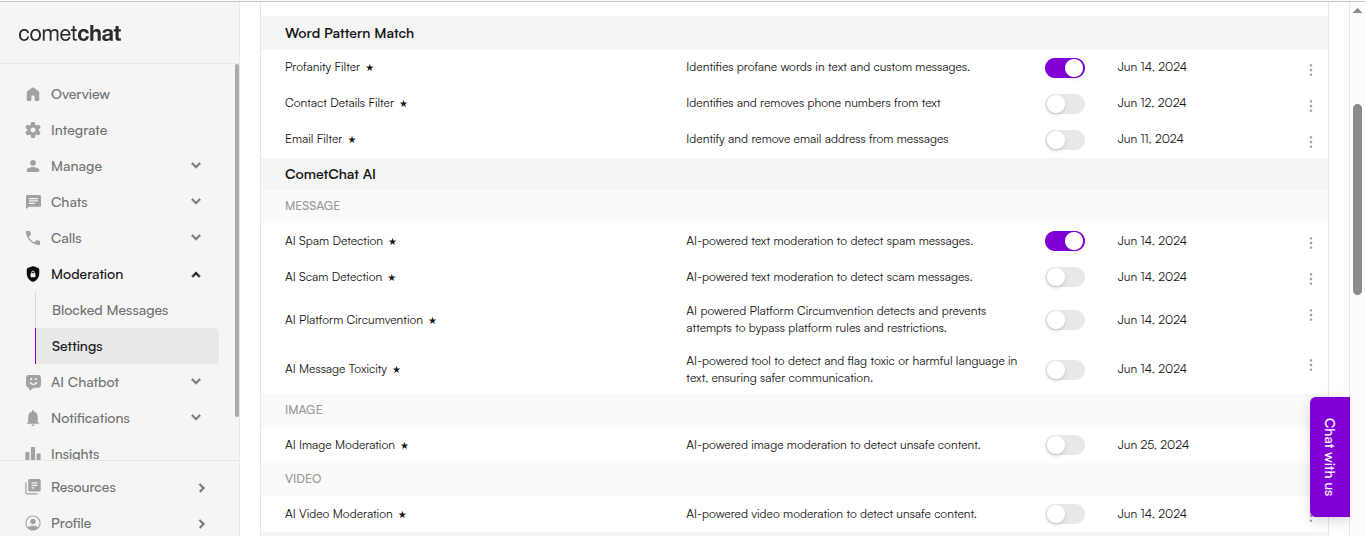
 If you have specific requirements, you can create **custom moderation rules** tailored to your app’s needs. Rules can be created in two ways:
1. **Using the CometChat Dashboard** — A simple, no-code interface for visually creating and managing moderation rules.
If you have specific requirements, you can create **custom moderation rules** tailored to your app’s needs. Rules can be created in two ways:
1. **Using the CometChat Dashboard** — A simple, no-code interface for visually creating and managing moderation rules.
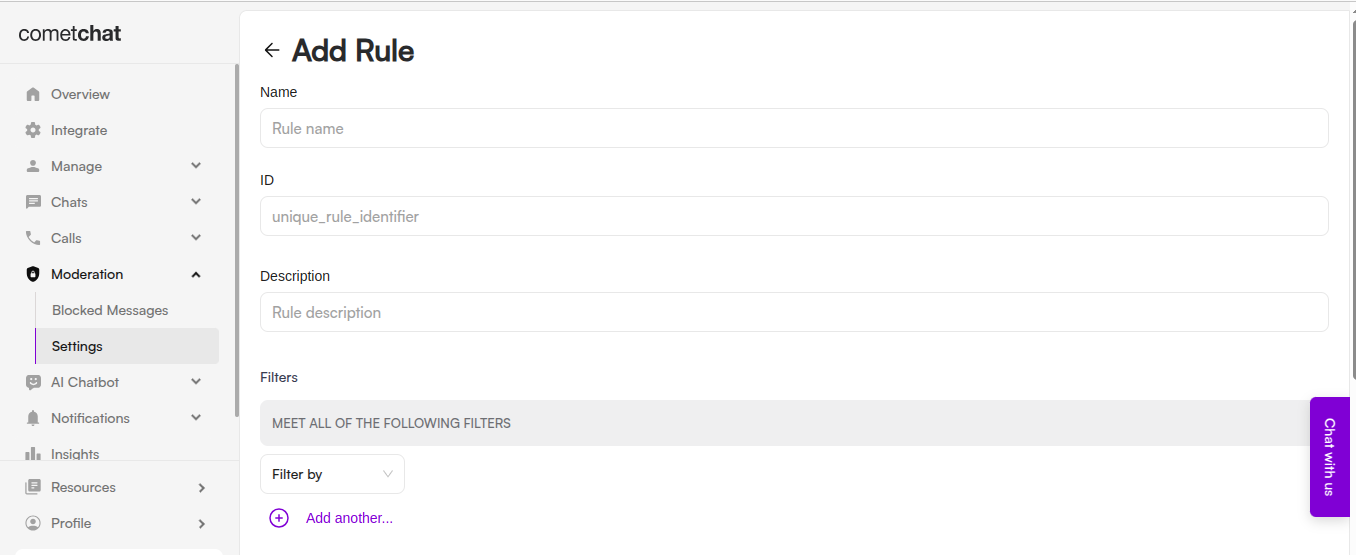 2. **Using the CometChat API** — Programmatically create and manage moderation rules for advanced or automated workflows. See the [Create Rule API documentation](\{apiEndpoints.createRule.url}).
***
## Configuring a Moderation Webhook
To automate your moderation flow and receive updates in real time, configure a **moderation webhook**. This allows your system to react instantly when a message or media is moderated.
### How It Works
* Every time content is moderated, a webhook event is triggered and sent to the URL you specify.
* Your application can then take action based on the moderation result.
### Prerequisites
* Your webhook URL must be accessible over **HTTPS** to ensure secure data transmission.
* The URL should be publicly accessible from the internet.
* Ensure your endpoint supports the `HTTP POST` method. Event payloads will be delivered via `POST` requests in JSON format.
* Configure your endpoint to respond immediately to the CometChat server with a `200 OK` response.
* For security, set up **Basic Authentication** (username and password) for server-to-server communication.
When your webhook URL is triggered, the HTTP header includes:
```http theme={null}
Authorization: Basic
2. **Using the CometChat API** — Programmatically create and manage moderation rules for advanced or automated workflows. See the [Create Rule API documentation](\{apiEndpoints.createRule.url}).
***
## Configuring a Moderation Webhook
To automate your moderation flow and receive updates in real time, configure a **moderation webhook**. This allows your system to react instantly when a message or media is moderated.
### How It Works
* Every time content is moderated, a webhook event is triggered and sent to the URL you specify.
* Your application can then take action based on the moderation result.
### Prerequisites
* Your webhook URL must be accessible over **HTTPS** to ensure secure data transmission.
* The URL should be publicly accessible from the internet.
* Ensure your endpoint supports the `HTTP POST` method. Event payloads will be delivered via `POST` requests in JSON format.
* Configure your endpoint to respond immediately to the CometChat server with a `200 OK` response.
* For security, set up **Basic Authentication** (username and password) for server-to-server communication.
When your webhook URL is triggered, the HTTP header includes:
```http theme={null}
Authorization: Basic 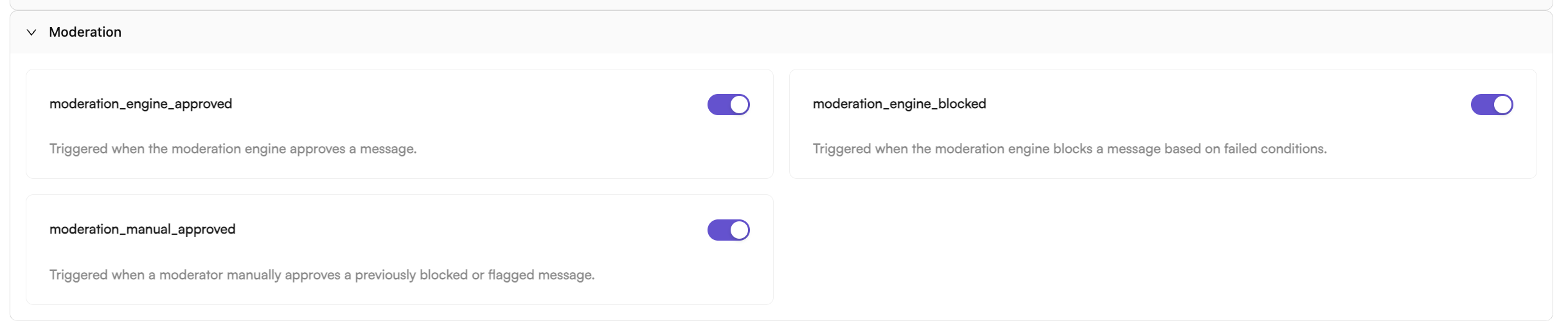 ***
## Integrating and Testing the Moderation API
Once your moderation rules and webhook are configured, integrate the **Moderation API** into your application to programmatically submit content and receive moderation results.
### Steps to Integrate and Test
1. **Submit content:** Use the API to send messages, images, or videos for moderation.
2. **Check responses:** Verify moderation status in real time.
3. **Handle outcomes:** Apply business logic based on approved, flagged, or disapproved responses.
4. **End-to-end testing:** Test both the API response and webhook delivery to ensure complete coverage.
When you’re ready, you can render all moderation endpoints dynamically:
### Send message
This endpoint is used to submit a message for moderation before it is delivered to the recipient. The message is scanned against the moderation rules configured for the app.
**URL:**
```
https://api-explorer.cometchat.com/reference/chat-api-send-message-moderation
```
**Request Body:**
```json theme={null}
{
"category": "message",
"type": "text",
"data": {
"text": "Hi new user"
},
"sender": "cometchat-uid-2",
"receiver": "cometchat-uid-1",
"receiverType": "user",
"sentAt": 1750335220
}
```
### List messages
Retrieves a list of messages submitted for moderation, along with the current moderation status of each message as determined by your configured rules.
**URL:**
```
https://api-explorer.cometchat.com/reference/chat-api-list-message-moderation/
```
### Get message
Retrieves the details of a specific message submitted for moderation, including its current moderation status as determined by your configured rules.
**URL:**
```
https://api-explorer.cometchat.com/reference/chat-api-get-message-moderation/
```
### Update message
Edits an existing message. The moderation status is re-evaluated based on your configured rules.
**URL:**
```
https://api-explorer.cometchat.com/reference/chat-api-update-message-moderation/
```
### Delete message
Deletes a previously submitted message along with its associated moderation data, in accordance with your configured rules.
**URL:**
```
https://api-explorer.cometchat.com/reference/chat-api-delete-message-moderation/
```
### Approve message
Approves a previously blocked message, allowing it to be delivered to the recipient.
**URL:**
```
https://api-explorer.cometchat.com/reference/chat-api-approve-moderation-blocked-messages/
```
***
| Endpoint | Purpose |
| ------------------------------------------------------------------------- | ----------------------------------------------------------------------------------------------------------------------------------------- |
| **Send message for moderation**
***
## Integrating and Testing the Moderation API
Once your moderation rules and webhook are configured, integrate the **Moderation API** into your application to programmatically submit content and receive moderation results.
### Steps to Integrate and Test
1. **Submit content:** Use the API to send messages, images, or videos for moderation.
2. **Check responses:** Verify moderation status in real time.
3. **Handle outcomes:** Apply business logic based on approved, flagged, or disapproved responses.
4. **End-to-end testing:** Test both the API response and webhook delivery to ensure complete coverage.
When you’re ready, you can render all moderation endpoints dynamically:
### Send message
This endpoint is used to submit a message for moderation before it is delivered to the recipient. The message is scanned against the moderation rules configured for the app.
**URL:**
```
https://api-explorer.cometchat.com/reference/chat-api-send-message-moderation
```
**Request Body:**
```json theme={null}
{
"category": "message",
"type": "text",
"data": {
"text": "Hi new user"
},
"sender": "cometchat-uid-2",
"receiver": "cometchat-uid-1",
"receiverType": "user",
"sentAt": 1750335220
}
```
### List messages
Retrieves a list of messages submitted for moderation, along with the current moderation status of each message as determined by your configured rules.
**URL:**
```
https://api-explorer.cometchat.com/reference/chat-api-list-message-moderation/
```
### Get message
Retrieves the details of a specific message submitted for moderation, including its current moderation status as determined by your configured rules.
**URL:**
```
https://api-explorer.cometchat.com/reference/chat-api-get-message-moderation/
```
### Update message
Edits an existing message. The moderation status is re-evaluated based on your configured rules.
**URL:**
```
https://api-explorer.cometchat.com/reference/chat-api-update-message-moderation/
```
### Delete message
Deletes a previously submitted message along with its associated moderation data, in accordance with your configured rules.
**URL:**
```
https://api-explorer.cometchat.com/reference/chat-api-delete-message-moderation/
```
### Approve message
Approves a previously blocked message, allowing it to be delivered to the recipient.
**URL:**
```
https://api-explorer.cometchat.com/reference/chat-api-approve-moderation-blocked-messages/
```
***
| Endpoint | Purpose |
| ------------------------------------------------------------------------- | ----------------------------------------------------------------------------------------------------------------------------------------- |
| **Send message for moderation**`POST /moderation/messages` | Submits a new message for moderation. Triggers the engine, emits a webhook, and makes the message available via the get-message endpoint. | | **Edit message for moderation**
`PUT /moderation/messages/:id` | Re-evaluates an edited message. If approved, the updates are accepted; if blocked, the message is withheld. | | **Get message moderation status**
`GET /moderation/messages/:id` | Retrieves the moderation status, rule metadata, and action history of a message. | | **List messages for moderation**
`GET /moderation/messages` | Lists all moderated messages with optional filters such as category, type, status, and receiver UID/GUID. | | **Delete message from moderation**
`DELETE /moderation/messages/:id` | Deletes a moderated message. | *** ## Summary By combining well-defined moderation rules, automated webhooks, and robust API integration, you can build a safe, scalable, and user-friendly content moderation system tailored to your app’s values and audience expectations.