> ## Documentation Index
> Fetch the complete documentation index at: https://cometchat-22654f5b-feature-react-native-sdk-quotedmessage-a.mintlify.site/llms.txt
> Use this file to discover all available pages before exploring further.
# Call Logs
## Overview
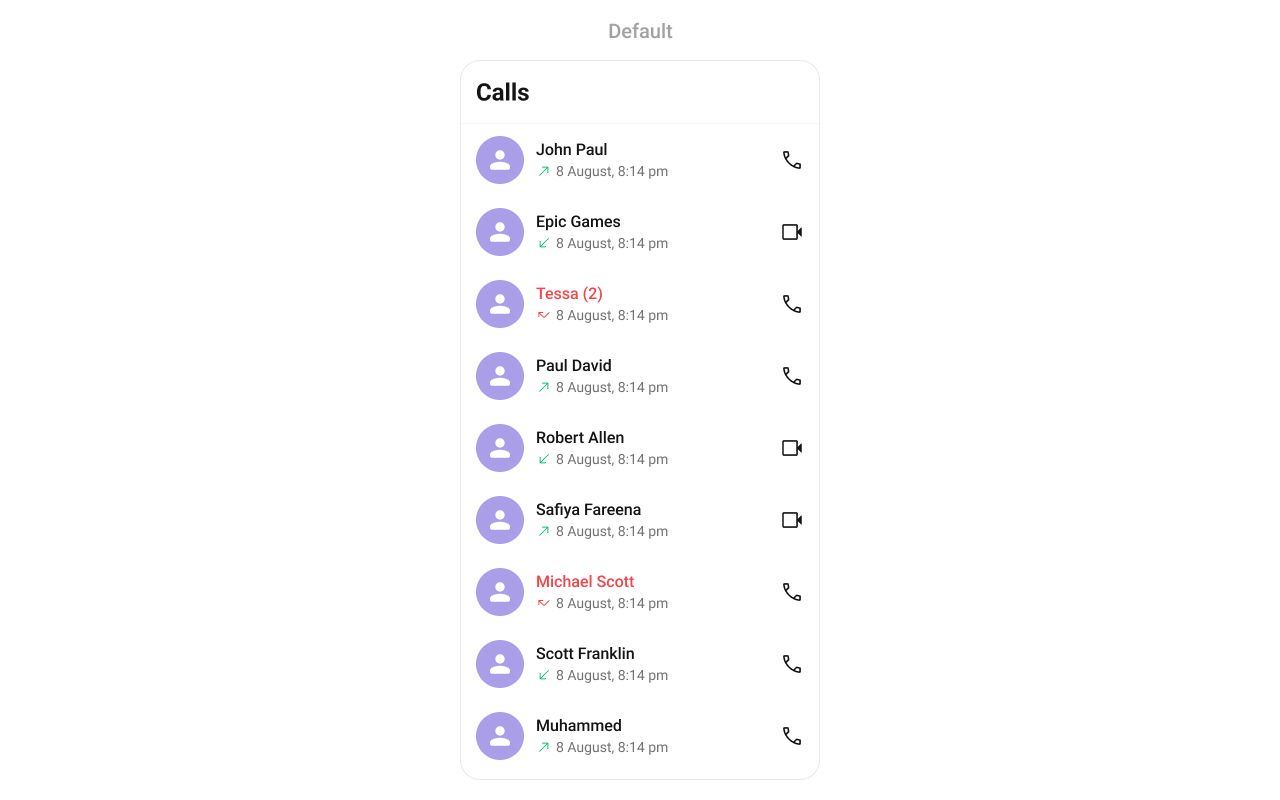
`CometChatCallLogs` is a [Component](/ui-kit/android/components-overview#components) that shows the list of Call Logs available. By default, names are shown for all listed users, along with their avatars if available.
 ## Usage
### Integration
`CometChatCallLogs` being a wrapper component, offers versatility in its integration. It can be seamlessly launched via button clicks or any user-triggered action, enhancing the overall user experience and facilitating smoother interactions within the application.
Since `CometChatCallLogs` can be launched by adding the following code snippet to the XML layout file.
```xml theme={null}
```
If you're defining the `CometChatCallLogs` within the XML code or in your activity or fragment then you'll need to extract them and set them on the User object using the appropriate method.
```java theme={null}
CometChatCallLogs cometchatCallLogs = binding.callLog; // 'binding' is a view binding instance. Initialize it with `binding = YourXmlFileNameBinding.inflate(getLayoutInflater());` to use views like `binding.callLog` after enabling view binding.
```
```kotlin theme={null}
val cometchatCallLogs: CometChatCallLogs = binding.callLog // 'binding' is a view binding instance. Initialize it with `binding = YourXmlFileNameBinding.inflate(layoutInflater)` to use views like `binding.callLog` after enabling view binding.
```
##### Activity and Fragment
You can integrate `CometChatCallLogs` into your Activity and Fragment by adding the following code snippets into the respective classes.
```java YourActivity.java theme={null}
CometChatCallLogs cometchatCallLogs;
@Override
protected void onCreate(Bundle savedInstanceState) {
super.onCreate(savedInstanceState);
cometchatCallLogs = new CometChatCallLogs(this);
setContentView(cometchatCallLogs);
}
```
```kotlin YourActivity.kt theme={null}
private lateinit var cometchatCallLogs: CometChatCallLogs
override fun onCreate(savedInstanceState: Bundle?) {
super.onCreate(savedInstanceState)
cometchatCallLogs = CometChatCallLogs(this);
setContentView(cometchatCallLogs)
}
```
```java YourFragment.java theme={null}
CometChatCallLogs cometchatCallLogs;
@Override
public View onCreateView(@NonNull LayoutInflater inflater, ViewGroup container, Bundle savedInstanceState) {
cometchatCallLogs = new CometChatCallLogs(requireContext());
return cometchatCallLogs;
}
```
```kotlin YourFragment.kt theme={null}
private lateinit var cometchatCallLogs: CometChatCallLogs
override fun onCreateView(
inflater: LayoutInflater?, container: ViewGroup?,
savedInstanceState: Bundle?
): View {
cometchatCallLogs = new CometChatCallLogs(requireContext());
return cometchatCallLogs
}
```
### Actions
[Actions](/ui-kit/android/components-overview#actions) dictate how a component functions. They are divided into two types: Predefined and User-defined. You can override either type, allowing you to tailor the behavior of the component to fit your specific needs.
##### setOnItemClick
Function invoked when a call log item is clicked, typically used to open a detailed chat screen.
```java YourActivity.java theme={null}
cometchatCallLogs.setOnItemClick((view1, position, callLog) -> {
});
```
```kotlin YourActivity.kt theme={null}
cometchatCallLogs.onItemClick = OnItemClick { view, position, callLog ->
}
```
***
##### setOnItemLongClick
Function executed when a callLog item is long-pressed, allowing additional actions like delete or select.
```java YourActivity.java theme={null}
cometchatCallLogs.setOnItemLongClick((view1, position, callLog) -> {
});
```
```kotlin YourActivity.kt theme={null}
cometchatCallLogs.onItemLongClick = OnItemLongClick({ view, position, callLog ->
})
```
***
##### setOnBackPressListener
`OnBackPressListener` is triggered when you press the back button in the app bar. It has a predefined behavior; when clicked, it navigates to the previous activity. However, you can override this action using the following code snippet.
```java YourActivity.java theme={null}
cometchatCallLogs.setOnBackPressListener(() -> {
});
```
```kotlin YourActivity.kt theme={null}
cometchatCallLogs.onBackPressListener = OnBackPress {
}
```
***
##### OnError
This action doesn't change the behavior of the component but rather listens for any errors that occur in the callLogs component.
```java YourActivity.java theme={null}
cometchatCallLogs.setOnError(cometchatException -> {
});
```
```kotlin YourActivity.kt theme={null}
cometchatCallLogs.setOnError {
}
```
***
##### setOnLoad
Invoked when the list is successfully fetched and loaded, helping track component readiness.
```java YourActivity.java theme={null}
cometchatCallLogs.setOnLoad(list -> {
});
```
```kotlin YourActivity.kt theme={null}
cometchatCallLogs.setOnLoad(object : OnLoad {
override fun onLoad(list: MutableList?) {
}
})
```
***
##### setOnEmpty
Called when the list is empty, enabling custom handling such as showing a placeholder message.
```java YourActivity.java theme={null}
cometchatCallLogs.setOnEmpty(() -> {
});
```
```kotlin YourActivity.kt theme={null}
cometchatCallLogs.setOnEmpty{
}
```
***
### Filters
**Filters** allow you to customize the data displayed in a list within a Component. You can filter the list based on your specific criteria, allowing for a more customized. Filters can be applied using RequestBuilders of Chat SDK.
##### 1. CallLogRequestBuilder
The [CallLogRequestBuilder](/sdk/android/call-logs) enables you to filter and customize the call list based on available parameters in CallLogRequestBuilder. This feature allows you to create more specific and targeted queries during the call. The following are the parameters available in [CallLogRequestBuilder](/sdk/android/call-logs)
**Example**
In the example below, we are applying a filter based on the limit and have a call recording.
```java theme={null}
CallLogRequest.CallLogRequestBuilder callLogRequestBuilder = new CallLogRequest.CallLogRequestBuilder()
.setLimit(20)
.setHasRecording(true);
cometchatCallLogs.setCallLogRequestBuilder(callLogRequestBuilder);
```
```kotlin theme={null}
val callLogRequestBuilder = CallLogRequestBuilder()
.setLimit(20)
.setHasRecording(true)
cometchatCallLogs.setCallLogRequestBuilder(callLogRequestBuilder)
```
| Property | Description | Code |
| ------------------ | --------------------------------------------------- | ----------------------------------------- |
| **Limit** | Sets the limit for the call logs request | `.setLimit(int limit)` |
| **Call Type** | Sets the call type for the call logs request | `.setCallType(String callType)` |
| **Call Status** | Sets the call status for the call logs request | `.setCallStatus(String callStatus)` |
| **Has Recording** | Sets the recording status for the call logs request | `.setHasRecording(boolean hasRecording)` |
| **Call Direction** | Sets the call direction for the call logs request | `.setCallDirection(String callDirection)` |
| **UID** | Sets the user ID for the call logs request | `.setUid(String uid)` |
| **GUID** | Sets the group ID for the call logs request | `.setGuid(String guid)` |
| **Call Category** | Sets the call category for the call logs request | `.setCallCategory(String callCategory)` |
| **Auth Token** | Sets the auth token for the call logs request | `.setAuthToken(String authToken)` |
***
### Events
[Events](/ui-kit/android/components-overview#events) are emitted by a `Component`. By using event you can extend existing functionality. Being global events, they can be applied in Multiple Locations and are capable of being Added or Removed.
The `CometChatCallLogs` component does not have any exposed events.
***
## Customization
To fit your app's design requirements, you can customize the appearance of the CallLog component. We provide exposed methods that allow you to modify the experience and behavior according to your specific needs.
### Style
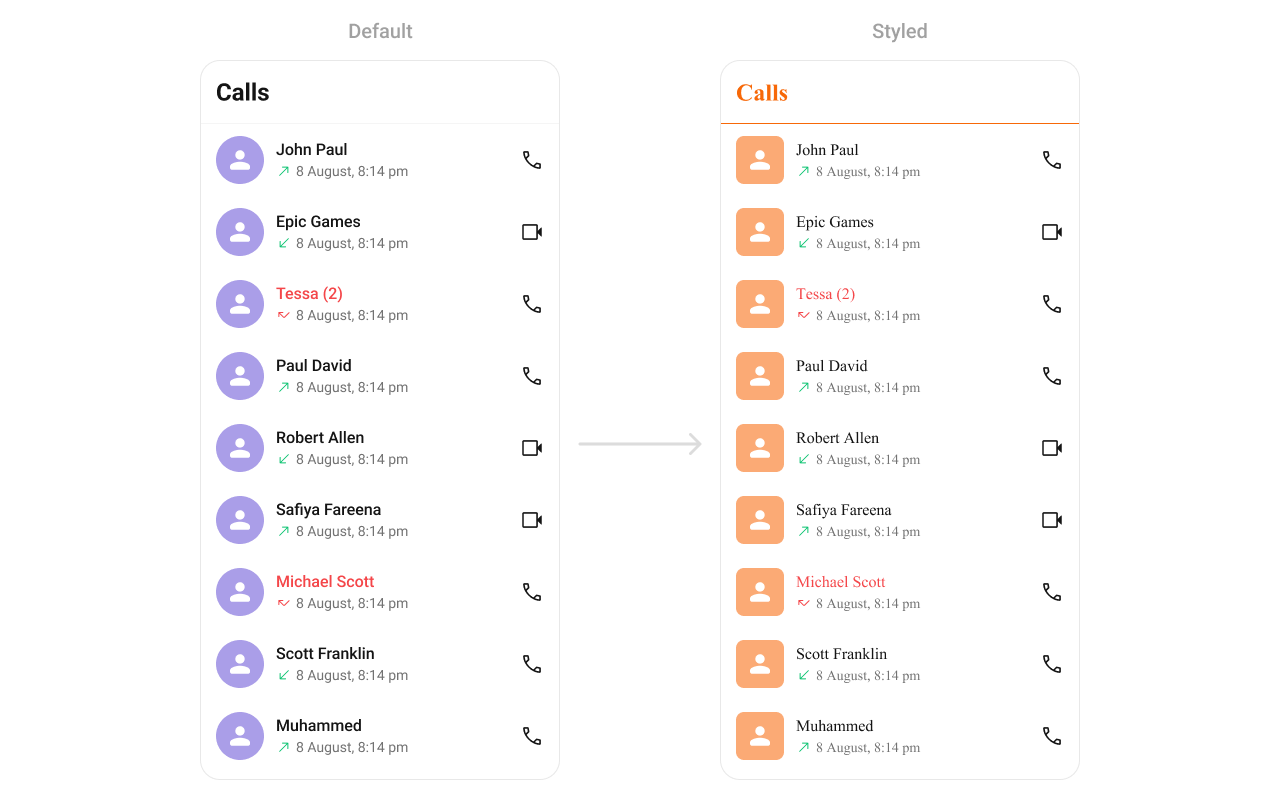
Using Style you can customize the look and feel of the component in your app, These parameters typically control elements such as the color, size, shape, and fonts used within the component.
## Usage
### Integration
`CometChatCallLogs` being a wrapper component, offers versatility in its integration. It can be seamlessly launched via button clicks or any user-triggered action, enhancing the overall user experience and facilitating smoother interactions within the application.
Since `CometChatCallLogs` can be launched by adding the following code snippet to the XML layout file.
```xml theme={null}
```
If you're defining the `CometChatCallLogs` within the XML code or in your activity or fragment then you'll need to extract them and set them on the User object using the appropriate method.
```java theme={null}
CometChatCallLogs cometchatCallLogs = binding.callLog; // 'binding' is a view binding instance. Initialize it with `binding = YourXmlFileNameBinding.inflate(getLayoutInflater());` to use views like `binding.callLog` after enabling view binding.
```
```kotlin theme={null}
val cometchatCallLogs: CometChatCallLogs = binding.callLog // 'binding' is a view binding instance. Initialize it with `binding = YourXmlFileNameBinding.inflate(layoutInflater)` to use views like `binding.callLog` after enabling view binding.
```
##### Activity and Fragment
You can integrate `CometChatCallLogs` into your Activity and Fragment by adding the following code snippets into the respective classes.
```java YourActivity.java theme={null}
CometChatCallLogs cometchatCallLogs;
@Override
protected void onCreate(Bundle savedInstanceState) {
super.onCreate(savedInstanceState);
cometchatCallLogs = new CometChatCallLogs(this);
setContentView(cometchatCallLogs);
}
```
```kotlin YourActivity.kt theme={null}
private lateinit var cometchatCallLogs: CometChatCallLogs
override fun onCreate(savedInstanceState: Bundle?) {
super.onCreate(savedInstanceState)
cometchatCallLogs = CometChatCallLogs(this);
setContentView(cometchatCallLogs)
}
```
```java YourFragment.java theme={null}
CometChatCallLogs cometchatCallLogs;
@Override
public View onCreateView(@NonNull LayoutInflater inflater, ViewGroup container, Bundle savedInstanceState) {
cometchatCallLogs = new CometChatCallLogs(requireContext());
return cometchatCallLogs;
}
```
```kotlin YourFragment.kt theme={null}
private lateinit var cometchatCallLogs: CometChatCallLogs
override fun onCreateView(
inflater: LayoutInflater?, container: ViewGroup?,
savedInstanceState: Bundle?
): View {
cometchatCallLogs = new CometChatCallLogs(requireContext());
return cometchatCallLogs
}
```
### Actions
[Actions](/ui-kit/android/components-overview#actions) dictate how a component functions. They are divided into two types: Predefined and User-defined. You can override either type, allowing you to tailor the behavior of the component to fit your specific needs.
##### setOnItemClick
Function invoked when a call log item is clicked, typically used to open a detailed chat screen.
```java YourActivity.java theme={null}
cometchatCallLogs.setOnItemClick((view1, position, callLog) -> {
});
```
```kotlin YourActivity.kt theme={null}
cometchatCallLogs.onItemClick = OnItemClick { view, position, callLog ->
}
```
***
##### setOnItemLongClick
Function executed when a callLog item is long-pressed, allowing additional actions like delete or select.
```java YourActivity.java theme={null}
cometchatCallLogs.setOnItemLongClick((view1, position, callLog) -> {
});
```
```kotlin YourActivity.kt theme={null}
cometchatCallLogs.onItemLongClick = OnItemLongClick({ view, position, callLog ->
})
```
***
##### setOnBackPressListener
`OnBackPressListener` is triggered when you press the back button in the app bar. It has a predefined behavior; when clicked, it navigates to the previous activity. However, you can override this action using the following code snippet.
```java YourActivity.java theme={null}
cometchatCallLogs.setOnBackPressListener(() -> {
});
```
```kotlin YourActivity.kt theme={null}
cometchatCallLogs.onBackPressListener = OnBackPress {
}
```
***
##### OnError
This action doesn't change the behavior of the component but rather listens for any errors that occur in the callLogs component.
```java YourActivity.java theme={null}
cometchatCallLogs.setOnError(cometchatException -> {
});
```
```kotlin YourActivity.kt theme={null}
cometchatCallLogs.setOnError {
}
```
***
##### setOnLoad
Invoked when the list is successfully fetched and loaded, helping track component readiness.
```java YourActivity.java theme={null}
cometchatCallLogs.setOnLoad(list -> {
});
```
```kotlin YourActivity.kt theme={null}
cometchatCallLogs.setOnLoad(object : OnLoad {
override fun onLoad(list: MutableList?) {
}
})
```
***
##### setOnEmpty
Called when the list is empty, enabling custom handling such as showing a placeholder message.
```java YourActivity.java theme={null}
cometchatCallLogs.setOnEmpty(() -> {
});
```
```kotlin YourActivity.kt theme={null}
cometchatCallLogs.setOnEmpty{
}
```
***
### Filters
**Filters** allow you to customize the data displayed in a list within a Component. You can filter the list based on your specific criteria, allowing for a more customized. Filters can be applied using RequestBuilders of Chat SDK.
##### 1. CallLogRequestBuilder
The [CallLogRequestBuilder](/sdk/android/call-logs) enables you to filter and customize the call list based on available parameters in CallLogRequestBuilder. This feature allows you to create more specific and targeted queries during the call. The following are the parameters available in [CallLogRequestBuilder](/sdk/android/call-logs)
**Example**
In the example below, we are applying a filter based on the limit and have a call recording.
```java theme={null}
CallLogRequest.CallLogRequestBuilder callLogRequestBuilder = new CallLogRequest.CallLogRequestBuilder()
.setLimit(20)
.setHasRecording(true);
cometchatCallLogs.setCallLogRequestBuilder(callLogRequestBuilder);
```
```kotlin theme={null}
val callLogRequestBuilder = CallLogRequestBuilder()
.setLimit(20)
.setHasRecording(true)
cometchatCallLogs.setCallLogRequestBuilder(callLogRequestBuilder)
```
| Property | Description | Code |
| ------------------ | --------------------------------------------------- | ----------------------------------------- |
| **Limit** | Sets the limit for the call logs request | `.setLimit(int limit)` |
| **Call Type** | Sets the call type for the call logs request | `.setCallType(String callType)` |
| **Call Status** | Sets the call status for the call logs request | `.setCallStatus(String callStatus)` |
| **Has Recording** | Sets the recording status for the call logs request | `.setHasRecording(boolean hasRecording)` |
| **Call Direction** | Sets the call direction for the call logs request | `.setCallDirection(String callDirection)` |
| **UID** | Sets the user ID for the call logs request | `.setUid(String uid)` |
| **GUID** | Sets the group ID for the call logs request | `.setGuid(String guid)` |
| **Call Category** | Sets the call category for the call logs request | `.setCallCategory(String callCategory)` |
| **Auth Token** | Sets the auth token for the call logs request | `.setAuthToken(String authToken)` |
***
### Events
[Events](/ui-kit/android/components-overview#events) are emitted by a `Component`. By using event you can extend existing functionality. Being global events, they can be applied in Multiple Locations and are capable of being Added or Removed.
The `CometChatCallLogs` component does not have any exposed events.
***
## Customization
To fit your app's design requirements, you can customize the appearance of the CallLog component. We provide exposed methods that allow you to modify the experience and behavior according to your specific needs.
### Style
Using Style you can customize the look and feel of the component in your app, These parameters typically control elements such as the color, size, shape, and fonts used within the component.
 ```xml themes.xml theme={null}
```
```java theme={null}
cometchatCallLogs.setStyle(R.style.CustomCallLogStyle);
```
```kotlin theme={null}
cometchatCallLogs.setStyle(R.style.CustomCallLogStyle)
```
***
To know more such attributes, visit the [attributes file](https://github.com/cometchat/cometchat-uikit-android/blob/v5/chatuikit/src/main/res/values/attr_cometchat_call_logs.xml).
### Functionality
These are a set of small functional customizations that allow you to fine-tune the overall experience of the component. With these, you can change text, set custom icons, and toggle the visibility of UI elements.
| Methods | Description | Code |
| ------------------------- | --------------------------------------------------------- | ---------------------------------------- |
| setBackIconVisibility | Used to toggle visibility for back button in the app bar | `.setBackIconVisibility(View.VISIBLE);` |
| setToolbarVisibility | Used to toggle visibility for back button in the app bar | `.setToolbarVisibility(View.GONE);` |
| setLoadingStateVisibility | Used to hide loading state while fetching Users | `.setLoadingStateVisibility(View.GONE);` |
| setErrorStateVisibility | Used to hide error state on fetching conversations | `.setErrorStateVisibility(View.GONE);` |
| setEmptyStateVisibility | Used to hide empty state on fetching conversations | `.setEmptyStateVisibility(View.GONE);` |
| setSeparatorVisibility | Used to control visibility of Separators in the list view | `.setSeparatorVisibility(View.GONE);` |
***
### Advanced
For advanced-level customization, you can set custom views to the component. This lets you tailor each aspect of the component to fit your exact needs and application aesthetics. You can create and define your views, layouts, and UI elements and then incorporate those into the component.
#### setOptions
Defines the available actions users can perform on a call log entry, such as deleting, marking as spam, or calling back.
Use Cases:
* Provide quick call-back options.
* Allow users to block a number.
* Enable deleting multiple call logs.
```java theme={null}
cometchatConversations.setOptions((context, conversation) -> Collections.emptyList());
```
```kotlin theme={null}
cometchatConversations.options = Function2?> { context, conversation -> emptyList() }
```
***
#### addOptions
Adds custom actions to the existing call log options.
Use Cases:
* Add favorite/star call log option.
* Integrate a "Send Message" option.
* Provide an archive feature.
```java theme={null}
cometchatConversations.addOptions((context, conversation) -> Collections.emptyList());
```
```kotlin theme={null}
cometchatConversations.addOptions { context, conversation -> emptyList() }
```
***
#### setDateTimeFormatter
By providing a custom implementation of the DateTimeFormatterCallback, you can configure how time and date values are displayed. This ensures consistent formatting for labels such as "Today", "Yesterday", "X minutes ago", and more.
Each method in the interface corresponds to a specific case:
`time(long timestamp)` → Custom full timestamp format
`today(long timestamp)` → Called when a message is from today
`yesterday(long timestamp)` → Called for yesterday’s messages
`lastWeek(long timestamp)` → Messages from the past week
`otherDays(long timestamp)` → Older messages
`minute(long timestamp)` / `hour(long timestamp)` → Exact time unit
`minutes(long diffInMinutesFromNow, long timestamp)` → e.g., "5 minutes ago"
`hours(long diffInHourFromNow, long timestamp)` → e.g., "2 hours ago"
```java theme={null}
import java.text.SimpleDateFormat;
import java.util.Date;
import java.util.Locale;
cometchatCallLogs.setDateTimeFormatter(new DateTimeFormatterCallback() {
private final SimpleDateFormat fullTimeFormatter = new SimpleDateFormat("hh:mm a", Locale.getDefault());
private final SimpleDateFormat dateFormatter = new SimpleDateFormat("dd MMM yyyy", Locale.getDefault());
@Override
public String time(long timestamp) {
return fullTimeFormatter.format(new Date(timestamp));
}
@Override
public String today(long timestamp) {
return "Today";
}
@Override
public String yesterday(long timestamp) {
return "Yesterday";
}
@Override
public String lastWeek(long timestamp) {
return "Last Week";
}
@Override
public String otherDays(long timestamp) {
return dateFormatter.format(new Date(timestamp));
}
@Override
public String minutes(long diffInMinutesFromNow, long timestamp) {
return diffInMinutesFromNow + " mins ago";
}
@Override
public String hours(long diffInHourFromNow, long timestamp) {
return diffInHourFromNow + " hrs ago";
}
});
```
```kotlin theme={null}
import java.text.SimpleDateFormat
import java.util.*
cometchatCallLogs.setDateTimeFormatterCallback(object : DateTimeFormatterCallback {
private val fullTimeFormatter = SimpleDateFormat("hh:mm a", Locale.getDefault())
private val dateFormatter = SimpleDateFormat("dd MMM yyyy", Locale.getDefault())
override fun time(timestamp: Long): String {
return fullTimeFormatter.format(Date(timestamp))
}
override fun today(timestamp: Long): String {
return "Today"
}
override fun yesterday(timestamp: Long): String {
return "Yesterday"
}
override fun lastWeek(timestamp: Long): String {
return "Last Week"
}
override fun otherDays(timestamp: Long): String {
return dateFormatter.format(Date(timestamp))
}
override fun minutes(diffInMinutesFromNow: Long, timestamp: Long): String {
return "$diffInMinutesFromNow mins ago"
}
override fun hours(diffInHourFromNow: Long, timestamp: Long): String {
return "$diffInHourFromNow hrs ago"
}
});
```
***
#### setLoadingView
Allows setting a custom loading view when fetching call logs.
Use Cases:
* Display a spinner animation while loading.
* Show a "Fetching Call History..." message.
* Use a shimmer effect for better UI experience.
```java theme={null}
cometchatConversations.setLoadingView(R.layout.your_loading_view);
```
```kotlin theme={null}
cometchatConversations.loadingView = R.layout.your_loading_view
```
***
#### setEmptyView
Defines a custom view when no call logs are available.
Use Cases:
* Show a friendly message like "No calls yet!".
* Offer quick actions like "Make a Call".
* Display an illustration/image.
```java theme={null}
cometchatConversations.setEmptyView(R.layout.your_empty_view);
```
```kotlin theme={null}
cometchatConversations.emptyView = R.layout.your_empty_view
```
***
#### setErrorView
Allows setting a custom error state view when fetching call logs fails.
Use Cases:
* Display a retry button.
* Show a network issue message.
* Provide a troubleshooting guide.
```java theme={null}
cometchatConversations.setErrorView(R.layout.your_empty_view);
```
```kotlin theme={null}
cometchatConversations.errorView = R.layout.your_error_view
```
***
#### setItemView
Allows setting a custom layout for each call log item.
Use Cases:
* Customize the entire call log card.
* Display additional contact details.
* Use a two-column design for better readability.
```java theme={null}
cometChatCallLog.setItemView(new CallLogsViewHolderListener() {
@Override
public View createView(Context context, CometchatCallLogsItemsBinding listItem) {
return super.createView(context, listItem);
}
@Override
public void bindView(Context context,
View createdView,
CallLog call,
RecyclerView.ViewHolder holder,
List callList,
int position) {
super.bindView(context, createdView, call, holder, callList, position);
}
});
```
```kotlin theme={null}
cometChatCallLog.setItemView(object : CallLogsViewHolderListener() {
override fun createView(context: Context?, listItem: CometchatCallLogsItemsBinding?): View {
}
override fun bindView(
context: Context,
createdView: View,
callLog: CallLog,
holder: RecyclerView.ViewHolder,
callList: List,
position: Int
) {
}
})
```
```xml themes.xml theme={null}
```
```java theme={null}
cometchatCallLogs.setStyle(R.style.CustomCallLogStyle);
```
```kotlin theme={null}
cometchatCallLogs.setStyle(R.style.CustomCallLogStyle)
```
***
To know more such attributes, visit the [attributes file](https://github.com/cometchat/cometchat-uikit-android/blob/v5/chatuikit/src/main/res/values/attr_cometchat_call_logs.xml).
### Functionality
These are a set of small functional customizations that allow you to fine-tune the overall experience of the component. With these, you can change text, set custom icons, and toggle the visibility of UI elements.
| Methods | Description | Code |
| ------------------------- | --------------------------------------------------------- | ---------------------------------------- |
| setBackIconVisibility | Used to toggle visibility for back button in the app bar | `.setBackIconVisibility(View.VISIBLE);` |
| setToolbarVisibility | Used to toggle visibility for back button in the app bar | `.setToolbarVisibility(View.GONE);` |
| setLoadingStateVisibility | Used to hide loading state while fetching Users | `.setLoadingStateVisibility(View.GONE);` |
| setErrorStateVisibility | Used to hide error state on fetching conversations | `.setErrorStateVisibility(View.GONE);` |
| setEmptyStateVisibility | Used to hide empty state on fetching conversations | `.setEmptyStateVisibility(View.GONE);` |
| setSeparatorVisibility | Used to control visibility of Separators in the list view | `.setSeparatorVisibility(View.GONE);` |
***
### Advanced
For advanced-level customization, you can set custom views to the component. This lets you tailor each aspect of the component to fit your exact needs and application aesthetics. You can create and define your views, layouts, and UI elements and then incorporate those into the component.
#### setOptions
Defines the available actions users can perform on a call log entry, such as deleting, marking as spam, or calling back.
Use Cases:
* Provide quick call-back options.
* Allow users to block a number.
* Enable deleting multiple call logs.
```java theme={null}
cometchatConversations.setOptions((context, conversation) -> Collections.emptyList());
```
```kotlin theme={null}
cometchatConversations.options = Function2?> { context, conversation -> emptyList() }
```
***
#### addOptions
Adds custom actions to the existing call log options.
Use Cases:
* Add favorite/star call log option.
* Integrate a "Send Message" option.
* Provide an archive feature.
```java theme={null}
cometchatConversations.addOptions((context, conversation) -> Collections.emptyList());
```
```kotlin theme={null}
cometchatConversations.addOptions { context, conversation -> emptyList() }
```
***
#### setDateTimeFormatter
By providing a custom implementation of the DateTimeFormatterCallback, you can configure how time and date values are displayed. This ensures consistent formatting for labels such as "Today", "Yesterday", "X minutes ago", and more.
Each method in the interface corresponds to a specific case:
`time(long timestamp)` → Custom full timestamp format
`today(long timestamp)` → Called when a message is from today
`yesterday(long timestamp)` → Called for yesterday’s messages
`lastWeek(long timestamp)` → Messages from the past week
`otherDays(long timestamp)` → Older messages
`minute(long timestamp)` / `hour(long timestamp)` → Exact time unit
`minutes(long diffInMinutesFromNow, long timestamp)` → e.g., "5 minutes ago"
`hours(long diffInHourFromNow, long timestamp)` → e.g., "2 hours ago"
```java theme={null}
import java.text.SimpleDateFormat;
import java.util.Date;
import java.util.Locale;
cometchatCallLogs.setDateTimeFormatter(new DateTimeFormatterCallback() {
private final SimpleDateFormat fullTimeFormatter = new SimpleDateFormat("hh:mm a", Locale.getDefault());
private final SimpleDateFormat dateFormatter = new SimpleDateFormat("dd MMM yyyy", Locale.getDefault());
@Override
public String time(long timestamp) {
return fullTimeFormatter.format(new Date(timestamp));
}
@Override
public String today(long timestamp) {
return "Today";
}
@Override
public String yesterday(long timestamp) {
return "Yesterday";
}
@Override
public String lastWeek(long timestamp) {
return "Last Week";
}
@Override
public String otherDays(long timestamp) {
return dateFormatter.format(new Date(timestamp));
}
@Override
public String minutes(long diffInMinutesFromNow, long timestamp) {
return diffInMinutesFromNow + " mins ago";
}
@Override
public String hours(long diffInHourFromNow, long timestamp) {
return diffInHourFromNow + " hrs ago";
}
});
```
```kotlin theme={null}
import java.text.SimpleDateFormat
import java.util.*
cometchatCallLogs.setDateTimeFormatterCallback(object : DateTimeFormatterCallback {
private val fullTimeFormatter = SimpleDateFormat("hh:mm a", Locale.getDefault())
private val dateFormatter = SimpleDateFormat("dd MMM yyyy", Locale.getDefault())
override fun time(timestamp: Long): String {
return fullTimeFormatter.format(Date(timestamp))
}
override fun today(timestamp: Long): String {
return "Today"
}
override fun yesterday(timestamp: Long): String {
return "Yesterday"
}
override fun lastWeek(timestamp: Long): String {
return "Last Week"
}
override fun otherDays(timestamp: Long): String {
return dateFormatter.format(Date(timestamp))
}
override fun minutes(diffInMinutesFromNow: Long, timestamp: Long): String {
return "$diffInMinutesFromNow mins ago"
}
override fun hours(diffInHourFromNow: Long, timestamp: Long): String {
return "$diffInHourFromNow hrs ago"
}
});
```
***
#### setLoadingView
Allows setting a custom loading view when fetching call logs.
Use Cases:
* Display a spinner animation while loading.
* Show a "Fetching Call History..." message.
* Use a shimmer effect for better UI experience.
```java theme={null}
cometchatConversations.setLoadingView(R.layout.your_loading_view);
```
```kotlin theme={null}
cometchatConversations.loadingView = R.layout.your_loading_view
```
***
#### setEmptyView
Defines a custom view when no call logs are available.
Use Cases:
* Show a friendly message like "No calls yet!".
* Offer quick actions like "Make a Call".
* Display an illustration/image.
```java theme={null}
cometchatConversations.setEmptyView(R.layout.your_empty_view);
```
```kotlin theme={null}
cometchatConversations.emptyView = R.layout.your_empty_view
```
***
#### setErrorView
Allows setting a custom error state view when fetching call logs fails.
Use Cases:
* Display a retry button.
* Show a network issue message.
* Provide a troubleshooting guide.
```java theme={null}
cometchatConversations.setErrorView(R.layout.your_empty_view);
```
```kotlin theme={null}
cometchatConversations.errorView = R.layout.your_error_view
```
***
#### setItemView
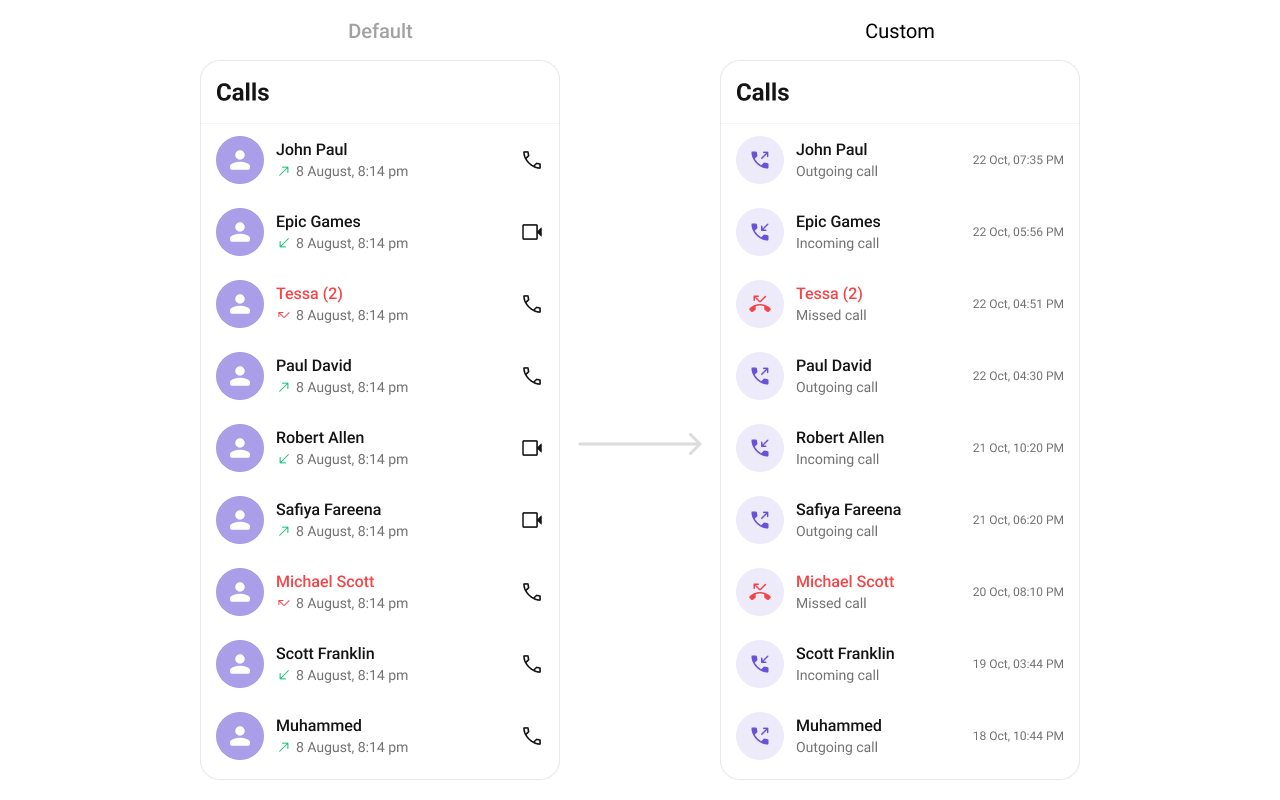
Allows setting a custom layout for each call log item.
Use Cases:
* Customize the entire call log card.
* Display additional contact details.
* Use a two-column design for better readability.
```java theme={null}
cometChatCallLog.setItemView(new CallLogsViewHolderListener() {
@Override
public View createView(Context context, CometchatCallLogsItemsBinding listItem) {
return super.createView(context, listItem);
}
@Override
public void bindView(Context context,
View createdView,
CallLog call,
RecyclerView.ViewHolder holder,
List callList,
int position) {
super.bindView(context, createdView, call, holder, callList, position);
}
});
```
```kotlin theme={null}
cometChatCallLog.setItemView(object : CallLogsViewHolderListener() {
override fun createView(context: Context?, listItem: CometchatCallLogsItemsBinding?): View {
}
override fun bindView(
context: Context,
createdView: View,
callLog: CallLog,
holder: RecyclerView.ViewHolder,
callList: List,
position: Int
) {
}
})
```
 ```xml call_log_list_item.xml theme={null}
```
```java theme={null}
cometChatCallLog.setItemView(new CallLogsViewHolderListener() {
@Override
public View createView(Context context, CometchatCallLogsItemsBinding listItem) {
return LayoutInflater.from(context).inflate(R.layout.call_log_list_item, null);
}
@Override
public void bindView(Context context,
View createdView,
CallLog call,
RecyclerView.ViewHolder holder,
List callList,
int position) {
CometChatAvatar avatar = view.findViewById(R.id.avatar);
TextView name = view.findViewById(R.id.tv_title);
TextView subTitle = view.findViewById(R.id.tv_subtitle);
TextView date = view.findViewById(R.id.tv_date_call_log);
LinearLayout.LayoutParams layoutParams = new LinearLayout.LayoutParams(
ViewGroup.LayoutParams.MATCH_PARENT, ViewGroup.LayoutParams.WRAP_CONTENT
);
view.setLayoutParams(layoutParams);
CallUser callUser = (CallUser) call.getInitiator();
CallUser callUser1 = (CallUser) call.getReceiver();
boolean isInitiator = callUser.getUid().equals(CometChat.getLoggedInUser().getUid());
date.setText(new SimpleDateFormat("dd MMM, hh:mm a").format(call.getInitiatedAt() * 1000));
if (call.getStatus().equals(CometChatCallsConstants.CALL_STATUS_UNANSWERED) || call
.getStatus()
.equals(CometChatCallsConstants.CALL_STATUS_MISSED)) {
avatar.setAvatar(ResourcesCompat.getDrawable(getResources(), R.drawable.ic_missed_call, null));
subTitle.setText("Missed Call");
} else {
if (isInitiator) {
avatar.setAvatar(ResourcesCompat.getDrawable(getResources(), R.drawable.ic_outgoing_call, null));
subTitle.setText("Outgoing Call");
name.setText(callUser1.getName());
} else {
avatar.setAvatar(ResourcesCompat.getDrawable(getResources(), R.drawable.ic_incoming_call, null));
subTitle.setText("Incoming Call");
name.setText(callUser.getName());
}
}
}
});
```
```kotlin theme={null}
cometChatCallLog.setItemView(object : CallLogsViewHolderListener() {
override fun createView(context: Context?, listItem: CometchatCallLogsItemsBinding?): View {
return LayoutInflater.from(context).inflate(R.layout.call_log_list_item, null)
}
override fun bindView(
context: Context,
createdView: View,
call: CallLog,
holder: RecyclerView.ViewHolder,
callList: List,
position: Int
) {
val avatar: CometChatAvatar = view.findViewById(R.id.avatar)
val name: TextView = view.findViewById(R.id.tv_title)
val subTitle: TextView = view.findViewById(R.id.tv_subtitle)
val date: TextView = view.findViewById(R.id.tv_date_call_log)
val layoutParams = LinearLayout.LayoutParams(
ViewGroup.LayoutParams.MATCH_PARENT, ViewGroup.LayoutParams.WRAP_CONTENT
)
view.setLayoutParams(layoutParams)
val callUser = call.initiator as CallUser
val callUser1 = call.receiver as CallUser
val isInitiator = callUser.uid == CometChat.getLoggedInUser().uid
date.text = SimpleDateFormat("dd MMM, hh:mm a").format(call.initiatedAt * 1000)
if (call.status == CometChatCallsConstants.CALL_STATUS_UNANSWERED || (call
.status
== CometChatCallsConstants.CALL_STATUS_MISSED)
) {
avatar.setAvatar(ResourcesCompat.getDrawable(resources, R.drawable.ic_missed_call, null)!!)
subTitle.text = "Missed Call"
} else {
if (isInitiator) {
avatar.setAvatar(ResourcesCompat.getDrawable(resources, R.drawable.ic_outgoing_call, null)!!)
subTitle.text = "Outgoing Call"
name.text = callUser1.name
} else {
avatar.setAvatar(ResourcesCompat.getDrawable(resources, R.drawable.ic_incoming_call, null)!!)
subTitle.text = "Incoming Call"
name.text = callUser.name
}
}
}
})
```
#### setTitleView
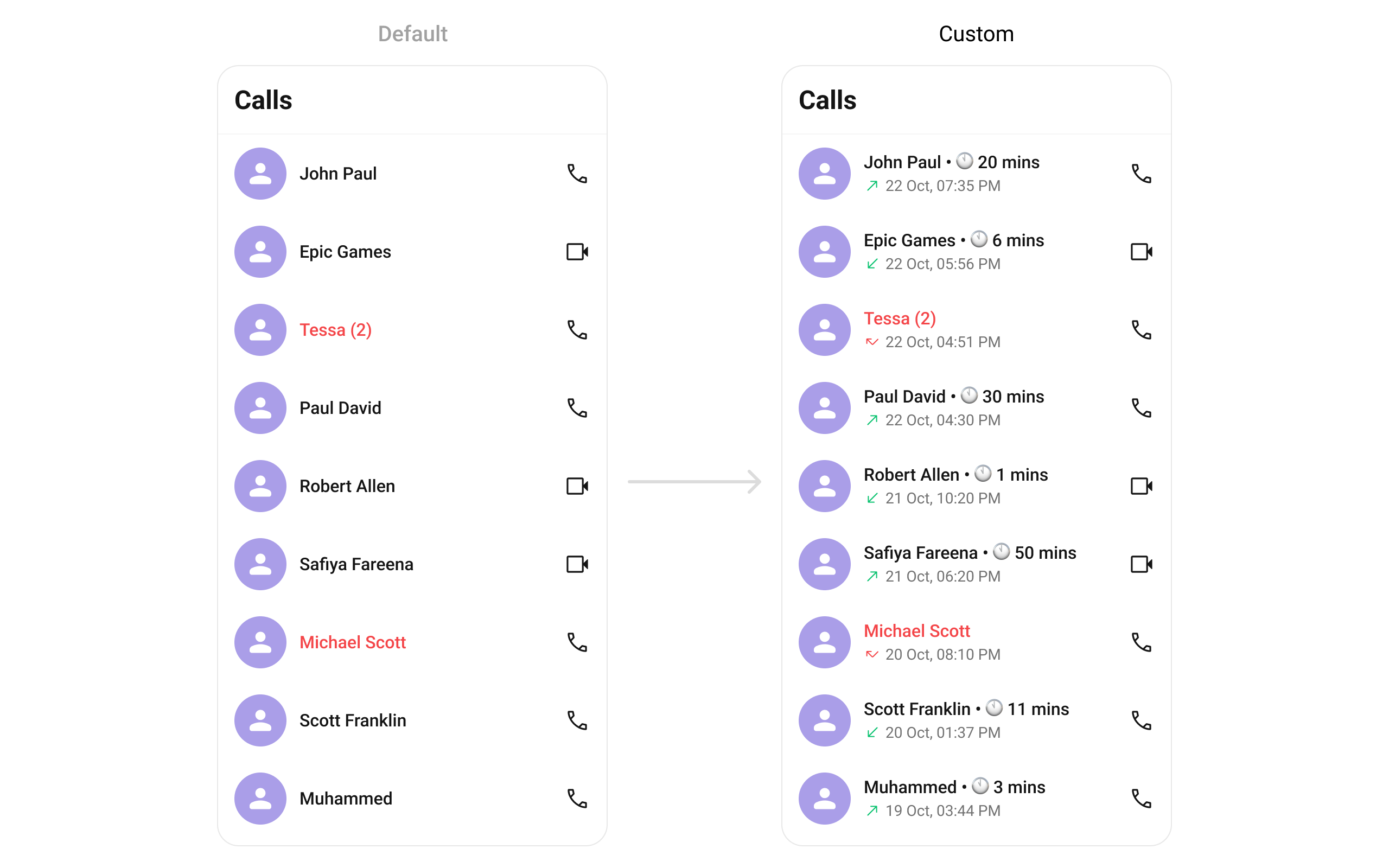
Allows setting a custom title view, typically used for the caller’s name or number.
Use Cases:
* Display caller’s full name.
* Show a business label for saved contacts.
* Use bold text for unknown numbers.
```java theme={null}
cometChatCallLog.setTitleView(new CallLogsViewHolderListener() {
@Override
public View createView(Context context, CometchatCallLogsItemsBinding listItem) {
return super.createView(context, listItem);
}
@Override
public void bindView(Context context,
View createdView,
CallLog call,
RecyclerView.ViewHolder holder,
List callList,
int position) {
super.bindView(context, createdView, call, holder, callList, position);
}
});
```
```kotlin theme={null}
cometChatCallLog.setTitleView(object : CallLogsViewHolderListener() {
override fun createView(context: Context?, listItem: CometchatCallLogsItemsBinding?): View {
}
override fun bindView(
context: Context,
createdView: View,
callLog: CallLog,
holder: RecyclerView.ViewHolder,
callList: List,
position: Int
) {
}
})
```
**Example**
```xml call_log_list_item.xml theme={null}
```
```java theme={null}
cometChatCallLog.setItemView(new CallLogsViewHolderListener() {
@Override
public View createView(Context context, CometchatCallLogsItemsBinding listItem) {
return LayoutInflater.from(context).inflate(R.layout.call_log_list_item, null);
}
@Override
public void bindView(Context context,
View createdView,
CallLog call,
RecyclerView.ViewHolder holder,
List callList,
int position) {
CometChatAvatar avatar = view.findViewById(R.id.avatar);
TextView name = view.findViewById(R.id.tv_title);
TextView subTitle = view.findViewById(R.id.tv_subtitle);
TextView date = view.findViewById(R.id.tv_date_call_log);
LinearLayout.LayoutParams layoutParams = new LinearLayout.LayoutParams(
ViewGroup.LayoutParams.MATCH_PARENT, ViewGroup.LayoutParams.WRAP_CONTENT
);
view.setLayoutParams(layoutParams);
CallUser callUser = (CallUser) call.getInitiator();
CallUser callUser1 = (CallUser) call.getReceiver();
boolean isInitiator = callUser.getUid().equals(CometChat.getLoggedInUser().getUid());
date.setText(new SimpleDateFormat("dd MMM, hh:mm a").format(call.getInitiatedAt() * 1000));
if (call.getStatus().equals(CometChatCallsConstants.CALL_STATUS_UNANSWERED) || call
.getStatus()
.equals(CometChatCallsConstants.CALL_STATUS_MISSED)) {
avatar.setAvatar(ResourcesCompat.getDrawable(getResources(), R.drawable.ic_missed_call, null));
subTitle.setText("Missed Call");
} else {
if (isInitiator) {
avatar.setAvatar(ResourcesCompat.getDrawable(getResources(), R.drawable.ic_outgoing_call, null));
subTitle.setText("Outgoing Call");
name.setText(callUser1.getName());
} else {
avatar.setAvatar(ResourcesCompat.getDrawable(getResources(), R.drawable.ic_incoming_call, null));
subTitle.setText("Incoming Call");
name.setText(callUser.getName());
}
}
}
});
```
```kotlin theme={null}
cometChatCallLog.setItemView(object : CallLogsViewHolderListener() {
override fun createView(context: Context?, listItem: CometchatCallLogsItemsBinding?): View {
return LayoutInflater.from(context).inflate(R.layout.call_log_list_item, null)
}
override fun bindView(
context: Context,
createdView: View,
call: CallLog,
holder: RecyclerView.ViewHolder,
callList: List,
position: Int
) {
val avatar: CometChatAvatar = view.findViewById(R.id.avatar)
val name: TextView = view.findViewById(R.id.tv_title)
val subTitle: TextView = view.findViewById(R.id.tv_subtitle)
val date: TextView = view.findViewById(R.id.tv_date_call_log)
val layoutParams = LinearLayout.LayoutParams(
ViewGroup.LayoutParams.MATCH_PARENT, ViewGroup.LayoutParams.WRAP_CONTENT
)
view.setLayoutParams(layoutParams)
val callUser = call.initiator as CallUser
val callUser1 = call.receiver as CallUser
val isInitiator = callUser.uid == CometChat.getLoggedInUser().uid
date.text = SimpleDateFormat("dd MMM, hh:mm a").format(call.initiatedAt * 1000)
if (call.status == CometChatCallsConstants.CALL_STATUS_UNANSWERED || (call
.status
== CometChatCallsConstants.CALL_STATUS_MISSED)
) {
avatar.setAvatar(ResourcesCompat.getDrawable(resources, R.drawable.ic_missed_call, null)!!)
subTitle.text = "Missed Call"
} else {
if (isInitiator) {
avatar.setAvatar(ResourcesCompat.getDrawable(resources, R.drawable.ic_outgoing_call, null)!!)
subTitle.text = "Outgoing Call"
name.text = callUser1.name
} else {
avatar.setAvatar(ResourcesCompat.getDrawable(resources, R.drawable.ic_incoming_call, null)!!)
subTitle.text = "Incoming Call"
name.text = callUser.name
}
}
}
})
```
#### setTitleView
Allows setting a custom title view, typically used for the caller’s name or number.
Use Cases:
* Display caller’s full name.
* Show a business label for saved contacts.
* Use bold text for unknown numbers.
```java theme={null}
cometChatCallLog.setTitleView(new CallLogsViewHolderListener() {
@Override
public View createView(Context context, CometchatCallLogsItemsBinding listItem) {
return super.createView(context, listItem);
}
@Override
public void bindView(Context context,
View createdView,
CallLog call,
RecyclerView.ViewHolder holder,
List callList,
int position) {
super.bindView(context, createdView, call, holder, callList, position);
}
});
```
```kotlin theme={null}
cometChatCallLog.setTitleView(object : CallLogsViewHolderListener() {
override fun createView(context: Context?, listItem: CometchatCallLogsItemsBinding?): View {
}
override fun bindView(
context: Context,
createdView: View,
callLog: CallLog,
holder: RecyclerView.ViewHolder,
callList: List,
position: Int
) {
}
})
```
**Example**
 ```java YourActivity.java theme={null}
cometChatcallLog.setTitleView(new CallLogsViewHolderListener() {
@Override
public View createView(Context context, CometchatCallLogsItemsBinding listItem) {
return new TextView(context);
}
@Override
public void bindView(Context context,
View createdView,
CallLog callLog,
RecyclerView.ViewHolder holder,
List callList,
int position) {
TextView textView = (TextView) createdView;
textView.setTextAppearance(CometChatTheme.getTextAppearanceHeading4Regular(context));
textView.setTextColor(CometChatTheme.getTextColorPrimary(context));
CallUtils.getCallLogUserName(callLog);
if (callLog.getTotalDurationInMinutes() > 0) {
String duration = String.valueOf(callLog.getTotalDurationInMinutes());
textView.setText(CallUtils.getCallLogUserName(callLog) + " • \uD83D\uDD5A\uFE0F " + duration
.substring(0, duration.length() > 4 ? 4 : 3) + " mins");
} else textView.setText(CallUtils.getCallLogUserName(callLog));
}
});
```
```kotlin YourActivity.kt theme={null}
cometChatCallLog.setTitleView(object : CallLogsViewHolderListener() {
override fun createView(context: Context?, listItem: CometchatCallLogsItemsBinding?): View {
return TextView(context)
}
override fun bindView(
context: Context,
createdView: View,
callLog: CallLog,
holder: RecyclerView.ViewHolder,
callList: List,
position: Int
) {
val textView = createdView as TextView
textView.setTextAppearance(CometChatTheme.getTextAppearanceHeading4Regular(context))
textView.setTextColor(CometChatTheme.getTextColorPrimary(context))
CallUtils.getCallLogUserName(callLog)
if (callLog.totalDurationInMinutes > 0) {
val duration = callLog.totalDurationInMinutes.toString()
textView.text = CallUtils.getCallLogUserName(callLog) + " • \uD83D\uDD5A\uFE0F " + duration
.substring(0, if (duration.length > 4) 4 else 3) + " mins"
} else textView.text = CallUtils.getCallLogUserName(callLog)
}
})
```
***
#### setLeadingView
Customizes the leading view, usually the caller’s avatar or profile picture.
Use Cases:
* Display a profile picture.
* Show a call type icon (missed, received, dialed).
* Indicate call status (e.g., missed calls in red).
```java theme={null}
cometChatCallLog.setLeadingView(new CallLogsViewHolderListener() {
@Override
public View createView(Context context, CometchatCallLogsItemsBinding listItem) {
return super.createView(context, listItem);
}
@Override
public void bindView(Context context,
View createdView,
CallLog call,
RecyclerView.ViewHolder holder,
List callList,
int position) {
super.bindView(context, createdView, call, holder, callList, position);
}
});
```
```kotlin theme={null}
cometChatCallLog.setLeadingView(object : CallLogsViewHolderListener() {
override fun createView(context: Context?, listItem: CometchatCallLogsItemsBinding?): View {
}
override fun bindView(
context: Context,
createdView: View,
callLog: CallLog,
holder: RecyclerView.ViewHolder,
callList: List,
position: Int
) {
}
})
```
**Example**
```java YourActivity.java theme={null}
cometChatcallLog.setTitleView(new CallLogsViewHolderListener() {
@Override
public View createView(Context context, CometchatCallLogsItemsBinding listItem) {
return new TextView(context);
}
@Override
public void bindView(Context context,
View createdView,
CallLog callLog,
RecyclerView.ViewHolder holder,
List callList,
int position) {
TextView textView = (TextView) createdView;
textView.setTextAppearance(CometChatTheme.getTextAppearanceHeading4Regular(context));
textView.setTextColor(CometChatTheme.getTextColorPrimary(context));
CallUtils.getCallLogUserName(callLog);
if (callLog.getTotalDurationInMinutes() > 0) {
String duration = String.valueOf(callLog.getTotalDurationInMinutes());
textView.setText(CallUtils.getCallLogUserName(callLog) + " • \uD83D\uDD5A\uFE0F " + duration
.substring(0, duration.length() > 4 ? 4 : 3) + " mins");
} else textView.setText(CallUtils.getCallLogUserName(callLog));
}
});
```
```kotlin YourActivity.kt theme={null}
cometChatCallLog.setTitleView(object : CallLogsViewHolderListener() {
override fun createView(context: Context?, listItem: CometchatCallLogsItemsBinding?): View {
return TextView(context)
}
override fun bindView(
context: Context,
createdView: View,
callLog: CallLog,
holder: RecyclerView.ViewHolder,
callList: List,
position: Int
) {
val textView = createdView as TextView
textView.setTextAppearance(CometChatTheme.getTextAppearanceHeading4Regular(context))
textView.setTextColor(CometChatTheme.getTextColorPrimary(context))
CallUtils.getCallLogUserName(callLog)
if (callLog.totalDurationInMinutes > 0) {
val duration = callLog.totalDurationInMinutes.toString()
textView.text = CallUtils.getCallLogUserName(callLog) + " • \uD83D\uDD5A\uFE0F " + duration
.substring(0, if (duration.length > 4) 4 else 3) + " mins"
} else textView.text = CallUtils.getCallLogUserName(callLog)
}
})
```
***
#### setLeadingView
Customizes the leading view, usually the caller’s avatar or profile picture.
Use Cases:
* Display a profile picture.
* Show a call type icon (missed, received, dialed).
* Indicate call status (e.g., missed calls in red).
```java theme={null}
cometChatCallLog.setLeadingView(new CallLogsViewHolderListener() {
@Override
public View createView(Context context, CometchatCallLogsItemsBinding listItem) {
return super.createView(context, listItem);
}
@Override
public void bindView(Context context,
View createdView,
CallLog call,
RecyclerView.ViewHolder holder,
List callList,
int position) {
super.bindView(context, createdView, call, holder, callList, position);
}
});
```
```kotlin theme={null}
cometChatCallLog.setLeadingView(object : CallLogsViewHolderListener() {
override fun createView(context: Context?, listItem: CometchatCallLogsItemsBinding?): View {
}
override fun bindView(
context: Context,
createdView: View,
callLog: CallLog,
holder: RecyclerView.ViewHolder,
callList: List,
position: Int
) {
}
})
```
**Example**
 ```java YourActivity.java theme={null}
cometChatcallLog.setLeadingView(new CallLogsViewHolderListener() {
@Override
public View createView(Context context, CometchatCallLogsItemsBinding listItem) {
return new CometChatAvatar(context);
}
@Override
public void bindView(Context context,
View createdView,
CallLog callLog,
RecyclerView.ViewHolder holder,
List callList,
int position) {
CometChatAvatar avatar = (CometChatAvatar) createdView;
if (callLog.getInitiator() instanceof CallUser) {
CallUser initiator = (CallUser) callLog.getInitiator();
boolean isLoggedInUser = CallUtils.isLoggedInUser(initiator);
boolean isMissedOrUnanswered = callLog.getStatus().equals(CometChatCallsConstants.CALL_STATUS_UNANSWERED) || callLog
.getStatus()
.equals(CometChatCallsConstants.CALL_STATUS_MISSED);
if (callLog.getType().equals(CometChatCallsConstants.CALL_TYPE_AUDIO) || callLog
.getType()
.equals(CometChatCallsConstants.CALL_TYPE_VIDEO) || callLog.getType().equals(CometChatCallsConstants.CALL_TYPE_AUDIO_VIDEO)) {
if (isLoggedInUser) {
avatar.setAvatar(ResourcesCompat.getDrawable(context.getResources(), R.drawable.outgoing_voice_call, null));
} else if (isMissedOrUnanswered) {
avatar.setAvatar(ResourcesCompat.getDrawable(context.getResources(), R.drawable.miss_call, null));
} else {
avatar.setAvatar(ResourcesCompat.getDrawable(context.getResources(), R.drawable.incoming_voice_call, null));
}
}
}
LinearLayout.LayoutParams layoutParams = new LinearLayout.LayoutParams(
Utils.convertDpToPx(context, 50),
Utils.convertDpToPx(context, 50)
);
avatar.setLayoutParams(layoutParams);
}
});
```
```kotlin YourActivity.kt theme={null}
cometChatCallLog.setLeadingView(object : CallLogsViewHolderListener() {
override fun createView(context: Context?, listItem: CometchatCallLogsItemsBinding?): View {
return CometChatAvatar(context)
}
override fun bindView(
context: Context,
createdView: View,
callLog: CallLog,
holder: RecyclerView.ViewHolder,
callList: List,
position: Int
) {
val avatar = createdView as CometChatAvatar
if (callLog.initiator is CallUser) {
val initiator = callLog.initiator as CallUser
val isLoggedInUser = CallUtils.isLoggedInUser(initiator)
val isMissedOrUnanswered = callLog.status == CometChatCallsConstants.CALL_STATUS_UNANSWERED || (callLog
.status
== CometChatCallsConstants.CALL_STATUS_MISSED)
if (callLog.type == CometChatCallsConstants.CALL_TYPE_AUDIO || (callLog
.type
== CometChatCallsConstants.CALL_TYPE_VIDEO) || callLog.type == CometChatCallsConstants.CALL_TYPE_AUDIO_VIDEO
) {
if (isLoggedInUser) {
avatar.setAvatar(ResourcesCompat.getDrawable(context.resources, R.drawable.outgoing_voice_call, null)!!)
} else if (isMissedOrUnanswered) {
avatar.setAvatar(ResourcesCompat.getDrawable(context.resources, R.drawable.miss_call, null)!!)
} else {
avatar.setAvatar(ResourcesCompat.getDrawable(context.resources, R.drawable.incoming_voice_call, null)!!)
}
}
}
val layoutParams = LinearLayout.LayoutParams(
Utils.convertDpToPx(context, 50),
Utils.convertDpToPx(context, 50)
)
avatar.layoutParams = layoutParams
}
})
```
***
#### setSubtitleView
Enables customizing the subtitle view, usually used for additional call details.
Use Cases:
* Display call type (Missed, Received, Outgoing).
* Show network strength indicators.
* Include call duration in a more readable format.
```java theme={null}
cometChatCallLog.setSubtitleView(new CallLogsViewHolderListener() {
@Override
public View createView(Context context, CometchatCallLogsItemsBinding listItem) {
return super.createView(context, listItem);
}
@Override
public void bindView(Context context,
View createdView,
CallLog call,
RecyclerView.ViewHolder holder,
List callList,
int position) {
super.bindView(context, createdView, call, holder, callList, position);
}
});
```
```kotlin theme={null}
cometChatCallLog.setSubtitleView(object : CallLogsViewHolderListener() {
override fun createView(context: Context?, listItem: CometchatCallLogsItemsBinding?): View {
}
override fun bindView(
context: Context,
createdView: View,
callLog: CallLog,
holder: RecyclerView.ViewHolder,
callList: List,
position: Int
) {
}
})
```
**Example**
```java YourActivity.java theme={null}
cometChatcallLog.setLeadingView(new CallLogsViewHolderListener() {
@Override
public View createView(Context context, CometchatCallLogsItemsBinding listItem) {
return new CometChatAvatar(context);
}
@Override
public void bindView(Context context,
View createdView,
CallLog callLog,
RecyclerView.ViewHolder holder,
List callList,
int position) {
CometChatAvatar avatar = (CometChatAvatar) createdView;
if (callLog.getInitiator() instanceof CallUser) {
CallUser initiator = (CallUser) callLog.getInitiator();
boolean isLoggedInUser = CallUtils.isLoggedInUser(initiator);
boolean isMissedOrUnanswered = callLog.getStatus().equals(CometChatCallsConstants.CALL_STATUS_UNANSWERED) || callLog
.getStatus()
.equals(CometChatCallsConstants.CALL_STATUS_MISSED);
if (callLog.getType().equals(CometChatCallsConstants.CALL_TYPE_AUDIO) || callLog
.getType()
.equals(CometChatCallsConstants.CALL_TYPE_VIDEO) || callLog.getType().equals(CometChatCallsConstants.CALL_TYPE_AUDIO_VIDEO)) {
if (isLoggedInUser) {
avatar.setAvatar(ResourcesCompat.getDrawable(context.getResources(), R.drawable.outgoing_voice_call, null));
} else if (isMissedOrUnanswered) {
avatar.setAvatar(ResourcesCompat.getDrawable(context.getResources(), R.drawable.miss_call, null));
} else {
avatar.setAvatar(ResourcesCompat.getDrawable(context.getResources(), R.drawable.incoming_voice_call, null));
}
}
}
LinearLayout.LayoutParams layoutParams = new LinearLayout.LayoutParams(
Utils.convertDpToPx(context, 50),
Utils.convertDpToPx(context, 50)
);
avatar.setLayoutParams(layoutParams);
}
});
```
```kotlin YourActivity.kt theme={null}
cometChatCallLog.setLeadingView(object : CallLogsViewHolderListener() {
override fun createView(context: Context?, listItem: CometchatCallLogsItemsBinding?): View {
return CometChatAvatar(context)
}
override fun bindView(
context: Context,
createdView: View,
callLog: CallLog,
holder: RecyclerView.ViewHolder,
callList: List,
position: Int
) {
val avatar = createdView as CometChatAvatar
if (callLog.initiator is CallUser) {
val initiator = callLog.initiator as CallUser
val isLoggedInUser = CallUtils.isLoggedInUser(initiator)
val isMissedOrUnanswered = callLog.status == CometChatCallsConstants.CALL_STATUS_UNANSWERED || (callLog
.status
== CometChatCallsConstants.CALL_STATUS_MISSED)
if (callLog.type == CometChatCallsConstants.CALL_TYPE_AUDIO || (callLog
.type
== CometChatCallsConstants.CALL_TYPE_VIDEO) || callLog.type == CometChatCallsConstants.CALL_TYPE_AUDIO_VIDEO
) {
if (isLoggedInUser) {
avatar.setAvatar(ResourcesCompat.getDrawable(context.resources, R.drawable.outgoing_voice_call, null)!!)
} else if (isMissedOrUnanswered) {
avatar.setAvatar(ResourcesCompat.getDrawable(context.resources, R.drawable.miss_call, null)!!)
} else {
avatar.setAvatar(ResourcesCompat.getDrawable(context.resources, R.drawable.incoming_voice_call, null)!!)
}
}
}
val layoutParams = LinearLayout.LayoutParams(
Utils.convertDpToPx(context, 50),
Utils.convertDpToPx(context, 50)
)
avatar.layoutParams = layoutParams
}
})
```
***
#### setSubtitleView
Enables customizing the subtitle view, usually used for additional call details.
Use Cases:
* Display call type (Missed, Received, Outgoing).
* Show network strength indicators.
* Include call duration in a more readable format.
```java theme={null}
cometChatCallLog.setSubtitleView(new CallLogsViewHolderListener() {
@Override
public View createView(Context context, CometchatCallLogsItemsBinding listItem) {
return super.createView(context, listItem);
}
@Override
public void bindView(Context context,
View createdView,
CallLog call,
RecyclerView.ViewHolder holder,
List callList,
int position) {
super.bindView(context, createdView, call, holder, callList, position);
}
});
```
```kotlin theme={null}
cometChatCallLog.setSubtitleView(object : CallLogsViewHolderListener() {
override fun createView(context: Context?, listItem: CometchatCallLogsItemsBinding?): View {
}
override fun bindView(
context: Context,
createdView: View,
callLog: CallLog,
holder: RecyclerView.ViewHolder,
callList: List,
position: Int
) {
}
})
```
**Example**
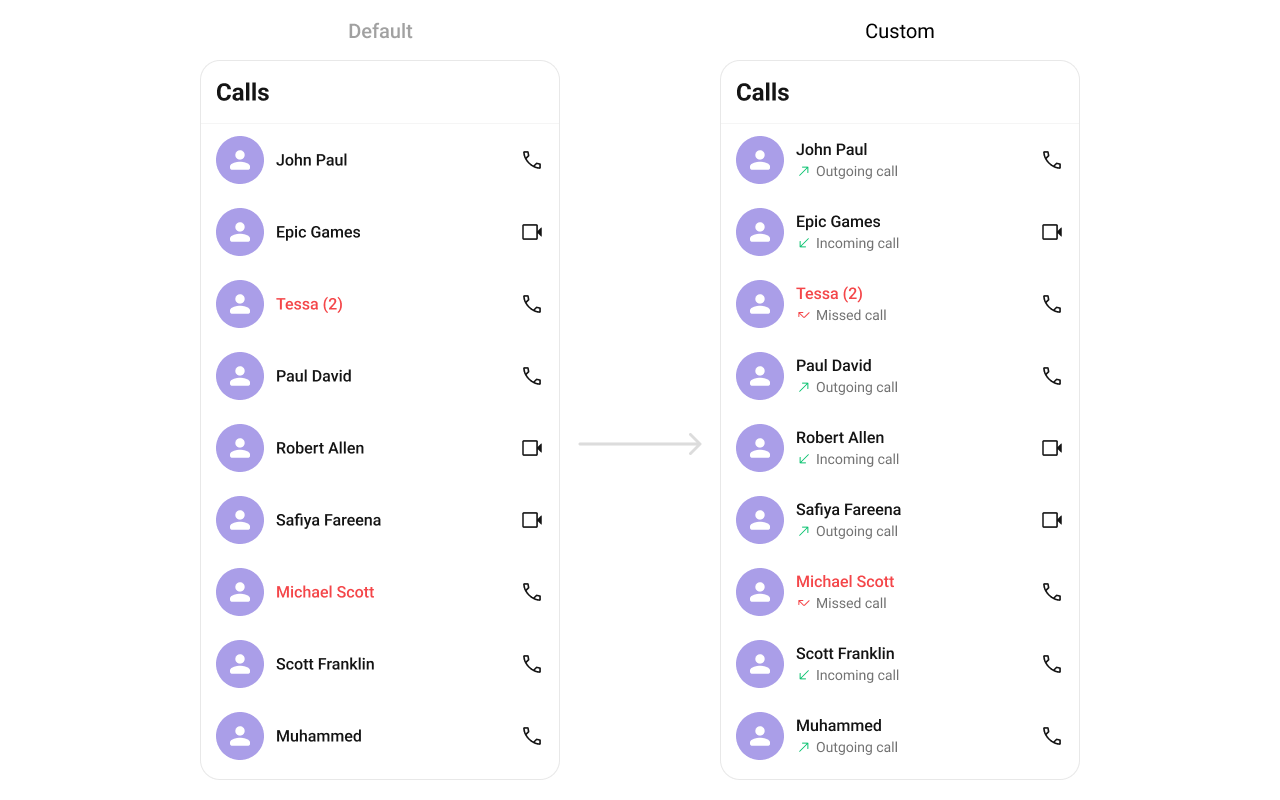 You can create and return a view from `setSubtitleView` which will be loaded in call log item.
```java YourActivity.java theme={null}
cometChatCallLog.setSubtitleView(new CallLogsViewHolderListener() {
@Override
public View createView(Context context, CometchatCallLogsItemsBinding listItem) {
return new TextView(context);
}
@Override
public void bindView(Context context,
View createdView,
CallLog callLog,
RecyclerView.ViewHolder holder,
List callList,
int position) {
TextView textView = (TextView) createdView;
CallUser callUser = (CallUser) callLog.getInitiator();
boolean isInitiator = callUser.getUid().equals(CometChat.getLoggedInUser().getUid());
if (callLog.getStatus().equals(CometChatCallsConstants.CALL_STATUS_UNANSWERED) || callLog
.getStatus()
.equals(CometChatCallsConstants.CALL_STATUS_MISSED)) {
textView.setText("Missed Call");
} else {
if (isInitiator) {
textView.setText("Outgoing Call");
} else {
textView.setText("Incoming Call");
}
}
}
});
```
```kotlin YourActivity.kt theme={null}
cometChatCallLog.setSubtitleView(object : CallLogsViewHolderListener() {
override fun createView(context: Context?, listItem: CometchatCallLogsItemsBinding?): View {
return TextView(context)
}
override fun bindView(
context: Context,
createdView: View,
callLog: CallLog,
holder: RecyclerView.ViewHolder,
callList: List,
position: Int
) {
val textView = createdView as TextView
val callUser = callLog.initiator as CallUser
val isInitiator = callUser.uid == CometChat.getLoggedInUser().uid
if (callLog.status == CometChatCallsConstants.CALL_STATUS_UNANSWERED || (callLog
.status
== CometChatCallsConstants.CALL_STATUS_MISSED)
) {
textView.text = "Missed Call"
} else {
if (isInitiator) {
textView.text = "Outgoing Call"
} else {
textView.text = "Incoming Call"
}
}
}
})
```
***
#### setTrailingView
Customizes the trailing section, typically for call duration or actions.
Use Cases:
* Display call duration.
* Add a "Call Again" button.
* Show call timestamps.
```java theme={null}
cometChatCallLog.setTrailingView(new CallLogsViewHolderListener() {
@Override
public View createView(Context context, CometchatCallLogsItemsBinding listItem) {
return super.createView(context, listItem);
}
@Override
public void bindView(Context context,
View createdView,
CallLog call,
RecyclerView.ViewHolder holder,
List callList,
int position) {
super.bindView(context, createdView, call, holder, callList, position);
}
});
```
```kotlin theme={null}
cometChatCallLog.setTrailingView(object : CallLogsViewHolderListener() {
override fun createView(context: Context?, listItem: CometchatCallLogsItemsBinding?): View {
}
override fun bindView(
context: Context,
createdView: View,
callLog: CallLog,
holder: RecyclerView.ViewHolder,
callList: List,
position: Int
) {
}
})
```
**Example**
You can create and return a view from `setSubtitleView` which will be loaded in call log item.
```java YourActivity.java theme={null}
cometChatCallLog.setSubtitleView(new CallLogsViewHolderListener() {
@Override
public View createView(Context context, CometchatCallLogsItemsBinding listItem) {
return new TextView(context);
}
@Override
public void bindView(Context context,
View createdView,
CallLog callLog,
RecyclerView.ViewHolder holder,
List callList,
int position) {
TextView textView = (TextView) createdView;
CallUser callUser = (CallUser) callLog.getInitiator();
boolean isInitiator = callUser.getUid().equals(CometChat.getLoggedInUser().getUid());
if (callLog.getStatus().equals(CometChatCallsConstants.CALL_STATUS_UNANSWERED) || callLog
.getStatus()
.equals(CometChatCallsConstants.CALL_STATUS_MISSED)) {
textView.setText("Missed Call");
} else {
if (isInitiator) {
textView.setText("Outgoing Call");
} else {
textView.setText("Incoming Call");
}
}
}
});
```
```kotlin YourActivity.kt theme={null}
cometChatCallLog.setSubtitleView(object : CallLogsViewHolderListener() {
override fun createView(context: Context?, listItem: CometchatCallLogsItemsBinding?): View {
return TextView(context)
}
override fun bindView(
context: Context,
createdView: View,
callLog: CallLog,
holder: RecyclerView.ViewHolder,
callList: List,
position: Int
) {
val textView = createdView as TextView
val callUser = callLog.initiator as CallUser
val isInitiator = callUser.uid == CometChat.getLoggedInUser().uid
if (callLog.status == CometChatCallsConstants.CALL_STATUS_UNANSWERED || (callLog
.status
== CometChatCallsConstants.CALL_STATUS_MISSED)
) {
textView.text = "Missed Call"
} else {
if (isInitiator) {
textView.text = "Outgoing Call"
} else {
textView.text = "Incoming Call"
}
}
}
})
```
***
#### setTrailingView
Customizes the trailing section, typically for call duration or actions.
Use Cases:
* Display call duration.
* Add a "Call Again" button.
* Show call timestamps.
```java theme={null}
cometChatCallLog.setTrailingView(new CallLogsViewHolderListener() {
@Override
public View createView(Context context, CometchatCallLogsItemsBinding listItem) {
return super.createView(context, listItem);
}
@Override
public void bindView(Context context,
View createdView,
CallLog call,
RecyclerView.ViewHolder holder,
List callList,
int position) {
super.bindView(context, createdView, call, holder, callList, position);
}
});
```
```kotlin theme={null}
cometChatCallLog.setTrailingView(object : CallLogsViewHolderListener() {
override fun createView(context: Context?, listItem: CometchatCallLogsItemsBinding?): View {
}
override fun bindView(
context: Context,
createdView: View,
callLog: CallLog,
holder: RecyclerView.ViewHolder,
callList: List,
position: Int
) {
}
})
```
**Example**
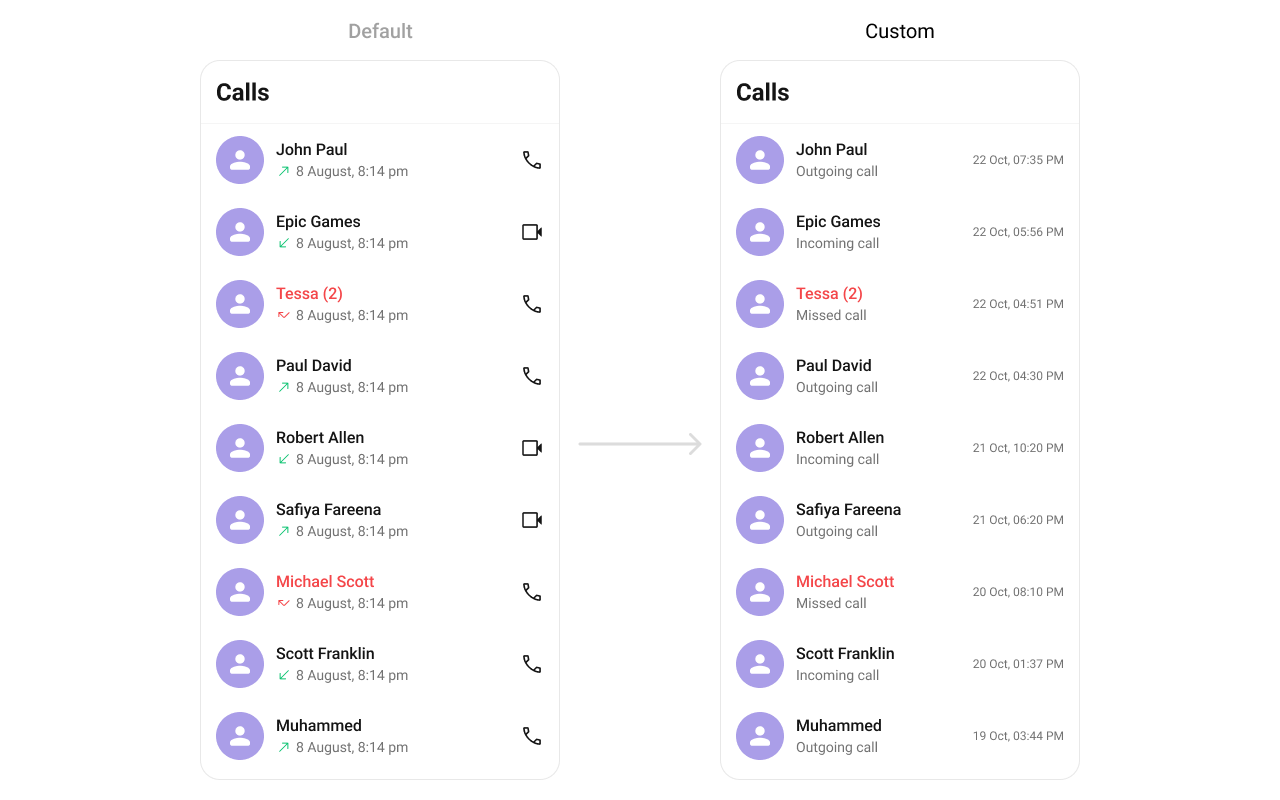 You can create and return a view from setTail which will be loaded in call log item.
```java YourActivity.java theme={null}
cometChatcallLog.setTrailingView(new CallLogsViewHolderListener() {
@Override
public View createView(Context context, CometchatCallLogsItemsBinding listItem) {
return new TextView(context);
}
@Override
public void bindView(Context context,
View createdView,
CallLog callLog,
RecyclerView.ViewHolder holder,
List callList,
int position) {
TextView textView = (TextView) createdView;
textView.setText(new SimpleDateFormat("dd MMM, hh:mm a").format(callLog.getInitiatedAt() * 1000));
}
});
```
```kotlin YourActivity.kt theme={null}
cometChatCallLog.setTrailingView(object : CallLogsViewHolderListener() {
override fun createView(context: Context?, listItem: CometchatCallLogsItemsBinding?): View {
return TextView(context)
}
override fun bindView(
context: Context,
createdView: View,
callLog: CallLog,
holder: RecyclerView.ViewHolder,
callList: List,
position: Int
) {
val textView = createdView as TextView
textView.text = SimpleDateFormat("dd MMM, hh:mm a").format(callLog.initiatedAt * 1000)
}
})
```
You can create and return a view from setTail which will be loaded in call log item.
```java YourActivity.java theme={null}
cometChatcallLog.setTrailingView(new CallLogsViewHolderListener() {
@Override
public View createView(Context context, CometchatCallLogsItemsBinding listItem) {
return new TextView(context);
}
@Override
public void bindView(Context context,
View createdView,
CallLog callLog,
RecyclerView.ViewHolder holder,
List callList,
int position) {
TextView textView = (TextView) createdView;
textView.setText(new SimpleDateFormat("dd MMM, hh:mm a").format(callLog.getInitiatedAt() * 1000));
}
});
```
```kotlin YourActivity.kt theme={null}
cometChatCallLog.setTrailingView(object : CallLogsViewHolderListener() {
override fun createView(context: Context?, listItem: CometchatCallLogsItemsBinding?): View {
return TextView(context)
}
override fun bindView(
context: Context,
createdView: View,
callLog: CallLog,
holder: RecyclerView.ViewHolder,
callList: List,
position: Int
) {
val textView = createdView as TextView
textView.text = SimpleDateFormat("dd MMM, hh:mm a").format(callLog.initiatedAt * 1000)
}
})
```