> ## Documentation Index
> Fetch the complete documentation index at: https://cometchat-22654f5b-feature-react-native-sdk-quotedmessage-a.mintlify.site/llms.txt
> Use this file to discover all available pages before exploring further.
# Conversations
## Overview
The Conversations is a [Component](/ui-kit/android/components-overview#components), That shows all conversations related to the currently logged-in user,
 ## Usage
### Integration
There are multiple ways in which you can use Conversations in your app. **Layout File**: To use Conversations in your \`layout\_activity.xml, use the following code snippet.
```xml layout_activity.xml theme={null}
```
2. **Activity**: To use Conversations in your Activity, use the following code snippet.
```java YourActivity.java theme={null}
@Override
protected void onCreate(Bundle savedInstanceState) {
super.onCreate(savedInstanceState);
setContentView(new CometChatConversations(this));
}
```
```kotlin YourActivity.kt theme={null}
override fun onCreate(savedInstanceState: Bundle?) {
super.onCreate(savedInstanceState)
setContentView(CometChatConversations(this))
}
```
3. **Fragment**: To use `Conversations` in your `Fragment`, use the following code snippet.
```java YourFragment.java theme={null}
@Override
public View onCreateView(LayoutInflater inflater, ViewGroup container,
Bundle savedInstanceState) {
return new CometChatConversations(getContext());
}
```
```kotlin YourFragment.kt theme={null}
override fun onCreateView(inflater: LayoutInflater,container: ViewGroup?,savedInstanceState: Bundle?): View {
return CometChatConversations(requireContext())
}
```
### Actions
[Actions](/ui-kit/android/components-overview#actions) dictate how a component functions. They are divided into two types: Predefined and User-defined. You can override either type, allowing you to tailor the behavior of the component to fit your specific needs.
##### setOnItemClick
Function invoked when a conversation item is clicked, typically used to open a detailed chat screen.
```java YourActivity.java theme={null}
cometchatConversations.setOnItemClick((view1, position, conversation) -> {
});
```
```kotlin YourActivity.kt theme={null}
cometchatConversations.onItemClick = OnItemClick { view, position, conversation ->
}
```
***
##### setOnItemLongClick
Function executed when a conversation item is long-pressed, allowing additional actions like delete or select.
```java YourActivity.java theme={null}
cometchatConversations.setOnItemLongClick((view1, position, conversation) -> {
});
```
```kotlin YourActivity.kt theme={null}
cometchatConversations.onItemLongClick = OnItemLongClick({ view, position, conversation ->
})
```
***
##### setOnBackPressListener
`OnBackPressListener` is triggered when you press the back button in the app bar. It has a predefined behavior; when clicked, it navigates to the previous activity. However, you can override this action using the following code snippet.
```java YourActivity.java theme={null}
cometchatConversations.setOnBackPressListener(() -> {
});
```
```kotlin YourActivity.kt theme={null}
cometchatConversations.onBackPressListener = OnBackPress {
}
```
***
##### setOnSearchClickListener
`setOnSearchClickListener` is triggered when you click the search bar. It has a predefined behavior; when clicked, it opens the search screen. However, you can override this action using the following code snippet.
```java YourActivity.java theme={null}
binding.cometchatConversations.setOnSearchClickListener(() -> {
Log.i(TAG, "onViewCreated: Search Bar Clicked");
});
```
```kotlin YourActivity.kt theme={null}
binding.cometchatConversations.setOnSearchClickListener {
Log.i(TAG, "onViewCreated: Search Bar Clicked")
}
```
***
##### setOnSelect
Called when a item from the fetched list is selected, useful for multi-selection features.
```java YourActivity.java theme={null}
cometchatConversations.setOnSelect(t -> {
});
```
```kotlin YourActivity.kt theme={null}
cometchatConversations.setOnSelect(object : OnSelection {
override fun onSelection(t: MutableList?) {
}
})
```
***
##### OnError
This action doesn't change the behavior of the component but rather listens for any errors that occur in the Conversations component.
```java YourActivity.java theme={null}
cometchatConversations.setOnError(cometchatException -> {
});
```
```kotlin YourActivity.kt theme={null}
cometchatConversations.setOnError {
}
```
***
##### setOnLoad
Invoked when the list is successfully fetched and loaded, helping track component readiness.
```java YourActivity.java theme={null}
cometchatConversations.setOnLoad(list -> {
});
```
```kotlin YourActivity.kt theme={null}
cometchatConversations.setOnLoad(object : OnLoad {
override fun onLoad(list: MutableList?) {
}
})
```
***
##### setOnEmpty
Called when the list is empty, enabling custom handling such as showing a placeholder message.
```java YourActivity.java theme={null}
cometchatConversations.setOnEmpty(() -> {
});
```
```kotlin YourActivity.kt theme={null}
cometchatConversations.setOnEmpty{
}
```
***
### Filters
You can set `ConversationsRequestBuilder` in the Conversations Component to filter the conversation list. You can modify the builder as per your specific requirements with multiple options available to know more refer to [ConversationRequestBuilder](/sdk/android/retrieve-conversations).
You can set filters using the following parameters.
1. **Conversation Type:** Filters on type of Conversation, `User` or `Groups`
2. **Limit:** Number of conversations fetched in a single request.
3. **WithTags:** Filter on fetching conversations containing tags
4. **Tags:** Filters on specific `Tag`
5. **UserTags:** Filters on specific User `Tag`
6. **GroupTags:** Filters on specific Group `Tag`
```java YourActivity.java theme={null}
ConversationsRequest.ConversationsRequestBuilder builder = new ConversationsRequest.ConversationsRequestBuilder();
builder.setConversationType(CometChatConstants.CONVERSATION_TYPE_USER);
builder.setLimit(50);
cometChatConversations.setConversationsRequestBuilder(builder);
```
```kotlin theme={null}
val builder = ConversationsRequest.ConversationsRequestBuilder()
builder.setConversationType(CometChatConstants.CONVERSATION_TYPE_USER)
builder.setLimit(50)
cometChatConversations.setConversationsRequestBuilder(builder)
```
***
### Events
[Events](/ui-kit/android/components-overview#events) are emitted by a `Component`. By using event you can extend existing functionality. Being global events, they can be applied in Multiple Locations and are capable of being Added or Removed.
##### 1. ConversationDeleted
This event will be emitted when the user deletes a conversation
```ruby Add Listener theme={null}
CometChatConversationEvents.addListener("YOUR_LISTENER_TAG", new CometChatConversationEvents() {
@Override
public void ccConversationDeleted(Conversation conversation) {
super.ccConversationDeleted(conversation);
}
});
```
Remove Listener
```
CometChatConversationEvents.removeListener("YOUR_LISTENER_TAG");
```
```ruby Add Listener theme={null}
CometChatConversationEvents.addListener("LISTENER_TAG", object : CometChatConversationEvents() {
override fun ccConversationDeleted(conversation: Conversation) {
super.ccConversationDeleted(conversation)
}
})
```
Remove Listener
```
CometChatConversationEvents.removeListener("LISTENER_TAG");
```
## Customization
To fit your app's design requirements, you can customize the appearance of the conversation component. We provide exposed methods that allow you to modify the experience and behavior according to your specific needs.
### Style
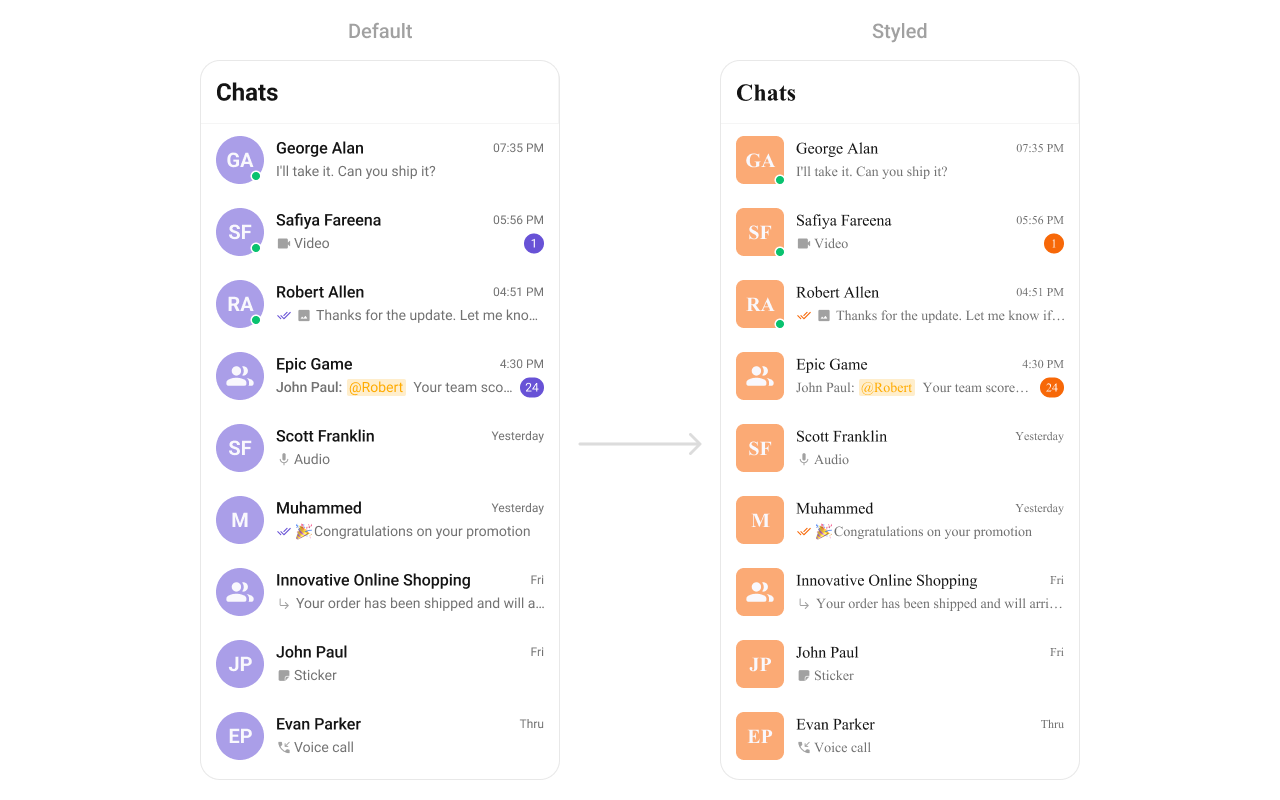
Using Style you can customize the look and feel of the component in your app, These parameters typically control elements such as the color, size, shape, and fonts used within the component.
##### setStyle
You can set the styling object to the `CometChatConversations` Component to customize the styling.
## Usage
### Integration
There are multiple ways in which you can use Conversations in your app. **Layout File**: To use Conversations in your \`layout\_activity.xml, use the following code snippet.
```xml layout_activity.xml theme={null}
```
2. **Activity**: To use Conversations in your Activity, use the following code snippet.
```java YourActivity.java theme={null}
@Override
protected void onCreate(Bundle savedInstanceState) {
super.onCreate(savedInstanceState);
setContentView(new CometChatConversations(this));
}
```
```kotlin YourActivity.kt theme={null}
override fun onCreate(savedInstanceState: Bundle?) {
super.onCreate(savedInstanceState)
setContentView(CometChatConversations(this))
}
```
3. **Fragment**: To use `Conversations` in your `Fragment`, use the following code snippet.
```java YourFragment.java theme={null}
@Override
public View onCreateView(LayoutInflater inflater, ViewGroup container,
Bundle savedInstanceState) {
return new CometChatConversations(getContext());
}
```
```kotlin YourFragment.kt theme={null}
override fun onCreateView(inflater: LayoutInflater,container: ViewGroup?,savedInstanceState: Bundle?): View {
return CometChatConversations(requireContext())
}
```
### Actions
[Actions](/ui-kit/android/components-overview#actions) dictate how a component functions. They are divided into two types: Predefined and User-defined. You can override either type, allowing you to tailor the behavior of the component to fit your specific needs.
##### setOnItemClick
Function invoked when a conversation item is clicked, typically used to open a detailed chat screen.
```java YourActivity.java theme={null}
cometchatConversations.setOnItemClick((view1, position, conversation) -> {
});
```
```kotlin YourActivity.kt theme={null}
cometchatConversations.onItemClick = OnItemClick { view, position, conversation ->
}
```
***
##### setOnItemLongClick
Function executed when a conversation item is long-pressed, allowing additional actions like delete or select.
```java YourActivity.java theme={null}
cometchatConversations.setOnItemLongClick((view1, position, conversation) -> {
});
```
```kotlin YourActivity.kt theme={null}
cometchatConversations.onItemLongClick = OnItemLongClick({ view, position, conversation ->
})
```
***
##### setOnBackPressListener
`OnBackPressListener` is triggered when you press the back button in the app bar. It has a predefined behavior; when clicked, it navigates to the previous activity. However, you can override this action using the following code snippet.
```java YourActivity.java theme={null}
cometchatConversations.setOnBackPressListener(() -> {
});
```
```kotlin YourActivity.kt theme={null}
cometchatConversations.onBackPressListener = OnBackPress {
}
```
***
##### setOnSearchClickListener
`setOnSearchClickListener` is triggered when you click the search bar. It has a predefined behavior; when clicked, it opens the search screen. However, you can override this action using the following code snippet.
```java YourActivity.java theme={null}
binding.cometchatConversations.setOnSearchClickListener(() -> {
Log.i(TAG, "onViewCreated: Search Bar Clicked");
});
```
```kotlin YourActivity.kt theme={null}
binding.cometchatConversations.setOnSearchClickListener {
Log.i(TAG, "onViewCreated: Search Bar Clicked")
}
```
***
##### setOnSelect
Called when a item from the fetched list is selected, useful for multi-selection features.
```java YourActivity.java theme={null}
cometchatConversations.setOnSelect(t -> {
});
```
```kotlin YourActivity.kt theme={null}
cometchatConversations.setOnSelect(object : OnSelection {
override fun onSelection(t: MutableList?) {
}
})
```
***
##### OnError
This action doesn't change the behavior of the component but rather listens for any errors that occur in the Conversations component.
```java YourActivity.java theme={null}
cometchatConversations.setOnError(cometchatException -> {
});
```
```kotlin YourActivity.kt theme={null}
cometchatConversations.setOnError {
}
```
***
##### setOnLoad
Invoked when the list is successfully fetched and loaded, helping track component readiness.
```java YourActivity.java theme={null}
cometchatConversations.setOnLoad(list -> {
});
```
```kotlin YourActivity.kt theme={null}
cometchatConversations.setOnLoad(object : OnLoad {
override fun onLoad(list: MutableList?) {
}
})
```
***
##### setOnEmpty
Called when the list is empty, enabling custom handling such as showing a placeholder message.
```java YourActivity.java theme={null}
cometchatConversations.setOnEmpty(() -> {
});
```
```kotlin YourActivity.kt theme={null}
cometchatConversations.setOnEmpty{
}
```
***
### Filters
You can set `ConversationsRequestBuilder` in the Conversations Component to filter the conversation list. You can modify the builder as per your specific requirements with multiple options available to know more refer to [ConversationRequestBuilder](/sdk/android/retrieve-conversations).
You can set filters using the following parameters.
1. **Conversation Type:** Filters on type of Conversation, `User` or `Groups`
2. **Limit:** Number of conversations fetched in a single request.
3. **WithTags:** Filter on fetching conversations containing tags
4. **Tags:** Filters on specific `Tag`
5. **UserTags:** Filters on specific User `Tag`
6. **GroupTags:** Filters on specific Group `Tag`
```java YourActivity.java theme={null}
ConversationsRequest.ConversationsRequestBuilder builder = new ConversationsRequest.ConversationsRequestBuilder();
builder.setConversationType(CometChatConstants.CONVERSATION_TYPE_USER);
builder.setLimit(50);
cometChatConversations.setConversationsRequestBuilder(builder);
```
```kotlin theme={null}
val builder = ConversationsRequest.ConversationsRequestBuilder()
builder.setConversationType(CometChatConstants.CONVERSATION_TYPE_USER)
builder.setLimit(50)
cometChatConversations.setConversationsRequestBuilder(builder)
```
***
### Events
[Events](/ui-kit/android/components-overview#events) are emitted by a `Component`. By using event you can extend existing functionality. Being global events, they can be applied in Multiple Locations and are capable of being Added or Removed.
##### 1. ConversationDeleted
This event will be emitted when the user deletes a conversation
```ruby Add Listener theme={null}
CometChatConversationEvents.addListener("YOUR_LISTENER_TAG", new CometChatConversationEvents() {
@Override
public void ccConversationDeleted(Conversation conversation) {
super.ccConversationDeleted(conversation);
}
});
```
Remove Listener
```
CometChatConversationEvents.removeListener("YOUR_LISTENER_TAG");
```
```ruby Add Listener theme={null}
CometChatConversationEvents.addListener("LISTENER_TAG", object : CometChatConversationEvents() {
override fun ccConversationDeleted(conversation: Conversation) {
super.ccConversationDeleted(conversation)
}
})
```
Remove Listener
```
CometChatConversationEvents.removeListener("LISTENER_TAG");
```
## Customization
To fit your app's design requirements, you can customize the appearance of the conversation component. We provide exposed methods that allow you to modify the experience and behavior according to your specific needs.
### Style
Using Style you can customize the look and feel of the component in your app, These parameters typically control elements such as the color, size, shape, and fonts used within the component.
##### setStyle
You can set the styling object to the `CometChatConversations` Component to customize the styling.
 ```xml themes.xml theme={null}
```
```java theme={null}
cometChatConversations.setStyle(R.style.CustomConversationsStyle);
```
```kotlin theme={null}
cometChatConversations.setStyle(R.style.CustomConversationsStyle)
```
To know more such attributes, visit the [attributes file](https://github.com/cometchat/cometchat-uikit-android/blob/v5/chatuikit/src/main/res/values/attr_cometchat_conversations.xml).
### Functionality
These are a set of small functional customizations that allow you to fine-tune the overall experience of the component. With these, you can change text, set custom icons, and toggle the visibility of UI elements.
Below is a list of customizations along with corresponding code snippets
| Methods | Description | Code |
| ------------------------------------- | ----------------------------------------------------------------------------------------------------------------------------------------------------- | ---------------------------------------------------------------------------- |
| setBackIconVisibility | Used to toggle visibility for back button in the app bar | `.setBackIconVisibility(View.VISIBLE);` |
| setToolbarVisibility | Used to toggle visibility for back button in the app bar | `.setToolbarVisibility(View.GONE);` |
| setLoadingStateVisibility | Used to hide loading state while fetching Users | `.setLoadingStateVisibility(View.GONE);` |
| setDeleteConversationOptionVisibility | Used to toggle visibility for delete option on a long press of conversation item | `.setDeleteConversationOptionVisibility(View.GONE);` |
| setErrorStateVisibility | Used to hide error state on fetching conversations | `.setErrorStateVisibility(View.GONE);` |
| setEmptyStateVisibility | Used to hide empty state on fetching conversations | `.setEmptyStateVisibility(View.GONE);` |
| setSeparatorVisibility | Used to control visibility of Separators in the list view | `.setSeparatorVisibility(View.GONE);` |
| setUsersStatusVisibility | Used to control visibility of status indicator shown if user is online | `.setUsersStatusVisibility(View.GONE);` |
| setGroupTypeVisibility | Used to control visibility of status indicator shown for the group type | `.setGroupTypeVisibility(View.GONE);` |
| setReceiptsVisibility | Used to hide receipts shown in the subtitle of the conversation item without disabling the functionality of marking messages as read and delivered. | `.setReceiptsVisibility(View.GONE);` |
| setSearchInputEndIconVisibility | Used to control the visibility for the end icon icon in the search bar of 'CometChatConversation' | `.setSearchInputEndIconVisibility(View.GONE);` |
| setSearchInputEndIconVisibility | Used to control the visibility for the end icon icon in the search bar of 'CometChatConversation' | `.setSearchInputEndIconVisibility(View.GONE);` |
| disableSoundForMessages | This method disables sound notifications for incoming messages | `.disableSoundForMessages(true);` |
| setCustomSoundForMessages | This method enables users to personalize their chat experience by setting a custom sound file for incoming message notifications. | `.setCustomSoundForMessages(com.cometchat.chatuikit.R.raw.cometchat_beep2);` |
| setSelectionMode | This method determines the selection mode for conversations, enabling users to select either a single conversation or multiple conversations at once. | `.setSelectionMode(UIKitConstants.SelectionMode.MULTIPLE);` |
| setSearchInputText | This method sets the text in the search input field. | .setSearchInputText("Sample Text"); |
| setSearchPlaceholderText | This method sets the placeholder text for the search input field. | .setSearchPlaceholderText("Enter search term"); |
### Advanced
For advanced-level customization, you can set custom views to the component. This lets you tailor each aspect of the component to fit your exact needs and application aesthetics. You can create and define your views, layouts, and UI elements and then incorporate those into the component.
***
#### setDateTimeFormatter
By providing a custom implementation of the DateTimeFormatterCallback, you can configure how time and date values are displayed. This ensures consistent formatting for labels such as "Today", "Yesterday", "X minutes ago", and more.
Each method in the interface corresponds to a specific case:
`time(long timestamp)` → Custom full timestamp format
`today(long timestamp)` → Called when a message is from today
`yesterday(long timestamp)` → Called for yesterday’s messages
`lastWeek(long timestamp)` → Messages from the past week
`otherDays(long timestamp)` → Older messages
`minute(long timestamp)` / `hour(long timestamp)` → Exact time unit
`minutes(long diffInMinutesFromNow, long timestamp)` → e.g., "5 minutes ago"
`hours(long diffInHourFromNow, long timestamp)` → e.g., "2 hours ago"
```java theme={null}
import java.text.SimpleDateFormat;
import java.util.Date;
import java.util.Locale;
cometchatConversations.setDateTimeFormatter(new DateTimeFormatterCallback() {
private final SimpleDateFormat fullTimeFormatter = new SimpleDateFormat("hh:mm a", Locale.getDefault());
private final SimpleDateFormat dateFormatter = new SimpleDateFormat("dd MMM yyyy", Locale.getDefault());
@Override
public String time(long timestamp) {
return fullTimeFormatter.format(new Date(timestamp));
}
@Override
public String today(long timestamp) {
return "Today";
}
@Override
public String yesterday(long timestamp) {
return "Yesterday";
}
@Override
public String lastWeek(long timestamp) {
return "Last Week";
}
@Override
public String otherDays(long timestamp) {
return dateFormatter.format(new Date(timestamp));
}
@Override
public String minutes(long diffInMinutesFromNow, long timestamp) {
return diffInMinutesFromNow + " mins ago";
}
@Override
public String hours(long diffInHourFromNow, long timestamp) {
return diffInHourFromNow + " hrs ago";
}
});
```
```kotlin theme={null}
import java.text.SimpleDateFormat
import java.util.*
cometchatConversations.setDateTimeFormatterCallback(object : DateTimeFormatterCallback {
private val fullTimeFormatter = SimpleDateFormat("hh:mm a", Locale.getDefault())
private val dateFormatter = SimpleDateFormat("dd MMM yyyy", Locale.getDefault())
override fun time(timestamp: Long): String {
return fullTimeFormatter.format(Date(timestamp))
}
override fun today(timestamp: Long): String {
return "Today"
}
override fun yesterday(timestamp: Long): String {
return "Yesterday"
}
override fun lastWeek(timestamp: Long): String {
return "Last Week"
}
override fun otherDays(timestamp: Long): String {
return dateFormatter.format(Date(timestamp))
}
override fun minutes(diffInMinutesFromNow: Long, timestamp: Long): String {
return "$diffInMinutesFromNow mins ago"
}
override fun hours(diffInHourFromNow: Long, timestamp: Long): String {
return "$diffInHourFromNow hrs ago"
}
});
```
***
#### setOptions
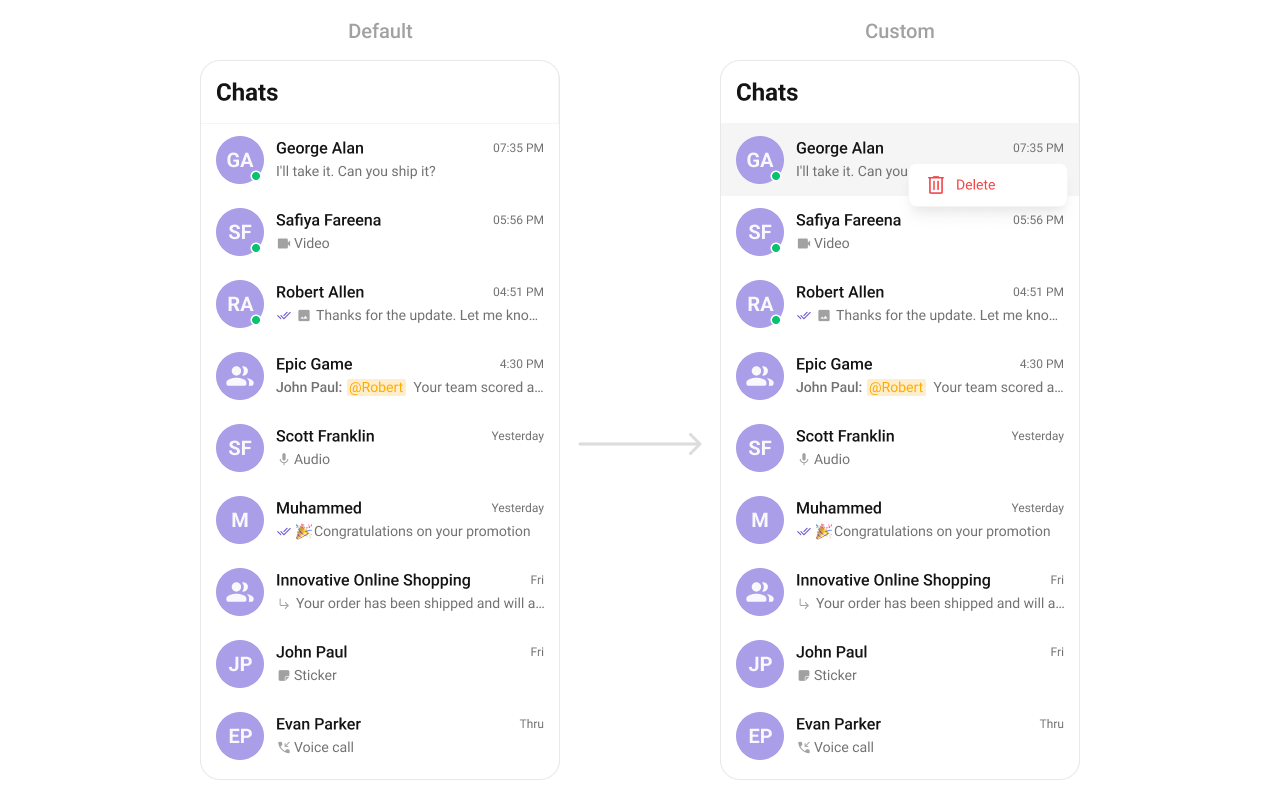
This method sets a predefined list of actions that users can perform when they long press a conversation in the list. These options typically include:
* Deleting a conversation
* Marking a conversation as read or unread
* Pinning or unpinning a conversation
* Muting notifications for a specific conversation
By customizing these options, developers can provide a streamlined and contextually relevant user experience.
```java theme={null}
cometchatConversations.setOptions((context, conversation) -> Collections.emptyList());
```
```kotlin theme={null}
cometchatConversations.options = Function2?> { context, conversation -> emptyList() }
```
Demonstration
```xml themes.xml theme={null}
```
```java theme={null}
cometChatConversations.setStyle(R.style.CustomConversationsStyle);
```
```kotlin theme={null}
cometChatConversations.setStyle(R.style.CustomConversationsStyle)
```
To know more such attributes, visit the [attributes file](https://github.com/cometchat/cometchat-uikit-android/blob/v5/chatuikit/src/main/res/values/attr_cometchat_conversations.xml).
### Functionality
These are a set of small functional customizations that allow you to fine-tune the overall experience of the component. With these, you can change text, set custom icons, and toggle the visibility of UI elements.
Below is a list of customizations along with corresponding code snippets
| Methods | Description | Code |
| ------------------------------------- | ----------------------------------------------------------------------------------------------------------------------------------------------------- | ---------------------------------------------------------------------------- |
| setBackIconVisibility | Used to toggle visibility for back button in the app bar | `.setBackIconVisibility(View.VISIBLE);` |
| setToolbarVisibility | Used to toggle visibility for back button in the app bar | `.setToolbarVisibility(View.GONE);` |
| setLoadingStateVisibility | Used to hide loading state while fetching Users | `.setLoadingStateVisibility(View.GONE);` |
| setDeleteConversationOptionVisibility | Used to toggle visibility for delete option on a long press of conversation item | `.setDeleteConversationOptionVisibility(View.GONE);` |
| setErrorStateVisibility | Used to hide error state on fetching conversations | `.setErrorStateVisibility(View.GONE);` |
| setEmptyStateVisibility | Used to hide empty state on fetching conversations | `.setEmptyStateVisibility(View.GONE);` |
| setSeparatorVisibility | Used to control visibility of Separators in the list view | `.setSeparatorVisibility(View.GONE);` |
| setUsersStatusVisibility | Used to control visibility of status indicator shown if user is online | `.setUsersStatusVisibility(View.GONE);` |
| setGroupTypeVisibility | Used to control visibility of status indicator shown for the group type | `.setGroupTypeVisibility(View.GONE);` |
| setReceiptsVisibility | Used to hide receipts shown in the subtitle of the conversation item without disabling the functionality of marking messages as read and delivered. | `.setReceiptsVisibility(View.GONE);` |
| setSearchInputEndIconVisibility | Used to control the visibility for the end icon icon in the search bar of 'CometChatConversation' | `.setSearchInputEndIconVisibility(View.GONE);` |
| setSearchInputEndIconVisibility | Used to control the visibility for the end icon icon in the search bar of 'CometChatConversation' | `.setSearchInputEndIconVisibility(View.GONE);` |
| disableSoundForMessages | This method disables sound notifications for incoming messages | `.disableSoundForMessages(true);` |
| setCustomSoundForMessages | This method enables users to personalize their chat experience by setting a custom sound file for incoming message notifications. | `.setCustomSoundForMessages(com.cometchat.chatuikit.R.raw.cometchat_beep2);` |
| setSelectionMode | This method determines the selection mode for conversations, enabling users to select either a single conversation or multiple conversations at once. | `.setSelectionMode(UIKitConstants.SelectionMode.MULTIPLE);` |
| setSearchInputText | This method sets the text in the search input field. | .setSearchInputText("Sample Text"); |
| setSearchPlaceholderText | This method sets the placeholder text for the search input field. | .setSearchPlaceholderText("Enter search term"); |
### Advanced
For advanced-level customization, you can set custom views to the component. This lets you tailor each aspect of the component to fit your exact needs and application aesthetics. You can create and define your views, layouts, and UI elements and then incorporate those into the component.
***
#### setDateTimeFormatter
By providing a custom implementation of the DateTimeFormatterCallback, you can configure how time and date values are displayed. This ensures consistent formatting for labels such as "Today", "Yesterday", "X minutes ago", and more.
Each method in the interface corresponds to a specific case:
`time(long timestamp)` → Custom full timestamp format
`today(long timestamp)` → Called when a message is from today
`yesterday(long timestamp)` → Called for yesterday’s messages
`lastWeek(long timestamp)` → Messages from the past week
`otherDays(long timestamp)` → Older messages
`minute(long timestamp)` / `hour(long timestamp)` → Exact time unit
`minutes(long diffInMinutesFromNow, long timestamp)` → e.g., "5 minutes ago"
`hours(long diffInHourFromNow, long timestamp)` → e.g., "2 hours ago"
```java theme={null}
import java.text.SimpleDateFormat;
import java.util.Date;
import java.util.Locale;
cometchatConversations.setDateTimeFormatter(new DateTimeFormatterCallback() {
private final SimpleDateFormat fullTimeFormatter = new SimpleDateFormat("hh:mm a", Locale.getDefault());
private final SimpleDateFormat dateFormatter = new SimpleDateFormat("dd MMM yyyy", Locale.getDefault());
@Override
public String time(long timestamp) {
return fullTimeFormatter.format(new Date(timestamp));
}
@Override
public String today(long timestamp) {
return "Today";
}
@Override
public String yesterday(long timestamp) {
return "Yesterday";
}
@Override
public String lastWeek(long timestamp) {
return "Last Week";
}
@Override
public String otherDays(long timestamp) {
return dateFormatter.format(new Date(timestamp));
}
@Override
public String minutes(long diffInMinutesFromNow, long timestamp) {
return diffInMinutesFromNow + " mins ago";
}
@Override
public String hours(long diffInHourFromNow, long timestamp) {
return diffInHourFromNow + " hrs ago";
}
});
```
```kotlin theme={null}
import java.text.SimpleDateFormat
import java.util.*
cometchatConversations.setDateTimeFormatterCallback(object : DateTimeFormatterCallback {
private val fullTimeFormatter = SimpleDateFormat("hh:mm a", Locale.getDefault())
private val dateFormatter = SimpleDateFormat("dd MMM yyyy", Locale.getDefault())
override fun time(timestamp: Long): String {
return fullTimeFormatter.format(Date(timestamp))
}
override fun today(timestamp: Long): String {
return "Today"
}
override fun yesterday(timestamp: Long): String {
return "Yesterday"
}
override fun lastWeek(timestamp: Long): String {
return "Last Week"
}
override fun otherDays(timestamp: Long): String {
return dateFormatter.format(Date(timestamp))
}
override fun minutes(diffInMinutesFromNow: Long, timestamp: Long): String {
return "$diffInMinutesFromNow mins ago"
}
override fun hours(diffInHourFromNow: Long, timestamp: Long): String {
return "$diffInHourFromNow hrs ago"
}
});
```
***
#### setOptions
This method sets a predefined list of actions that users can perform when they long press a conversation in the list. These options typically include:
* Deleting a conversation
* Marking a conversation as read or unread
* Pinning or unpinning a conversation
* Muting notifications for a specific conversation
By customizing these options, developers can provide a streamlined and contextually relevant user experience.
```java theme={null}
cometchatConversations.setOptions((context, conversation) -> Collections.emptyList());
```
```kotlin theme={null}
cometchatConversations.options = Function2?> { context, conversation -> emptyList() }
```
Demonstration
 ```java theme={null}
cometchatConversations.setOptions((context, conversation) -> {
List optionsArrayList = new ArrayList<>();
optionsArrayList.add(new CometChatPopupMenu.MenuItem(UIKitConstants.ConversationOption.DELETE,
"Delete",
getResources().getDrawable(com.cometchat.chatuikit.R.drawable.cometchat_ic_delete),
null,
CometChatTheme.getErrorColor(context),
0,
CometChatTheme.getErrorColor(context),
CometChatTheme.getTextAppearanceBodyRegular(context),
() -> {
Toast.makeText(context, "Delete", Toast.LENGTH_SHORT).show();
}));
return optionsArrayList;
});
```
```kotlin theme={null}
cometchatConversations.setOptions { context, conversation ->
val optionsArrayList: MutableList =
ArrayList()
optionsArrayList.add(
CometChatPopupMenu.MenuItem(
UIKitConstants.ConversationOption.DELETE,
"Delete",
ResourcesCompat. getDrawable(resources,com.cometchat.chatuikit.R.drawable.cometchat_ic_delete, getContext()?.theme),
null,
CometChatTheme.getErrorColor(context),
0,
CometChatTheme.getErrorColor(context),
CometChatTheme.getTextAppearanceBodyRegular(context)
) {
Toast.makeText(context, "Delete", Toast.LENGTH_SHORT).show()
}
)
optionsArrayList
}
```
***
#### addOptions
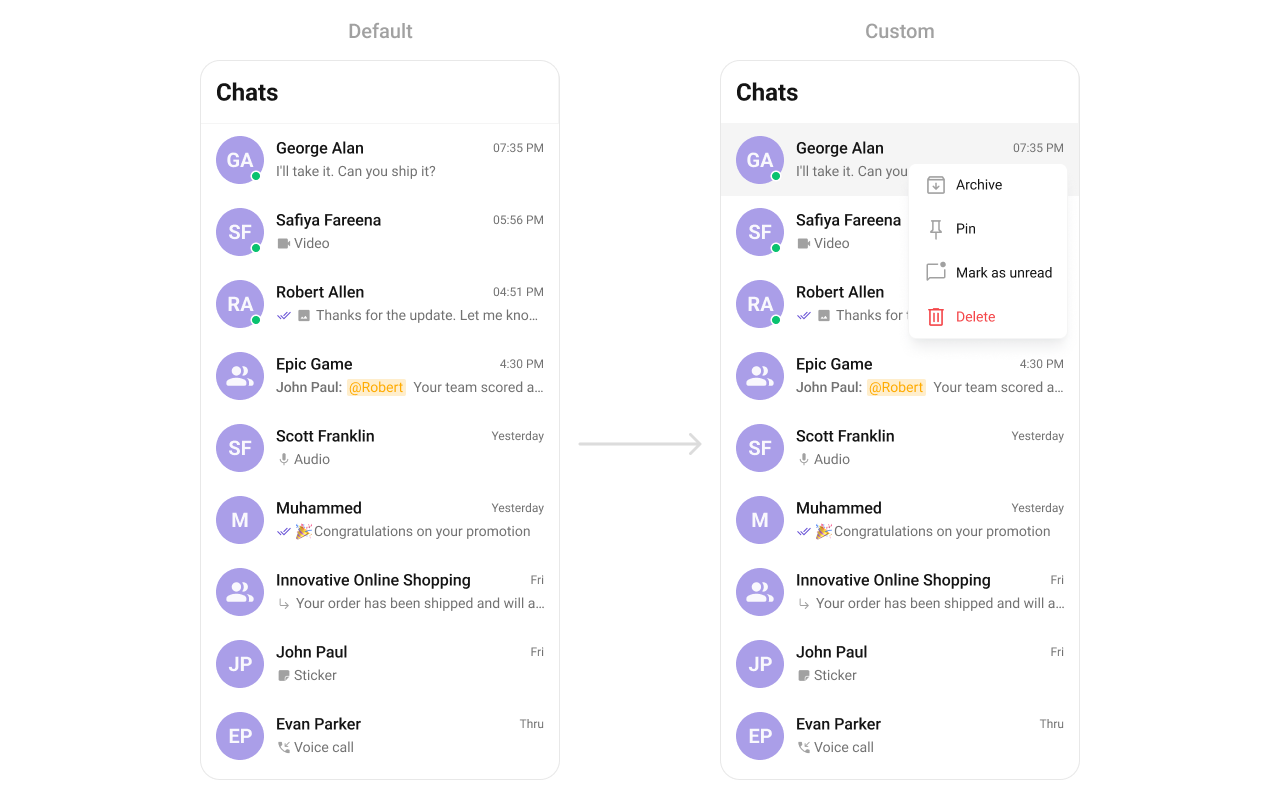
This method extends the existing set of actions available when users long press a conversation item. Unlike setOptionsDefines, which replaces the default options, addOptionsAdds allows developers to append additional actions without removing the default ones. Example use cases include:
* Adding a "Report Spam" action
* Introducing a "Save to Notes" option
* Integrating third-party actions such as "Share to Cloud Storage"
This method provides flexibility in modifying user interaction capabilities.
```java theme={null}
cometchatConversations.addOptions((context, conversation) -> Collections.emptyList());
```
```kotlin theme={null}
cometchatConversations.addOptions { context, conversation -> emptyList() }
```
Demonstration
```java theme={null}
cometchatConversations.setOptions((context, conversation) -> {
List optionsArrayList = new ArrayList<>();
optionsArrayList.add(new CometChatPopupMenu.MenuItem(UIKitConstants.ConversationOption.DELETE,
"Delete",
getResources().getDrawable(com.cometchat.chatuikit.R.drawable.cometchat_ic_delete),
null,
CometChatTheme.getErrorColor(context),
0,
CometChatTheme.getErrorColor(context),
CometChatTheme.getTextAppearanceBodyRegular(context),
() -> {
Toast.makeText(context, "Delete", Toast.LENGTH_SHORT).show();
}));
return optionsArrayList;
});
```
```kotlin theme={null}
cometchatConversations.setOptions { context, conversation ->
val optionsArrayList: MutableList =
ArrayList()
optionsArrayList.add(
CometChatPopupMenu.MenuItem(
UIKitConstants.ConversationOption.DELETE,
"Delete",
ResourcesCompat. getDrawable(resources,com.cometchat.chatuikit.R.drawable.cometchat_ic_delete, getContext()?.theme),
null,
CometChatTheme.getErrorColor(context),
0,
CometChatTheme.getErrorColor(context),
CometChatTheme.getTextAppearanceBodyRegular(context)
) {
Toast.makeText(context, "Delete", Toast.LENGTH_SHORT).show()
}
)
optionsArrayList
}
```
***
#### addOptions
This method extends the existing set of actions available when users long press a conversation item. Unlike setOptionsDefines, which replaces the default options, addOptionsAdds allows developers to append additional actions without removing the default ones. Example use cases include:
* Adding a "Report Spam" action
* Introducing a "Save to Notes" option
* Integrating third-party actions such as "Share to Cloud Storage"
This method provides flexibility in modifying user interaction capabilities.
```java theme={null}
cometchatConversations.addOptions((context, conversation) -> Collections.emptyList());
```
```kotlin theme={null}
cometchatConversations.addOptions { context, conversation -> emptyList() }
```
Demonstration
 ```java theme={null}
cometchatConversations.addOptions((context, conversation) -> {
List optionsArrayList = new ArrayList<>();
optionsArrayList.add(new CometChatPopupMenu.MenuItem("ARCHIVE",
"Archive",
getResources().getDrawable(R.drawable.archive),
null,
CometChatTheme.getTextColorPrimary(context),
0,
CometChatTheme.getTextColorPrimary(context),
CometChatTheme.getTextAppearanceBodyRegular(context),
() -> Toast.makeText(context, "Delete", Toast.LENGTH_SHORT).show()));
optionsArrayList.add(new CometChatPopupMenu.MenuItem("PIN",
"Pin",
getResources().getDrawable(R.drawable.pin),
null,
CometChatTheme.getTextColorPrimary(context),
0,
CometChatTheme.getTextColorPrimary(context),
CometChatTheme.getTextAppearanceBodyRegular(context),
() -> Toast.makeText(context, "Archive", Toast.LENGTH_SHORT).show()));
optionsArrayList.add(new CometChatPopupMenu.MenuItem("MARKASREAD",
"Mark as read",
getResources().getDrawable(R.drawable.mark_as_read),
null,
CometChatTheme.getTextColorPrimary(context),
0,
CometChatTheme.getTextColorPrimary(context),
CometChatTheme.getTextAppearanceBodyRegular(context),
() -> Toast.makeText(context, "Mark as read", Toast.LENGTH_SHORT).show()));
return optionsArrayList;
});
```
```kotlin theme={null}
cometchatConversations.addOptions { context, conversation ->
val optionsArrayList: MutableList = ArrayList()
optionsArrayList.add(
CometChatPopupMenu.MenuItem(
"ARCHIVE",
"Archive",
resources.getDrawable(R.drawable.archive),
null,
CometChatTheme.getTextColorPrimary(context),
0,
CometChatTheme.getTextColorPrimary(context),
CometChatTheme.getTextAppearanceBodyRegular(context)
) {
Toast
.makeText(context, "Delete", Toast.LENGTH_SHORT)
.show()
}
)
optionsArrayList.add(
CometChatPopupMenu.MenuItem(
"PIN",
"Pin",
resources.getDrawable(R.drawable.pin),
null,
CometChatTheme.getTextColorPrimary(context),
0,
CometChatTheme.getTextColorPrimary(context),
CometChatTheme.getTextAppearanceBodyRegular(context)
) {
Toast
.makeText(context, "Archive", Toast.LENGTH_SHORT)
.show()
}
)
optionsArrayList.add(
CometChatPopupMenu.MenuItem(
"MARKASREAD",
"Mark as read",
resources.getDrawable(R.drawable.mark_as_read),
null,
CometChatTheme.getTextColorPrimary(context),
0,
CometChatTheme.getTextColorPrimary(context),
CometChatTheme.getTextAppearanceBodyRegular(context)
) {
Toast
.makeText(context, "Mark as read", Toast.LENGTH_SHORT)
.show()
}
)
optionsArrayList
}
```
***
#### setLoadingView
This method allows developers to set a custom loading view that is displayed when data is being fetched or loaded within the component. Instead of using a default loading spinner, a custom animation, progress bar, or branded loading screen can be displayed.
Use cases:
* Showing a skeleton loader for conversations while data loads
* Displaying a custom progress indicator with branding
* Providing an animated loading experience for a more engaging UI
```java theme={null}
cometchatConversations.setLoadingView(R.layout.your_loading_view);
```
```kotlin theme={null}
cometchatConversations.loadingView = R.layout.your_loading_view
```
***
#### setEmptyView
Configures a custom view to be displayed when there are no conversations or messages in the list. This improves the user experience by providing meaningful content instead of an empty screen.
Examples:
* Displaying a message like "No conversations yet. Start a new chat!"
* Showing an illustration or animation to make the UI visually appealing
* Providing a button to start a new conversation
```java theme={null}
cometchatConversations.setEmptyView(R.layout.your_empty_view);
```
```kotlin theme={null}
cometchatConversations.emptyView = R.layout.your_empty_view
```
***
#### setErrorView
Defines a custom error state view that appears when an issue occurs while loading conversations or messages. This enhances the user experience by displaying friendly error messages instead of generic system errors.
Common use cases:
* Showing "Something went wrong. Please try again." with a retry button
* Displaying a connection issue message if the user is offline
* Providing troubleshooting steps for the error
```java theme={null}
cometchatConversations.setErrorView(R.layout.your_empty_view);
```
```kotlin theme={null}
cometchatConversations.errorView = R.layout.your_error_view
```
***
#### setLeadingView
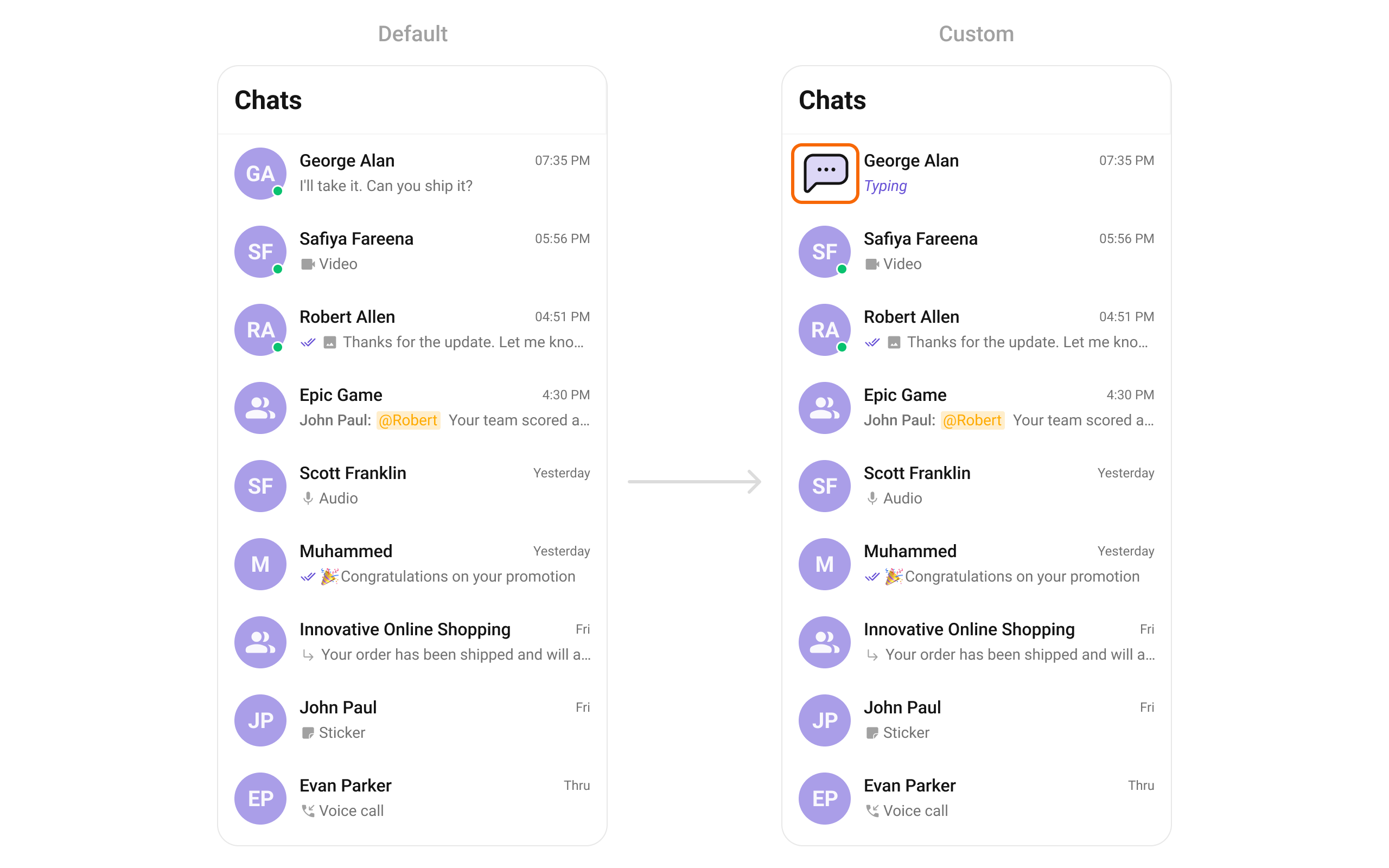
Allows setting a custom leading view element that appears at the beginning of each conversation item. This is typically used to modify profile pictures, avatars, or icons in the conversation list.
Examples:
* Displaying user avatars with online/offline status indicators
* Using initials or custom graphics instead of images
```java theme={null}
cometchatConversations.setLeadingView(new ConversationsViewHolderListener() {
@Override
public View createView(Context context, CometchatConversationsListItemsBinding listItem) {
return null;
}
@Override
public void bindView(Context context, View createdView, Conversation conversation, RecyclerView.ViewHolder holder, List conversationList, int position) {
}
});
```
```kotlin theme={null}
cometchatConversations.setLeadingView(object :
ConversationsViewHolderListener() {
override fun createView(
context: Context?,
listItem: CometchatConversationsListItemsBinding?
): View? {
return null
}
override fun bindView(
context: Context,
createdView: View,
conversation: Conversation,
holder: RecyclerView.ViewHolder,
conversationList: List,
position: Int
) {
}
})
```
Demonstration
```java theme={null}
cometchatConversations.addOptions((context, conversation) -> {
List optionsArrayList = new ArrayList<>();
optionsArrayList.add(new CometChatPopupMenu.MenuItem("ARCHIVE",
"Archive",
getResources().getDrawable(R.drawable.archive),
null,
CometChatTheme.getTextColorPrimary(context),
0,
CometChatTheme.getTextColorPrimary(context),
CometChatTheme.getTextAppearanceBodyRegular(context),
() -> Toast.makeText(context, "Delete", Toast.LENGTH_SHORT).show()));
optionsArrayList.add(new CometChatPopupMenu.MenuItem("PIN",
"Pin",
getResources().getDrawable(R.drawable.pin),
null,
CometChatTheme.getTextColorPrimary(context),
0,
CometChatTheme.getTextColorPrimary(context),
CometChatTheme.getTextAppearanceBodyRegular(context),
() -> Toast.makeText(context, "Archive", Toast.LENGTH_SHORT).show()));
optionsArrayList.add(new CometChatPopupMenu.MenuItem("MARKASREAD",
"Mark as read",
getResources().getDrawable(R.drawable.mark_as_read),
null,
CometChatTheme.getTextColorPrimary(context),
0,
CometChatTheme.getTextColorPrimary(context),
CometChatTheme.getTextAppearanceBodyRegular(context),
() -> Toast.makeText(context, "Mark as read", Toast.LENGTH_SHORT).show()));
return optionsArrayList;
});
```
```kotlin theme={null}
cometchatConversations.addOptions { context, conversation ->
val optionsArrayList: MutableList = ArrayList()
optionsArrayList.add(
CometChatPopupMenu.MenuItem(
"ARCHIVE",
"Archive",
resources.getDrawable(R.drawable.archive),
null,
CometChatTheme.getTextColorPrimary(context),
0,
CometChatTheme.getTextColorPrimary(context),
CometChatTheme.getTextAppearanceBodyRegular(context)
) {
Toast
.makeText(context, "Delete", Toast.LENGTH_SHORT)
.show()
}
)
optionsArrayList.add(
CometChatPopupMenu.MenuItem(
"PIN",
"Pin",
resources.getDrawable(R.drawable.pin),
null,
CometChatTheme.getTextColorPrimary(context),
0,
CometChatTheme.getTextColorPrimary(context),
CometChatTheme.getTextAppearanceBodyRegular(context)
) {
Toast
.makeText(context, "Archive", Toast.LENGTH_SHORT)
.show()
}
)
optionsArrayList.add(
CometChatPopupMenu.MenuItem(
"MARKASREAD",
"Mark as read",
resources.getDrawable(R.drawable.mark_as_read),
null,
CometChatTheme.getTextColorPrimary(context),
0,
CometChatTheme.getTextColorPrimary(context),
CometChatTheme.getTextAppearanceBodyRegular(context)
) {
Toast
.makeText(context, "Mark as read", Toast.LENGTH_SHORT)
.show()
}
)
optionsArrayList
}
```
***
#### setLoadingView
This method allows developers to set a custom loading view that is displayed when data is being fetched or loaded within the component. Instead of using a default loading spinner, a custom animation, progress bar, or branded loading screen can be displayed.
Use cases:
* Showing a skeleton loader for conversations while data loads
* Displaying a custom progress indicator with branding
* Providing an animated loading experience for a more engaging UI
```java theme={null}
cometchatConversations.setLoadingView(R.layout.your_loading_view);
```
```kotlin theme={null}
cometchatConversations.loadingView = R.layout.your_loading_view
```
***
#### setEmptyView
Configures a custom view to be displayed when there are no conversations or messages in the list. This improves the user experience by providing meaningful content instead of an empty screen.
Examples:
* Displaying a message like "No conversations yet. Start a new chat!"
* Showing an illustration or animation to make the UI visually appealing
* Providing a button to start a new conversation
```java theme={null}
cometchatConversations.setEmptyView(R.layout.your_empty_view);
```
```kotlin theme={null}
cometchatConversations.emptyView = R.layout.your_empty_view
```
***
#### setErrorView
Defines a custom error state view that appears when an issue occurs while loading conversations or messages. This enhances the user experience by displaying friendly error messages instead of generic system errors.
Common use cases:
* Showing "Something went wrong. Please try again." with a retry button
* Displaying a connection issue message if the user is offline
* Providing troubleshooting steps for the error
```java theme={null}
cometchatConversations.setErrorView(R.layout.your_empty_view);
```
```kotlin theme={null}
cometchatConversations.errorView = R.layout.your_error_view
```
***
#### setLeadingView
Allows setting a custom leading view element that appears at the beginning of each conversation item. This is typically used to modify profile pictures, avatars, or icons in the conversation list.
Examples:
* Displaying user avatars with online/offline status indicators
* Using initials or custom graphics instead of images
```java theme={null}
cometchatConversations.setLeadingView(new ConversationsViewHolderListener() {
@Override
public View createView(Context context, CometchatConversationsListItemsBinding listItem) {
return null;
}
@Override
public void bindView(Context context, View createdView, Conversation conversation, RecyclerView.ViewHolder holder, List conversationList, int position) {
}
});
```
```kotlin theme={null}
cometchatConversations.setLeadingView(object :
ConversationsViewHolderListener() {
override fun createView(
context: Context?,
listItem: CometchatConversationsListItemsBinding?
): View? {
return null
}
override fun bindView(
context: Context,
createdView: View,
conversation: Conversation,
holder: RecyclerView.ViewHolder,
conversationList: List,
position: Int
) {
}
})
```
Demonstration
 ```xml drawable/chat_dots.xml theme={null}
```
You can create an `leading_view.xml` as a custom layout file. Which we will inflate in `setLeadingView()`
```html theme={null}
```
In the method `setLeadingView` you need to inflate the XML and initialize the views using the conversation objects.
```java theme={null}
HashMap typingIndicatorHashMap = new HashMap<>();
CometChat.addMessageListener(System.currentTimeMillis() + "", new CometChat.MessageListener() {
@Override
public void onTypingStarted(TypingIndicator typingIndicator) {
if (typingIndicator.getReceiverType().equals(CometChatConstants.RECEIVER_TYPE_USER)) {
if (typingIndicatorHashMap.containsKey(typingIndicator.getSender().getUid())) {
return;
}
Log.e(TAG, "bindView: " + typingIndicator.getSender().getUid());
typingIndicatorHashMap.put(typingIndicator.getSender().getUid(), true);
} else {
if (typingIndicatorHashMap.containsKey(typingIndicator.getReceiverId())) {
return;
}
typingIndicatorHashMap.put(typingIndicator.getReceiverId(), true);
}
}
@Override
public void onTypingEnded(TypingIndicator typingIndicator) {
if (typingIndicator.getReceiverType().equals(CometChatConstants.RECEIVER_TYPE_USER)) {
typingIndicatorHashMap.remove(typingIndicator.getSender().getUid());
} else {
typingIndicatorHashMap.remove(typingIndicator.getReceiverId());
}
}
});
cometchatConversations.setLeadingView(new ConversationsViewHolderListener() {
@Override
public View createView(Context context, CometchatConversationsListItemsBinding listItem) {
return LayoutInflater.from(context).inflate(R.layout.leading_view, null);
}
@Override
public void bindView(Context context,
View createdView,
Conversation conversation,
RecyclerView.ViewHolder holder,
List conversationList,
int position) {
ImageView imageView = createdView.findViewById(R.id.leading_iv);
ConstraintLayout constraintLayout = createdView.findViewById(R.id.leading_view);
CometChatAvatar avatar = createdView.findViewById(R.id.conversations_avatar);
CometChatStatusIndicator statusIndicator = createdView.findViewById(R.id.status_and_type_indicator);
avatar.setAvatar(ConversationsUtils.getConversationTitle(conversation), ConversationsUtils.getConversationAvatar(conversation));
if (conversation.getConversationType().equals(CometChatConstants.RECEIVER_TYPE_USER)) {
if (((User) conversation.getConversationWith()).getStatus().equalsIgnoreCase(CometChatConstants.USER_STATUS_ONLINE)) {
if (!Utils.isBlocked(((User) conversation.getConversationWith()))) {
statusIndicator.setStatusIndicator(StatusIndicator.ONLINE);
} else {
statusIndicator.setStatusIndicator(StatusIndicator.OFFLINE);
}
} else {
statusIndicator.setStatusIndicator(StatusIndicator.OFFLINE);
}
if (typingIndicatorHashMap.containsKey(((User) conversation.getConversationWith()).getUid())) {
imageView.setVisibility(View.VISIBLE);
constraintLayout.setVisibility(GONE);
} else {
imageView.setVisibility(GONE);
constraintLayout.setVisibility(View.VISIBLE);
}
} else {
if (typingIndicatorHashMap.containsKey(((Group) conversation.getConversationWith()).getGuid())) {
imageView.setVisibility(View.VISIBLE);
constraintLayout.setVisibility(GONE);
} else {
imageView.setVisibility(GONE);
constraintLayout.setVisibility(View.VISIBLE);
}
}
}
});
```
```kotlin theme={null}
val typingIndicatorHashMap = HashMap()
CometChat.addMessageListener(System.currentTimeMillis().toString() + "", object : MessageListener() {
override fun onTypingStarted(typingIndicator: TypingIndicator) {
if (typingIndicator.receiverType == CometChatConstants.RECEIVER_TYPE_USER) {
if (typingIndicatorHashMap.containsKey(typingIndicator.sender.uid)) {
return
}
typingIndicatorHashMap[typingIndicator.sender.uid] = true
} else {
if (typingIndicatorHashMap.containsKey(typingIndicator.receiverId)) {
return
}
typingIndicatorHashMap[typingIndicator.receiverId] = true
}
}
override fun onTypingEnded(typingIndicator: TypingIndicator) {
if (typingIndicator.receiverType == CometChatConstants.RECEIVER_TYPE_USER) {
typingIndicatorHashMap.remove(typingIndicator.sender.uid)
} else {
typingIndicatorHashMap.remove(typingIndicator.receiverId)
}
}
})
binding.cometchatConversations.setLeadingView(object : ConversationsViewHolderListener() {
override fun createView(context: Context?, listItem: CometchatConversationsListItemsBinding?): View {
return LayoutInflater.from(context).inflate(R.layout.leading_view, null)
}
override fun bindView(
context: Context,
createdView: View,
conversation: Conversation,
holder: RecyclerView.ViewHolder,
conversationList: List,
position: Int
) {
val imageView = createdView.findViewById(R.id.leading_iv)
val constraintLayout = createdView.findViewById(R.id.leading_view)
val avatar = createdView.findViewById(R.id.conversations_avatar)
val statusIndicator = createdView.findViewById(R.id.status_and_type_indicator)
avatar.setAvatar(ConversationsUtils.getConversationTitle(conversation), ConversationsUtils.getConversationAvatar(conversation))
if (conversation.conversationType == CometChatConstants.RECEIVER_TYPE_USER) {
if ((conversation.conversationWith as User).status.equals(CometChatConstants.USER_STATUS_ONLINE, ignoreCase = true)) {
if (!Utils.isBlocked((conversation.conversationWith as User))) {
statusIndicator.statusIndicator = StatusIndicator.ONLINE
} else {
statusIndicator.statusIndicator = StatusIndicator.OFFLINE
}
} else {
statusIndicator.statusIndicator = StatusIndicator.OFFLINE
}
if (typingIndicatorHashMap.containsKey((conversation.conversationWith as User).uid)) {
imageView.visibility = View.VISIBLE
constraintLayout.visibility = View.GONE
} else {
imageView.visibility = View.GONE
constraintLayout.visibility = View.VISIBLE
}
} else {
if (typingIndicatorHashMap.containsKey((conversation.conversationWith as Group).guid)) {
imageView.visibility = View.VISIBLE
constraintLayout.visibility = View.GONE
} else {
imageView.visibility = View.GONE
constraintLayout.visibility = View.VISIBLE
}
}
}
})
```
***
#### setTitleView
Overrides the default title view in the conversation list with a custom layout. This is useful for branding or modifying how conversation names and details are displayed.
Examples:
* Displaying conversation titles with additional metadata (e.g., last seen time)
* Custom fonts or text styles for conversation names
* Adding icons or indicators next to titles
```java theme={null}
cometchatConversations.setTitleView(new ConversationsViewHolderListener() {
@Override
public View createView(Context context, CometchatConversationsListItemsBinding listItem) {
return null;
}
@Override
public void bindView(Context context, View createdView, Conversation conversation, RecyclerView.ViewHolder holder, List conversationList, int position) {
}
});
```
```kotlin theme={null}
cometchatConversations.setTitleView(object :
ConversationsViewHolderListener() {
override fun createView(
context: Context?,
listItem: CometchatConversationsListItemsBinding?
): View? {
return null
}
override fun bindView(
context: Context,
createdView: View,
conversation: Conversation,
holder: RecyclerView.ViewHolder,
conversationList: List,
position: Int
) {
}
})
```
Demonstration
You can create an `custom_title_view.xml` as a custom layout file. Which we will inflate in `setTitleView()`
```html theme={null}
```
In the method `setTitleView` you need to inflate the XML and initialize the views using the conversation objects.
```java theme={null}
cometchatConversations.setTitleView(new ConversationsViewHolderListener() {
@Override
public View createView(Context context, CometchatConversationsListItemsBinding listItem) {
return LayoutInflater.from(context).inflate(R.layout.custom_title_view, null);
}
@Override
public void bindView(Context context,
View createdView,
Conversation conversation,
RecyclerView.ViewHolder holder,
List conversationList,
int position) {
TextView name = createdView.findViewById(R.id.name);
TextView status = createdView.findViewById(R.id.status);
name.setText(ConversationsUtils.getConversationTitle(conversation));
if (conversation.getConversationType().equals(CometChatConstants.RECEIVER_TYPE_USER)) {
status.setVisibility(View.VISIBLE);
status.setText("• " + ((User) conversation.getConversationWith()).getStatusMessage());
} else {
status.setVisibility(View.GONE);
}
}
});
```
```kotlin theme={null}
cometchatConversations.setTitleView(object : ConversationsViewHolderListener() {
override fun createView(context: Context?, listItem: CometchatConversationsListItemsBinding?): View {
return LayoutInflater.from(context).inflate(R.layout.custom_title_view, null)
}
override fun bindView(
context: Context,
createdView: View,
conversation: Conversation,
holder: RecyclerView.ViewHolder,
conversationList: List,
position: Int
) {
val name = createdView.findViewById(R.id.name)
val status = createdView.findViewById(R.id.status)
name.text = ConversationsUtils.getConversationTitle(conversation)
if (conversation.conversationType == CometChatConstants.RECEIVER_TYPE_USER) {
status.visibility = View.VISIBLE
status.text = "• " + (conversation.conversationWith as User).statusMessage
} else {
status.visibility = View.GONE
}
}
})
```
***
#### setTrailingView
Customizes the trailing (end) view of a conversation item, which is typically used for action buttons or additional information.
Examples:
* Adding a mute/unmute button for each conversation
* Displaying the last message time in a custom format
* Showing unread message counts or notification badges
You can create an `custom_tail_view.xml` as a custom layout file. Which we will inflate in `setTrailingView()`
```html theme={null}
```
In the method `setTrailingView` you need to inflate the XML and initialize the views using the conversation objects.
```java theme={null}
cometchatConversations.setTrailingView(new ConversationsViewHolderListener() {
@Override
public View createView(Context context, CometchatConversationsListItemsBinding listItem) {
return LayoutInflater.from(context).inflate(R.layout.custom_tail_view, null);
}
@Override
public void bindView(Context context,
View createdView,
Conversation conversation,
RecyclerView.ViewHolder holder,
List conversationList,
int position) {
MaterialCardView card = createdView.findViewById(R.id.card);
TextView tvHours = createdView.findViewById(R.id.hours);
TextView tvMessage = createdView.findViewById(R.id.time_title);
long timestamp = conversation.getUpdatedAt() * 1000;
if (String.valueOf(timestamp).length() == 10) {
// Convert seconds to milliseconds
timestamp *= 1000;
}
Calendar now = Calendar.getInstance();
Calendar lastSeen = Calendar.getInstance();
lastSeen.setTimeInMillis(timestamp);
long diffInMillis = now.getTimeInMillis() - lastSeen.getTimeInMillis();
long diffInMinutes = TimeUnit.MILLISECONDS.toMinutes(diffInMillis);
long diffInHours = TimeUnit.MILLISECONDS.toHours(diffInMillis);
// Check if the timestamp is within the last hour
if (diffInMinutes == 0) {
tvHours.setText("1");
tvMessage.setText("Min ago");
card.setCardBackgroundColor(Utils.applyColorWithAlphaValue(Color.parseColor("#6852D6"), 40));
tvMessage.setTextColor(Color.parseColor("#6852D6"));
tvHours.setTextColor(Color.parseColor("#6852D6"));
return;
} else if (diffInMinutes < 60) {
tvHours.setText(diffInMinutes + "");
tvMessage.setText("Min ago");
card.setCardBackgroundColor(Utils.multiplyColorAlpha(Color.parseColor("#6852D6"), 40));
tvMessage.setTextColor(Color.parseColor("#6852D6"));
tvHours.setTextColor(Color.parseColor("#6852D6"));
return;
}
// Check if the timestamp is within the last 24 hours
if (diffInHours < 10) {
tvHours.setText(diffInHours + "");
tvMessage.setText("Hr ago");
tvMessage.setTextColor(Color.parseColor("#FFAB00"));
tvHours.setTextColor(Color.parseColor("#FFAB00"));
card.setCardBackgroundColor(Utils.multiplyColorAlpha(Color.parseColor("#FFAB00"), 40));
} else if (diffInHours < 1000) {
tvHours.setText(diffInHours + "");
tvMessage.setText("Hr ago");
tvMessage.setTextColor(Color.parseColor("#F44649"));
tvHours.setTextColor(Color.parseColor("#F44649"));
card.setCardBackgroundColor(Utils.multiplyColorAlpha(Color.parseColor("#F44649"), 40));
}
}
});
```
```kotlin theme={null}
cometchatConversations.setTrailingView(object : ConversationsViewHolderListener() {
override fun createView(context: Context?, listItem: CometchatConversationsListItemsBinding?): View {
return LayoutInflater.from(context).inflate(R.layout.custom_tail_view, null)
}
override fun bindView(
context: Context,
createdView: View,
conversation: Conversation,
holder: RecyclerView.ViewHolder,
conversationList: List,
position: Int
) {
val card = createdView.findViewById(R.id.card)
val tvHours = createdView.findViewById(R.id.hours)
val tvMessage = createdView.findViewById(R.id.time_title)
var timestamp = conversation.updatedAt * 1000
if (timestamp.toString().length == 10) {
// Convert seconds to milliseconds
timestamp *= 1000
}
val now = Calendar.getInstance()
val lastSeen = Calendar.getInstance()
lastSeen.timeInMillis = timestamp
val diffInMillis = now.timeInMillis - lastSeen.timeInMillis
val diffInMinutes = TimeUnit.MILLISECONDS.toMinutes(diffInMillis)
val diffInHours = TimeUnit.MILLISECONDS.toHours(diffInMillis)
// Check if the timestamp is within the last hour
if (diffInMinutes == 0L) {
tvHours.text = "1"
tvMessage.text = "Min ago"
card.setCardBackgroundColor(Utils.applyColorWithAlphaValue(Color.parseColor("#6852D6"), 40))
tvMessage.setTextColor(Color.parseColor("#6852D6"))
tvHours.setTextColor(Color.parseColor("#6852D6"))
return
} else if (diffInMinutes < 60) {
tvHours.text = diffInMinutes.toString() + ""
tvMessage.text = "Min ago"
card.setCardBackgroundColor(Utils.multiplyColorAlpha(Color.parseColor("#6852D6"), 40))
tvMessage.setTextColor(Color.parseColor("#6852D6"))
tvHours.setTextColor(Color.parseColor("#6852D6"))
return
}
// Check if the timestamp is within the last 24 hours
if (diffInHours < 10) {
tvHours.text = diffInHours.toString() + ""
tvMessage.text = "Hr ago"
tvMessage.setTextColor(Color.parseColor("#FFAB00"))
tvHours.setTextColor(Color.parseColor("#FFAB00"))
card.setCardBackgroundColor(Utils.multiplyColorAlpha(Color.parseColor("#FFAB00"), 40))
} else if (diffInHours < 1000) {
tvHours.text = diffInHours.toString() + ""
tvMessage.text = "Hr ago"
tvMessage.setTextColor(Color.parseColor("#F44649"))
tvHours.setTextColor(Color.parseColor("#F44649"))
card.setCardBackgroundColor(Utils.multiplyColorAlpha(Color.parseColor("#F44649"), 40))
}
}
})
```
Demonstration
```xml drawable/chat_dots.xml theme={null}
```
You can create an `leading_view.xml` as a custom layout file. Which we will inflate in `setLeadingView()`
```html theme={null}
```
In the method `setLeadingView` you need to inflate the XML and initialize the views using the conversation objects.
```java theme={null}
HashMap typingIndicatorHashMap = new HashMap<>();
CometChat.addMessageListener(System.currentTimeMillis() + "", new CometChat.MessageListener() {
@Override
public void onTypingStarted(TypingIndicator typingIndicator) {
if (typingIndicator.getReceiverType().equals(CometChatConstants.RECEIVER_TYPE_USER)) {
if (typingIndicatorHashMap.containsKey(typingIndicator.getSender().getUid())) {
return;
}
Log.e(TAG, "bindView: " + typingIndicator.getSender().getUid());
typingIndicatorHashMap.put(typingIndicator.getSender().getUid(), true);
} else {
if (typingIndicatorHashMap.containsKey(typingIndicator.getReceiverId())) {
return;
}
typingIndicatorHashMap.put(typingIndicator.getReceiverId(), true);
}
}
@Override
public void onTypingEnded(TypingIndicator typingIndicator) {
if (typingIndicator.getReceiverType().equals(CometChatConstants.RECEIVER_TYPE_USER)) {
typingIndicatorHashMap.remove(typingIndicator.getSender().getUid());
} else {
typingIndicatorHashMap.remove(typingIndicator.getReceiverId());
}
}
});
cometchatConversations.setLeadingView(new ConversationsViewHolderListener() {
@Override
public View createView(Context context, CometchatConversationsListItemsBinding listItem) {
return LayoutInflater.from(context).inflate(R.layout.leading_view, null);
}
@Override
public void bindView(Context context,
View createdView,
Conversation conversation,
RecyclerView.ViewHolder holder,
List conversationList,
int position) {
ImageView imageView = createdView.findViewById(R.id.leading_iv);
ConstraintLayout constraintLayout = createdView.findViewById(R.id.leading_view);
CometChatAvatar avatar = createdView.findViewById(R.id.conversations_avatar);
CometChatStatusIndicator statusIndicator = createdView.findViewById(R.id.status_and_type_indicator);
avatar.setAvatar(ConversationsUtils.getConversationTitle(conversation), ConversationsUtils.getConversationAvatar(conversation));
if (conversation.getConversationType().equals(CometChatConstants.RECEIVER_TYPE_USER)) {
if (((User) conversation.getConversationWith()).getStatus().equalsIgnoreCase(CometChatConstants.USER_STATUS_ONLINE)) {
if (!Utils.isBlocked(((User) conversation.getConversationWith()))) {
statusIndicator.setStatusIndicator(StatusIndicator.ONLINE);
} else {
statusIndicator.setStatusIndicator(StatusIndicator.OFFLINE);
}
} else {
statusIndicator.setStatusIndicator(StatusIndicator.OFFLINE);
}
if (typingIndicatorHashMap.containsKey(((User) conversation.getConversationWith()).getUid())) {
imageView.setVisibility(View.VISIBLE);
constraintLayout.setVisibility(GONE);
} else {
imageView.setVisibility(GONE);
constraintLayout.setVisibility(View.VISIBLE);
}
} else {
if (typingIndicatorHashMap.containsKey(((Group) conversation.getConversationWith()).getGuid())) {
imageView.setVisibility(View.VISIBLE);
constraintLayout.setVisibility(GONE);
} else {
imageView.setVisibility(GONE);
constraintLayout.setVisibility(View.VISIBLE);
}
}
}
});
```
```kotlin theme={null}
val typingIndicatorHashMap = HashMap()
CometChat.addMessageListener(System.currentTimeMillis().toString() + "", object : MessageListener() {
override fun onTypingStarted(typingIndicator: TypingIndicator) {
if (typingIndicator.receiverType == CometChatConstants.RECEIVER_TYPE_USER) {
if (typingIndicatorHashMap.containsKey(typingIndicator.sender.uid)) {
return
}
typingIndicatorHashMap[typingIndicator.sender.uid] = true
} else {
if (typingIndicatorHashMap.containsKey(typingIndicator.receiverId)) {
return
}
typingIndicatorHashMap[typingIndicator.receiverId] = true
}
}
override fun onTypingEnded(typingIndicator: TypingIndicator) {
if (typingIndicator.receiverType == CometChatConstants.RECEIVER_TYPE_USER) {
typingIndicatorHashMap.remove(typingIndicator.sender.uid)
} else {
typingIndicatorHashMap.remove(typingIndicator.receiverId)
}
}
})
binding.cometchatConversations.setLeadingView(object : ConversationsViewHolderListener() {
override fun createView(context: Context?, listItem: CometchatConversationsListItemsBinding?): View {
return LayoutInflater.from(context).inflate(R.layout.leading_view, null)
}
override fun bindView(
context: Context,
createdView: View,
conversation: Conversation,
holder: RecyclerView.ViewHolder,
conversationList: List,
position: Int
) {
val imageView = createdView.findViewById(R.id.leading_iv)
val constraintLayout = createdView.findViewById(R.id.leading_view)
val avatar = createdView.findViewById(R.id.conversations_avatar)
val statusIndicator = createdView.findViewById(R.id.status_and_type_indicator)
avatar.setAvatar(ConversationsUtils.getConversationTitle(conversation), ConversationsUtils.getConversationAvatar(conversation))
if (conversation.conversationType == CometChatConstants.RECEIVER_TYPE_USER) {
if ((conversation.conversationWith as User).status.equals(CometChatConstants.USER_STATUS_ONLINE, ignoreCase = true)) {
if (!Utils.isBlocked((conversation.conversationWith as User))) {
statusIndicator.statusIndicator = StatusIndicator.ONLINE
} else {
statusIndicator.statusIndicator = StatusIndicator.OFFLINE
}
} else {
statusIndicator.statusIndicator = StatusIndicator.OFFLINE
}
if (typingIndicatorHashMap.containsKey((conversation.conversationWith as User).uid)) {
imageView.visibility = View.VISIBLE
constraintLayout.visibility = View.GONE
} else {
imageView.visibility = View.GONE
constraintLayout.visibility = View.VISIBLE
}
} else {
if (typingIndicatorHashMap.containsKey((conversation.conversationWith as Group).guid)) {
imageView.visibility = View.VISIBLE
constraintLayout.visibility = View.GONE
} else {
imageView.visibility = View.GONE
constraintLayout.visibility = View.VISIBLE
}
}
}
})
```
***
#### setTitleView
Overrides the default title view in the conversation list with a custom layout. This is useful for branding or modifying how conversation names and details are displayed.
Examples:
* Displaying conversation titles with additional metadata (e.g., last seen time)
* Custom fonts or text styles for conversation names
* Adding icons or indicators next to titles
```java theme={null}
cometchatConversations.setTitleView(new ConversationsViewHolderListener() {
@Override
public View createView(Context context, CometchatConversationsListItemsBinding listItem) {
return null;
}
@Override
public void bindView(Context context, View createdView, Conversation conversation, RecyclerView.ViewHolder holder, List conversationList, int position) {
}
});
```
```kotlin theme={null}
cometchatConversations.setTitleView(object :
ConversationsViewHolderListener() {
override fun createView(
context: Context?,
listItem: CometchatConversationsListItemsBinding?
): View? {
return null
}
override fun bindView(
context: Context,
createdView: View,
conversation: Conversation,
holder: RecyclerView.ViewHolder,
conversationList: List,
position: Int
) {
}
})
```
Demonstration
You can create an `custom_title_view.xml` as a custom layout file. Which we will inflate in `setTitleView()`
```html theme={null}
```
In the method `setTitleView` you need to inflate the XML and initialize the views using the conversation objects.
```java theme={null}
cometchatConversations.setTitleView(new ConversationsViewHolderListener() {
@Override
public View createView(Context context, CometchatConversationsListItemsBinding listItem) {
return LayoutInflater.from(context).inflate(R.layout.custom_title_view, null);
}
@Override
public void bindView(Context context,
View createdView,
Conversation conversation,
RecyclerView.ViewHolder holder,
List conversationList,
int position) {
TextView name = createdView.findViewById(R.id.name);
TextView status = createdView.findViewById(R.id.status);
name.setText(ConversationsUtils.getConversationTitle(conversation));
if (conversation.getConversationType().equals(CometChatConstants.RECEIVER_TYPE_USER)) {
status.setVisibility(View.VISIBLE);
status.setText("• " + ((User) conversation.getConversationWith()).getStatusMessage());
} else {
status.setVisibility(View.GONE);
}
}
});
```
```kotlin theme={null}
cometchatConversations.setTitleView(object : ConversationsViewHolderListener() {
override fun createView(context: Context?, listItem: CometchatConversationsListItemsBinding?): View {
return LayoutInflater.from(context).inflate(R.layout.custom_title_view, null)
}
override fun bindView(
context: Context,
createdView: View,
conversation: Conversation,
holder: RecyclerView.ViewHolder,
conversationList: List,
position: Int
) {
val name = createdView.findViewById(R.id.name)
val status = createdView.findViewById(R.id.status)
name.text = ConversationsUtils.getConversationTitle(conversation)
if (conversation.conversationType == CometChatConstants.RECEIVER_TYPE_USER) {
status.visibility = View.VISIBLE
status.text = "• " + (conversation.conversationWith as User).statusMessage
} else {
status.visibility = View.GONE
}
}
})
```
***
#### setTrailingView
Customizes the trailing (end) view of a conversation item, which is typically used for action buttons or additional information.
Examples:
* Adding a mute/unmute button for each conversation
* Displaying the last message time in a custom format
* Showing unread message counts or notification badges
You can create an `custom_tail_view.xml` as a custom layout file. Which we will inflate in `setTrailingView()`
```html theme={null}
```
In the method `setTrailingView` you need to inflate the XML and initialize the views using the conversation objects.
```java theme={null}
cometchatConversations.setTrailingView(new ConversationsViewHolderListener() {
@Override
public View createView(Context context, CometchatConversationsListItemsBinding listItem) {
return LayoutInflater.from(context).inflate(R.layout.custom_tail_view, null);
}
@Override
public void bindView(Context context,
View createdView,
Conversation conversation,
RecyclerView.ViewHolder holder,
List conversationList,
int position) {
MaterialCardView card = createdView.findViewById(R.id.card);
TextView tvHours = createdView.findViewById(R.id.hours);
TextView tvMessage = createdView.findViewById(R.id.time_title);
long timestamp = conversation.getUpdatedAt() * 1000;
if (String.valueOf(timestamp).length() == 10) {
// Convert seconds to milliseconds
timestamp *= 1000;
}
Calendar now = Calendar.getInstance();
Calendar lastSeen = Calendar.getInstance();
lastSeen.setTimeInMillis(timestamp);
long diffInMillis = now.getTimeInMillis() - lastSeen.getTimeInMillis();
long diffInMinutes = TimeUnit.MILLISECONDS.toMinutes(diffInMillis);
long diffInHours = TimeUnit.MILLISECONDS.toHours(diffInMillis);
// Check if the timestamp is within the last hour
if (diffInMinutes == 0) {
tvHours.setText("1");
tvMessage.setText("Min ago");
card.setCardBackgroundColor(Utils.applyColorWithAlphaValue(Color.parseColor("#6852D6"), 40));
tvMessage.setTextColor(Color.parseColor("#6852D6"));
tvHours.setTextColor(Color.parseColor("#6852D6"));
return;
} else if (diffInMinutes < 60) {
tvHours.setText(diffInMinutes + "");
tvMessage.setText("Min ago");
card.setCardBackgroundColor(Utils.multiplyColorAlpha(Color.parseColor("#6852D6"), 40));
tvMessage.setTextColor(Color.parseColor("#6852D6"));
tvHours.setTextColor(Color.parseColor("#6852D6"));
return;
}
// Check if the timestamp is within the last 24 hours
if (diffInHours < 10) {
tvHours.setText(diffInHours + "");
tvMessage.setText("Hr ago");
tvMessage.setTextColor(Color.parseColor("#FFAB00"));
tvHours.setTextColor(Color.parseColor("#FFAB00"));
card.setCardBackgroundColor(Utils.multiplyColorAlpha(Color.parseColor("#FFAB00"), 40));
} else if (diffInHours < 1000) {
tvHours.setText(diffInHours + "");
tvMessage.setText("Hr ago");
tvMessage.setTextColor(Color.parseColor("#F44649"));
tvHours.setTextColor(Color.parseColor("#F44649"));
card.setCardBackgroundColor(Utils.multiplyColorAlpha(Color.parseColor("#F44649"), 40));
}
}
});
```
```kotlin theme={null}
cometchatConversations.setTrailingView(object : ConversationsViewHolderListener() {
override fun createView(context: Context?, listItem: CometchatConversationsListItemsBinding?): View {
return LayoutInflater.from(context).inflate(R.layout.custom_tail_view, null)
}
override fun bindView(
context: Context,
createdView: View,
conversation: Conversation,
holder: RecyclerView.ViewHolder,
conversationList: List,
position: Int
) {
val card = createdView.findViewById(R.id.card)
val tvHours = createdView.findViewById(R.id.hours)
val tvMessage = createdView.findViewById(R.id.time_title)
var timestamp = conversation.updatedAt * 1000
if (timestamp.toString().length == 10) {
// Convert seconds to milliseconds
timestamp *= 1000
}
val now = Calendar.getInstance()
val lastSeen = Calendar.getInstance()
lastSeen.timeInMillis = timestamp
val diffInMillis = now.timeInMillis - lastSeen.timeInMillis
val diffInMinutes = TimeUnit.MILLISECONDS.toMinutes(diffInMillis)
val diffInHours = TimeUnit.MILLISECONDS.toHours(diffInMillis)
// Check if the timestamp is within the last hour
if (diffInMinutes == 0L) {
tvHours.text = "1"
tvMessage.text = "Min ago"
card.setCardBackgroundColor(Utils.applyColorWithAlphaValue(Color.parseColor("#6852D6"), 40))
tvMessage.setTextColor(Color.parseColor("#6852D6"))
tvHours.setTextColor(Color.parseColor("#6852D6"))
return
} else if (diffInMinutes < 60) {
tvHours.text = diffInMinutes.toString() + ""
tvMessage.text = "Min ago"
card.setCardBackgroundColor(Utils.multiplyColorAlpha(Color.parseColor("#6852D6"), 40))
tvMessage.setTextColor(Color.parseColor("#6852D6"))
tvHours.setTextColor(Color.parseColor("#6852D6"))
return
}
// Check if the timestamp is within the last 24 hours
if (diffInHours < 10) {
tvHours.text = diffInHours.toString() + ""
tvMessage.text = "Hr ago"
tvMessage.setTextColor(Color.parseColor("#FFAB00"))
tvHours.setTextColor(Color.parseColor("#FFAB00"))
card.setCardBackgroundColor(Utils.multiplyColorAlpha(Color.parseColor("#FFAB00"), 40))
} else if (diffInHours < 1000) {
tvHours.text = diffInHours.toString() + ""
tvMessage.text = "Hr ago"
tvMessage.setTextColor(Color.parseColor("#F44649"))
tvHours.setTextColor(Color.parseColor("#F44649"))
card.setCardBackgroundColor(Utils.multiplyColorAlpha(Color.parseColor("#F44649"), 40))
}
}
})
```
Demonstration
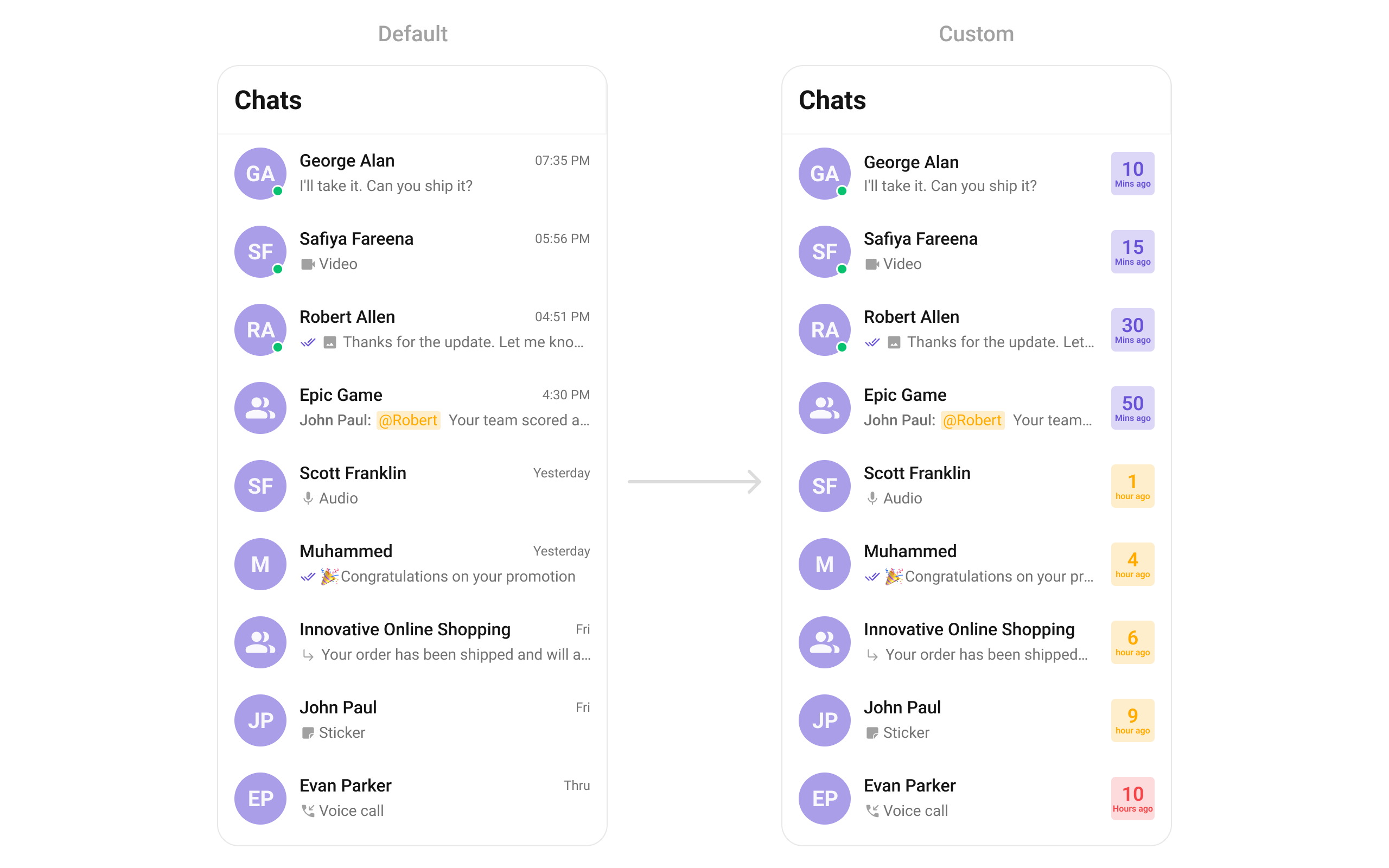 ```java theme={null}
cometchatConversations.setTrailingView(new ConversationsViewHolderListener() {
@Override
public View createView(Context context, CometchatConversationsListItemsBinding listItem) {
return null;
}
@Override
public void bindView(Context context, View createdView, Conversation conversation, RecyclerView.ViewHolder holder, List conversationList, int position) {
}
});
```
```kotlin theme={null}
cometchatConversations.setTrailingView(object :
ConversationsViewHolderListener() {
override fun createView(
context: Context?,
listItem: CometchatConversationsListItemsBinding?
): View? {
return null
}
override fun bindView(
context: Context,
createdView: View,
conversation: Conversation,
holder: RecyclerView.ViewHolder,
conversationList: List,
position: Int
) {
}
})
```
***
#### setItemView
This function allows developers to assign a completely custom list item design to the Conversations Component, replacing the default layout.
Use cases:
* Implementing a unique conversation list design with custom styling
* Adding extra elements like swipe gestures, priority indicators, or group labels
* Fully customizing how messages are displayed in the list
```java theme={null}
cometchatConversations.setItemView(new ConversationsViewHolderListener() {
@Override
public View createView(Context context, CometchatConversationsListItemsBinding listItem) {
return null;
}
@Override
public void bindView(Context context, View createdView, Conversation conversation, RecyclerView.ViewHolder holder, List conversationList, int position) {
}
});
```
```kotlin theme={null}
cometchatConversations.setItemView(object :
ConversationsViewHolderListener() {
override fun createView(
context: Context?,
listItem: CometchatConversationsListItemsBinding?
): View? {
return null
}
override fun bindView(
context: Context,
createdView: View,
conversation: Conversation,
holder: RecyclerView.ViewHolder,
conversationList: List,
position: Int
) {
}
})
```
Demonstration
```java theme={null}
cometchatConversations.setTrailingView(new ConversationsViewHolderListener() {
@Override
public View createView(Context context, CometchatConversationsListItemsBinding listItem) {
return null;
}
@Override
public void bindView(Context context, View createdView, Conversation conversation, RecyclerView.ViewHolder holder, List conversationList, int position) {
}
});
```
```kotlin theme={null}
cometchatConversations.setTrailingView(object :
ConversationsViewHolderListener() {
override fun createView(
context: Context?,
listItem: CometchatConversationsListItemsBinding?
): View? {
return null
}
override fun bindView(
context: Context,
createdView: View,
conversation: Conversation,
holder: RecyclerView.ViewHolder,
conversationList: List,
position: Int
) {
}
})
```
***
#### setItemView
This function allows developers to assign a completely custom list item design to the Conversations Component, replacing the default layout.
Use cases:
* Implementing a unique conversation list design with custom styling
* Adding extra elements like swipe gestures, priority indicators, or group labels
* Fully customizing how messages are displayed in the list
```java theme={null}
cometchatConversations.setItemView(new ConversationsViewHolderListener() {
@Override
public View createView(Context context, CometchatConversationsListItemsBinding listItem) {
return null;
}
@Override
public void bindView(Context context, View createdView, Conversation conversation, RecyclerView.ViewHolder holder, List conversationList, int position) {
}
});
```
```kotlin theme={null}
cometchatConversations.setItemView(object :
ConversationsViewHolderListener() {
override fun createView(
context: Context?,
listItem: CometchatConversationsListItemsBinding?
): View? {
return null
}
override fun bindView(
context: Context,
createdView: View,
conversation: Conversation,
holder: RecyclerView.ViewHolder,
conversationList: List,
position: Int
) {
}
})
```
Demonstration
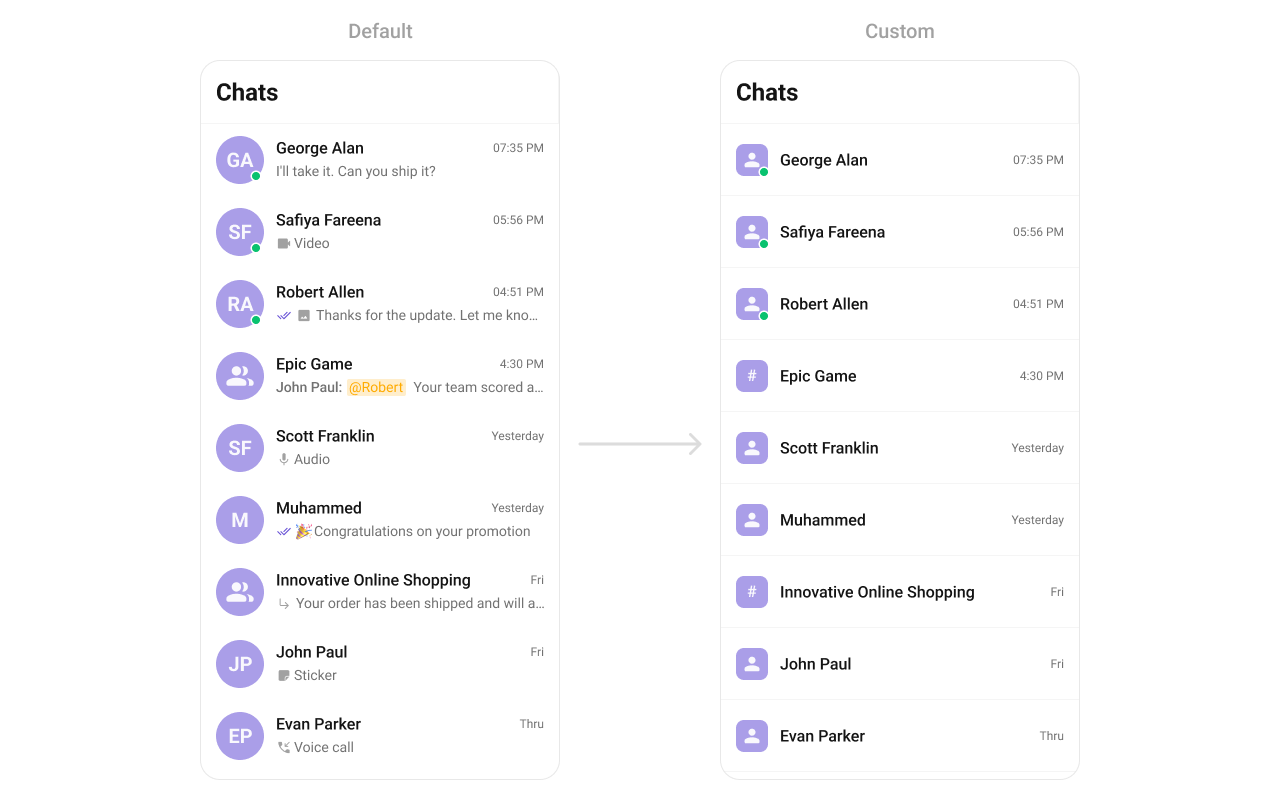 You can create an `item_converation_list.xml` as a custom layout file. Which we will inflate in `setListItemView()`
```html theme={null}
```
In the method `setItemView` you need to inflate the XML and initialize the views using the conversation objects.
```java YourActivity.java theme={null}
cometchatConversations.setItemView(new ConversationsViewHolderListener() {
@Override
public View createView(Context context, CometchatConversationsListItemsBinding listItem) {
return LayoutInflater.from(context).inflate(R.layout.custom_list_item_view, null, false);
}
@Override
public void bindView(Context context, View createdView, Conversation conversation, RecyclerView.ViewHolder holder, List conversationList, int position) {
CometChatAvatar avatar = createdView.findViewById(R.id.custom_avatar);
TextView title = createdView.findViewById(R.id.tvName);
TextView tvDate = createdView.findViewById(R.id.tvDate);
String name = ConversationsUtils.getConversationTitle(conversation);
title.setText(name);
avatar.setStyle(com.cometchat.chatuikit.R.style.CometChatAvatarStyle);
avatar.setAvatarPlaceHolderTextAppearance(com.cometchat.chatuikit.R.style.CometChatTextAppearanceHeading4_Bold);
avatar.setAvatar(name, ConversationsUtils.getConversationAvatar(conversation));
SimpleDateFormat simpleDateFormat = new SimpleDateFormat("hh:mm a");
String date = simpleDateFormat.format(conversation.getUpdatedAt() * 1000);
tvDate.setText(date);
}
});
```
```kotlin theme={null}
cometchatConversations.setItemView(object :
ConversationsViewHolderListener() {
override fun createView(
context: Context?,
listItem: CometchatConversationsListItemsBinding?
): View {
return LayoutInflater.from(context)
.inflate(R.layout.custom_list_item_view, null, false)
}
override fun bindView(
context: Context,
createdView: View,
conversation: Conversation,
holder: RecyclerView.ViewHolder,
conversationList: List,
position: Int
) {
val avatar = createdView.findViewById(R.id.custom_avatar)
val title = createdView.findViewById(R.id.tvName)
val tvDate = createdView.findViewById(R.id.tvDate)
val name = ConversationsUtils.getConversationTitle(conversation)
title.text = name
avatar.setStyle(com.cometchat.chatuikit.R.style.CometChatAvatarStyle)
avatar.avatarPlaceHolderTextAppearance =
com.cometchat.chatuikit.R.style.CometChatTextAppearanceHeading4_Bold
avatar.setAvatar(name, ConversationsUtils.getConversationAvatar(conversation))
val simpleDateFormat = SimpleDateFormat("hh:mm a")
val date = simpleDateFormat.format(conversation.updatedAt * 1000)
tvDate.text = date
}
})
```
***
#### setTextFormatters
This method enables developers to define and apply text formatters that dynamically modify or transform message content before rendering it in the UI. Text formatters can be used for purposes such as:
* Automatically converting URLs into clickable links
* Applying Markdown or rich text styling
* Replacing certain words or patterns with emojis or predefined text
* Censoring specific words for moderation
By utilizing this method, developers can enhance readability, usability, and compliance with content guidelines. [MentionsFormatter Guide](/ui-kit/android/mentions-formatter-guide)
**Example**
You can create an `item_converation_list.xml` as a custom layout file. Which we will inflate in `setListItemView()`
```html theme={null}
```
In the method `setItemView` you need to inflate the XML and initialize the views using the conversation objects.
```java YourActivity.java theme={null}
cometchatConversations.setItemView(new ConversationsViewHolderListener() {
@Override
public View createView(Context context, CometchatConversationsListItemsBinding listItem) {
return LayoutInflater.from(context).inflate(R.layout.custom_list_item_view, null, false);
}
@Override
public void bindView(Context context, View createdView, Conversation conversation, RecyclerView.ViewHolder holder, List conversationList, int position) {
CometChatAvatar avatar = createdView.findViewById(R.id.custom_avatar);
TextView title = createdView.findViewById(R.id.tvName);
TextView tvDate = createdView.findViewById(R.id.tvDate);
String name = ConversationsUtils.getConversationTitle(conversation);
title.setText(name);
avatar.setStyle(com.cometchat.chatuikit.R.style.CometChatAvatarStyle);
avatar.setAvatarPlaceHolderTextAppearance(com.cometchat.chatuikit.R.style.CometChatTextAppearanceHeading4_Bold);
avatar.setAvatar(name, ConversationsUtils.getConversationAvatar(conversation));
SimpleDateFormat simpleDateFormat = new SimpleDateFormat("hh:mm a");
String date = simpleDateFormat.format(conversation.getUpdatedAt() * 1000);
tvDate.setText(date);
}
});
```
```kotlin theme={null}
cometchatConversations.setItemView(object :
ConversationsViewHolderListener() {
override fun createView(
context: Context?,
listItem: CometchatConversationsListItemsBinding?
): View {
return LayoutInflater.from(context)
.inflate(R.layout.custom_list_item_view, null, false)
}
override fun bindView(
context: Context,
createdView: View,
conversation: Conversation,
holder: RecyclerView.ViewHolder,
conversationList: List,
position: Int
) {
val avatar = createdView.findViewById(R.id.custom_avatar)
val title = createdView.findViewById(R.id.tvName)
val tvDate = createdView.findViewById(R.id.tvDate)
val name = ConversationsUtils.getConversationTitle(conversation)
title.text = name
avatar.setStyle(com.cometchat.chatuikit.R.style.CometChatAvatarStyle)
avatar.avatarPlaceHolderTextAppearance =
com.cometchat.chatuikit.R.style.CometChatTextAppearanceHeading4_Bold
avatar.setAvatar(name, ConversationsUtils.getConversationAvatar(conversation))
val simpleDateFormat = SimpleDateFormat("hh:mm a")
val date = simpleDateFormat.format(conversation.updatedAt * 1000)
tvDate.text = date
}
})
```
***
#### setTextFormatters
This method enables developers to define and apply text formatters that dynamically modify or transform message content before rendering it in the UI. Text formatters can be used for purposes such as:
* Automatically converting URLs into clickable links
* Applying Markdown or rich text styling
* Replacing certain words or patterns with emojis or predefined text
* Censoring specific words for moderation
By utilizing this method, developers can enhance readability, usability, and compliance with content guidelines. [MentionsFormatter Guide](/ui-kit/android/mentions-formatter-guide)
**Example**
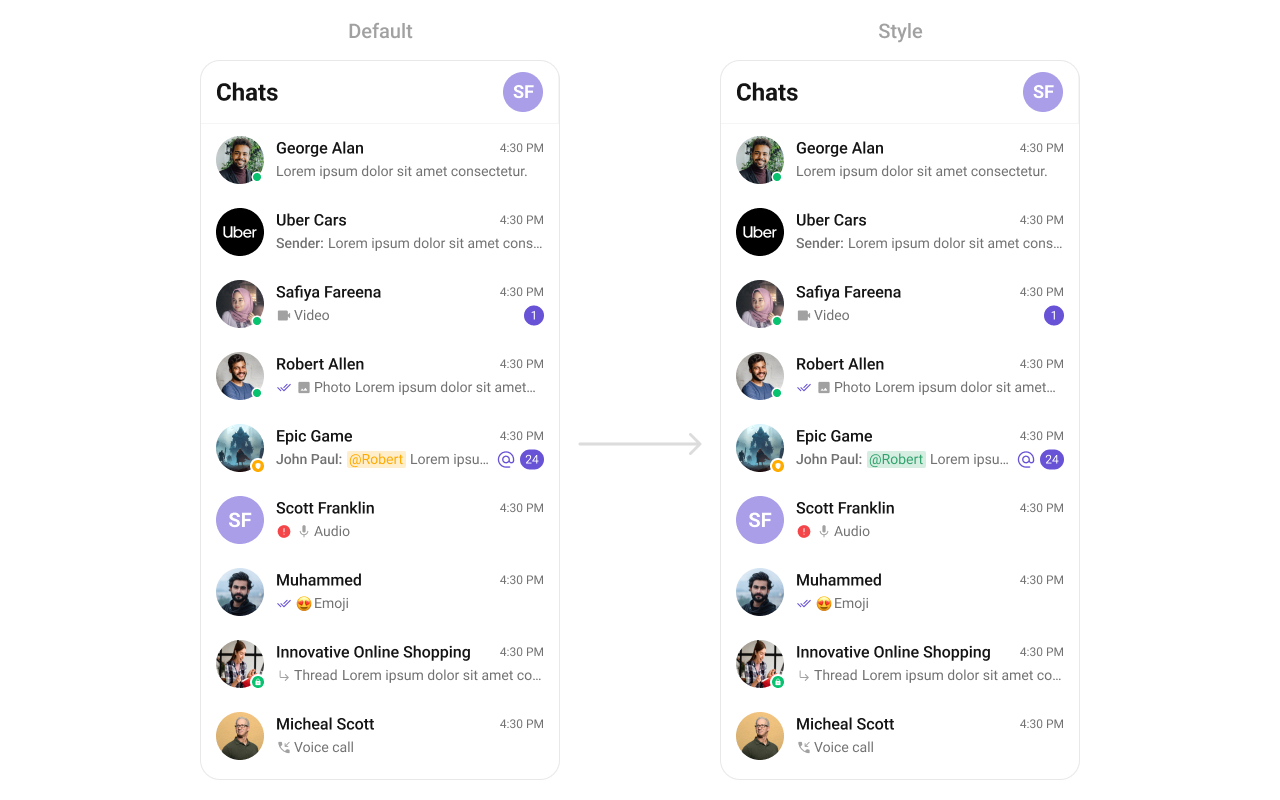 ```xml themes.xml theme={null}
```
```java theme={null}
// Initialize CometChatMentionsFormatter
CometChatMentionsFormatter mentionFormatter = new CometChatMentionsFormatter(context);
//set style to customize conversation mention text
mentionFormatter.setConversationsMentionTextStyle(context, R.style.CustomConversationsMentionsStyle);
// This can be passed as an array of formatter in CometChatConversations by using setTextFormatters method.
List textFormatters = new ArrayList<>();
textFormatters.add(mentionFormatter);
cometChatConversations.setTextFormatters(textFormatters);
```
```kotlin theme={null}
// Initialize CometChatMentionsFormatter
val mentionFormatter = CometChatMentionsFormatter(context)
//set style to customize conversation mention text
mentionFormatter.setConversationsMentionTextStyle(context, R.style.CustomConversationsMentionsStyle)
// This can be passed as an array of formatter in CometChatConversations by using setTextFormatters method.
val textFormatters: MutableList = ArrayList()
textFormatters.add(mentionFormatter)
cometChatConversations.setTextFormatters(textFormatters)
```
#### setOverflowMenu
The setOverflowMenu method allows developers to customize the overflow menu within the Conversations component. This menu typically appears as a three-dot (⋮) or hamburger icon and provides users with additional options beyond those displayed in the main UI.
Use Cases:
* Archive Chat
* Mark All as Read
* Delete Conversations
```java theme={null}
cometChatConversations.setOverflowMenu(View v);
```
```kotlin theme={null}
cometChatConversations.setOverflowMenu(v)
```
Demonstration
```xml themes.xml theme={null}
```
```java theme={null}
// Initialize CometChatMentionsFormatter
CometChatMentionsFormatter mentionFormatter = new CometChatMentionsFormatter(context);
//set style to customize conversation mention text
mentionFormatter.setConversationsMentionTextStyle(context, R.style.CustomConversationsMentionsStyle);
// This can be passed as an array of formatter in CometChatConversations by using setTextFormatters method.
List textFormatters = new ArrayList<>();
textFormatters.add(mentionFormatter);
cometChatConversations.setTextFormatters(textFormatters);
```
```kotlin theme={null}
// Initialize CometChatMentionsFormatter
val mentionFormatter = CometChatMentionsFormatter(context)
//set style to customize conversation mention text
mentionFormatter.setConversationsMentionTextStyle(context, R.style.CustomConversationsMentionsStyle)
// This can be passed as an array of formatter in CometChatConversations by using setTextFormatters method.
val textFormatters: MutableList = ArrayList()
textFormatters.add(mentionFormatter)
cometChatConversations.setTextFormatters(textFormatters)
```
#### setOverflowMenu
The setOverflowMenu method allows developers to customize the overflow menu within the Conversations component. This menu typically appears as a three-dot (⋮) or hamburger icon and provides users with additional options beyond those displayed in the main UI.
Use Cases:
* Archive Chat
* Mark All as Read
* Delete Conversations
```java theme={null}
cometChatConversations.setOverflowMenu(View v);
```
```kotlin theme={null}
cometChatConversations.setOverflowMenu(v)
```
Demonstration
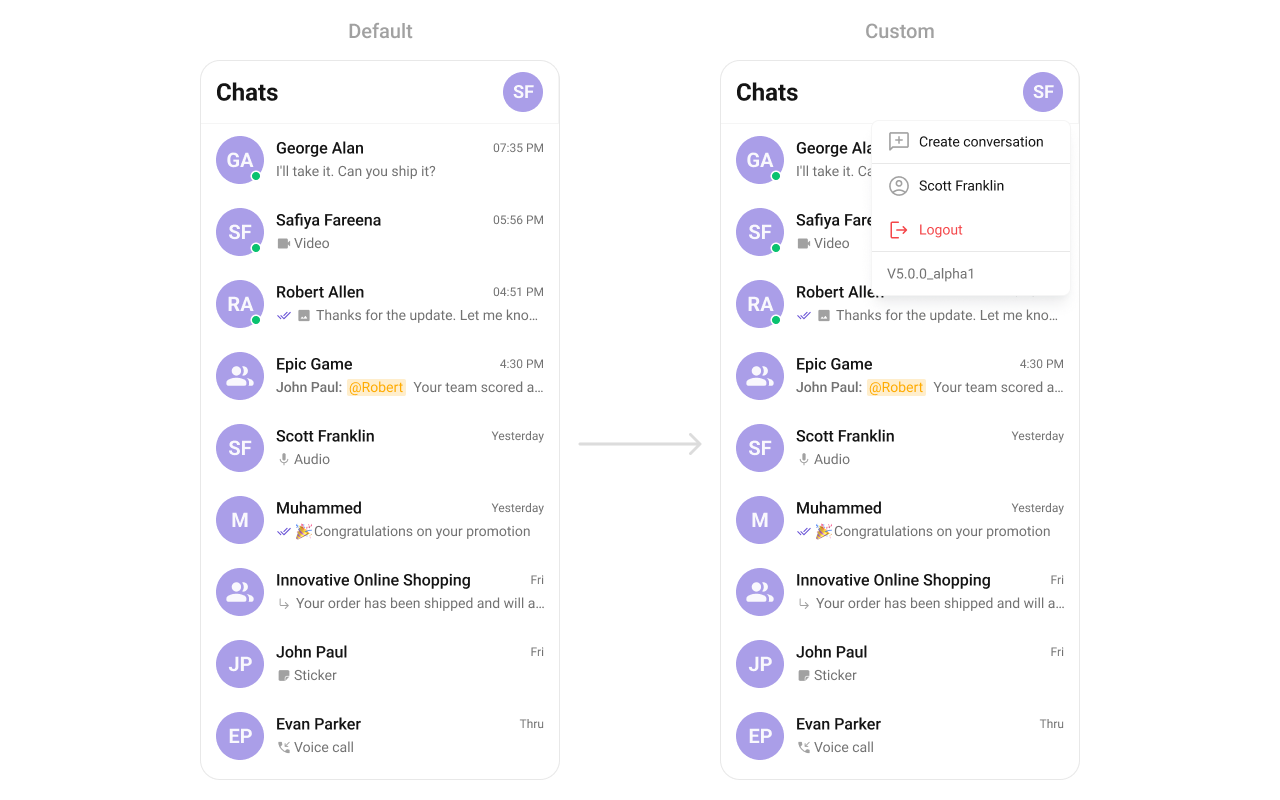 You can create a `view_menu.xml` as a custom view file. Which we will inflate and pass it to `.setMenu`.
```xml user_profile_popup_menu_layout.xml theme={null}
```
You inflate the view and pass it to `setMenu`. You can get the child view reference and can handle click actions.
```java theme={null}
import android.os.Bundle;
import android.view.Gravity;
import android.view.LayoutInflater;
import android.view.View;
import android.widget.LinearLayout;
import android.widget.PopupWindow;
import androidx.appcompat.app.AppCompatActivity;
import com.cometchat.chat.models.User;
import com.cometchat.chatuikit.conversations.CometChatConversations;
import com.cometchat.chatuikit.shared.cometchatuikit.CometChatUIKit;
import com.cometchat.chatuikit.shared.views.cometchatavatar.CometChatAvatar;
import com.cometchat.sampleapp.java.BuildConfig;
import com.cometchat.sampleapp.java.R;
import com.cometchat.sampleapp.java.databinding.UserProfilePopupMenuLayoutBinding;
public class YourActivity extends AppCompatActivity {
private CometChatConversations cometChatConversations;
@Override
protected void onCreate(Bundle savedInstanceState) {
super.onCreate(savedInstanceState);
setContentView(R.layout.activity_main);
cometChatConversations = findViewById(R.id.conversations);
cometChatConversations.setOverflowMenu(getLogoutView());
}
private View getLogoutView() {
User user = CometChatUIKit.getLoggedInUser();
if (user != null) {
CometChatAvatar cometchatAvatar = new CometChatAvatar(this);
cometchatAvatar.setAvatar(CometChatUIKit.getLoggedInUser().getName(), CometChatUIKit.getLoggedInUser().getAvatar());
LinearLayout.LayoutParams layoutParams = new LinearLayout.LayoutParams(getResources().getDimensionPixelSize(com.cometchat.chatuikit.R.dimen.cometchat_40dp), getResources().getDimensionPixelSize(com.cometchat.chatuikit.R.dimen.cometchat_40dp));
layoutParams.setLayoutDirection(Gravity.CENTER_VERTICAL);
cometchatAvatar.setLayoutParams(layoutParams);
cometchatAvatar.setOnClickListener(v -> {
showCustomMenu(cometChatConversations.getBinding().toolbarLayout);
});
return cometchatAvatar;
}
return null;
}
private void showCustomMenu(View anchorView) {
UserProfilePopupMenuLayoutBinding popupMenuBinding = UserProfilePopupMenuLayoutBinding.inflate(LayoutInflater.from(this));
final PopupWindow popupWindow = new PopupWindow(popupMenuBinding.getRoot(), getResources().getDimensionPixelSize(com.cometchat.chatuikit.R.dimen.cometchat_250dp), LinearLayout.LayoutParams.WRAP_CONTENT, true);
popupMenuBinding.tvUserName.setText(CometChatUIKit.getLoggedInUser().getName());
String version = "V" + BuildConfig.VERSION_NAME + "(" + BuildConfig.VERSION_CODE + ")";
popupMenuBinding.tvVersion.setText(version);
popupMenuBinding.tvCreateConversation.setOnClickListener(view -> {
popupWindow.dismiss();
});
popupMenuBinding.tvUserName.setOnClickListener(view -> {
popupWindow.dismiss();
});
popupMenuBinding.tvLogout.setOnClickListener(view -> {
popupWindow.dismiss();
});
popupWindow.setElevation(5);
int endMargin = getResources().getDimensionPixelSize(com.cometchat.chatuikit.R.dimen.cometchat_margin_2);
int anchorWidth = anchorView.getWidth();
int offsetX = anchorWidth - popupWindow.getWidth() - endMargin;
int offsetY = 0;
popupWindow.showAsDropDown(anchorView, offsetX, offsetY);
}
}
```
```kotlin theme={null}
import android.os.Bundle
import android.view.Gravity
import android.view.LayoutInflater
import android.view.View
import android.widget.LinearLayout
import android.widget.PopupWindow
import androidx.appcompat.app.AppCompatActivity
import com.cometchat.chatuikit.conversations.CometChatConversations
import com.cometchat.chatuikit.shared.cometchatuikit.CometChatUIKit
import com.cometchat.chatuikit.shared.views.cometchatavatar.CometChatAvatar
import com.cometchat.sampleapp.java.BuildConfig
import com.cometchat.sampleapp.java.R
import com.cometchat.sampleapp.java.databinding.UserProfilePopupMenuLayoutBinding
class YourActivity : AppCompatActivity() {
private lateinit var cometChatConversations: CometChatConversations
override fun onCreate(savedInstanceState: Bundle?) {
super.onCreate(savedInstanceState)
setContentView(R.layout.activity_main)
cometChatConversations = findViewById(R.id.conversations)
cometChatConversations.setOverflowMenu(logoutView)
}
private val logoutView: View?
get() {
val user = CometChatUIKit.getLoggedInUser()
if (user != null) {
val cometchatAvatar = CometChatAvatar(this)
cometchatAvatar.setAvatar(
CometChatUIKit.getLoggedInUser().name,
CometChatUIKit.getLoggedInUser().avatar
)
val layoutParams = LinearLayout.LayoutParams(
resources.getDimensionPixelSize(com.cometchat.chatuikit.R.dimen.cometchat_40dp),
resources.getDimensionPixelSize(com.cometchat.chatuikit.R.dimen.cometchat_40dp)
)
layoutParams.layoutDirection = Gravity.CENTER_VERTICAL
cometchatAvatar.layoutParams = layoutParams
cometchatAvatar.setOnClickListener { v: View? ->
showCustomMenu(
cometChatConversations!!.binding.toolbarLayout
)
}
return cometchatAvatar
}
return null
}
private fun showCustomMenu(anchorView: View) {
val popupMenuBinding = UserProfilePopupMenuLayoutBinding.inflate(LayoutInflater.from(this))
val popupWindow = PopupWindow(
popupMenuBinding.root,
resources.getDimensionPixelSize(com.cometchat.chatuikit.R.dimen.cometchat_250dp),
LinearLayout.LayoutParams.WRAP_CONTENT,
true
)
popupMenuBinding.tvUserName.text = CometChatUIKit.getLoggedInUser().name
val version = "V" + BuildConfig.VERSION_NAME + "(" + BuildConfig.VERSION_CODE + ")"
popupMenuBinding.tvVersion.text = version
popupMenuBinding.tvCreateConversation.setOnClickListener { view ->
popupWindow.dismiss()
}
popupMenuBinding.tvUserName.setOnClickListener { view ->
popupWindow.dismiss()
}
popupMenuBinding.tvLogout.setOnClickListener { view ->
popupWindow.dismiss()
}
popupWindow.elevation = 5f
val endMargin =
resources.getDimensionPixelSize(com.cometchat.chatuikit.R.dimen.cometchat_margin_2)
val anchorWidth = anchorView.width
val offsetX = anchorWidth - popupWindow.width - endMargin
val offsetY = 0
popupWindow.showAsDropDown(anchorView, offsetX, offsetY)
}
}
```
***
#### setDateFormat
This method customizes the date format used for displaying timestamps in conversations or chat components. Developers can specify formats such as:
* dd/MM/yyyy HH:mm → Example: 10/07/2024 14:30
* MMM dd, yyyy → Example: Jul 10, 2024
* hh:mm a → Example: 02:30 PM
Custom date patterns improve the localization and readability of time-sensitive messages, catering to different regional preferences.
```java theme={null}
cometChatConversations.setDateFormat(SimpleDateFormat)
```
```kotlin theme={null}
cometChatConversations.setDateFormat(SimpleDateFormat)
```
Demonstration
You can create a `view_menu.xml` as a custom view file. Which we will inflate and pass it to `.setMenu`.
```xml user_profile_popup_menu_layout.xml theme={null}
```
You inflate the view and pass it to `setMenu`. You can get the child view reference and can handle click actions.
```java theme={null}
import android.os.Bundle;
import android.view.Gravity;
import android.view.LayoutInflater;
import android.view.View;
import android.widget.LinearLayout;
import android.widget.PopupWindow;
import androidx.appcompat.app.AppCompatActivity;
import com.cometchat.chat.models.User;
import com.cometchat.chatuikit.conversations.CometChatConversations;
import com.cometchat.chatuikit.shared.cometchatuikit.CometChatUIKit;
import com.cometchat.chatuikit.shared.views.cometchatavatar.CometChatAvatar;
import com.cometchat.sampleapp.java.BuildConfig;
import com.cometchat.sampleapp.java.R;
import com.cometchat.sampleapp.java.databinding.UserProfilePopupMenuLayoutBinding;
public class YourActivity extends AppCompatActivity {
private CometChatConversations cometChatConversations;
@Override
protected void onCreate(Bundle savedInstanceState) {
super.onCreate(savedInstanceState);
setContentView(R.layout.activity_main);
cometChatConversations = findViewById(R.id.conversations);
cometChatConversations.setOverflowMenu(getLogoutView());
}
private View getLogoutView() {
User user = CometChatUIKit.getLoggedInUser();
if (user != null) {
CometChatAvatar cometchatAvatar = new CometChatAvatar(this);
cometchatAvatar.setAvatar(CometChatUIKit.getLoggedInUser().getName(), CometChatUIKit.getLoggedInUser().getAvatar());
LinearLayout.LayoutParams layoutParams = new LinearLayout.LayoutParams(getResources().getDimensionPixelSize(com.cometchat.chatuikit.R.dimen.cometchat_40dp), getResources().getDimensionPixelSize(com.cometchat.chatuikit.R.dimen.cometchat_40dp));
layoutParams.setLayoutDirection(Gravity.CENTER_VERTICAL);
cometchatAvatar.setLayoutParams(layoutParams);
cometchatAvatar.setOnClickListener(v -> {
showCustomMenu(cometChatConversations.getBinding().toolbarLayout);
});
return cometchatAvatar;
}
return null;
}
private void showCustomMenu(View anchorView) {
UserProfilePopupMenuLayoutBinding popupMenuBinding = UserProfilePopupMenuLayoutBinding.inflate(LayoutInflater.from(this));
final PopupWindow popupWindow = new PopupWindow(popupMenuBinding.getRoot(), getResources().getDimensionPixelSize(com.cometchat.chatuikit.R.dimen.cometchat_250dp), LinearLayout.LayoutParams.WRAP_CONTENT, true);
popupMenuBinding.tvUserName.setText(CometChatUIKit.getLoggedInUser().getName());
String version = "V" + BuildConfig.VERSION_NAME + "(" + BuildConfig.VERSION_CODE + ")";
popupMenuBinding.tvVersion.setText(version);
popupMenuBinding.tvCreateConversation.setOnClickListener(view -> {
popupWindow.dismiss();
});
popupMenuBinding.tvUserName.setOnClickListener(view -> {
popupWindow.dismiss();
});
popupMenuBinding.tvLogout.setOnClickListener(view -> {
popupWindow.dismiss();
});
popupWindow.setElevation(5);
int endMargin = getResources().getDimensionPixelSize(com.cometchat.chatuikit.R.dimen.cometchat_margin_2);
int anchorWidth = anchorView.getWidth();
int offsetX = anchorWidth - popupWindow.getWidth() - endMargin;
int offsetY = 0;
popupWindow.showAsDropDown(anchorView, offsetX, offsetY);
}
}
```
```kotlin theme={null}
import android.os.Bundle
import android.view.Gravity
import android.view.LayoutInflater
import android.view.View
import android.widget.LinearLayout
import android.widget.PopupWindow
import androidx.appcompat.app.AppCompatActivity
import com.cometchat.chatuikit.conversations.CometChatConversations
import com.cometchat.chatuikit.shared.cometchatuikit.CometChatUIKit
import com.cometchat.chatuikit.shared.views.cometchatavatar.CometChatAvatar
import com.cometchat.sampleapp.java.BuildConfig
import com.cometchat.sampleapp.java.R
import com.cometchat.sampleapp.java.databinding.UserProfilePopupMenuLayoutBinding
class YourActivity : AppCompatActivity() {
private lateinit var cometChatConversations: CometChatConversations
override fun onCreate(savedInstanceState: Bundle?) {
super.onCreate(savedInstanceState)
setContentView(R.layout.activity_main)
cometChatConversations = findViewById(R.id.conversations)
cometChatConversations.setOverflowMenu(logoutView)
}
private val logoutView: View?
get() {
val user = CometChatUIKit.getLoggedInUser()
if (user != null) {
val cometchatAvatar = CometChatAvatar(this)
cometchatAvatar.setAvatar(
CometChatUIKit.getLoggedInUser().name,
CometChatUIKit.getLoggedInUser().avatar
)
val layoutParams = LinearLayout.LayoutParams(
resources.getDimensionPixelSize(com.cometchat.chatuikit.R.dimen.cometchat_40dp),
resources.getDimensionPixelSize(com.cometchat.chatuikit.R.dimen.cometchat_40dp)
)
layoutParams.layoutDirection = Gravity.CENTER_VERTICAL
cometchatAvatar.layoutParams = layoutParams
cometchatAvatar.setOnClickListener { v: View? ->
showCustomMenu(
cometChatConversations!!.binding.toolbarLayout
)
}
return cometchatAvatar
}
return null
}
private fun showCustomMenu(anchorView: View) {
val popupMenuBinding = UserProfilePopupMenuLayoutBinding.inflate(LayoutInflater.from(this))
val popupWindow = PopupWindow(
popupMenuBinding.root,
resources.getDimensionPixelSize(com.cometchat.chatuikit.R.dimen.cometchat_250dp),
LinearLayout.LayoutParams.WRAP_CONTENT,
true
)
popupMenuBinding.tvUserName.text = CometChatUIKit.getLoggedInUser().name
val version = "V" + BuildConfig.VERSION_NAME + "(" + BuildConfig.VERSION_CODE + ")"
popupMenuBinding.tvVersion.text = version
popupMenuBinding.tvCreateConversation.setOnClickListener { view ->
popupWindow.dismiss()
}
popupMenuBinding.tvUserName.setOnClickListener { view ->
popupWindow.dismiss()
}
popupMenuBinding.tvLogout.setOnClickListener { view ->
popupWindow.dismiss()
}
popupWindow.elevation = 5f
val endMargin =
resources.getDimensionPixelSize(com.cometchat.chatuikit.R.dimen.cometchat_margin_2)
val anchorWidth = anchorView.width
val offsetX = anchorWidth - popupWindow.width - endMargin
val offsetY = 0
popupWindow.showAsDropDown(anchorView, offsetX, offsetY)
}
}
```
***
#### setDateFormat
This method customizes the date format used for displaying timestamps in conversations or chat components. Developers can specify formats such as:
* dd/MM/yyyy HH:mm → Example: 10/07/2024 14:30
* MMM dd, yyyy → Example: Jul 10, 2024
* hh:mm a → Example: 02:30 PM
Custom date patterns improve the localization and readability of time-sensitive messages, catering to different regional preferences.
```java theme={null}
cometChatConversations.setDateFormat(SimpleDateFormat)
```
```kotlin theme={null}
cometChatConversations.setDateFormat(SimpleDateFormat)
```
Demonstration
 ```java theme={null}
cometchatConversations.setDatePattern(new SimpleDateFormat("dd Mmm, hh:mm a",Locale.getDefault()));
```
```kotlin theme={null}
cometchatConversations.setDatePattern(SimpleDateFormat("dd MMM, hh:mm a",Locale.getDefault()))
```
#### setSubtitleView
The setSubtitleView method allows developers to customize the subtitle view of each conversation item in the list. The subtitle typically displays additional information below the conversation title, such as the last message, message status, or other relevant details.
Use Cases:
* Customizing the Last Message Display – Modify how the last message appears, including text styling, truncation, or emoji support.
* Message Status Indicators – Show message status (e.g., Sent, Delivered, Read) alongside the last message.
* Typing Indicators – Display "User is typing..." in real time.
```java theme={null}
cometChatConversations.setSubtitleView()
```
```kotlin theme={null}
cometChatConversations.setSubtitleView()
```
Demonstration
```java theme={null}
cometchatConversations.setDatePattern(new SimpleDateFormat("dd Mmm, hh:mm a",Locale.getDefault()));
```
```kotlin theme={null}
cometchatConversations.setDatePattern(SimpleDateFormat("dd MMM, hh:mm a",Locale.getDefault()))
```
#### setSubtitleView
The setSubtitleView method allows developers to customize the subtitle view of each conversation item in the list. The subtitle typically displays additional information below the conversation title, such as the last message, message status, or other relevant details.
Use Cases:
* Customizing the Last Message Display – Modify how the last message appears, including text styling, truncation, or emoji support.
* Message Status Indicators – Show message status (e.g., Sent, Delivered, Read) alongside the last message.
* Typing Indicators – Display "User is typing..." in real time.
```java theme={null}
cometChatConversations.setSubtitleView()
```
```kotlin theme={null}
cometChatConversations.setSubtitleView()
```
Demonstration
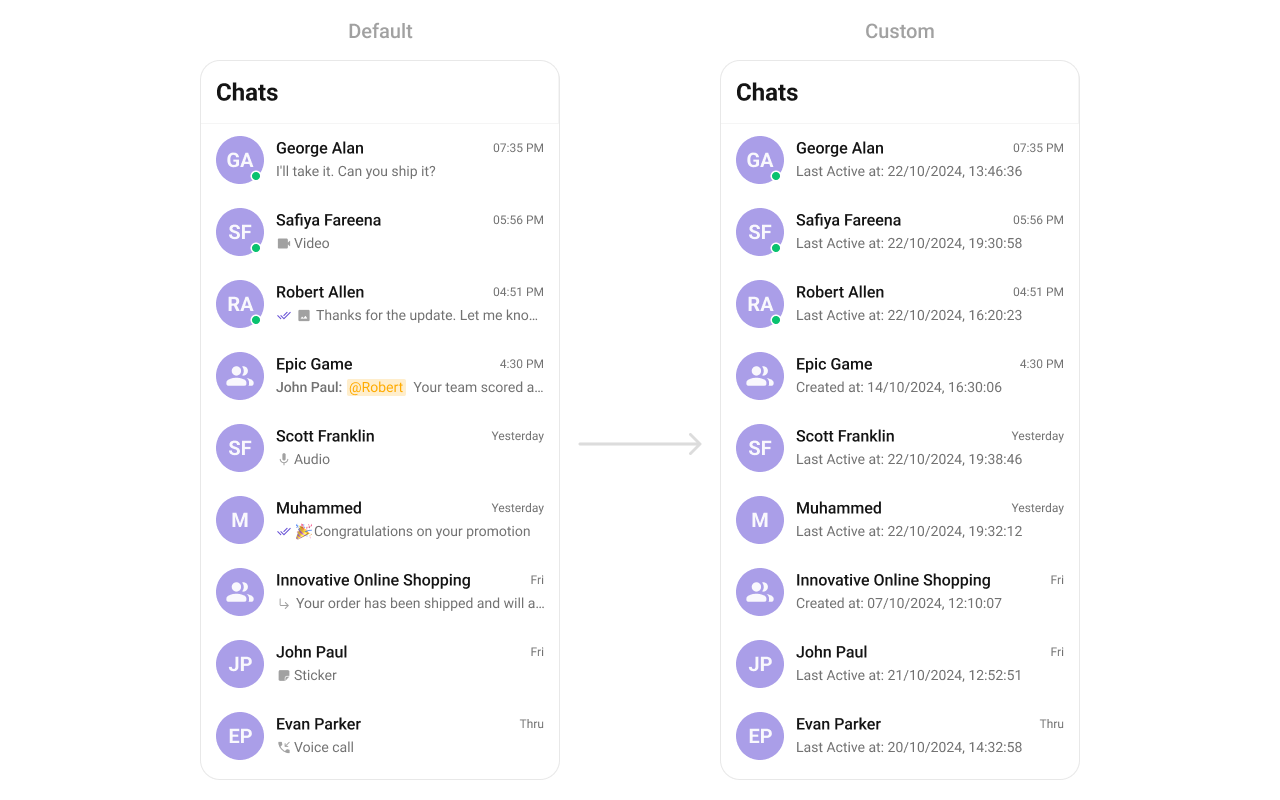 ```java YourActivity.java theme={null}
cometchatConversations.setSubtitleView(new ConversationsViewHolderListener() {
@Override
public View createView(Context context, CometchatConversationsListItemsBinding listItem) {
return new TextView(context);
}
@Override
public void bindView(Context context, View createdView, Conversation conversation, RecyclerView.ViewHolder holder, List conversationList, int position) {
TextView tvSubtitle = (TextView) createdView;
tvSubtitle.setText("Last Active at: "+new SimpleDateFormat("dd/mm/yyyy, HH:MM:SS").format(conversation.getUpdatedAt() * 1000));
tvSubtitle.setTextColor(Color.BLACK);
}
});
```
```kotlin theme={null}
cometchatConversations.setSubtitleView(object :
ConversationsViewHolderListener() {
override fun createView(
context: Context?,
listItem: CometchatConversationsListItemsBinding?
): View {
return TextView(context)
}
override fun bindView(
context: Context,
createdView: View,
conversation: Conversation,
holder: RecyclerView.ViewHolder,
conversationList: List,
position: Int
) {
val tvSubtitle = createdView as TextView
tvSubtitle.text =
"Last Active at: " + SimpleDateFormat("dd/mm/yyyy, HH:MM:SS").format(
conversation.updatedAt * 1000
)
tvSubtitle.setTextColor(Color.BLACK)
}
})
```
```java YourActivity.java theme={null}
cometchatConversations.setSubtitleView(new ConversationsViewHolderListener() {
@Override
public View createView(Context context, CometchatConversationsListItemsBinding listItem) {
return new TextView(context);
}
@Override
public void bindView(Context context, View createdView, Conversation conversation, RecyclerView.ViewHolder holder, List conversationList, int position) {
TextView tvSubtitle = (TextView) createdView;
tvSubtitle.setText("Last Active at: "+new SimpleDateFormat("dd/mm/yyyy, HH:MM:SS").format(conversation.getUpdatedAt() * 1000));
tvSubtitle.setTextColor(Color.BLACK);
}
});
```
```kotlin theme={null}
cometchatConversations.setSubtitleView(object :
ConversationsViewHolderListener() {
override fun createView(
context: Context?,
listItem: CometchatConversationsListItemsBinding?
): View {
return TextView(context)
}
override fun bindView(
context: Context,
createdView: View,
conversation: Conversation,
holder: RecyclerView.ViewHolder,
conversationList: List,
position: Int
) {
val tvSubtitle = createdView as TextView
tvSubtitle.text =
"Last Active at: " + SimpleDateFormat("dd/mm/yyyy, HH:MM:SS").format(
conversation.updatedAt * 1000
)
tvSubtitle.setTextColor(Color.BLACK)
}
})
```