> ## Documentation Index
> Fetch the complete documentation index at: https://cometchat-22654f5b-feature-react-native-sdk-quotedmessage-a.mintlify.site/llms.txt
> Use this file to discover all available pages before exploring further.
# Groups
## Overview
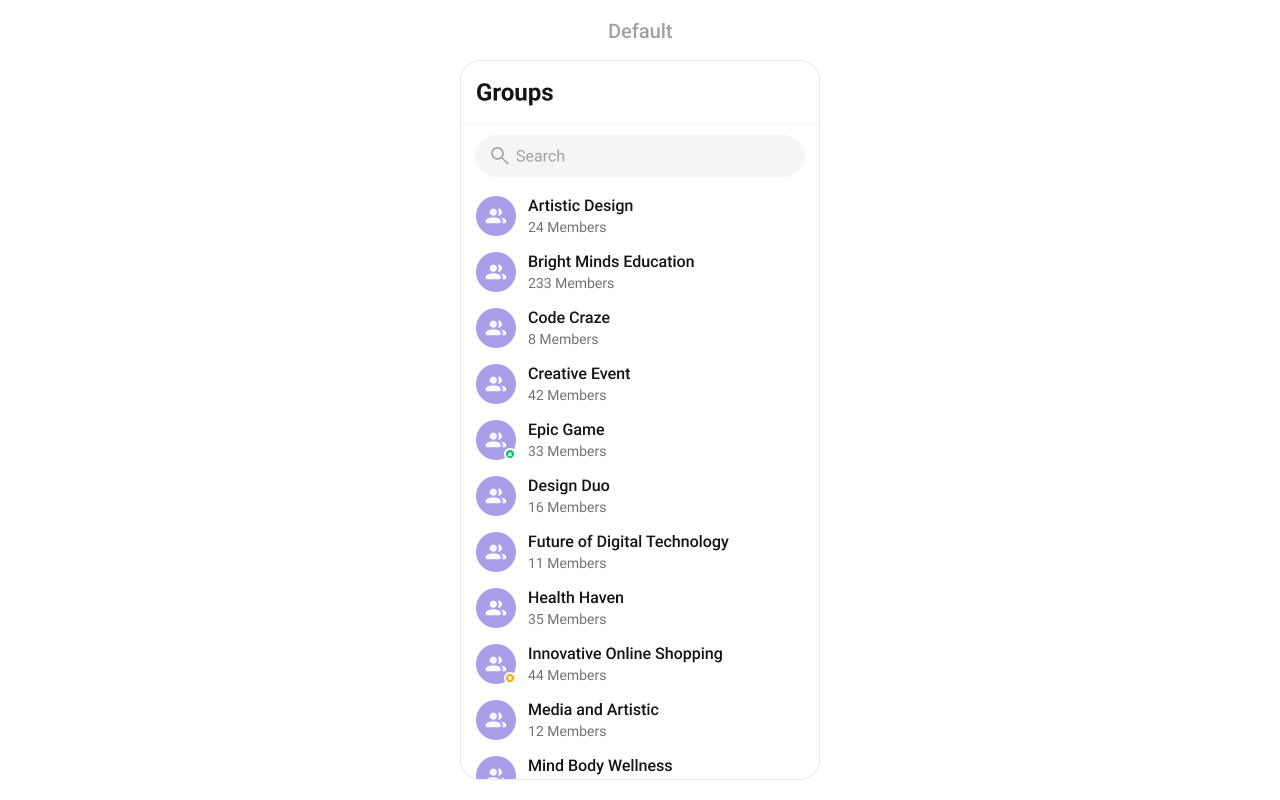
`CometChatGroups` functions as a standalone [component](/ui-kit/android/components-overview#components) designed to create a screen displaying a list of groups, with the added functionality of enabling groups to search for specific groups. Acting as a container component, CometChatGroups encapsulates and formats the `CometChatListBase` and `CometChatGroupList` components without introducing any additional behavior of its own.
 ***
## Usage
***
### Integration
The following code snippet illustrates how you can can launch `CometChatGroups`.
```xml theme={null}
```
***
### Actions
[Actions](/ui-kit/android/components-overview#actions) dictate how a component functions. They are divided into two types: Predefined and Group-defined. You can override either type, allowing you to tailor the behavior of the component to fit your specific needs.
##### setOnItemClick
Function invoked when a Group item is clicked, typically used to open a Group profile or chat screen.
```java YourActivity.java theme={null}
cometchatGroups.setOnItemClick((view1, position, group) -> {
});
```
```kotlin YourActivity.kt theme={null}
cometchatGroups.onItemClick = OnItemClick { view, position, group ->
}
```
***
##### setOnItemLongClick
Function executed when a Group item is long-pressed, allowing additional actions like delete or block.
```java YourActivity.java theme={null}
cometchatGroups.setOnItemLongClick((view1, position, group) -> {
});
```
```kotlin YourActivity.kt theme={null}
cometchatGroups.onItemLongClick = OnItemLongClick({ view, position, group ->
})
```
***
##### setOnBackPressListener
`OnBackPressListener` is triggered when you press the back button in the app bar. It has a predefined behavior; when clicked, it navigates to the previous activity. However, you can override this action using the following code snippet.
```java YourActivity.java theme={null}
cometchatGroups.setOnBackPressListener(() -> {
});
```
```kotlin YourActivity.kt theme={null}
cometchatGroups.onBackPressListener = OnBackPress {
}
```
***
##### setOnSelect
Called when a item from the fetched list is selected, useful for multi-selection features.
```java YourActivity.java theme={null}
cometchatGroups.setOnSelect(t -> {
});
```
```kotlin YourActivity.kt theme={null}
cometchatGroups.setOnSelect(object : OnSelection {
override fun onSelection(t: MutableList?) {
}
})
```
***
##### OnError
This action doesn't change the behavior of the component but rather listens for any errors that occur in the groups component.
```java YourActivity.java theme={null}
cometchatGroups.setOnError(cometchatException -> {
});
```
```kotlin YourActivity.kt theme={null}
cometchatGroups.setOnError {
}
```
***
##### setOnLoad
Invoked when the list is successfully fetched and loaded, helping track component readiness.
```java YourActivity.java theme={null}
cometchatGroups.setOnLoad(list -> {
});
```
```kotlin YourActivity.kt theme={null}
cometchatGroups.setOnLoad(object : OnLoad {
override fun onLoad(list: MutableList?) {
}
})
```
***
##### setOnEmpty
Called when the list is empty, enabling custom handling such as showing a placeholder message.
```java YourActivity.java theme={null}
cometchatGroups.setOnEmpty(() -> {
});
```
```kotlin YourActivity.kt theme={null}
cometchatGroups.setOnEmpty{
}
```
***
### Filters
Filters allow you to customize the data displayed in a list within a Component. You can filter the list based on your specific criteria, allowing for a more customized. Filters can be applied using RequestBuilders of Chat SDK.
##### 1. GroupsRequestBuilder
The [GroupsRequestBuilder](/sdk/android/retrieve-groups) enables you to filter and customize the group list based on available parameters in GroupsRequestBuilder. This feature allows you to create more specific and targeted queries when fetching groups. The following are the parameters available in [GroupsRequestBuilder](/sdk/android/retrieve-groups)
| Property | Description | Code |
| ------------------ | ------------------------------------------------------------------------------------------------------------------- | --------------------------- |
| **Limit** | Configure the maximum number of groups to fetch in a single request, optimizing pagination for smoother navigation. | `.setLimit(Int)` |
| **Search Keyword** | Employed to retrieve groups that match the provided string, facilitating precise searches. | `.setSearchKeyWord(String)` |
| **Joined Only** | Exclusively fetches joined groups. | `.joinedOnly(boolean)` |
| **Tags** | Utilized to fetch groups containing the specified tags. | `.setTags(List)` |
| **With Tags** | Utilized to retrieve groups with specific tags. | `.withTags(boolean)` |
**Example**
In the example below, we are applying a filter to the Group List based on only joined groups.
```java theme={null}
GroupsRequest.GroupsRequestBuilder builder = new GroupsRequest.GroupsRequestBuilder().setLimit(10).joinedOnly(true);
cometchatGroups.setGroupsRequestBuilder(builder);
```
```kotlin theme={null}
val builder = GroupsRequestBuilder().setLimit(10).joinedOnly(true)
cometchatGroups.setGroupsRequestBuilder(builder)
```
***
##### 2. SearchRequestBuilder
The SearchRequestBuilder uses [GroupsRequestBuilder](/sdk/android/retrieve-groups) enables you to filter and customize the search list based on available parameters in GroupsRequestBuilder. This feature allows you to keep uniformity between the displayed Groups List and searched Group List.
**Example**
```java theme={null}
GroupsRequest.GroupsRequestBuilder builder = new GroupsRequest.GroupsRequestBuilder().setLimit(10).setSearchKeyWord("**");
cometchatGroups.setSearchRequestBuilder(builder);
```
```kotlin theme={null}
val builder = GroupsRequestBuilder().setLimit(10).setSearchKeyWord("**")
cometchatGroups.setSearchRequestBuilder(builder)
```
***
### Events
[Events](/ui-kit/android/components-overview#events) are emitted by a `Component`. By using event you can extend existing functionality. Being global events, they can be applied in Multiple Locations and are capable of being Added or Removed.
The list of events emitted by the Groups component is as follows.
| Events | Description |
| ----------------------------- | ---------------------------------------------------------------------------------------------------------- |
| `ccGroupCreated()` | This will get triggered when the logged in user creates a group |
| `ccGroupDeleted()` | This will get triggered when the logged in user deletes a group |
| `ccGroupLeft()` | This will get triggered when the logged in user leaves a group |
| `ccGroupMemberScopeChanged()` | This will get triggered when the logged in user changes the scope of another group member |
| `ccGroupMemberBanned()` | This will get triggered when the logged in user bans a group member from the group |
| `ccGroupMemberKicked()` | This will get triggered when the logged in user kicks another group member from the group |
| `ccGroupMemberUnbanned()` | This will get triggered when the logged in user unbans a user banned from the group |
| `ccGroupMemberJoined()` | This will get triggered when the logged in user joins a group |
| `ccGroupMemberAdded()` | This will get triggered when the logged in user add new members to the group |
| `ccOwnershipChanged` | This will get triggered when the logged in user transfer the ownership of their group to some other member |
##### 1. Add `CometChatGroupEvents` Listener's
```java theme={null}
CometChatGroupEvents.addGroupListener("LISTENER_TAG", new CometChatGroupEvents() {
@Override
public void ccGroupCreated(Group group) {
super.ccGroupCreated(group);
}
@Override
public void ccGroupDeleted(Group group) {
super.ccGroupDeleted(group);
}
@Override
public void ccGroupLeft(Action actionMessage, User leftUser, Group leftGroup) {
super.ccGroupLeft(actionMessage, leftUser, leftGroup);
}
@Override
public void ccGroupMemberJoined(User joinedUser, Group joinedGroup) {
super.ccGroupMemberJoined(joinedUser, joinedGroup);
}
@Override
public void ccGroupMemberAdded(List actionMessages, List usersAdded, Group userAddedIn, User addedBy) {
super.ccGroupMemberAdded(actionMessages, usersAdded, userAddedIn, addedBy);
}
@Override
public void ccGroupMemberKicked(Action actionMessage, User kickedUser, User kickedBy, Group kickedFrom) {
super.ccGroupMemberKicked(actionMessage, kickedUser, kickedBy, kickedFrom);
}
@Override
public void ccGroupMemberBanned(Action actionMessage, User bannedUser, User bannedBy, Group bannedFrom) {
super.ccGroupMemberBanned(actionMessage, bannedUser, bannedBy, bannedFrom);
}
@Override
public void ccGroupMemberUnBanned(Action actionMessage, User unbannedUser, User unBannedBy, Group unBannedFrom) {
super.ccGroupMemberUnBanned(actionMessage, unbannedUser, unBannedBy, unBannedFrom);
}
@Override
public void ccGroupMemberScopeChanged(Action actionMessage, User updatedUser, String scopeChangedTo, String scopeChangedFrom, Group group) {
super.ccGroupMemberScopeChanged(actionMessage, updatedUser, scopeChangedTo, scopeChangedFrom, group);
}
@Override
public void ccOwnershipChanged(Group group, GroupMember newOwner) {
super.ccOwnershipChanged(group, newOwner);
}
});
```
```kotlin theme={null}
CometChatGroupEvents.addGroupListener("LISTENER_TAG", object : CometChatGroupEvents() {
override fun ccGroupCreated(group: Group?) {
super.ccGroupCreated(group)
}
override fun ccGroupDeleted(group: Group?) {
super.ccGroupDeleted(group)
}
override fun ccGroupLeft(actionMessage: Action?, leftUser: User?, leftGroup: Group?) {
super.ccGroupLeft(actionMessage, leftUser, leftGroup)
}
override fun ccGroupMemberJoined(joinedUser: User?, joinedGroup: Group?) {
super.ccGroupMemberJoined(joinedUser, joinedGroup)
}
override fun ccGroupMemberAdded(
actionMessages: List?,
usersAdded: List?,
userAddedIn: Group?,
addedBy: User?
) {
super.ccGroupMemberAdded(actionMessages, usersAdded, userAddedIn, addedBy)
}
override fun ccGroupMemberKicked(
actionMessage: Action?,
kickedUser: User?,
kickedBy: User?,
kickedFrom: Group?
) {
super.ccGroupMemberKicked(actionMessage, kickedUser, kickedBy, kickedFrom)
}
override fun ccGroupMemberBanned(
actionMessage: Action?,
bannedUser: User?,
bannedBy: User?,
bannedFrom: Group?
) {
super.ccGroupMemberBanned(actionMessage, bannedUser, bannedBy, bannedFrom)
}
override fun ccGroupMemberUnBanned(
actionMessage: Action?,
unbannedUser: User?,
unBannedBy: User?,
unBannedFrom: Group?
) {
super.ccGroupMemberUnBanned(actionMessage, unbannedUser, unBannedBy, unBannedFrom)
}
override fun ccGroupMemberScopeChanged(
actionMessage: Action?,
updatedUser: User?,
scopeChangedTo: String?,
scopeChangedFrom: String?,
group: Group?
) {
super.ccGroupMemberScopeChanged(
actionMessage,
updatedUser,
scopeChangedTo,
scopeChangedFrom,
group
)
}
override fun ccOwnershipChanged(group: Group?, newOwner: GroupMember?) {
super.ccOwnershipChanged(group, newOwner)
}
})
```
***
##### 2. Removing `CometChatGroupEvents` Listener's
```java theme={null}
CometChatGroupEvents.removeListeners();
```
```kotlin theme={null}
CometChatGroupEvents.removeListeners()
```
***
## Customization
To fit your app's design requirements, you can customize the appearance of the groups component. We provide exposed methods that allow you to modify the experience and behavior according to your specific needs.
### Style
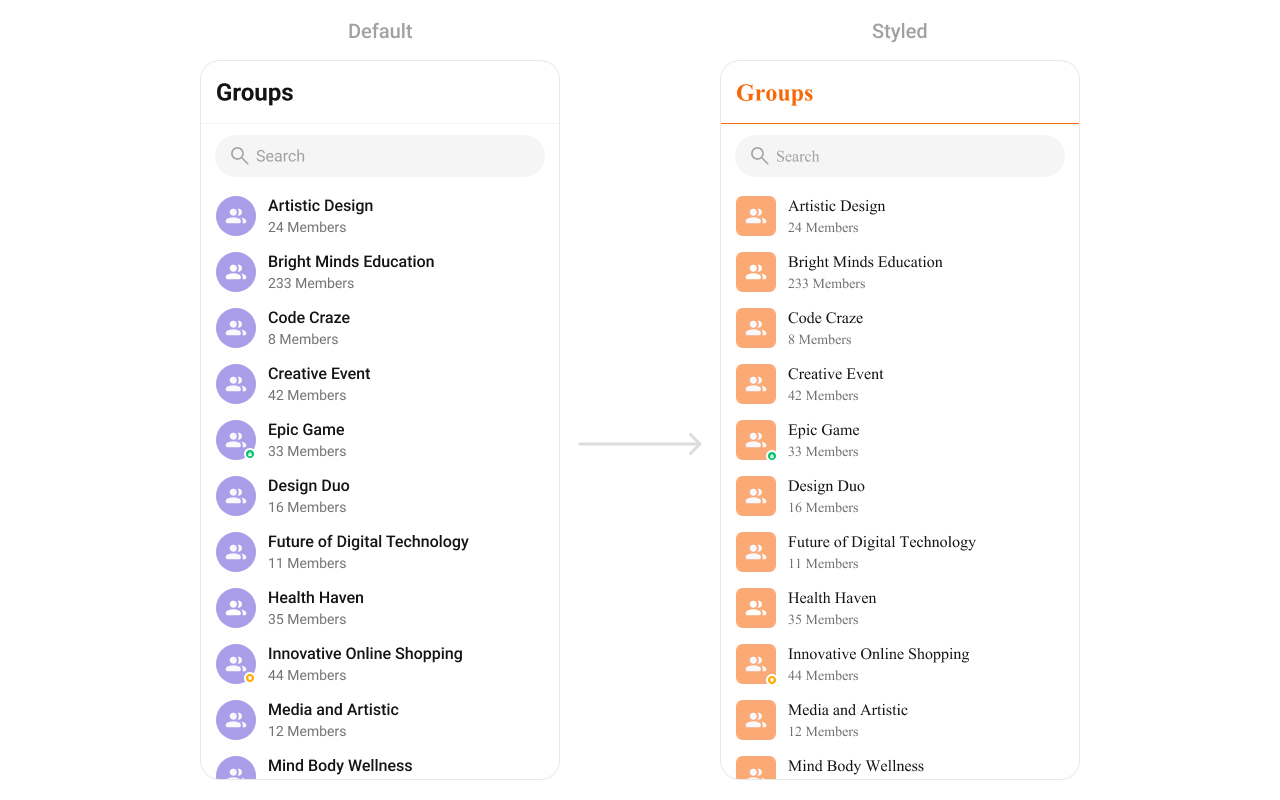
Using Style you can customize the look and feel of the component in your app, These parameters typically control elements such as the color, size, shape, and fonts used within the component.
***
## Usage
***
### Integration
The following code snippet illustrates how you can can launch `CometChatGroups`.
```xml theme={null}
```
***
### Actions
[Actions](/ui-kit/android/components-overview#actions) dictate how a component functions. They are divided into two types: Predefined and Group-defined. You can override either type, allowing you to tailor the behavior of the component to fit your specific needs.
##### setOnItemClick
Function invoked when a Group item is clicked, typically used to open a Group profile or chat screen.
```java YourActivity.java theme={null}
cometchatGroups.setOnItemClick((view1, position, group) -> {
});
```
```kotlin YourActivity.kt theme={null}
cometchatGroups.onItemClick = OnItemClick { view, position, group ->
}
```
***
##### setOnItemLongClick
Function executed when a Group item is long-pressed, allowing additional actions like delete or block.
```java YourActivity.java theme={null}
cometchatGroups.setOnItemLongClick((view1, position, group) -> {
});
```
```kotlin YourActivity.kt theme={null}
cometchatGroups.onItemLongClick = OnItemLongClick({ view, position, group ->
})
```
***
##### setOnBackPressListener
`OnBackPressListener` is triggered when you press the back button in the app bar. It has a predefined behavior; when clicked, it navigates to the previous activity. However, you can override this action using the following code snippet.
```java YourActivity.java theme={null}
cometchatGroups.setOnBackPressListener(() -> {
});
```
```kotlin YourActivity.kt theme={null}
cometchatGroups.onBackPressListener = OnBackPress {
}
```
***
##### setOnSelect
Called when a item from the fetched list is selected, useful for multi-selection features.
```java YourActivity.java theme={null}
cometchatGroups.setOnSelect(t -> {
});
```
```kotlin YourActivity.kt theme={null}
cometchatGroups.setOnSelect(object : OnSelection {
override fun onSelection(t: MutableList?) {
}
})
```
***
##### OnError
This action doesn't change the behavior of the component but rather listens for any errors that occur in the groups component.
```java YourActivity.java theme={null}
cometchatGroups.setOnError(cometchatException -> {
});
```
```kotlin YourActivity.kt theme={null}
cometchatGroups.setOnError {
}
```
***
##### setOnLoad
Invoked when the list is successfully fetched and loaded, helping track component readiness.
```java YourActivity.java theme={null}
cometchatGroups.setOnLoad(list -> {
});
```
```kotlin YourActivity.kt theme={null}
cometchatGroups.setOnLoad(object : OnLoad {
override fun onLoad(list: MutableList?) {
}
})
```
***
##### setOnEmpty
Called when the list is empty, enabling custom handling such as showing a placeholder message.
```java YourActivity.java theme={null}
cometchatGroups.setOnEmpty(() -> {
});
```
```kotlin YourActivity.kt theme={null}
cometchatGroups.setOnEmpty{
}
```
***
### Filters
Filters allow you to customize the data displayed in a list within a Component. You can filter the list based on your specific criteria, allowing for a more customized. Filters can be applied using RequestBuilders of Chat SDK.
##### 1. GroupsRequestBuilder
The [GroupsRequestBuilder](/sdk/android/retrieve-groups) enables you to filter and customize the group list based on available parameters in GroupsRequestBuilder. This feature allows you to create more specific and targeted queries when fetching groups. The following are the parameters available in [GroupsRequestBuilder](/sdk/android/retrieve-groups)
| Property | Description | Code |
| ------------------ | ------------------------------------------------------------------------------------------------------------------- | --------------------------- |
| **Limit** | Configure the maximum number of groups to fetch in a single request, optimizing pagination for smoother navigation. | `.setLimit(Int)` |
| **Search Keyword** | Employed to retrieve groups that match the provided string, facilitating precise searches. | `.setSearchKeyWord(String)` |
| **Joined Only** | Exclusively fetches joined groups. | `.joinedOnly(boolean)` |
| **Tags** | Utilized to fetch groups containing the specified tags. | `.setTags(List)` |
| **With Tags** | Utilized to retrieve groups with specific tags. | `.withTags(boolean)` |
**Example**
In the example below, we are applying a filter to the Group List based on only joined groups.
```java theme={null}
GroupsRequest.GroupsRequestBuilder builder = new GroupsRequest.GroupsRequestBuilder().setLimit(10).joinedOnly(true);
cometchatGroups.setGroupsRequestBuilder(builder);
```
```kotlin theme={null}
val builder = GroupsRequestBuilder().setLimit(10).joinedOnly(true)
cometchatGroups.setGroupsRequestBuilder(builder)
```
***
##### 2. SearchRequestBuilder
The SearchRequestBuilder uses [GroupsRequestBuilder](/sdk/android/retrieve-groups) enables you to filter and customize the search list based on available parameters in GroupsRequestBuilder. This feature allows you to keep uniformity between the displayed Groups List and searched Group List.
**Example**
```java theme={null}
GroupsRequest.GroupsRequestBuilder builder = new GroupsRequest.GroupsRequestBuilder().setLimit(10).setSearchKeyWord("**");
cometchatGroups.setSearchRequestBuilder(builder);
```
```kotlin theme={null}
val builder = GroupsRequestBuilder().setLimit(10).setSearchKeyWord("**")
cometchatGroups.setSearchRequestBuilder(builder)
```
***
### Events
[Events](/ui-kit/android/components-overview#events) are emitted by a `Component`. By using event you can extend existing functionality. Being global events, they can be applied in Multiple Locations and are capable of being Added or Removed.
The list of events emitted by the Groups component is as follows.
| Events | Description |
| ----------------------------- | ---------------------------------------------------------------------------------------------------------- |
| `ccGroupCreated()` | This will get triggered when the logged in user creates a group |
| `ccGroupDeleted()` | This will get triggered when the logged in user deletes a group |
| `ccGroupLeft()` | This will get triggered when the logged in user leaves a group |
| `ccGroupMemberScopeChanged()` | This will get triggered when the logged in user changes the scope of another group member |
| `ccGroupMemberBanned()` | This will get triggered when the logged in user bans a group member from the group |
| `ccGroupMemberKicked()` | This will get triggered when the logged in user kicks another group member from the group |
| `ccGroupMemberUnbanned()` | This will get triggered when the logged in user unbans a user banned from the group |
| `ccGroupMemberJoined()` | This will get triggered when the logged in user joins a group |
| `ccGroupMemberAdded()` | This will get triggered when the logged in user add new members to the group |
| `ccOwnershipChanged` | This will get triggered when the logged in user transfer the ownership of their group to some other member |
##### 1. Add `CometChatGroupEvents` Listener's
```java theme={null}
CometChatGroupEvents.addGroupListener("LISTENER_TAG", new CometChatGroupEvents() {
@Override
public void ccGroupCreated(Group group) {
super.ccGroupCreated(group);
}
@Override
public void ccGroupDeleted(Group group) {
super.ccGroupDeleted(group);
}
@Override
public void ccGroupLeft(Action actionMessage, User leftUser, Group leftGroup) {
super.ccGroupLeft(actionMessage, leftUser, leftGroup);
}
@Override
public void ccGroupMemberJoined(User joinedUser, Group joinedGroup) {
super.ccGroupMemberJoined(joinedUser, joinedGroup);
}
@Override
public void ccGroupMemberAdded(List actionMessages, List usersAdded, Group userAddedIn, User addedBy) {
super.ccGroupMemberAdded(actionMessages, usersAdded, userAddedIn, addedBy);
}
@Override
public void ccGroupMemberKicked(Action actionMessage, User kickedUser, User kickedBy, Group kickedFrom) {
super.ccGroupMemberKicked(actionMessage, kickedUser, kickedBy, kickedFrom);
}
@Override
public void ccGroupMemberBanned(Action actionMessage, User bannedUser, User bannedBy, Group bannedFrom) {
super.ccGroupMemberBanned(actionMessage, bannedUser, bannedBy, bannedFrom);
}
@Override
public void ccGroupMemberUnBanned(Action actionMessage, User unbannedUser, User unBannedBy, Group unBannedFrom) {
super.ccGroupMemberUnBanned(actionMessage, unbannedUser, unBannedBy, unBannedFrom);
}
@Override
public void ccGroupMemberScopeChanged(Action actionMessage, User updatedUser, String scopeChangedTo, String scopeChangedFrom, Group group) {
super.ccGroupMemberScopeChanged(actionMessage, updatedUser, scopeChangedTo, scopeChangedFrom, group);
}
@Override
public void ccOwnershipChanged(Group group, GroupMember newOwner) {
super.ccOwnershipChanged(group, newOwner);
}
});
```
```kotlin theme={null}
CometChatGroupEvents.addGroupListener("LISTENER_TAG", object : CometChatGroupEvents() {
override fun ccGroupCreated(group: Group?) {
super.ccGroupCreated(group)
}
override fun ccGroupDeleted(group: Group?) {
super.ccGroupDeleted(group)
}
override fun ccGroupLeft(actionMessage: Action?, leftUser: User?, leftGroup: Group?) {
super.ccGroupLeft(actionMessage, leftUser, leftGroup)
}
override fun ccGroupMemberJoined(joinedUser: User?, joinedGroup: Group?) {
super.ccGroupMemberJoined(joinedUser, joinedGroup)
}
override fun ccGroupMemberAdded(
actionMessages: List?,
usersAdded: List?,
userAddedIn: Group?,
addedBy: User?
) {
super.ccGroupMemberAdded(actionMessages, usersAdded, userAddedIn, addedBy)
}
override fun ccGroupMemberKicked(
actionMessage: Action?,
kickedUser: User?,
kickedBy: User?,
kickedFrom: Group?
) {
super.ccGroupMemberKicked(actionMessage, kickedUser, kickedBy, kickedFrom)
}
override fun ccGroupMemberBanned(
actionMessage: Action?,
bannedUser: User?,
bannedBy: User?,
bannedFrom: Group?
) {
super.ccGroupMemberBanned(actionMessage, bannedUser, bannedBy, bannedFrom)
}
override fun ccGroupMemberUnBanned(
actionMessage: Action?,
unbannedUser: User?,
unBannedBy: User?,
unBannedFrom: Group?
) {
super.ccGroupMemberUnBanned(actionMessage, unbannedUser, unBannedBy, unBannedFrom)
}
override fun ccGroupMemberScopeChanged(
actionMessage: Action?,
updatedUser: User?,
scopeChangedTo: String?,
scopeChangedFrom: String?,
group: Group?
) {
super.ccGroupMemberScopeChanged(
actionMessage,
updatedUser,
scopeChangedTo,
scopeChangedFrom,
group
)
}
override fun ccOwnershipChanged(group: Group?, newOwner: GroupMember?) {
super.ccOwnershipChanged(group, newOwner)
}
})
```
***
##### 2. Removing `CometChatGroupEvents` Listener's
```java theme={null}
CometChatGroupEvents.removeListeners();
```
```kotlin theme={null}
CometChatGroupEvents.removeListeners()
```
***
## Customization
To fit your app's design requirements, you can customize the appearance of the groups component. We provide exposed methods that allow you to modify the experience and behavior according to your specific needs.
### Style
Using Style you can customize the look and feel of the component in your app, These parameters typically control elements such as the color, size, shape, and fonts used within the component.
 ```html theme={null}
```
```java theme={null}
cometchatGroups.setStyle(R.style.CustomGroupsStyle);
```
```kotlin theme={null}
cometchatGroups.setStyle(R.style.CustomGroupsStyle)
```
***
To know more such attributes, visit the [attributes file](https://github.com/cometchat/cometchat-uikit-android/blob/v5/chatuikit/src/main/res/values/attr_cometchat_groups.xml).
### Functionality
These are a set of small functional customizations that allow you to fine-tune the overall experience of the component. With these, you can change text, set custom icons, and toggle the visibility of UI elements.
Below is a list of customizations along with corresponding code snippets
| Methods | Description | Code |
| ------------------------- | -------------------------------------------------------------------------------------------------------------------------------- | ----------------------------------------------------------- |
| setBackIconVisibility | Used to toggle visibility for back button in the app bar | `.setBackIconVisibility(View.VISIBLE);` |
| setToolbarVisibility | Used to toggle visibility for back button in the app bar | `.setToolbarVisibility(View.GONE);` |
| setLoadingStateVisibility | Used to hide loading state while fetching groups | `.setLoadingStateVisibility(View.GONE);` |
| setErrorStateVisibility | Used to hide error state on fetching groups | `.setErrorStateVisibility(View.GONE);` |
| setEmptyStateVisibility | Used to hide empty state on fetching groups | `.setEmptyStateVisibility(View.GONE);` |
| setSeparatorVisibility | Used to control visibility of Separators in the list view | `.setSeparatorVisibility(View.GONE);` |
| setGroupTypeVisibility | Used to control visibility of status indicator shown for the group type | `.setGroupTypeVisibility(View.GONE);` |
| setSearchBoxVisibility | Used to hide search box shown in the tool bar | `.setSearchBoxVisibility(View.GONE);` |
| setSelectionMode | This method determines the selection mode for groups, enabling user to select either a single groups or multiple groups at once. | `.setSelectionMode(UIKitConstants.SelectionMode.MULTIPLE);` |
| setSearchkeyword | Used for fetching groups matching the passed keywords | `.setSearchkeyword("anything");` |
***
### Advanced
For advanced-level customization, you can set custom views to the component. This lets you tailor each aspect of the component to fit your exact needs and application aesthetics. You can create and define your views, layouts, and UI elements and then incorporate those into the component.
#### setOptions
Defines the available actions when users interact with a group item, such as long-pressing or swiping.
Use Cases:
* Enable actions like "Mute Notifications", "Leave Group", "Pin Group".
* Provide admin-only actions like "Manage Members", "Delete Group".
```java theme={null}
cometchatGroups.setOptions((context, group) -> Collections.emptyList());
```
```kotlin theme={null}
cometchatGroups.options = Function2?> { context, Group -> emptyList() }
```
***
#### addOptions
This method extends the existing set of actions available when Groups long press a Group item. Unlike setOptionsDefines, which replaces the default options, addOptionsAdds allows developers to append additional actions without removing the default ones. Example use cases include:
* Adding a "Report Spam" action
* Introducing a "Save to Notes" option
* Integrating third-party actions such as "Share to Cloud Storage"
This method provides flexibility in modifying Group interaction capabilities.
```java theme={null}
cometchatGroups.addOptions((context, group) -> Collections.emptyList());
```
```kotlin theme={null}
cometchatGroups.addOptions { context, group -> emptyList() }
```
***
#### setLoadingView
Configures a custom loading view displayed while groups are being fetched.
Use Cases:
* Show a spinner with "Loading groups..." text.
* Display a skeleton loader for a smooth UI experience.
```java theme={null}
cometchatGroups.setLoadingView(R.layout.your_loading_view);
```
```kotlin theme={null}
cometchatGroups.loadingView = R.layout.your_loading_view
```
***
#### setEmptyView
Defines a view that appears when no groups are available.
Use Cases:
* Show a message like "No groups found, create one now!".
* Display an illustration with a "Create New Group" button.
```java theme={null}
cometchatGroups.setEmptyView(R.layout.your_empty_view);
```
```kotlin theme={null}
cometchatGroups.emptyView = R.layout.your_empty_view
```
***
#### setErrorView
Configures the UI when an error occurs while fetching groups.
Use Cases:
* Display a retry button with "Failed to load groups, try again.".
* Show a friendly error illustration.
```java theme={null}
cometchatGroups.setErrorView(R.layout.your_empty_view);
```
```kotlin theme={null}
cometchatGroups.errorView = R.layout.your_error_view
```
***
#### setLeadingView
Sets a custom leading view that appears at the start of each group item.
Use Cases:
* Display the group profile picture.
* Add an icon indicating Public or Private groups.
```java theme={null}
cometchatGroups.setLeadingView(new GroupsViewHolderListener() {
@Override
public View createView(Context context, CometchatListBaseItemsBinding listItem) {
return null;
}
@Override
public void bindView(Context context, View createdView, Group group, RecyclerView.ViewHolder holder, List groupList, int position) {
}
});
```
```kotlin theme={null}
cometchatGroups.setLeadingView(object: GroupsViewHolderListener {
override fun createView(context: Context, cometChatListItem: CometChatListItem): View? {
return null
}
override fun bindView(context: Context, view: View, Group: group, viewHolder: RecyclerView.ViewHolder, list: List, i: Int) {
}
})
```
```html theme={null}
```
```java theme={null}
cometchatGroups.setStyle(R.style.CustomGroupsStyle);
```
```kotlin theme={null}
cometchatGroups.setStyle(R.style.CustomGroupsStyle)
```
***
To know more such attributes, visit the [attributes file](https://github.com/cometchat/cometchat-uikit-android/blob/v5/chatuikit/src/main/res/values/attr_cometchat_groups.xml).
### Functionality
These are a set of small functional customizations that allow you to fine-tune the overall experience of the component. With these, you can change text, set custom icons, and toggle the visibility of UI elements.
Below is a list of customizations along with corresponding code snippets
| Methods | Description | Code |
| ------------------------- | -------------------------------------------------------------------------------------------------------------------------------- | ----------------------------------------------------------- |
| setBackIconVisibility | Used to toggle visibility for back button in the app bar | `.setBackIconVisibility(View.VISIBLE);` |
| setToolbarVisibility | Used to toggle visibility for back button in the app bar | `.setToolbarVisibility(View.GONE);` |
| setLoadingStateVisibility | Used to hide loading state while fetching groups | `.setLoadingStateVisibility(View.GONE);` |
| setErrorStateVisibility | Used to hide error state on fetching groups | `.setErrorStateVisibility(View.GONE);` |
| setEmptyStateVisibility | Used to hide empty state on fetching groups | `.setEmptyStateVisibility(View.GONE);` |
| setSeparatorVisibility | Used to control visibility of Separators in the list view | `.setSeparatorVisibility(View.GONE);` |
| setGroupTypeVisibility | Used to control visibility of status indicator shown for the group type | `.setGroupTypeVisibility(View.GONE);` |
| setSearchBoxVisibility | Used to hide search box shown in the tool bar | `.setSearchBoxVisibility(View.GONE);` |
| setSelectionMode | This method determines the selection mode for groups, enabling user to select either a single groups or multiple groups at once. | `.setSelectionMode(UIKitConstants.SelectionMode.MULTIPLE);` |
| setSearchkeyword | Used for fetching groups matching the passed keywords | `.setSearchkeyword("anything");` |
***
### Advanced
For advanced-level customization, you can set custom views to the component. This lets you tailor each aspect of the component to fit your exact needs and application aesthetics. You can create and define your views, layouts, and UI elements and then incorporate those into the component.
#### setOptions
Defines the available actions when users interact with a group item, such as long-pressing or swiping.
Use Cases:
* Enable actions like "Mute Notifications", "Leave Group", "Pin Group".
* Provide admin-only actions like "Manage Members", "Delete Group".
```java theme={null}
cometchatGroups.setOptions((context, group) -> Collections.emptyList());
```
```kotlin theme={null}
cometchatGroups.options = Function2?> { context, Group -> emptyList() }
```
***
#### addOptions
This method extends the existing set of actions available when Groups long press a Group item. Unlike setOptionsDefines, which replaces the default options, addOptionsAdds allows developers to append additional actions without removing the default ones. Example use cases include:
* Adding a "Report Spam" action
* Introducing a "Save to Notes" option
* Integrating third-party actions such as "Share to Cloud Storage"
This method provides flexibility in modifying Group interaction capabilities.
```java theme={null}
cometchatGroups.addOptions((context, group) -> Collections.emptyList());
```
```kotlin theme={null}
cometchatGroups.addOptions { context, group -> emptyList() }
```
***
#### setLoadingView
Configures a custom loading view displayed while groups are being fetched.
Use Cases:
* Show a spinner with "Loading groups..." text.
* Display a skeleton loader for a smooth UI experience.
```java theme={null}
cometchatGroups.setLoadingView(R.layout.your_loading_view);
```
```kotlin theme={null}
cometchatGroups.loadingView = R.layout.your_loading_view
```
***
#### setEmptyView
Defines a view that appears when no groups are available.
Use Cases:
* Show a message like "No groups found, create one now!".
* Display an illustration with a "Create New Group" button.
```java theme={null}
cometchatGroups.setEmptyView(R.layout.your_empty_view);
```
```kotlin theme={null}
cometchatGroups.emptyView = R.layout.your_empty_view
```
***
#### setErrorView
Configures the UI when an error occurs while fetching groups.
Use Cases:
* Display a retry button with "Failed to load groups, try again.".
* Show a friendly error illustration.
```java theme={null}
cometchatGroups.setErrorView(R.layout.your_empty_view);
```
```kotlin theme={null}
cometchatGroups.errorView = R.layout.your_error_view
```
***
#### setLeadingView
Sets a custom leading view that appears at the start of each group item.
Use Cases:
* Display the group profile picture.
* Add an icon indicating Public or Private groups.
```java theme={null}
cometchatGroups.setLeadingView(new GroupsViewHolderListener() {
@Override
public View createView(Context context, CometchatListBaseItemsBinding listItem) {
return null;
}
@Override
public void bindView(Context context, View createdView, Group group, RecyclerView.ViewHolder holder, List groupList, int position) {
}
});
```
```kotlin theme={null}
cometchatGroups.setLeadingView(object: GroupsViewHolderListener {
override fun createView(context: Context, cometChatListItem: CometChatListItem): View? {
return null
}
override fun bindView(context: Context, view: View, Group: group, viewHolder: RecyclerView.ViewHolder, list: List, i: Int) {
}
})
```
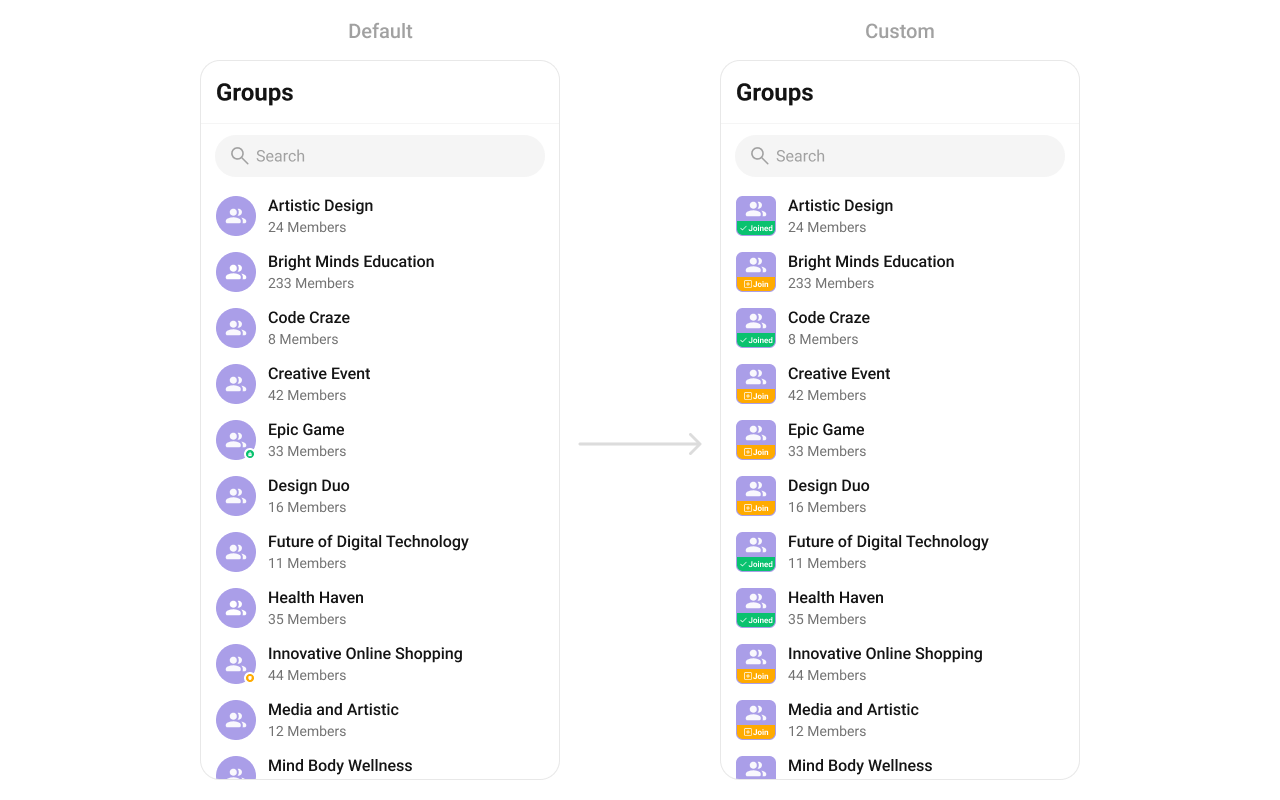 You can indeed create a custom layout file named `custom_leading_avatar_view.xml` for more complex or unique list items.
Once this layout file is made, you would inflate it inside the `createView()` method of the `GroupsViewHolderListener`. The inflation process prepares the layout for use in your application:
Following this, you would use the `bindView()` method to initialize and assign values to your individual views. This could include setting text on TextViews, images on ImageViews, and so on based on the properties of the Group object:
```xml custom_leading_avatar_view.xml theme={null}
```
```java theme={null}
cometchatGroups.setLeadingView(new GroupsViewHolderListener() {
@Override
public View createView(Context context, CometchatListBaseItemsBinding listItem) {
return LayoutInflater.from(context).inflate(R.layout.custom_leading_avatar_view, null);
}
@Override
public void bindView(Context context,
View createdView,
Group group,
RecyclerView.ViewHolder holder,
List groupList,
int position) {
LinearLayout groupAvatar = createdView.findViewById(R.id.leading_avatar_view);
groupAvatar.setBackground(group.isJoined() ? ResourcesCompat.getDrawable(getResources(),
R.drawable.group_leading_joined,
null) : ResourcesCompat.getDrawable(getResources(),
R.drawable.group_leading_join,
null));
groupAvatar.setOnLongClickListener(v -> {
if (group.isJoined()) {
Toast.makeText(context, "Group already joined", Toast.LENGTH_SHORT).show();
} else {
Toast.makeText(context, "Joining group", Toast.LENGTH_SHORT).show();
}
return true;
});
}
});
```
```kotlin theme={null}
cometchatGroups.setLeadingView(object : GroupsViewHolderListener() {
override fun createView(context: Context?, listItem: CometchatListBaseItemsBinding?): View {
return LayoutInflater.from(context).inflate(R.layout.custom_leading_avatar_view, null)
}
override fun bindView(
context: Context,
createdView: View,
group: Group,
holder: RecyclerView.ViewHolder,
groupList: List,
position: Int
) {
val groupAvatar = createdView.findViewById(R.id.leading_avatar_view)
groupAvatar.background = if (group.isJoined) ResourcesCompat.getDrawable(
resources,
R.drawable.group_leading_joined,
null
) else ResourcesCompat.getDrawable(
resources,
R.drawable.group_leading_join,
null
)
groupAvatar.setOnLongClickListener { v: View? ->
if (group.isJoined) {
Toast.makeText(context, "Group already joined", Toast.LENGTH_SHORT).show()
} else {
Toast.makeText(context, "Joining group", Toast.LENGTH_SHORT).show()
}
true
}
}
})
```
***
#### setTitleView
Customizes the title view of each group item, which typically displays the group name.
Use Cases:
* Style group names with custom fonts and colors.
* Show a verified badge for official groups.
```java theme={null}
cometchatGroups.setTitleView(new GroupsViewHolderListener() {
@Override
public View createView(Context context, CometchatListBaseItemsBinding listItem) {
return null;
}
@Override
public void bindView(Context context, View createdView, Group group, RecyclerView.ViewHolder holder, List groupList, int position) {
}
});
```
```kotlin theme={null}
cometchatGroups.setTitleView(object: GroupsViewHolderListener {
override fun createView(context: Context, cometChatListItem: CometChatListItem): View? {
return null
}
override fun bindView(context: Context, view: View, Group: group, viewHolder: RecyclerView.ViewHolder, list: List, i: Int) {
}
})
```
You can indeed create a custom layout file named `custom_leading_avatar_view.xml` for more complex or unique list items.
Once this layout file is made, you would inflate it inside the `createView()` method of the `GroupsViewHolderListener`. The inflation process prepares the layout for use in your application:
Following this, you would use the `bindView()` method to initialize and assign values to your individual views. This could include setting text on TextViews, images on ImageViews, and so on based on the properties of the Group object:
```xml custom_leading_avatar_view.xml theme={null}
```
```java theme={null}
cometchatGroups.setLeadingView(new GroupsViewHolderListener() {
@Override
public View createView(Context context, CometchatListBaseItemsBinding listItem) {
return LayoutInflater.from(context).inflate(R.layout.custom_leading_avatar_view, null);
}
@Override
public void bindView(Context context,
View createdView,
Group group,
RecyclerView.ViewHolder holder,
List groupList,
int position) {
LinearLayout groupAvatar = createdView.findViewById(R.id.leading_avatar_view);
groupAvatar.setBackground(group.isJoined() ? ResourcesCompat.getDrawable(getResources(),
R.drawable.group_leading_joined,
null) : ResourcesCompat.getDrawable(getResources(),
R.drawable.group_leading_join,
null));
groupAvatar.setOnLongClickListener(v -> {
if (group.isJoined()) {
Toast.makeText(context, "Group already joined", Toast.LENGTH_SHORT).show();
} else {
Toast.makeText(context, "Joining group", Toast.LENGTH_SHORT).show();
}
return true;
});
}
});
```
```kotlin theme={null}
cometchatGroups.setLeadingView(object : GroupsViewHolderListener() {
override fun createView(context: Context?, listItem: CometchatListBaseItemsBinding?): View {
return LayoutInflater.from(context).inflate(R.layout.custom_leading_avatar_view, null)
}
override fun bindView(
context: Context,
createdView: View,
group: Group,
holder: RecyclerView.ViewHolder,
groupList: List,
position: Int
) {
val groupAvatar = createdView.findViewById(R.id.leading_avatar_view)
groupAvatar.background = if (group.isJoined) ResourcesCompat.getDrawable(
resources,
R.drawable.group_leading_joined,
null
) else ResourcesCompat.getDrawable(
resources,
R.drawable.group_leading_join,
null
)
groupAvatar.setOnLongClickListener { v: View? ->
if (group.isJoined) {
Toast.makeText(context, "Group already joined", Toast.LENGTH_SHORT).show()
} else {
Toast.makeText(context, "Joining group", Toast.LENGTH_SHORT).show()
}
true
}
}
})
```
***
#### setTitleView
Customizes the title view of each group item, which typically displays the group name.
Use Cases:
* Style group names with custom fonts and colors.
* Show a verified badge for official groups.
```java theme={null}
cometchatGroups.setTitleView(new GroupsViewHolderListener() {
@Override
public View createView(Context context, CometchatListBaseItemsBinding listItem) {
return null;
}
@Override
public void bindView(Context context, View createdView, Group group, RecyclerView.ViewHolder holder, List groupList, int position) {
}
});
```
```kotlin theme={null}
cometchatGroups.setTitleView(object: GroupsViewHolderListener {
override fun createView(context: Context, cometChatListItem: CometChatListItem): View? {
return null
}
override fun bindView(context: Context, view: View, Group: group, viewHolder: RecyclerView.ViewHolder, list: List, i: Int) {
}
})
```
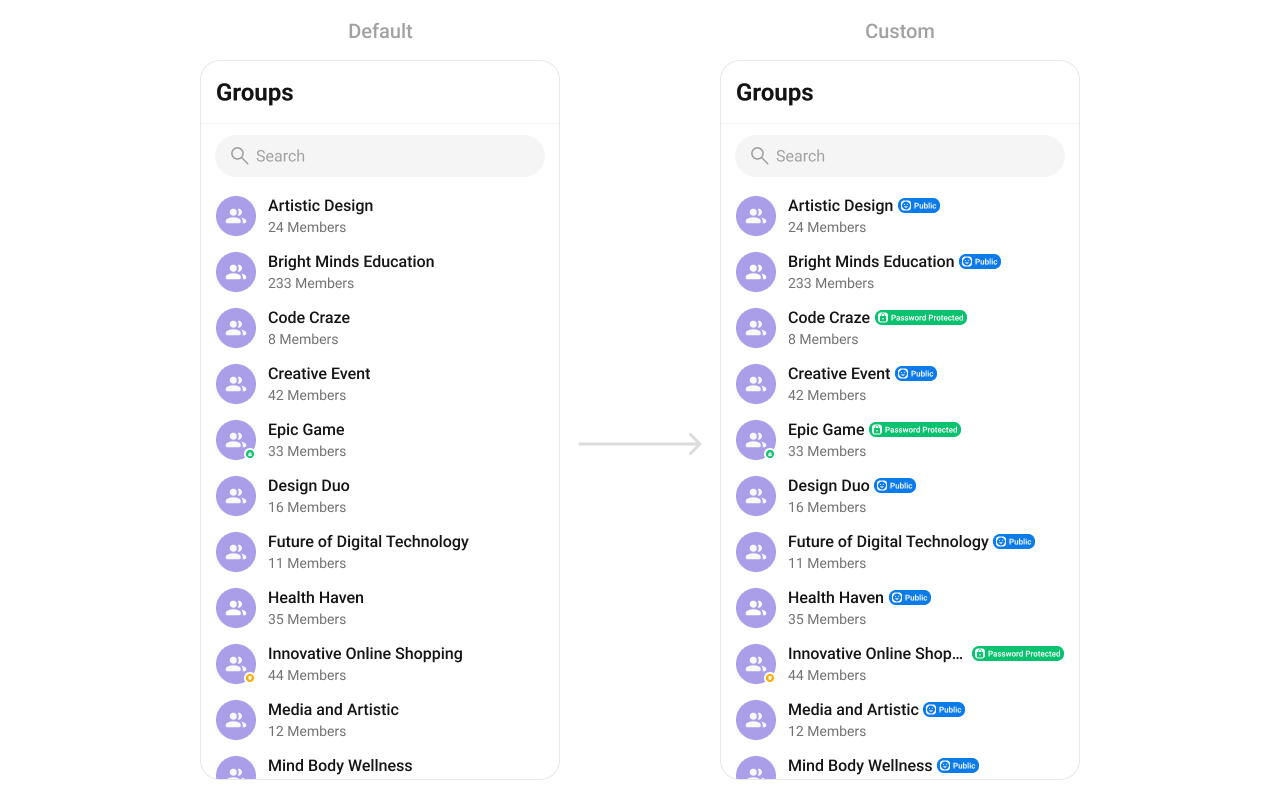 You can indeed create a custom layout file named `custom_title_view.xml` for more complex or unique list items.
Once this layout file is made, you would inflate it inside the `createView()` method of the `GroupsViewHolderListener`. The inflation process prepares the layout for use in your application:
Following this, you would use the `bindView()` method to initialize and assign values to your individual views. This could include setting text on TextViews, images on ImageViews, and so on based on the properties of the Group object:
```xml custom_title_view.xml theme={null}
```
```java theme={null}
cometchatGroups.setTitleView(new GroupsViewHolderListener() {
@Override
public View createView(Context context, CometchatListBaseItemsBinding listItem) {
return LayoutInflater.from(context).inflate(R.layout.custom_group_title_view, null);
}
@Override
public void bindView(Context context, View createdView, Group group, RecyclerView.ViewHolder holder, List groupList, int position) {
LinearLayout layout = createdView.findViewById(R.id.user_layout);
LinearLayout.LayoutParams layoutParams = new LinearLayout.LayoutParams(ViewGroup.LayoutParams.WRAP_CONTENT,
ViewGroup.LayoutParams.WRAP_CONTENT);
layout.setLayoutParams(layoutParams);
TextView name = createdView.findViewById(R.id.title);
name.setText(group.getName());
View type = createdView.findViewById(R.id.role);
if (CometChatConstants.GROUP_TYPE_PUBLIC.equals(group.getType())) {
type.setVisibility(View.VISIBLE);
type.setBackground(ResourcesCompat.getDrawable(getResources(), R.drawable.public_icon, null));
} else if (CometChatConstants.GROUP_TYPE_PASSWORD.equals(group.getType())) {
type.setVisibility(View.VISIBLE);
type.setBackground(ResourcesCompat.getDrawable(getResources(), R.drawable.passowrd_icon, null));
} else if (CometChatConstants.GROUP_TYPE_PRIVATE.equals(roup.getType())) {
type.setVisibility(View.VISIBLE);
type.setBackground(ResourcesCompat.getDrawable(getResources(), R.drawable.private_icon, null));
} else {
type.setVisibility(View.GONE);
}
}
});
```
```kotlin theme={null}
cometchatGroups.setTitleView(object : GroupsViewHolderListener() {
override fun createView(context: Context?, listItem: CometchatListBaseItemsBinding?): View {
return LayoutInflater.from(context).inflate(R.layout.custom_group_title_view, null)
}
override fun bindView(
context: Context,
createdView: View,
group: Group,
holder: RecyclerView.ViewHolder,
groupList: List,
position: Int
) {
val layout = createdView.findViewById(R.id.group_layout)
val layoutParams = LinearLayout.LayoutParams(
ViewGroup.LayoutParams.WRAP_CONTENT,
ViewGroup.LayoutParams.WRAP_CONTENT
)
layout.layoutParams = layoutParams
val name = createdView.findViewById(R.id.title)
name.text = group.name
val type = createdView.findViewById(R.id.type)
if (CometChatConstants.GROUP_TYPE_PUBLIC == group.groupType) {
type.visibility = View.VISIBLE
type.background = ResourcesCompat.getDrawable(resources, R.drawable.public_icon, null)
} else if (CometChatConstants.GROUP_TYPE_PASSWORD == group.groupType) {
type.visibility = View.VISIBLE
type.background = ResourcesCompat.getDrawable(resources, R.drawable.passowrd_icon, null)
} else if (CometChatConstants.GROUP_TYPE_PRIVATE == group.groupTyp) {
type.visibility = View.VISIBLE
type.background = ResourcesCompat.getDrawable(resources, R.drawable.private_icon, null)
} else {
type.visibility = View.GONE
}
}
})
```
***
#### setTrailingView
Allows custom elements to be added at the end of each group item, such as buttons or indicators.
Use Cases:
* Show unread message counts.
* Add a quick Join or Leave button.
```java theme={null}
cometchatGroups.setTrailingView(new GroupsViewHolderListener() {
@Override
public View createView(Context context, CometchatListBaseItemsBinding listItem) {
return null;
}
@Override
public void bindView(Context context, View createdView, Group group, RecyclerView.ViewHolder holder, List groupList, int position) {
}
});
```
```kotlin theme={null}
cometchatGroups.setTrailingView(object: GroupsViewHolderListener {
override fun createView(context: Context, cometChatListItem: CometChatListItem): View? {
return null
}
override fun bindView(context: Context, view: View, Group: Group, viewHolder: RecyclerView.ViewHolder, list: List, i: Int) {
}
})
```
You can indeed create a custom layout file named `custom_title_view.xml` for more complex or unique list items.
Once this layout file is made, you would inflate it inside the `createView()` method of the `GroupsViewHolderListener`. The inflation process prepares the layout for use in your application:
Following this, you would use the `bindView()` method to initialize and assign values to your individual views. This could include setting text on TextViews, images on ImageViews, and so on based on the properties of the Group object:
```xml custom_title_view.xml theme={null}
```
```java theme={null}
cometchatGroups.setTitleView(new GroupsViewHolderListener() {
@Override
public View createView(Context context, CometchatListBaseItemsBinding listItem) {
return LayoutInflater.from(context).inflate(R.layout.custom_group_title_view, null);
}
@Override
public void bindView(Context context, View createdView, Group group, RecyclerView.ViewHolder holder, List groupList, int position) {
LinearLayout layout = createdView.findViewById(R.id.user_layout);
LinearLayout.LayoutParams layoutParams = new LinearLayout.LayoutParams(ViewGroup.LayoutParams.WRAP_CONTENT,
ViewGroup.LayoutParams.WRAP_CONTENT);
layout.setLayoutParams(layoutParams);
TextView name = createdView.findViewById(R.id.title);
name.setText(group.getName());
View type = createdView.findViewById(R.id.role);
if (CometChatConstants.GROUP_TYPE_PUBLIC.equals(group.getType())) {
type.setVisibility(View.VISIBLE);
type.setBackground(ResourcesCompat.getDrawable(getResources(), R.drawable.public_icon, null));
} else if (CometChatConstants.GROUP_TYPE_PASSWORD.equals(group.getType())) {
type.setVisibility(View.VISIBLE);
type.setBackground(ResourcesCompat.getDrawable(getResources(), R.drawable.passowrd_icon, null));
} else if (CometChatConstants.GROUP_TYPE_PRIVATE.equals(roup.getType())) {
type.setVisibility(View.VISIBLE);
type.setBackground(ResourcesCompat.getDrawable(getResources(), R.drawable.private_icon, null));
} else {
type.setVisibility(View.GONE);
}
}
});
```
```kotlin theme={null}
cometchatGroups.setTitleView(object : GroupsViewHolderListener() {
override fun createView(context: Context?, listItem: CometchatListBaseItemsBinding?): View {
return LayoutInflater.from(context).inflate(R.layout.custom_group_title_view, null)
}
override fun bindView(
context: Context,
createdView: View,
group: Group,
holder: RecyclerView.ViewHolder,
groupList: List,
position: Int
) {
val layout = createdView.findViewById(R.id.group_layout)
val layoutParams = LinearLayout.LayoutParams(
ViewGroup.LayoutParams.WRAP_CONTENT,
ViewGroup.LayoutParams.WRAP_CONTENT
)
layout.layoutParams = layoutParams
val name = createdView.findViewById(R.id.title)
name.text = group.name
val type = createdView.findViewById(R.id.type)
if (CometChatConstants.GROUP_TYPE_PUBLIC == group.groupType) {
type.visibility = View.VISIBLE
type.background = ResourcesCompat.getDrawable(resources, R.drawable.public_icon, null)
} else if (CometChatConstants.GROUP_TYPE_PASSWORD == group.groupType) {
type.visibility = View.VISIBLE
type.background = ResourcesCompat.getDrawable(resources, R.drawable.passowrd_icon, null)
} else if (CometChatConstants.GROUP_TYPE_PRIVATE == group.groupTyp) {
type.visibility = View.VISIBLE
type.background = ResourcesCompat.getDrawable(resources, R.drawable.private_icon, null)
} else {
type.visibility = View.GONE
}
}
})
```
***
#### setTrailingView
Allows custom elements to be added at the end of each group item, such as buttons or indicators.
Use Cases:
* Show unread message counts.
* Add a quick Join or Leave button.
```java theme={null}
cometchatGroups.setTrailingView(new GroupsViewHolderListener() {
@Override
public View createView(Context context, CometchatListBaseItemsBinding listItem) {
return null;
}
@Override
public void bindView(Context context, View createdView, Group group, RecyclerView.ViewHolder holder, List groupList, int position) {
}
});
```
```kotlin theme={null}
cometchatGroups.setTrailingView(object: GroupsViewHolderListener {
override fun createView(context: Context, cometChatListItem: CometChatListItem): View? {
return null
}
override fun bindView(context: Context, view: View, Group: Group, viewHolder: RecyclerView.ViewHolder, list: List, i: Int) {
}
})
```
 You can indeed create a custom layout file named `custom_tail_view.xml` for more complex or unique list items.
Once this layout file is made, you would inflate it inside the `createView()` method of the `GroupsViewHolderListener`. The inflation process prepares the layout for use in your application:
Following this, you would use the `bindView()` method to initialize and assign values to your individual views. This could include setting text on TextViews, images on ImageViews, and so on based on the properties of the Group object:
```xml custom_tail_view.xml theme={null}
```
```java theme={null}
cometchatGroups.setTrailingView(new GroupsViewHolderListener() {
@Override
public View createView(Context context, CometchatListBaseItemsBinding listItem) {
return LayoutInflater.from(context).inflate(R.layout.custom_tail_view, null);
}
@Override
public void bindView(Context context,
View createdView,
Group group,
RecyclerView.ViewHolder holder,
List groupList,
int position) {
MaterialButton button = createdView.findViewById(R.id.button);
button.setText(group.isJoined() ? "Joined" : "+ Join");
}
});
```
```kotlin theme={null}
cometchatGroups.setTrailingView(object : GroupsViewHolderListener() {
override fun createView(context: Context?, listItem: CometchatListBaseItemsBinding?): View {
return LayoutInflater.from(context).inflate(R.layout.custom_tail_view, null)
}
override fun bindView(
context: Context,
createdView: View,
group: Group,
holder: RecyclerView.ViewHolder,
groupList: List,
position: Int
) {
val button = createdView.findViewById(R.id.button)
button.text = (if (group.isJoined) "Joined" else "+ Join")
}
})
```
***
#### setItemView
Assigns a fully custom ListItem layout to the Groups component, replacing the default design.
Use Cases:
* Add a description below the group name.
* Customize layout to include additional metadata.
```java theme={null}
cometchatGroups.setItemView(new GroupsViewHolderListener() {
@Override
public View createView(Context context, CometchatListBaseItemsBinding cometChatListItem) {
return null;
}
@Override
public void bindView(Context context, View view, Group group, RecyclerView.ViewHolder viewHolder, List list, int i) {
}
});
```
```kotlin theme={null}
cometchatGroups.setItemView(object : GroupsViewHolderListener() {
override fun createView(
context: Context?,
CometchatListBaseItemsBinding: CometChatListItem?
): View? {
return null
}
override fun bindView(
context: Context?,
view: View?,
group: Group?,
viewHolder: RecyclerView.ViewHolder?,
list: List?,
i: Int
) {
}
})
```
**Example**
You can indeed create a custom layout file named `custom_tail_view.xml` for more complex or unique list items.
Once this layout file is made, you would inflate it inside the `createView()` method of the `GroupsViewHolderListener`. The inflation process prepares the layout for use in your application:
Following this, you would use the `bindView()` method to initialize and assign values to your individual views. This could include setting text on TextViews, images on ImageViews, and so on based on the properties of the Group object:
```xml custom_tail_view.xml theme={null}
```
```java theme={null}
cometchatGroups.setTrailingView(new GroupsViewHolderListener() {
@Override
public View createView(Context context, CometchatListBaseItemsBinding listItem) {
return LayoutInflater.from(context).inflate(R.layout.custom_tail_view, null);
}
@Override
public void bindView(Context context,
View createdView,
Group group,
RecyclerView.ViewHolder holder,
List groupList,
int position) {
MaterialButton button = createdView.findViewById(R.id.button);
button.setText(group.isJoined() ? "Joined" : "+ Join");
}
});
```
```kotlin theme={null}
cometchatGroups.setTrailingView(object : GroupsViewHolderListener() {
override fun createView(context: Context?, listItem: CometchatListBaseItemsBinding?): View {
return LayoutInflater.from(context).inflate(R.layout.custom_tail_view, null)
}
override fun bindView(
context: Context,
createdView: View,
group: Group,
holder: RecyclerView.ViewHolder,
groupList: List,
position: Int
) {
val button = createdView.findViewById(R.id.button)
button.text = (if (group.isJoined) "Joined" else "+ Join")
}
})
```
***
#### setItemView
Assigns a fully custom ListItem layout to the Groups component, replacing the default design.
Use Cases:
* Add a description below the group name.
* Customize layout to include additional metadata.
```java theme={null}
cometchatGroups.setItemView(new GroupsViewHolderListener() {
@Override
public View createView(Context context, CometchatListBaseItemsBinding cometChatListItem) {
return null;
}
@Override
public void bindView(Context context, View view, Group group, RecyclerView.ViewHolder viewHolder, List list, int i) {
}
});
```
```kotlin theme={null}
cometchatGroups.setItemView(object : GroupsViewHolderListener() {
override fun createView(
context: Context?,
CometchatListBaseItemsBinding: CometChatListItem?
): View? {
return null
}
override fun bindView(
context: Context?,
view: View?,
group: Group?,
viewHolder: RecyclerView.ViewHolder?,
list: List?,
i: Int
) {
}
})
```
**Example**
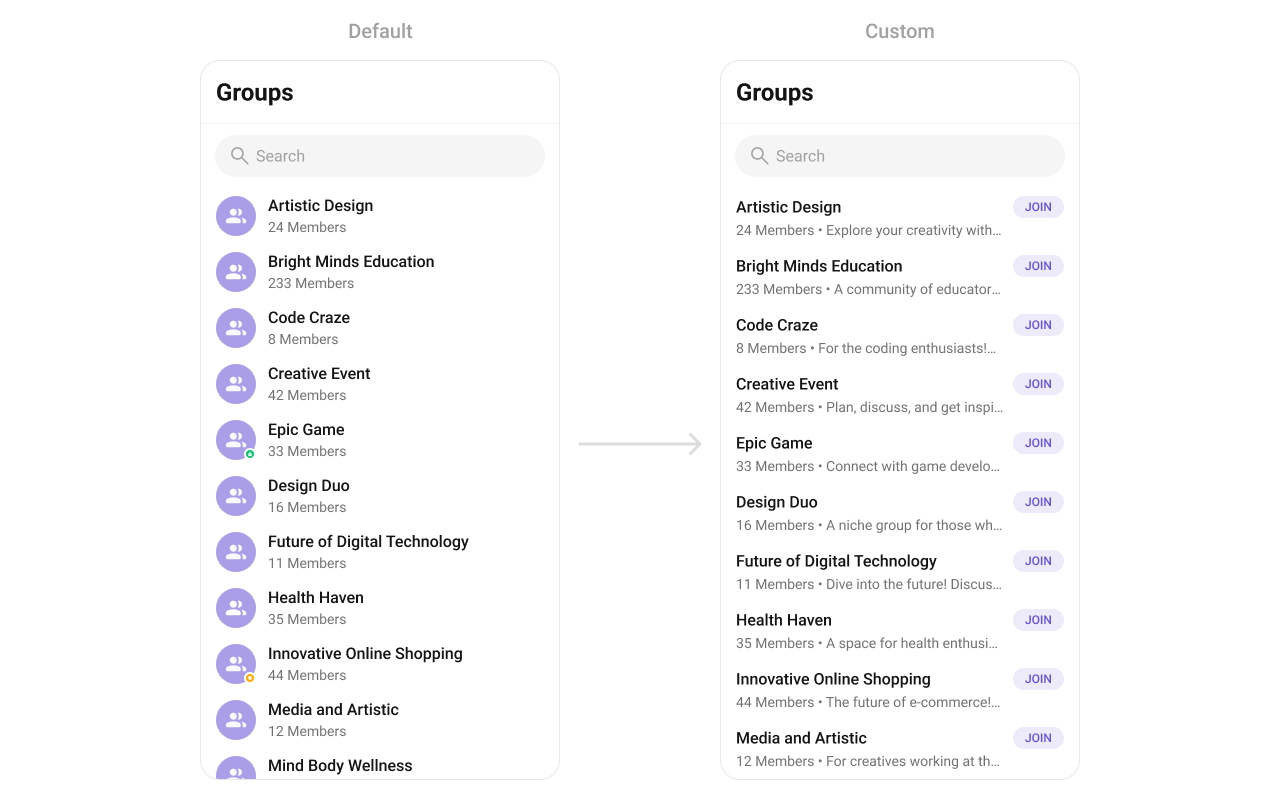 You can indeed create a custom layout file named `item_list.xml` for more complex or unique list items.
Once this layout file is made, you would inflate it inside the `createView()` method of the `GroupsViewHolderListener`. The inflation process prepares the layout for use in your application:
Following this, you would use the `bindView()` method to initialize and assign values to your individual views. This could include setting text on TextViews, images on ImageViews, and so on based on the properties of the Group object:
```xml custom_group_list_itemd.xml theme={null}
```
```java YourActivity.java theme={null}
cometChatGroup.setItemView(new GroupsViewHolderListener() {
@Override
public View createView(Context context, CometchatListBaseItemsBinding listItem) {
return View.inflate(context,R.layout.custom_group_list_item,null);
}
@Override
public void bindView(Context context, View createdView, Group group, RecyclerView.ViewHolder holder, List groupList, int position) {
TextView groupName = createdView.findViewById(R.id.tvName);
TextView groupMemberCount = createdView.findViewById(R.id.tvSubtitle);
LinearLayout.LayoutParams params = new LinearLayout.LayoutParams(LinearLayout.LayoutParams.MATCH_PARENT, LinearLayout.LayoutParams.WRAP_CONTENT);
createdView.setLayoutParams(params);
groupName.setText(group.getName());
groupMemberCount.setText(group.getMembersCount() > 1 ? group.getMembersCount() + " members" : group.getMembersCount() + " member" + " • " + group.getDescription());
}
});
```
```kotlin YourActivity.kt theme={null}
cometChatGroup.setItemView(object : GroupsViewHolderListener() {
override fun createView(
context: Context?,
listItem: CometchatListBaseItemsBinding?
): View {
return View.inflate(context, R.layout.custom_group_list_item, null)
}
override fun bindView(
context: Context,
createdView: View,
group: Group,
holder: RecyclerView.ViewHolder,
groupList: List,
position: Int
) {
val groupName = createdView.findViewById(R.id.tvName)
val groupMemberCount = createdView.findViewById(R.id.tvSubtitle)
val params = LinearLayout.LayoutParams(
LinearLayout.LayoutParams.MATCH_PARENT,
LinearLayout.LayoutParams.WRAP_CONTENT
)
createdView.layoutParams = params
groupName.text = group.name
groupMemberCount.text =
if (group.membersCount > 1) group.membersCount.toString() + " members" else group.membersCount.toString() + " member" + " • " + group.description
}
})
```
***
#### setSubTitleView
Customizes the subtitle view for each group item, which typically displays extra information.
Use Cases:
* Show last message preview.
* Display the number of members.
```java theme={null}
CometChatGroup.setSubtitleView(new GroupsViewHolderListener() {
@Override
public View createView(Context context, CometchatListBaseItemsBinding listItem) {
return null;
}
@Override
public void bindView(Context context, View createdView, Group group, RecyclerView.ViewHolder holder, List groupList, int position) {
}
});
```
```kotlin theme={null}
cometChatGroup.setSubtitleView(object : GroupsViewHolderListener() {
override fun createView(
context: Context?,
listItem: CometchatListBaseItemsBinding?
): View {
return null
}
override fun bindView(
context: Context,
createdView: View,
group: Group,
holder: RecyclerView.ViewHolder,
groupList: List,
position: Int
) {
}
})
```
**Example**
You can indeed create a custom layout file named `item_list.xml` for more complex or unique list items.
Once this layout file is made, you would inflate it inside the `createView()` method of the `GroupsViewHolderListener`. The inflation process prepares the layout for use in your application:
Following this, you would use the `bindView()` method to initialize and assign values to your individual views. This could include setting text on TextViews, images on ImageViews, and so on based on the properties of the Group object:
```xml custom_group_list_itemd.xml theme={null}
```
```java YourActivity.java theme={null}
cometChatGroup.setItemView(new GroupsViewHolderListener() {
@Override
public View createView(Context context, CometchatListBaseItemsBinding listItem) {
return View.inflate(context,R.layout.custom_group_list_item,null);
}
@Override
public void bindView(Context context, View createdView, Group group, RecyclerView.ViewHolder holder, List groupList, int position) {
TextView groupName = createdView.findViewById(R.id.tvName);
TextView groupMemberCount = createdView.findViewById(R.id.tvSubtitle);
LinearLayout.LayoutParams params = new LinearLayout.LayoutParams(LinearLayout.LayoutParams.MATCH_PARENT, LinearLayout.LayoutParams.WRAP_CONTENT);
createdView.setLayoutParams(params);
groupName.setText(group.getName());
groupMemberCount.setText(group.getMembersCount() > 1 ? group.getMembersCount() + " members" : group.getMembersCount() + " member" + " • " + group.getDescription());
}
});
```
```kotlin YourActivity.kt theme={null}
cometChatGroup.setItemView(object : GroupsViewHolderListener() {
override fun createView(
context: Context?,
listItem: CometchatListBaseItemsBinding?
): View {
return View.inflate(context, R.layout.custom_group_list_item, null)
}
override fun bindView(
context: Context,
createdView: View,
group: Group,
holder: RecyclerView.ViewHolder,
groupList: List,
position: Int
) {
val groupName = createdView.findViewById(R.id.tvName)
val groupMemberCount = createdView.findViewById(R.id.tvSubtitle)
val params = LinearLayout.LayoutParams(
LinearLayout.LayoutParams.MATCH_PARENT,
LinearLayout.LayoutParams.WRAP_CONTENT
)
createdView.layoutParams = params
groupName.text = group.name
groupMemberCount.text =
if (group.membersCount > 1) group.membersCount.toString() + " members" else group.membersCount.toString() + " member" + " • " + group.description
}
})
```
***
#### setSubTitleView
Customizes the subtitle view for each group item, which typically displays extra information.
Use Cases:
* Show last message preview.
* Display the number of members.
```java theme={null}
CometChatGroup.setSubtitleView(new GroupsViewHolderListener() {
@Override
public View createView(Context context, CometchatListBaseItemsBinding listItem) {
return null;
}
@Override
public void bindView(Context context, View createdView, Group group, RecyclerView.ViewHolder holder, List groupList, int position) {
}
});
```
```kotlin theme={null}
cometChatGroup.setSubtitleView(object : GroupsViewHolderListener() {
override fun createView(
context: Context?,
listItem: CometchatListBaseItemsBinding?
): View {
return null
}
override fun bindView(
context: Context,
createdView: View,
group: Group,
holder: RecyclerView.ViewHolder,
groupList: List,
position: Int
) {
}
})
```
**Example**
 You can indeed create a custom layout file named `subtitle_layout.xml` for more complex or unique list items.
Once this layout file is made, you would inflate it inside the `createView()` method of the `GroupsViewHolderListener`. The inflation process prepares the layout for use in your application:
Following this, you would use the `bindView()` method to initialize and assign values to your individual views. This could include setting text on TextViews, images on ImageViews, and so on based on the properties of the Group object:
```java YourActivity.java theme={null}
cometChatGroup.setSubtitleView(new GroupsViewHolderListener() {
@Override
public View createView(Context context, CometchatListBaseItemsBinding listItem) {
return new TextView(context);
}
@Override
public void bindView(Context context, View createdView, Group group, RecyclerView.ViewHolder holder, List groupList, int position) {
TextView textView = (TextView) createdView;
textView.setText(group.getMembersCount() > 1 ? group.getMembersCount() + " members" : group.getMembersCount() + " member" + " • " + group.getDescription());
}
});
```
```kotlin YourActivity.kt theme={null}
group.setSubtitleView(object : GroupsViewHolderListener() {
override fun createView(
context: Context?,
listItem: CometchatListBaseItemsBinding?
): View {
return TextView(context)
}
override fun bindView(
context: Context,
createdView: View,
group: Group,
holder: RecyclerView.ViewHolder,
groupList: List,
position: Int
) {
val textView = createdView as TextView
textView.text =
if (group.membersCount > 1) group.membersCount.toString() + " members" else group.membersCount.toString() + " member" + " • " + group.description
}
})
```
***
#### SetOverflowMenu
Customizes the overflow menu (three-dot ⋮ icon) with additional options.
Use Cases:
* Add options like "Invite Members", "Report Group".
* Enable admin-specific options like "Manage Group Settings".
```java theme={null}
cometchatGroups.setOverflowMenu(View v);
```
```kotlin theme={null}
cometchatGroups.setOverflowMenu(v)
```
**Example**
You can indeed create a custom layout file named `subtitle_layout.xml` for more complex or unique list items.
Once this layout file is made, you would inflate it inside the `createView()` method of the `GroupsViewHolderListener`. The inflation process prepares the layout for use in your application:
Following this, you would use the `bindView()` method to initialize and assign values to your individual views. This could include setting text on TextViews, images on ImageViews, and so on based on the properties of the Group object:
```java YourActivity.java theme={null}
cometChatGroup.setSubtitleView(new GroupsViewHolderListener() {
@Override
public View createView(Context context, CometchatListBaseItemsBinding listItem) {
return new TextView(context);
}
@Override
public void bindView(Context context, View createdView, Group group, RecyclerView.ViewHolder holder, List groupList, int position) {
TextView textView = (TextView) createdView;
textView.setText(group.getMembersCount() > 1 ? group.getMembersCount() + " members" : group.getMembersCount() + " member" + " • " + group.getDescription());
}
});
```
```kotlin YourActivity.kt theme={null}
group.setSubtitleView(object : GroupsViewHolderListener() {
override fun createView(
context: Context?,
listItem: CometchatListBaseItemsBinding?
): View {
return TextView(context)
}
override fun bindView(
context: Context,
createdView: View,
group: Group,
holder: RecyclerView.ViewHolder,
groupList: List,
position: Int
) {
val textView = createdView as TextView
textView.text =
if (group.membersCount > 1) group.membersCount.toString() + " members" else group.membersCount.toString() + " member" + " • " + group.description
}
})
```
***
#### SetOverflowMenu
Customizes the overflow menu (three-dot ⋮ icon) with additional options.
Use Cases:
* Add options like "Invite Members", "Report Group".
* Enable admin-specific options like "Manage Group Settings".
```java theme={null}
cometchatGroups.setOverflowMenu(View v);
```
```kotlin theme={null}
cometchatGroups.setOverflowMenu(v)
```
**Example**
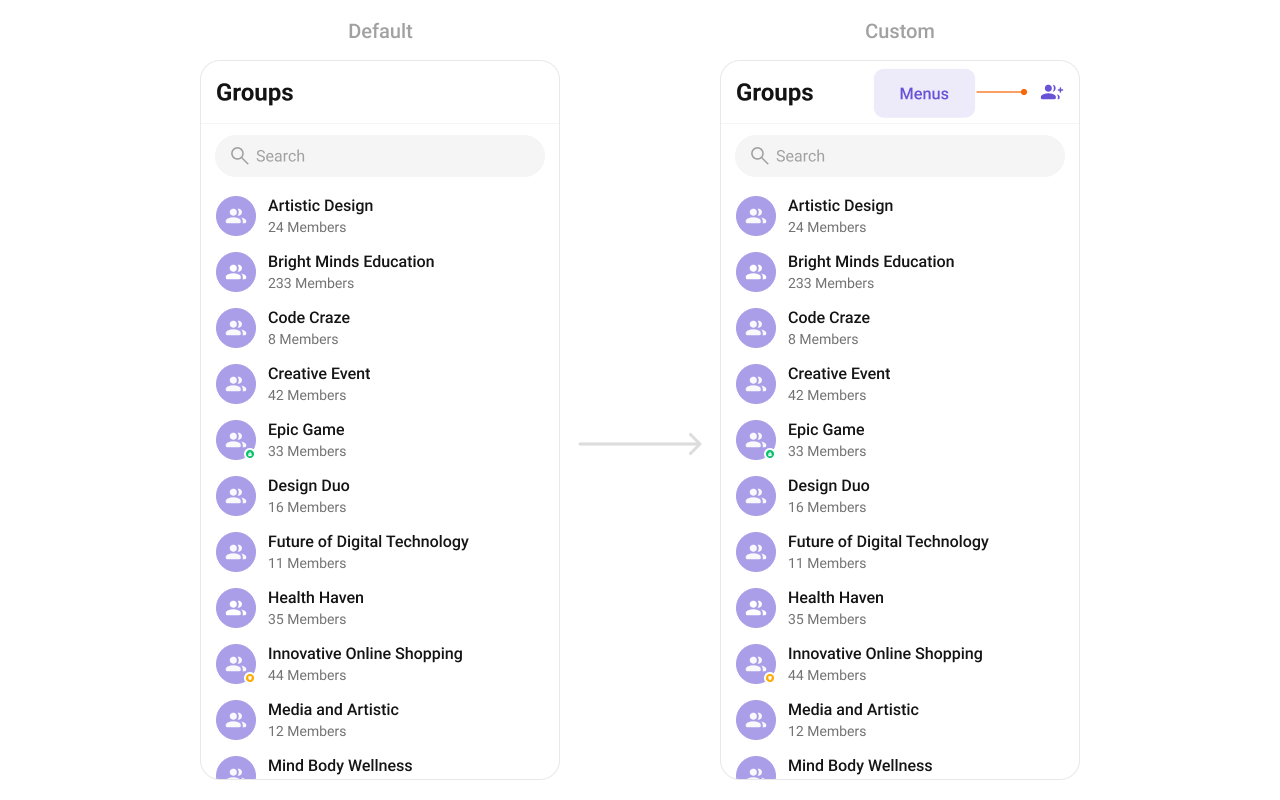 You need to create a `overflow_menu_layout.xml` as a custom view file. Which we will inflate and pass to `.setOverflowMenu()`.
```xml overflow_menu_layout.xml theme={null}
```
You inflate the view and pass it to `setOverflowMenu`. You can get the child view reference and can handle click actions.
```java YourActivity.java theme={null}
View view = getLayoutInflater().inflate(R.layout.overflow_menu_layout, null);
ImageView imgRefresh = view.findViewById(R.id.ivMenu);
imgRefresh.setOnClickListener(v -> {
Toast.makeText(requireContext(), "Clicked on Refresh", Toast.LENGTH_SHORT).show();
});
cometchatGroups.setOverflowMenu(view);
```
```kotlin YourActivity.kt theme={null}
val view: View = layoutInflater.inflate(R.layout.overflow_menu_layout, null)
val imgRefresh = view.findViewById(R.id.ivMenu)
imgRefresh.setOnClickListener { v: View? ->
Toast.makeText(requireContext(), "Clicked on Refresh", Toast.LENGTH_SHORT).show()
}
cometchatGroups.setOverflowMenu(view)
```
You need to create a `overflow_menu_layout.xml` as a custom view file. Which we will inflate and pass to `.setOverflowMenu()`.
```xml overflow_menu_layout.xml theme={null}
```
You inflate the view and pass it to `setOverflowMenu`. You can get the child view reference and can handle click actions.
```java YourActivity.java theme={null}
View view = getLayoutInflater().inflate(R.layout.overflow_menu_layout, null);
ImageView imgRefresh = view.findViewById(R.id.ivMenu);
imgRefresh.setOnClickListener(v -> {
Toast.makeText(requireContext(), "Clicked on Refresh", Toast.LENGTH_SHORT).show();
});
cometchatGroups.setOverflowMenu(view);
```
```kotlin YourActivity.kt theme={null}
val view: View = layoutInflater.inflate(R.layout.overflow_menu_layout, null)
val imgRefresh = view.findViewById(R.id.ivMenu)
imgRefresh.setOnClickListener { v: View? ->
Toast.makeText(requireContext(), "Clicked on Refresh", Toast.LENGTH_SHORT).show()
}
cometchatGroups.setOverflowMenu(view)
```