> ## Documentation Index
> Fetch the complete documentation index at: https://cometchat-22654f5b-feature-react-native-sdk-quotedmessage-a.mintlify.site/llms.txt
> Use this file to discover all available pages before exploring further.
# Message Composer
## Overview
MessageComposer is a [Component](/ui-kit/android/components-overview#components) that enables users to write and send a variety of messages, including text, image, video, and custom messages.
Features such as **Live Reaction**, **Attachments**, and **Message Editing** are also supported by it.
 ## Usage
### Integration
The following code snippet illustrates how you can directly incorporate the MessageComposer component into your `layout.xml` file.
```python theme={null}
```
The MessageComposer is responsible for managing runtime permissions. To ensure the **ActivityResultLauncher** is properly initialized, its object should be created in the the **onCreate** state of an activity. To ensure that the composer is loaded within the fragment, it is important to make sure that the fragment is loaded in the `onCreate` state of the activity.
### Actions
[Actions](/ui-kit/android/components-overview#actions) dictate how a component functions. They are divided into two types: Predefined and User-defined. You can override either type, allowing you to tailor the behavior of the component to fit your specific needs.
##### setOnSendButtonClick
The `OnSendButtonClick` event gets activated when the send message button is clicked. It has a predefined function of sending messages entered in the composer `EditText`. However, you can overide this action with the following code snippet.
```java theme={null}
messageComposer.setOnSendButtonClick(new CometChatMessageComposer.SendButtonClick() {
@Override
public void onClick(Context context, BaseMessage baseMessage) {
Toast.makeText(context, "OnSendButtonClicked ..", Toast.LENGTH_SHORT).show();
}
});
```
```kotlin theme={null}
messageComposer.setOnSendButtonClick(object : CometChatMessageComposer.SendButtonClick {
override fun onClick(context: Context, baseMessage: BaseMessage) {
Toast.makeText(context, "OnSendButtonClicked ..", Toast.LENGTH_SHORT).show()
}
})
```
##### setOnError
This action doesn't change the behavior of the component but rather listens for any errors that occur in the MessageList component.
```java YourActivity.java theme={null}
messageComposer.setOnError(new OnError() {
@Override
public void onError(Context context, CometChatException e) {
//Your Exception Handling code.
}
});
```
```kotlin YourActivity.kt theme={null}
messageComposer.setOnError(object : OnError {
override fun onError(context: Context, e: CometChatException) {
// Your Exception Handling code.
}
})
```
##### setOnTextChangedListener
Function triggered whenever the message input's text value changes, enabling dynamic text handling.
```java YourActivity.java theme={null}
messageComposer.setOnTextChangedListener(new CometChatTextWatcher() {
@Override
public void onTextChanged(CharSequence charSequence, int start, int before, int count) {
}
@Override
public void beforeTextChanged(CharSequence s, int start, int count, int after) {
}
@Override
public void afterTextChanged(Editable editable) {
}
});
```
```kotlin YourActivity.kt theme={null}
messageComposer.setOnTextChangedListener(object : CometChatTextWatcher() {
override fun onTextChanged(charSequence: CharSequence, start: Int, before: Int, count: Int) {
}
override fun beforeTextChanged(s: CharSequence, start: Int, count: Int, after: Int) {
}
override fun afterTextChanged(editable: Editable) {
}
})
```
***
### Filters
MessageComposer component does not have any available filters.
***
### Events
[Events](/ui-kit/android/components-overview#events) are emitted by a `Component`. By using event you can extend existing functionality. Being global events, they can be applied in Multiple Locations and are capable of being Added or Removed.
The MessageComposer Component does not emit any events of its own.
***
## Customization
To fit your app's design requirements, you can customize the appearance of the MessageComposer component. We provide exposed methods that allow you to modify the experience and behavior according to your specific needs.
### Style
Using Style you can customize the look and feel of the component in your app, These parameters typically control elements such as the color, size, shape, and fonts used within the component.
## Usage
### Integration
The following code snippet illustrates how you can directly incorporate the MessageComposer component into your `layout.xml` file.
```python theme={null}
```
The MessageComposer is responsible for managing runtime permissions. To ensure the **ActivityResultLauncher** is properly initialized, its object should be created in the the **onCreate** state of an activity. To ensure that the composer is loaded within the fragment, it is important to make sure that the fragment is loaded in the `onCreate` state of the activity.
### Actions
[Actions](/ui-kit/android/components-overview#actions) dictate how a component functions. They are divided into two types: Predefined and User-defined. You can override either type, allowing you to tailor the behavior of the component to fit your specific needs.
##### setOnSendButtonClick
The `OnSendButtonClick` event gets activated when the send message button is clicked. It has a predefined function of sending messages entered in the composer `EditText`. However, you can overide this action with the following code snippet.
```java theme={null}
messageComposer.setOnSendButtonClick(new CometChatMessageComposer.SendButtonClick() {
@Override
public void onClick(Context context, BaseMessage baseMessage) {
Toast.makeText(context, "OnSendButtonClicked ..", Toast.LENGTH_SHORT).show();
}
});
```
```kotlin theme={null}
messageComposer.setOnSendButtonClick(object : CometChatMessageComposer.SendButtonClick {
override fun onClick(context: Context, baseMessage: BaseMessage) {
Toast.makeText(context, "OnSendButtonClicked ..", Toast.LENGTH_SHORT).show()
}
})
```
##### setOnError
This action doesn't change the behavior of the component but rather listens for any errors that occur in the MessageList component.
```java YourActivity.java theme={null}
messageComposer.setOnError(new OnError() {
@Override
public void onError(Context context, CometChatException e) {
//Your Exception Handling code.
}
});
```
```kotlin YourActivity.kt theme={null}
messageComposer.setOnError(object : OnError {
override fun onError(context: Context, e: CometChatException) {
// Your Exception Handling code.
}
})
```
##### setOnTextChangedListener
Function triggered whenever the message input's text value changes, enabling dynamic text handling.
```java YourActivity.java theme={null}
messageComposer.setOnTextChangedListener(new CometChatTextWatcher() {
@Override
public void onTextChanged(CharSequence charSequence, int start, int before, int count) {
}
@Override
public void beforeTextChanged(CharSequence s, int start, int count, int after) {
}
@Override
public void afterTextChanged(Editable editable) {
}
});
```
```kotlin YourActivity.kt theme={null}
messageComposer.setOnTextChangedListener(object : CometChatTextWatcher() {
override fun onTextChanged(charSequence: CharSequence, start: Int, before: Int, count: Int) {
}
override fun beforeTextChanged(s: CharSequence, start: Int, count: Int, after: Int) {
}
override fun afterTextChanged(editable: Editable) {
}
})
```
***
### Filters
MessageComposer component does not have any available filters.
***
### Events
[Events](/ui-kit/android/components-overview#events) are emitted by a `Component`. By using event you can extend existing functionality. Being global events, they can be applied in Multiple Locations and are capable of being Added or Removed.
The MessageComposer Component does not emit any events of its own.
***
## Customization
To fit your app's design requirements, you can customize the appearance of the MessageComposer component. We provide exposed methods that allow you to modify the experience and behavior according to your specific needs.
### Style
Using Style you can customize the look and feel of the component in your app, These parameters typically control elements such as the color, size, shape, and fonts used within the component.
 ```html theme={null}
```
```html theme={null}
```
```java theme={null}
cometChatMessageComposer.setStyle(R.style.CustomMessageComposerStyle);
```
```kotlin theme={null}
cometChatMessageComposer.setStyle(R.style.CustomMessageComposerStyle)
```
To know more such attributes, visit the [attributes file](https://github.com/cometchat/cometchat-uikit-android/blob/v5/chatuikit/src/main/res/values/attr_cometchat_message_composer.xml).
***
### Functionality
These are a set of small functional customizations that allow you to fine-tune the overall experience of the component. With these, you can change text, set custom icons, and toggle the visibility of UI elements.
Below is a list of customizations along with corresponding code snippets
| Property | Description | Code |
| ---------------------------------------------- | ----------------------------------------------------------------------------------------------------------------------------------------------------------------------------------------------------------------------------------------------- | ----------------------------------------------------------- |
| **User** | Used to pass user object of which header specific details will be shown | `.setUser(user)` |
| **Group** | Used to pass group object of which header specific details will be shown | `.setGroup(Group)` |
| **disableTypingEvents** | Used to disable/enable typing events , default false | `.disableTypingEvents(boolean)` |
| **disableSoundForMessages** | Used to toggle sound for outgoing messages | `.disableSoundForMessages(boolean)` |
| **setInitialComposerText** | Used to set predefined text | `.setInitialComposerText("Your_Text")` |
| **setMaxLine** | Maximum lines allowed to increase in the input field | `.setMaxLine(int)` |
| **setAuxiliaryButtonAlignment** | controls position auxiliary button view , can be **left** or **right** . default **right** | `.setAuxiliaryButtonAlignment(AuxiliaryButtonsAlignment)` |
| **setDisableMentions** | Sets whether mentions in text should be disabled. Processes the text formatters If there are text formatters available and the disableMentions flag is set to true, it removes any formatters that are instances of CometChatMentionsFormatter. | `.setDisableMentions(true);` |
| **setCustomSoundForMessages** | Used to give custom sounds to outgoing messages | `.setCustomSoundForMessages(String)` |
| **setAttachmentButtonVisibility** | Hides the attachment button in the composer | `.setAttachmentButtonVisibility(View.VISIBLE)` |
| **setStickersButtonVisibility** | Hides the stickers button in the composer | `.setStickersButtonVisibility(View.GONE)` |
| **setSendButtonVisibility** | Hides the send button in the composer | `.setSendButtonVisibility(View.VISIBLE)` |
| **setCameraAttachmentOptionVisibility** | Controls whether camera attachments are allowed | `.setCameraAttachmentOptionVisibility(View.VISIBLE)` |
| **setImageAttachmentOptionVisibility** | Controls whether image attachments are allowed | `.setImageAttachmentOptionVisibility(View.VISIBLE)` |
| **setVideoAttachmentOptionVisibility** | Controls whether video attachments are allowed | `.setVideoAttachmentOptionVisibility(View.VISIBLE)` |
| **setAudioAttachmentOptionVisibility** | Controls whether audio attachments are allowed | `.setAudioAttachmentOptionVisibility(View.VISIBLE)` |
| **setFileAttachmentOptionVisibility** | Controls whether file attachments are allowed | `.setFileAttachmentOptionVisibility(View.VISIBLE)` |
| **setPollAttachmentOptionVisibility** | Controls whether polls can be shared | `.setPollAttachmentOptionVisibility(View.VISIBLE)` |
| **setCollaborativeDocumentOptionVisibility** | Controls whether collaborative documents can be shared | `.setCollaborativeDocumentOptionVisibility(View.VISIBLE)` |
| **setCollaborativeWhiteboardOptionVisibility** | Controls whether collaborative whiteboards can be shared | `.setCollaborativeWhiteboardOptionVisibility(View.VISIBLE)` |
***
### Advanced
For advanced-level customization, you can set custom views to the component. This lets you tailor each aspect of the component to fit your exact needs and application aesthetics. You can create and define your views, layouts, and UI elements and then incorporate those into the component.
***
#### setTextFormatters
Assigns the list of text formatters. If the provided list is not null, it sets the list. Otherwise, it assigns the default text formatters retrieved from the data source. To configure the existing Mentions look and feel check out [CometChatMentionsFormatter](/ui-kit/android/mentions-formatter-guide)
**Example**
```html theme={null}
```
```html theme={null}
```
```java theme={null}
cometChatMessageComposer.setStyle(R.style.CustomMessageComposerStyle);
```
```kotlin theme={null}
cometChatMessageComposer.setStyle(R.style.CustomMessageComposerStyle)
```
To know more such attributes, visit the [attributes file](https://github.com/cometchat/cometchat-uikit-android/blob/v5/chatuikit/src/main/res/values/attr_cometchat_message_composer.xml).
***
### Functionality
These are a set of small functional customizations that allow you to fine-tune the overall experience of the component. With these, you can change text, set custom icons, and toggle the visibility of UI elements.
Below is a list of customizations along with corresponding code snippets
| Property | Description | Code |
| ---------------------------------------------- | ----------------------------------------------------------------------------------------------------------------------------------------------------------------------------------------------------------------------------------------------- | ----------------------------------------------------------- |
| **User** | Used to pass user object of which header specific details will be shown | `.setUser(user)` |
| **Group** | Used to pass group object of which header specific details will be shown | `.setGroup(Group)` |
| **disableTypingEvents** | Used to disable/enable typing events , default false | `.disableTypingEvents(boolean)` |
| **disableSoundForMessages** | Used to toggle sound for outgoing messages | `.disableSoundForMessages(boolean)` |
| **setInitialComposerText** | Used to set predefined text | `.setInitialComposerText("Your_Text")` |
| **setMaxLine** | Maximum lines allowed to increase in the input field | `.setMaxLine(int)` |
| **setAuxiliaryButtonAlignment** | controls position auxiliary button view , can be **left** or **right** . default **right** | `.setAuxiliaryButtonAlignment(AuxiliaryButtonsAlignment)` |
| **setDisableMentions** | Sets whether mentions in text should be disabled. Processes the text formatters If there are text formatters available and the disableMentions flag is set to true, it removes any formatters that are instances of CometChatMentionsFormatter. | `.setDisableMentions(true);` |
| **setCustomSoundForMessages** | Used to give custom sounds to outgoing messages | `.setCustomSoundForMessages(String)` |
| **setAttachmentButtonVisibility** | Hides the attachment button in the composer | `.setAttachmentButtonVisibility(View.VISIBLE)` |
| **setStickersButtonVisibility** | Hides the stickers button in the composer | `.setStickersButtonVisibility(View.GONE)` |
| **setSendButtonVisibility** | Hides the send button in the composer | `.setSendButtonVisibility(View.VISIBLE)` |
| **setCameraAttachmentOptionVisibility** | Controls whether camera attachments are allowed | `.setCameraAttachmentOptionVisibility(View.VISIBLE)` |
| **setImageAttachmentOptionVisibility** | Controls whether image attachments are allowed | `.setImageAttachmentOptionVisibility(View.VISIBLE)` |
| **setVideoAttachmentOptionVisibility** | Controls whether video attachments are allowed | `.setVideoAttachmentOptionVisibility(View.VISIBLE)` |
| **setAudioAttachmentOptionVisibility** | Controls whether audio attachments are allowed | `.setAudioAttachmentOptionVisibility(View.VISIBLE)` |
| **setFileAttachmentOptionVisibility** | Controls whether file attachments are allowed | `.setFileAttachmentOptionVisibility(View.VISIBLE)` |
| **setPollAttachmentOptionVisibility** | Controls whether polls can be shared | `.setPollAttachmentOptionVisibility(View.VISIBLE)` |
| **setCollaborativeDocumentOptionVisibility** | Controls whether collaborative documents can be shared | `.setCollaborativeDocumentOptionVisibility(View.VISIBLE)` |
| **setCollaborativeWhiteboardOptionVisibility** | Controls whether collaborative whiteboards can be shared | `.setCollaborativeWhiteboardOptionVisibility(View.VISIBLE)` |
***
### Advanced
For advanced-level customization, you can set custom views to the component. This lets you tailor each aspect of the component to fit your exact needs and application aesthetics. You can create and define your views, layouts, and UI elements and then incorporate those into the component.
***
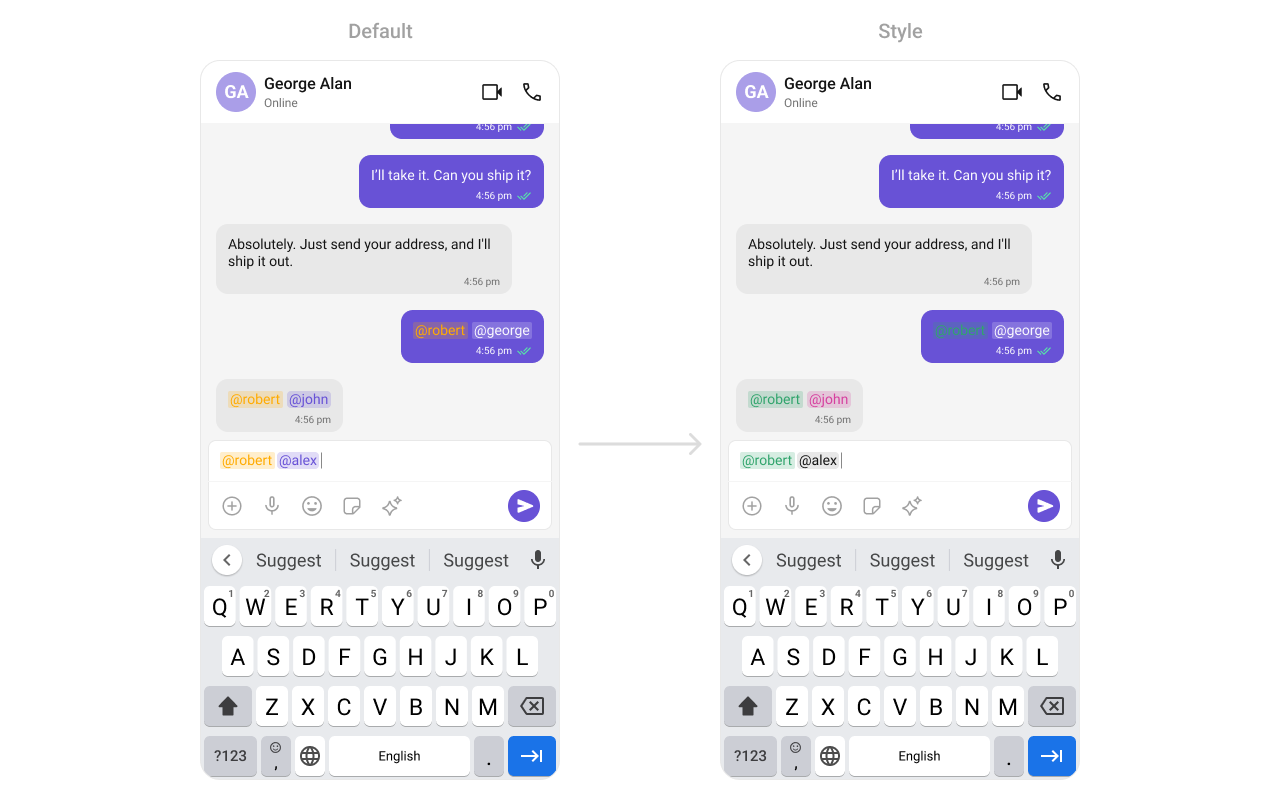
#### setTextFormatters
Assigns the list of text formatters. If the provided list is not null, it sets the list. Otherwise, it assigns the default text formatters retrieved from the data source. To configure the existing Mentions look and feel check out [CometChatMentionsFormatter](/ui-kit/android/mentions-formatter-guide)
**Example**
 ```xml themes.xml theme={null}
```
```java theme={null}
// Initialize CometChatMentionsFormatter
CometChatMentionsFormatter mentionFormatter = new CometChatMentionsFormatter(context);
// set style to customize composer mention text
mentionFormatter.setMessageComposerMentionTextStyle(context, R.style.CustomMessageComposerMentionsStyle);
// This can be passed as an array of formatter in CometChatMessageComposer by using setTextFormatters method.
List textFormatters = new ArrayList<>();
textFormatters.add(mentionFormatter);
messageComposer.setTextFormatters(textFormatters);
```
```kotlin theme={null}
// Initialize CometChatMentionsFormatter
val mentionFormatter = CometChatMentionsFormatter(context)
// set style to customize composer mention text
mentionFormatter.setMessageComposerMentionTextStyle(context, R.style.CustomMessageComposerMentionsStyle)
// This can be passed as an array of formatter in CometChatMessageComposer by using setTextFormatters method.
val textFormatters: MutableList = ArrayList()
textFormatters.add(mentionFormatter)
messageComposer.setTextFormatters(textFormatters)
```
#### setAttachmentOptions
By using `setAttachmentOptions()`, you can set a list of custom `MessageComposerActions` for the MessageComposer Component. This will override the existing list of `MessageComposerActions`.
```java theme={null}
cometChatMessageComposer.setAttachmentOptions()
```
```kotlin theme={null}
cometChatMessageComposer.setAttachmentOptions()
```
**Example**
```xml themes.xml theme={null}
```
```java theme={null}
// Initialize CometChatMentionsFormatter
CometChatMentionsFormatter mentionFormatter = new CometChatMentionsFormatter(context);
// set style to customize composer mention text
mentionFormatter.setMessageComposerMentionTextStyle(context, R.style.CustomMessageComposerMentionsStyle);
// This can be passed as an array of formatter in CometChatMessageComposer by using setTextFormatters method.
List textFormatters = new ArrayList<>();
textFormatters.add(mentionFormatter);
messageComposer.setTextFormatters(textFormatters);
```
```kotlin theme={null}
// Initialize CometChatMentionsFormatter
val mentionFormatter = CometChatMentionsFormatter(context)
// set style to customize composer mention text
mentionFormatter.setMessageComposerMentionTextStyle(context, R.style.CustomMessageComposerMentionsStyle)
// This can be passed as an array of formatter in CometChatMessageComposer by using setTextFormatters method.
val textFormatters: MutableList = ArrayList()
textFormatters.add(mentionFormatter)
messageComposer.setTextFormatters(textFormatters)
```
#### setAttachmentOptions
By using `setAttachmentOptions()`, you can set a list of custom `MessageComposerActions` for the MessageComposer Component. This will override the existing list of `MessageComposerActions`.
```java theme={null}
cometChatMessageComposer.setAttachmentOptions()
```
```kotlin theme={null}
cometChatMessageComposer.setAttachmentOptions()
```
**Example**
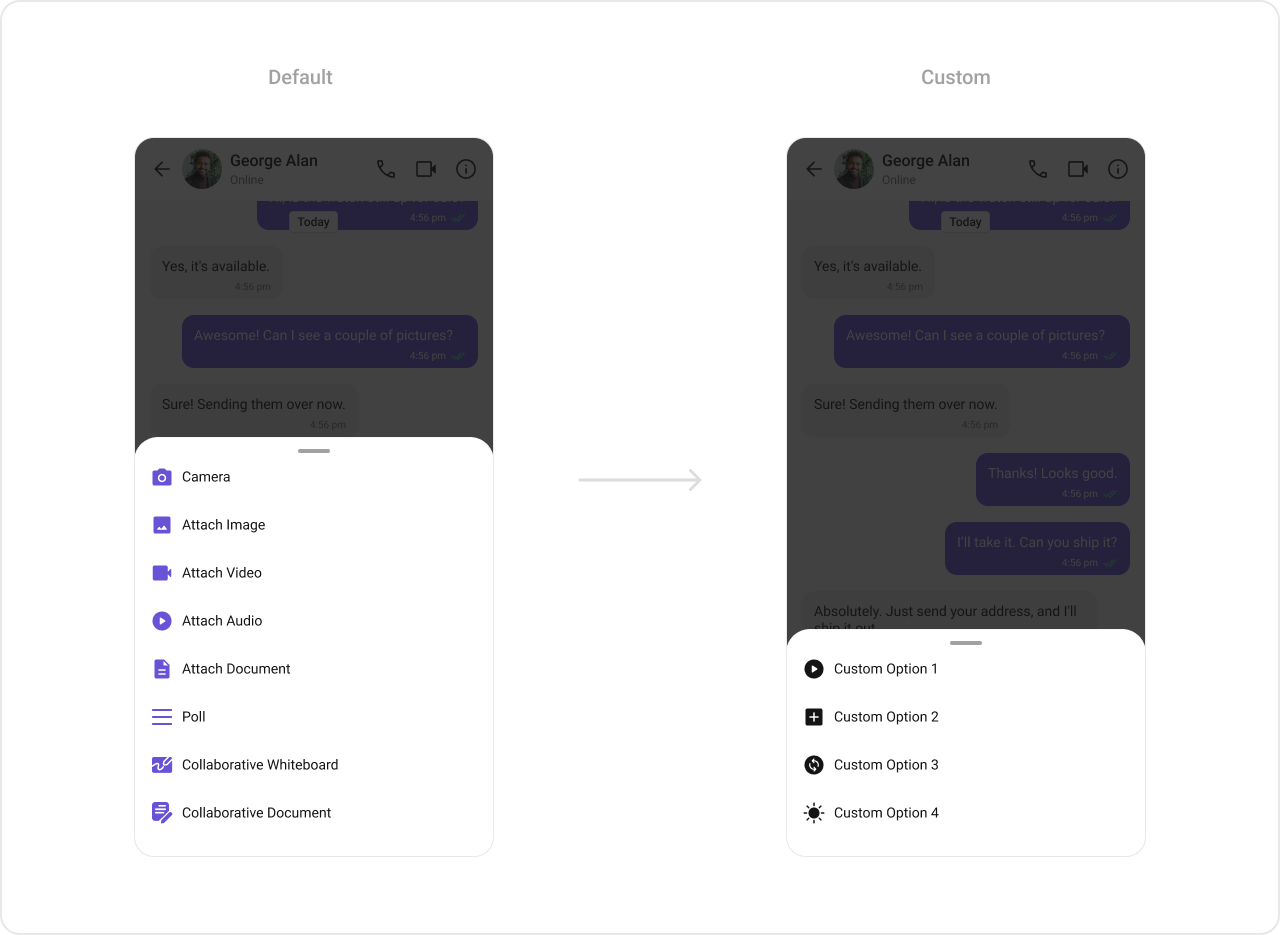 In this example, we are overriding the existing MessageComposerActions List with Capture Photo, Go Live & Payments actions.
```java theme={null}
List actionList = new ArrayList<>();
CometChatMessageComposerAction action1 = new CometChatMessageComposerAction();
action1.setTitle("Custom Option 1");
action1.setIcon(R.drawable.ic_cp_1);
action1.setOnClick(new OnClick() {
@Override
public void onClick() {
Toast.makeText(context, "Custom Option 1 !!!", Toast.LENGTH_SHORT).show();
}
});
actionList.add(action1);
CometChatMessageComposerAction action2 = new CometChatMessageComposerAction();
action2.setTitle("Custom Option 2");
action2.setIcon(R.drawable.ic_cp_2);
action2.setOnClick(new OnClick() {
@Override
public void onClick() {
Toast.makeText(context, "Custom Option 2 !!!", Toast.LENGTH_SHORT).show();
}
});
actionList.add(action2);
CometChatMessageComposerAction action3 = new CometChatMessageComposerAction();
action3.setTitle("Custom Option 3");
action3.setIcon(R.drawable.ic_cp_3);
action3.setOnClick(new OnClick() {
@Override
public void onClick() {
Toast.makeText(context, "Custom Option 3 !!!", Toast.LENGTH_SHORT).show();
}
});
actionList.add(action3);
CometChatMessageComposerAction action4 = new CometChatMessageComposerAction();
action4.setTitle("Custom Option 4");
action4.setIcon(R.drawable.ic_cp_4);
action4.setOnClick(new OnClick() {
@Override
public void onClick() {
Toast.makeText(context, "Custom Option 4 !!!", Toast.LENGTH_SHORT).show();
}
});
actionList.add(action4);
cometChatMessageComposer.setAttachmentOptions(actionList);
```
```kotlin theme={null}
val actionList = ArrayList()
val action1 = CometChatMessageComposerAction()
action1.title = "Custom Option 1"
action1.icon = R.drawable.ic_cp_1
action1.onClick = {
Toast.makeText(context, "Custom Option 1 !!!", Toast.LENGTH_SHORT).show()
}
actionList.add(action1)
val action2 = CometChatMessageComposerAction()
action2.title = "Custom Option 2"
action2.icon = R.drawable.ic_cp_2
action2.onClick = {
Toast.makeText(context, "Custom Option 2 !!!", Toast.LENGTH_SHORT).show()
}
actionList.add(action2)
val action3 = CometChatMessageComposerAction()
action3.title = "Custom Option 3"
action3.icon = R.drawable.ic_cp_3
action3.onClick = {
Toast.makeText(context, "Custom Option 2 !!!", Toast.LENGTH_SHORT).show()
}
actionList.add(action3)
val action4 = CometChatMessageComposerAction()
action4.title = "Custom Option 4"
action4.icon = R.drawable.ic_cp_4
action4.onClick = {
Toast.makeText(context, "Custom Option 4 !!!", Toast.LENGTH_SHORT).show()
}
actionList.add(action4)
cometChatMessageComposer.setAttachmentOptions(actionList)
```
***
#### setAuxiliaryButtonView
You can insert a custom view into the MessageComposer component to add additional functionality using the following method.
```java theme={null}
cometChatMessageComposer.setAuxiliaryButtonView()
```
```kotlin theme={null}
cometChatMessageComposer.setAuxiliaryButtonView()
```
Please note that the MessageComposer Component utilizes the AuxiliaryButton to provide sticker functionality. Overriding the AuxiliaryButton will subsequently replace the sticker functionality.
**Example**
In this example, we are overriding the existing MessageComposerActions List with Capture Photo, Go Live & Payments actions.
```java theme={null}
List actionList = new ArrayList<>();
CometChatMessageComposerAction action1 = new CometChatMessageComposerAction();
action1.setTitle("Custom Option 1");
action1.setIcon(R.drawable.ic_cp_1);
action1.setOnClick(new OnClick() {
@Override
public void onClick() {
Toast.makeText(context, "Custom Option 1 !!!", Toast.LENGTH_SHORT).show();
}
});
actionList.add(action1);
CometChatMessageComposerAction action2 = new CometChatMessageComposerAction();
action2.setTitle("Custom Option 2");
action2.setIcon(R.drawable.ic_cp_2);
action2.setOnClick(new OnClick() {
@Override
public void onClick() {
Toast.makeText(context, "Custom Option 2 !!!", Toast.LENGTH_SHORT).show();
}
});
actionList.add(action2);
CometChatMessageComposerAction action3 = new CometChatMessageComposerAction();
action3.setTitle("Custom Option 3");
action3.setIcon(R.drawable.ic_cp_3);
action3.setOnClick(new OnClick() {
@Override
public void onClick() {
Toast.makeText(context, "Custom Option 3 !!!", Toast.LENGTH_SHORT).show();
}
});
actionList.add(action3);
CometChatMessageComposerAction action4 = new CometChatMessageComposerAction();
action4.setTitle("Custom Option 4");
action4.setIcon(R.drawable.ic_cp_4);
action4.setOnClick(new OnClick() {
@Override
public void onClick() {
Toast.makeText(context, "Custom Option 4 !!!", Toast.LENGTH_SHORT).show();
}
});
actionList.add(action4);
cometChatMessageComposer.setAttachmentOptions(actionList);
```
```kotlin theme={null}
val actionList = ArrayList()
val action1 = CometChatMessageComposerAction()
action1.title = "Custom Option 1"
action1.icon = R.drawable.ic_cp_1
action1.onClick = {
Toast.makeText(context, "Custom Option 1 !!!", Toast.LENGTH_SHORT).show()
}
actionList.add(action1)
val action2 = CometChatMessageComposerAction()
action2.title = "Custom Option 2"
action2.icon = R.drawable.ic_cp_2
action2.onClick = {
Toast.makeText(context, "Custom Option 2 !!!", Toast.LENGTH_SHORT).show()
}
actionList.add(action2)
val action3 = CometChatMessageComposerAction()
action3.title = "Custom Option 3"
action3.icon = R.drawable.ic_cp_3
action3.onClick = {
Toast.makeText(context, "Custom Option 2 !!!", Toast.LENGTH_SHORT).show()
}
actionList.add(action3)
val action4 = CometChatMessageComposerAction()
action4.title = "Custom Option 4"
action4.icon = R.drawable.ic_cp_4
action4.onClick = {
Toast.makeText(context, "Custom Option 4 !!!", Toast.LENGTH_SHORT).show()
}
actionList.add(action4)
cometChatMessageComposer.setAttachmentOptions(actionList)
```
***
#### setAuxiliaryButtonView
You can insert a custom view into the MessageComposer component to add additional functionality using the following method.
```java theme={null}
cometChatMessageComposer.setAuxiliaryButtonView()
```
```kotlin theme={null}
cometChatMessageComposer.setAuxiliaryButtonView()
```
Please note that the MessageComposer Component utilizes the AuxiliaryButton to provide sticker functionality. Overriding the AuxiliaryButton will subsequently replace the sticker functionality.
**Example**
 In this example, we'll be adding a custom SOS button with click functionality. You'll first need to create a layout file and then inflate it inside the `.setAuxiliaryButtonView()` function.
```java theme={null}
ImageView imageView = new ImageView(this);
imageView.setImageResource(R.drawable.save_icon);
LinearLayout linearLayout = new LinearLayout(this);
linearLayout.setOrientation(LinearLayout.HORIZONTAL);
// code to get default auxiliary buttons
View view = CometChatUIKit
.getDataSource()
.getAuxiliaryOption(this,
user,
group,
binding.messageComposer.getComposerViewModel().getIdMap(),
binding.messageComposer.getAdditionParameter());
linearLayout.addView(view);
inearLayout.addView(imageView);
cometChatMessageComposer.setAuxiliaryButtonView(linearLayout);
```
```kotlin theme={null}
val imageView = ImageView(this)
imageView.setImageResource(android.R.drawable.save_icon)
val linearLayout = LinearLayout(this)
linearLayout.orientation = LinearLayout.HORIZONTAL
// code to get default auxiliary buttons
val view = CometChatUIKit
.getDataSource()
.getAuxiliaryOption(
this,
user,
group,
binding.messageComposer.composerViewModel.getIdMap(),
binding.messageComposer.additionParameter
)
linearLayout.addView(view)
linearLayout.addView(imageView)
cometChatMessageComposer.setAuxiliaryButtonView(linearLayout)
```
***
#### setSendButtonView
You can set a custom view in place of the already existing send button view. Using the following method.
```java theme={null}
cometChatMessageComposer.setSendButtonView(view);
```
```kotlin theme={null}
cometChatMessageComposer.setSendButtonView(view)
```
**Example**
In this example, we'll be adding a custom SOS button with click functionality. You'll first need to create a layout file and then inflate it inside the `.setAuxiliaryButtonView()` function.
```java theme={null}
ImageView imageView = new ImageView(this);
imageView.setImageResource(R.drawable.save_icon);
LinearLayout linearLayout = new LinearLayout(this);
linearLayout.setOrientation(LinearLayout.HORIZONTAL);
// code to get default auxiliary buttons
View view = CometChatUIKit
.getDataSource()
.getAuxiliaryOption(this,
user,
group,
binding.messageComposer.getComposerViewModel().getIdMap(),
binding.messageComposer.getAdditionParameter());
linearLayout.addView(view);
inearLayout.addView(imageView);
cometChatMessageComposer.setAuxiliaryButtonView(linearLayout);
```
```kotlin theme={null}
val imageView = ImageView(this)
imageView.setImageResource(android.R.drawable.save_icon)
val linearLayout = LinearLayout(this)
linearLayout.orientation = LinearLayout.HORIZONTAL
// code to get default auxiliary buttons
val view = CometChatUIKit
.getDataSource()
.getAuxiliaryOption(
this,
user,
group,
binding.messageComposer.composerViewModel.getIdMap(),
binding.messageComposer.additionParameter
)
linearLayout.addView(view)
linearLayout.addView(imageView)
cometChatMessageComposer.setAuxiliaryButtonView(linearLayout)
```
***
#### setSendButtonView
You can set a custom view in place of the already existing send button view. Using the following method.
```java theme={null}
cometChatMessageComposer.setSendButtonView(view);
```
```kotlin theme={null}
cometChatMessageComposer.setSendButtonView(view)
```
**Example**
 ```xml drawable/custom_send_button.xml theme={null}
```
```java theme={null}
ImageView imageView = new ImageView(this);
imageView.setImageResource(R.drawable.custom_send_button);
imageView.setOnClickListener(new View.OnClickListener() {
@Override
public void onClick(View view) {
Toast.makeText(YourActivity.this, "Custom Send Button Clicked !!!", Toast.LENGTH_SHORT).show();
}
});
cometChatMessageComposer.setSendButtonView(imageView);
```
```kotlin theme={null}
val imageView = ImageView(this)
imageView.setImageResource(R.drawable.custom_send_button)
imageView.setOnClickListener {
Toast
.makeText(this@YourActivity, "Custom Send Button Clicked !!!", Toast.LENGTH_SHORT)
.show()
}
cometChatMessageComposer.setSendButtonView(imageView)
```
***
#### HeaderView
You can set custom headerView to the MessageComposer component using the following method
```java theme={null}
cometChatMessageComposer.setHeaderView(view);
```
```kotlin theme={null}
cometChatMessageComposer.setHeaderView(view);
```
**Example**
```xml drawable/custom_send_button.xml theme={null}
```
```java theme={null}
ImageView imageView = new ImageView(this);
imageView.setImageResource(R.drawable.custom_send_button);
imageView.setOnClickListener(new View.OnClickListener() {
@Override
public void onClick(View view) {
Toast.makeText(YourActivity.this, "Custom Send Button Clicked !!!", Toast.LENGTH_SHORT).show();
}
});
cometChatMessageComposer.setSendButtonView(imageView);
```
```kotlin theme={null}
val imageView = ImageView(this)
imageView.setImageResource(R.drawable.custom_send_button)
imageView.setOnClickListener {
Toast
.makeText(this@YourActivity, "Custom Send Button Clicked !!!", Toast.LENGTH_SHORT)
.show()
}
cometChatMessageComposer.setSendButtonView(imageView)
```
***
#### HeaderView
You can set custom headerView to the MessageComposer component using the following method
```java theme={null}
cometChatMessageComposer.setHeaderView(view);
```
```kotlin theme={null}
cometChatMessageComposer.setHeaderView(view);
```
**Example**
 In the following example, we're going to apply a mock smart reply view to the MessageComposer Component using the `.setHeaderView()` method.
```xml custom_header_layout theme={null}
```
```java theme={null}
View view = getLayoutInflater().inflate(R.layout.custom_header_layout, null);
cometChatMessageComposer.setHeaderView(view);
```
```kotlin theme={null}
val view: View = LayoutInflater.from(context).inflate(R.layout.custom_header_layout, null)
cometChatMessageComposer.setHeaderView(view)
```
In the following example, we're going to apply a mock smart reply view to the MessageComposer Component using the `.setHeaderView()` method.
```xml custom_header_layout theme={null}
```
```java theme={null}
View view = getLayoutInflater().inflate(R.layout.custom_header_layout, null);
cometChatMessageComposer.setHeaderView(view);
```
```kotlin theme={null}
val view: View = LayoutInflater.from(context).inflate(R.layout.custom_header_layout, null)
cometChatMessageComposer.setHeaderView(view)
```