> ## Documentation Index
> Fetch the complete documentation index at: https://cometchat-22654f5b-feature-react-native-sdk-quotedmessage-a.mintlify.site/llms.txt
> Use this file to discover all available pages before exploring further.
# Message List
## Overview
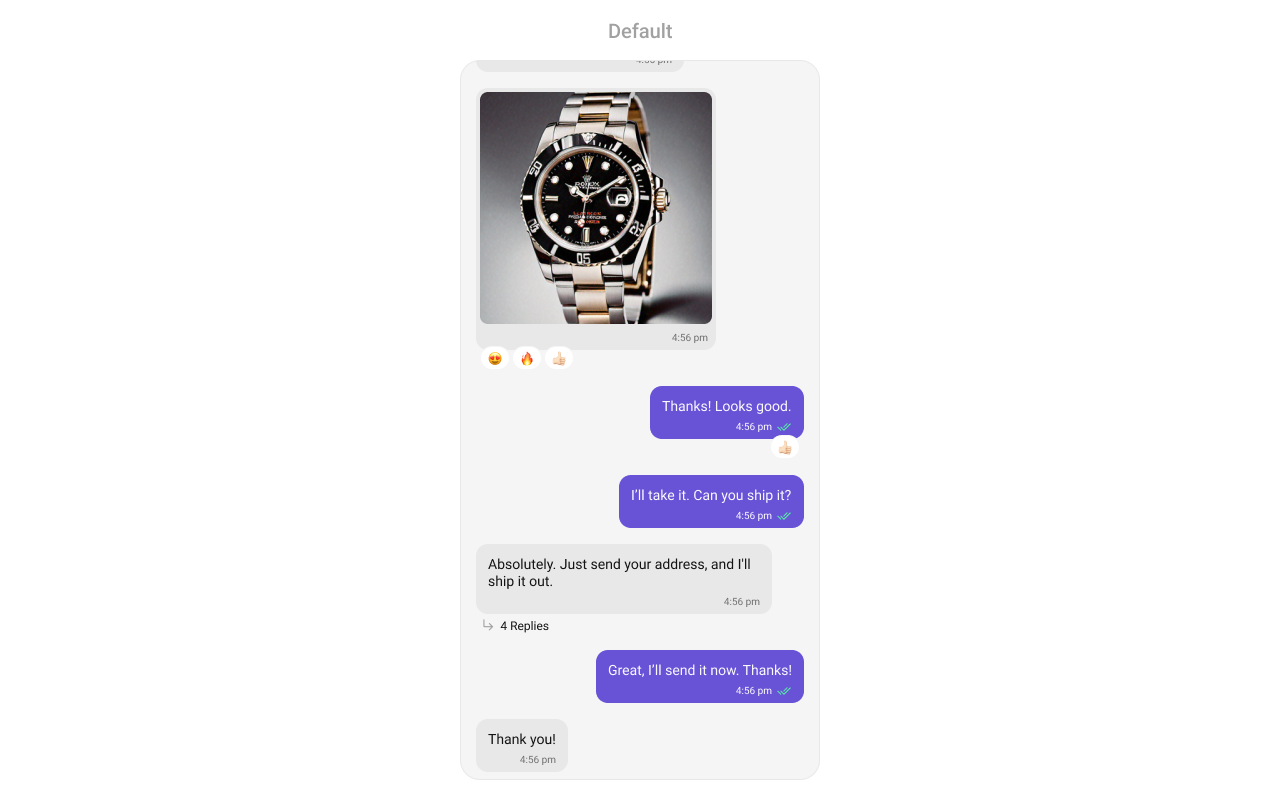
`MessageList` is a [Composite Component](/ui-kit/android/components-overview#components) that displays a list of messages and effectively manages real-time operations. It includes various types of messages such as Text Messages, Media Messages, Stickers, and more.
`MessageList` is primarily a list of the base component [MessageBubble](/ui-kit/android/message-bubble-styling#message-bubbles). The MessageBubble Component is utilized to create different types of chat bubbles depending on the message type.
 ## Usage
### Integration
The following code snippet illustrates how you can directly incorporate the MessageList component into your `layout.xml` file.
```xml theme={null}
```
Simply adding the `MessageList` component to the layout will only display the loading indicator. To fetch messages for a specific entity, you need to supplement it with `User` or `Group` Object.
***
### Actions
[Actions](/ui-kit/android/components-overview#actions) dictate how a component functions. They are divided into two types: Predefined and User-defined. You can override either type, allowing you to tailor the behavior of the component to fit your specific needs.
##### 1. onThreadRepliesClick
`onThreadRepliesClick` is triggered when you click on the threaded message bubble. The `onThreadRepliesClick` action doesn't have a predefined behavior. You can override this action using the following code snippet.
```java theme={null}
cometchatMessageList.setOnThreadRepliesClick((context, baseMessage, cometchatMessageTemplate) -> {
});
```
```kotlin theme={null}
cometchatMessageList.onThreadRepliesClick =
ThreadReplyClick { context, baseMessage, cometchatMessageTemplate -> }
```
##### 2. onError
This action doesn't change the behavior of the component but rather listens for any errors that occur in the MessageList component.
```java YourActivity.java theme={null}
cometchatMessageList.setOnError(new OnError() {
@Override
public void onError(CometChatException e) {
//Your Exception Handling code.
}
});
```
```kotlin YourActivity.kt theme={null}
cometchatMessageList.setOnError(object : OnError {
override fun onError(e: CometChatException) {
// Your Exception Handling code.
}
})
```
***
##### setOnLoad
Invoked when the list is successfully fetched and loaded, helping track component readiness.
```java YourActivity.java theme={null}
cometchatMessageList.setOnLoad(list -> {
});
```
```kotlin YourActivity.kt theme={null}
cometchatMessageList.setOnLoad(object : OnLoad {
override fun onLoad(list: MutableList?) {
}
})
```
***
##### setOnEmpty
Called when the list is empty, enabling custom handling such as showing a placeholder message.
```java YourActivity.java theme={null}
cometchatMessageList.setOnEmpty(() -> {
});
```
```kotlin YourActivity.kt theme={null}
cometchatMessageList.setOnEmpty{
}
```
***
##### onReactionLongClick
Function triggered when a user long presses on a reaction pill, allowing developers to override the default behavior.
```java YourActivity.java theme={null}
cometchatMessageList.setOnReactionLongClick((emoji, baseMessage) -> {
});
```
```kotlin YourActivity.kt theme={null}
cometchatMessageList.onReactionLongClick = OnReactionLongClick { emoji, baseMessage -> }
```
***
##### onAddMoreReactionsClick
Function triggered when a user clicks on the 'Add More Reactions' button, allowing developers to handle this action.
```java YourActivity.java theme={null}
cometchatMessageList.setOnAddMoreReactionsClick(baseMessage -> {
});
```
```kotlin YourActivity.kt theme={null}
cometchatMessageList.onAddMoreReactionsClick =
OnAddMoreReactionsClick {
}
```
***
##### onReactionClick
Function triggered when a reaction is clicked, enabling developers to customize reaction interactions.
```java YourActivity.java theme={null}
cometchatMessageList.setOnReactionClick((emoji, baseMessage) -> {
});
```
```kotlin YourActivity.kt theme={null}
cometchatMessageList.onReactionClick = OnReactionClick { emoji, baseMessage -> }
```
***
##### setOnReactionListItemClick
Function triggered when a reaction list item is clicked, allowing developers to override its behavior in CometChatReactionsList.
```java YourActivity.java theme={null}
cometchatMessageList.setOnReactionListItemClick((reaction, message) -> {
});
```
```kotlin YourActivity.kt theme={null}
cometchatMessageList.onReactionListItemClick =
OnReactionListItemClick { reaction, message -> }
```
***
***
##### setOnReactionListItemClick
Function triggered when a reaction list item is clicked, allowing developers to override its behavior in CometChatReactionsList.
```java YourActivity.java theme={null}
cometchatMessageList.setOnReactionListItemClick((reaction, message) -> {
});
```
```kotlin YourActivity.kt theme={null}
cometchatMessageList.onReactionListItemClick =
OnReactionListItemClick { reaction, message -> }
```
***
### Filters
You can adjust the `MessagesRequestBuilder` in the MessageList Component to customize your message list. Numerous options are available to alter the builder to meet your specific needs. For additional details on `MessagesRequestBuilder`, please visit [MessagesRequestBuilder](/sdk/android/additional-message-filtering).
In the example below, we are applying a filter to the messages based on a search substring and for a specific user. This means that only messages that contain the search term and are associated with the specified user will be displayed
```java theme={null}
MessagesRequest.MessagesRequestBuilder messagesRequest = new MessagesRequest.MessagesRequestBuilder()
.setSearchKeyword("your search keyword")
.setUID("user uid");
messageList.setMessagesRequestBuilder(messagesRequest);
```
```kotlin theme={null}
val messagesRequest = MessagesRequest.MessagesRequestBuilder()
.setSearchKeyword("your search keyword")
.setUID("user uid")
.build()
messageList.messagesRequestBuilder = messagesRequest
```
The following parameters in messageRequestBuilder will always be altered inside the message list
1. UID
2. GUID
3. types
4. categories
***
### Events
[Events](/ui-kit/android/components-overview#events) are emitted by a `Component`. By using event you can extend existing functionality. Being global events, they can be applied in Multiple Locations and are capable of being Added or Removed.
The MessageList Component does not emit any events of its own.
***
## Customization
To fit your app's design requirements, you can customize the appearance of the conversation component. We provide exposed methods that allow you to modify the experience and behavior according to your specific needs.
### Style
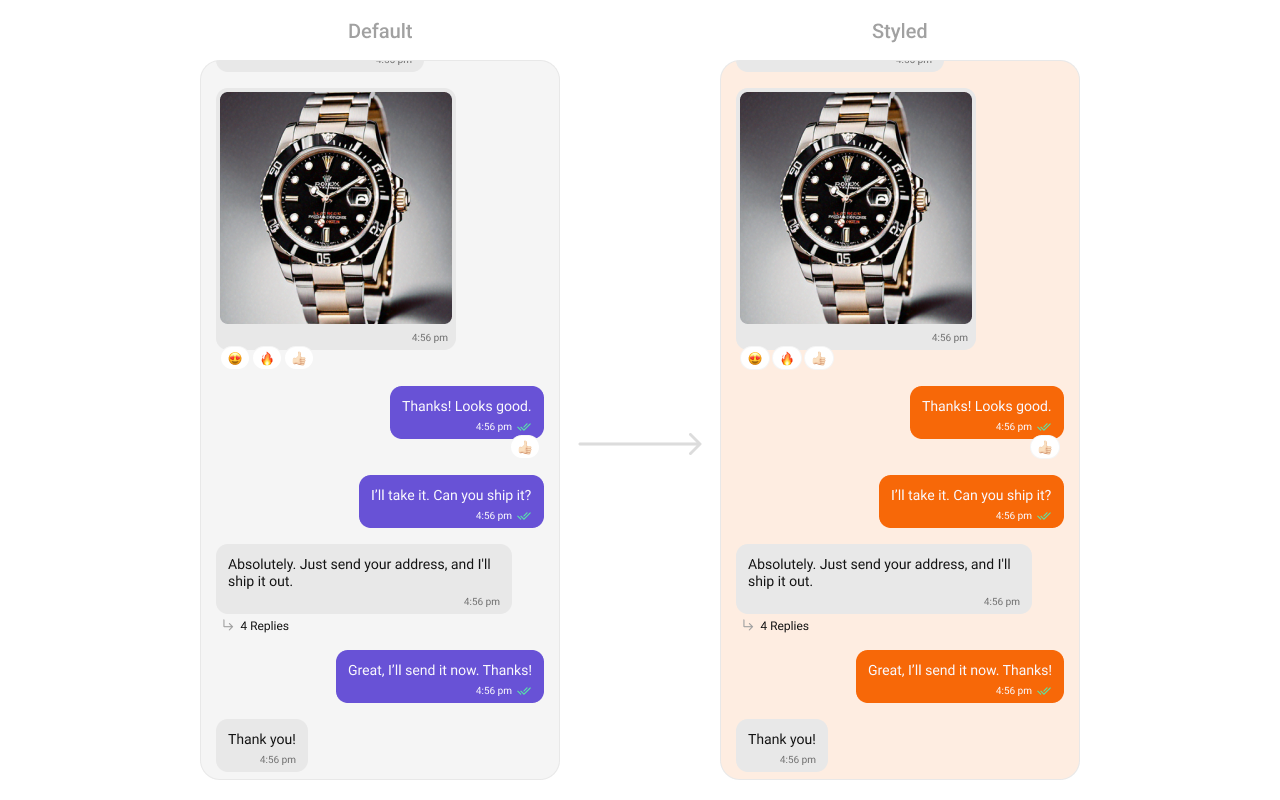
Using Style you can customize the look and feel of the component in your app, These parameters typically control elements such as the color, size, shape, and fonts used within the component.
## Usage
### Integration
The following code snippet illustrates how you can directly incorporate the MessageList component into your `layout.xml` file.
```xml theme={null}
```
Simply adding the `MessageList` component to the layout will only display the loading indicator. To fetch messages for a specific entity, you need to supplement it with `User` or `Group` Object.
***
### Actions
[Actions](/ui-kit/android/components-overview#actions) dictate how a component functions. They are divided into two types: Predefined and User-defined. You can override either type, allowing you to tailor the behavior of the component to fit your specific needs.
##### 1. onThreadRepliesClick
`onThreadRepliesClick` is triggered when you click on the threaded message bubble. The `onThreadRepliesClick` action doesn't have a predefined behavior. You can override this action using the following code snippet.
```java theme={null}
cometchatMessageList.setOnThreadRepliesClick((context, baseMessage, cometchatMessageTemplate) -> {
});
```
```kotlin theme={null}
cometchatMessageList.onThreadRepliesClick =
ThreadReplyClick { context, baseMessage, cometchatMessageTemplate -> }
```
##### 2. onError
This action doesn't change the behavior of the component but rather listens for any errors that occur in the MessageList component.
```java YourActivity.java theme={null}
cometchatMessageList.setOnError(new OnError() {
@Override
public void onError(CometChatException e) {
//Your Exception Handling code.
}
});
```
```kotlin YourActivity.kt theme={null}
cometchatMessageList.setOnError(object : OnError {
override fun onError(e: CometChatException) {
// Your Exception Handling code.
}
})
```
***
##### setOnLoad
Invoked when the list is successfully fetched and loaded, helping track component readiness.
```java YourActivity.java theme={null}
cometchatMessageList.setOnLoad(list -> {
});
```
```kotlin YourActivity.kt theme={null}
cometchatMessageList.setOnLoad(object : OnLoad {
override fun onLoad(list: MutableList?) {
}
})
```
***
##### setOnEmpty
Called when the list is empty, enabling custom handling such as showing a placeholder message.
```java YourActivity.java theme={null}
cometchatMessageList.setOnEmpty(() -> {
});
```
```kotlin YourActivity.kt theme={null}
cometchatMessageList.setOnEmpty{
}
```
***
##### onReactionLongClick
Function triggered when a user long presses on a reaction pill, allowing developers to override the default behavior.
```java YourActivity.java theme={null}
cometchatMessageList.setOnReactionLongClick((emoji, baseMessage) -> {
});
```
```kotlin YourActivity.kt theme={null}
cometchatMessageList.onReactionLongClick = OnReactionLongClick { emoji, baseMessage -> }
```
***
##### onAddMoreReactionsClick
Function triggered when a user clicks on the 'Add More Reactions' button, allowing developers to handle this action.
```java YourActivity.java theme={null}
cometchatMessageList.setOnAddMoreReactionsClick(baseMessage -> {
});
```
```kotlin YourActivity.kt theme={null}
cometchatMessageList.onAddMoreReactionsClick =
OnAddMoreReactionsClick {
}
```
***
##### onReactionClick
Function triggered when a reaction is clicked, enabling developers to customize reaction interactions.
```java YourActivity.java theme={null}
cometchatMessageList.setOnReactionClick((emoji, baseMessage) -> {
});
```
```kotlin YourActivity.kt theme={null}
cometchatMessageList.onReactionClick = OnReactionClick { emoji, baseMessage -> }
```
***
##### setOnReactionListItemClick
Function triggered when a reaction list item is clicked, allowing developers to override its behavior in CometChatReactionsList.
```java YourActivity.java theme={null}
cometchatMessageList.setOnReactionListItemClick((reaction, message) -> {
});
```
```kotlin YourActivity.kt theme={null}
cometchatMessageList.onReactionListItemClick =
OnReactionListItemClick { reaction, message -> }
```
***
***
##### setOnReactionListItemClick
Function triggered when a reaction list item is clicked, allowing developers to override its behavior in CometChatReactionsList.
```java YourActivity.java theme={null}
cometchatMessageList.setOnReactionListItemClick((reaction, message) -> {
});
```
```kotlin YourActivity.kt theme={null}
cometchatMessageList.onReactionListItemClick =
OnReactionListItemClick { reaction, message -> }
```
***
### Filters
You can adjust the `MessagesRequestBuilder` in the MessageList Component to customize your message list. Numerous options are available to alter the builder to meet your specific needs. For additional details on `MessagesRequestBuilder`, please visit [MessagesRequestBuilder](/sdk/android/additional-message-filtering).
In the example below, we are applying a filter to the messages based on a search substring and for a specific user. This means that only messages that contain the search term and are associated with the specified user will be displayed
```java theme={null}
MessagesRequest.MessagesRequestBuilder messagesRequest = new MessagesRequest.MessagesRequestBuilder()
.setSearchKeyword("your search keyword")
.setUID("user uid");
messageList.setMessagesRequestBuilder(messagesRequest);
```
```kotlin theme={null}
val messagesRequest = MessagesRequest.MessagesRequestBuilder()
.setSearchKeyword("your search keyword")
.setUID("user uid")
.build()
messageList.messagesRequestBuilder = messagesRequest
```
The following parameters in messageRequestBuilder will always be altered inside the message list
1. UID
2. GUID
3. types
4. categories
***
### Events
[Events](/ui-kit/android/components-overview#events) are emitted by a `Component`. By using event you can extend existing functionality. Being global events, they can be applied in Multiple Locations and are capable of being Added or Removed.
The MessageList Component does not emit any events of its own.
***
## Customization
To fit your app's design requirements, you can customize the appearance of the conversation component. We provide exposed methods that allow you to modify the experience and behavior according to your specific needs.
### Style
Using Style you can customize the look and feel of the component in your app, These parameters typically control elements such as the color, size, shape, and fonts used within the component.
 ```html theme={null}
```
```java theme={null}
cometChatMessageList.setStyle(R.style.CustomCometChatMessageListStyle);
```
```kotlin theme={null}
cometChatMessageList.setStyle(R.style.CustomCometChatMessageListStyle);
```
To know more such attributes, visit the [attributes file](https://github.com/cometchat/cometchat-uikit-android/blob/v5/chatuikit/src/main/res/values/attr_cometchat_message_list.xml).
### Functionality
These are a set of small functional customizations that allow you to fine-tune the overall experience of the component. With these, you can change text, set custom icons, and toggle the visibility of UI elements.
```java theme={null}
CometChatMessageList cometChatMessageList = findViewById(R.id.message_list);
cometChatMessageList.setUser(user);
cometChatMessageList.hideError(true);
cometChatMessageList.hideReceipt(true);
```
```kotlin theme={null}
val cometChatMessageList = findViewById(R.id.message_list)
cometChatMessageList.setUser(user)
cometChatMessageList.hideError(true)
cometChatMessageList.hideReceipt(true)
```
Below is a list of customizations along with corresponding code snippets
| Property | Description | Code |
| --------------------------------------------- | -------------------------------------------------------------------------------------------------------------------------- | ------------------------------------------------------------------------------------------------------------------------ |
| **setUser** | Used to pass user object of which header specific details will be shown | `.setUser(user);` |
| **setGroup** | Used to pass group object of which header specific details will be shown | `.setGroup(Group);` |
| **setAlignment** | used to set the alignmet of messages in CometChatMessageList. It can be either **leftAligned** or **standard** | `.setAlignment(UIKitConstants.MessageListAlignment);` |
| **setErrorStateVisibility** | used to toggle visibility of error state in MessageList | `.setErrorStateVisibility(View.GONE);` |
| **disableSoundForMessages** | used to enable/disable sound for incoming/outgoing messages , default false | `.disableSoundForMessages(false);` |
| **setCustomSoundForMessages** | used to set custom sound for outgoing message | `.setCustomSoundForMessages(@RawRes resource);` |
| **setAvatarVisibility** | used to toggle visibility for avatar | `.setAvatarVisibility(View.GONE);` |
| **scrollToBottomOnNewMessage** | should scroll to bottom on new message? , by default false | `.scrollToBottomOnNewMessage(true);` |
| **setReceiptsVisibility** | Used to control visibility of read receipts without disabling the functionality of marking messages as read and delivered. | `.setReceiptsVisibility(View.GONE);` |
| **setQuickReactions** | The list of quick reactions to be set.This list will replace the predefined set of reactions | `.setQuickReactions(Arrays.asList("👻","😈","🙀","🤡","❤️");` |
| **setStickyDateVisibility** | used to toggle visibility for sticky header | `.setStickyDateVisibility(View.GONE);` |
| **replyInThreadOptionVisibility** | used to toggle visibility for thread option | `.replyInThreadOptionVisibility(View.GONE);` |
| **translateMessageOptionVisibility** | used to toggle visibility for translate option | `.translateMessageOptionVisibility(View.GONE);` |
| **editMessageOptionVisibility** | used to toggle visibility for edit option | `.editMessageOptionVisibility(View.GONE);` |
| **deleteMessageOptionVisibility** | used to toggle visibility for delete option | `.deleteMessageOptionVisibility(View.GONE);` |
| **setMessageReactionOptionVisibility** | used to toggle visibility for reaction option | `.setMessageReactionOptionVisibility(View.GONE);` |
| **messagePrivatelyOptionVisibility** | used to toggle visibility for private option | `.messagePrivatelyOptionVisibility(View.GONE);` |
| **copyMessageOptionVisibility** | used to toggle visibility for copy option | `.copyMessageOptionVisibility(View.GONE);` |
| **messageInfoOptionVisibility** | used to toggle visibility for info option | `.messageInfoOptionVisibility(View.GONE);` |
| **groupActionMessageVisibility** | used to toggle visibility for action message option | `.groupActionMessageVisibility(View.GONE);` |
| **enableConversationStarters** | Controls whether conversation starters are generated in new conversations | `.enableConversationStarters(true);` |
| **setEnableConversationSummary** | Controls whether conversation summaries are enabled for the conversation list. | `.setEnableConversationSummary(true);` |
| **setUnreadMessageThreshold** | Sets the threshold for unread messages, determining when a message is marked as unread. | .setUnreadMessageThreshold(10); |
| **setSwipeToReplyEnabled** | Controls whether the swipe-to-reply functionality is enabled or disabled for messages. | .setSwipeToReplyEnabled(true); |
| **enableSmartReplies** | Enables smart replies for quick responses | `.enableSmartReplies(true);` |
| **smartRepliesKeywords** | Defines specific keywords in an incoming message that will trigger Smart Replies. | `.setAISmartRepliesKeywords(Arrays.asList("hello", "hi", "how are you", "good morning", "good evening", "good night"));` |
| **smartRepliesDelayDuration** | Sets the delay time before Smart Replies are fetched and displayed after a message is received. | `.smartRepliesDelayDuration(5000);` |
| **setAiAssistantSuggestedMessagesVisibility** | used to toggle visibility for suggested messages in case of chats with AI Assistants | `.setAiAssistantSuggestedMessagesVisibility(View.GONE);` |
| **setAIAssistantEmptyStateVisibility** | used to toggle visibility for empty chat greeting view in case of chats with AI Assistants | `.setAIAssistantEmptyStateVisibility(View.GONE);` |
| **refreshStyle** | used to refresh the style of message list | `.refreshStyle();` |
| **generateConversationSummary** | Triggers the generation of a conversation summary by fetching it from the ViewModel. | .generateConversationSummary(); |
| **setReplyOptionVisibility** | Sets the visibility of the “Reply to Message” option in the message actions menu. | .setReplyOptionVisibility(View\.VISIBLE); |
| setReportOptionVisibility | Sets the visibility of the “Report” option in the message actions menu. | .setReportOptionVisibility(View\.VISIBLE); |
***
### Advance
For advanced-level customization, you can set custom views to the component. This lets you tailor each aspect of the component to fit your exact needs and application aesthetics. You can create and define your views, layouts, and UI elements and then incorporate those into the component.
#### SetTemplate
[CometChatMessageTemplate](/ui-kit/android/message-template) is a pre-defined structure for creating message views that can be used as a starting point or blueprint for creating message views often known as message bubbles. For more information, you can refer to [CometChatMessageTemplate](/ui-kit/android/message-template).
#### setFlagReasonLocalization
Sets custom localization for flag reasons in the flag message popup.
```java theme={null}
HashMap localizationMap = new HashMap<>();
localizationMap.put("suicidal", R.string.suicidal);
binding.messageList.setFlagReasonLocalization(localizationMap);
```
```kotlin theme={null}
val localizationMap = HashMap()
localizationMap["suicidal"] = R.string.suicidal
binding.messageList.setFlagReasonLocalization(localizationMap)
```
***
#### setDateFormat
Specifies a custom format for displaying sticky date separators in the chat.
Use Cases:
* Customize date formats to match regional preferences.
* Use relative formats like "Yesterday" instead of full dates.
* Highlight weekend conversations with different styles.
```java theme={null}
messageList.setDateFormat(new SimpleDateFormat("MMM dd, yyyy",Locale.getDefault()));
```
```kotlin theme={null}
messageList.setDateFormat(SimpleDateFormat("MMM dd, yyyy",Locale.getDefault()))
```
***
#### setDateTimeFormatter
By providing a custom implementation of the DateTimeFormatterCallback, you can configure how time and date values are displayed. This ensures consistent formatting for labels such as "Today", "Yesterday", "X minutes ago", and more.
Each method in the interface corresponds to a specific case:
`time(long timestamp)` → Custom full timestamp format
`today(long timestamp)` → Called when a message is from today
`yesterday(long timestamp)` → Called for yesterday’s messages
`lastWeek(long timestamp)` → Messages from the past week
`otherDays(long timestamp)` → Older messages
`minute(long timestamp)` / `hour(long timestamp)` → Exact time unit
`minutes(long diffInMinutesFromNow, long timestamp)` → e.g., "5 minutes ago"
`hours(long diffInHourFromNow, long timestamp)` → e.g., "2 hours ago"
```java theme={null}
import java.text.SimpleDateFormat;
import java.util.Date;
import java.util.Locale;
cometchatMessageList.setDateTimeFormatter(new DateTimeFormatterCallback() {
private final SimpleDateFormat fullTimeFormatter = new SimpleDateFormat("hh:mm a", Locale.getDefault());
private final SimpleDateFormat dateFormatter = new SimpleDateFormat("dd MMM yyyy", Locale.getDefault());
@Override
public String time(long timestamp) {
return fullTimeFormatter.format(new Date(timestamp));
}
@Override
public String today(long timestamp) {
return "Today";
}
@Override
public String yesterday(long timestamp) {
return "Yesterday";
}
@Override
public String lastWeek(long timestamp) {
return "Last Week";
}
@Override
public String otherDays(long timestamp) {
return dateFormatter.format(new Date(timestamp));
}
@Override
public String minutes(long diffInMinutesFromNow, long timestamp) {
return diffInMinutesFromNow + " mins ago";
}
@Override
public String hours(long diffInHourFromNow, long timestamp) {
return diffInHourFromNow + " hrs ago";
}
});
```
```kotlin theme={null}
import java.text.SimpleDateFormat
import java.util.*
cometchatMessageList.setDateTimeFormatterCallback(object : DateTimeFormatterCallback {
private val fullTimeFormatter = SimpleDateFormat("hh:mm a", Locale.getDefault())
private val dateFormatter = SimpleDateFormat("dd MMM yyyy", Locale.getDefault())
override fun time(timestamp: Long): String {
return fullTimeFormatter.format(Date(timestamp))
}
override fun today(timestamp: Long): String {
return "Today"
}
override fun yesterday(timestamp: Long): String {
return "Yesterday"
}
override fun lastWeek(timestamp: Long): String {
return "Last Week"
}
override fun otherDays(timestamp: Long): String {
return dateFormatter.format(Date(timestamp))
}
override fun minutes(diffInMinutesFromNow: Long, timestamp: Long): String {
return "$diffInMinutesFromNow mins ago"
}
override fun hours(diffInHourFromNow: Long, timestamp: Long): String {
return "$diffInHourFromNow hrs ago"
}
});
```
***
#### setTimeFormat
Defines the format in which time appears for each message bubble.
Use Cases:
* Use 12-hour or 24-hour formats based on user preference.
* Display relative time ("Just now", "5 min ago").
* Add AM/PM indicators for clarity.
```java theme={null}
messageList.setTimeFormat(new SimpleDateFormat("hh:mm a",Locale.getDefault()));
```
```kotlin theme={null}
messageList.setTimeFormat(SimpleDateFormat("hh:mm a",Locale.getDefault()))
```
***
#### setLoadingView
Customizes the loading indicator when messages are being fetched.
Use Cases:
* Show a spinner or skeleton loader for smooth UX.
* Display a "Fetching messages..." text.
```java theme={null}
cometchatMessageList.setLoadingView(R.layout.your_loading_view);
```
```kotlin theme={null}
cometchatMessageList.loadingView = R.layout.your_loading_view
```
***
#### setEmptyView
Defines a custom view to be displayed when no messages are available.
Use Cases:
* Show a friendly message like "No messages yet. Start the conversation!".
```java theme={null}
cometchatMessageList.setEmptyView(R.layout.your_empty_view);
```
```kotlin theme={null}
cometchatMessageList.emptyView = R.layout.your_empty_view
```
***
#### setErrorView
Custom error state view displayed when fetching messages fails.
Use Cases:
* Show a retry button when an error occurs.
* Display a friendly message like "Couldn't load messages. Check your connection.".
```java theme={null}
cometchatMessageList.setErrorView(R.layout.your_empty_view);
```
```kotlin theme={null}
cometchatMessageList.errorView = R.layout.your_error_view
```
***
#### setAIAssistantEmptyChatGreetingView
Custom empty state view displayed in case of chats with AI Assistants.
Use Cases:
* Show an empty state view for chats with AI Assistants.
* Display a friendly message like "Hey, I am your AI Assistant".
```java theme={null}
cometchatMessageList.setAIAssistantEmptyChatGreetingView(R.layout.ai_assistant_empty_view);
```
```kotlin theme={null}
cometchatMessageList.setAIAssistantEmptyChatGreetingView(R.layout.ai_assistant_empty_view)
```
***
#### setAIAssistantSuggestedMessages
Sets the list of suggested messages for AI Assistant chats, allowing you to define which predefined queries or prompts are displayed to users.
Use Cases:
* Display a list of suggested messages for users to interact with the AI Assistant.
* Provide quick prompts or queries to help users start a conversation with the AI.
```java theme={null}
List aiSuggestedMessages = new ArrayList<>();
aiSuggestedMessages.add("How can I help you today?");
aiSuggestedMessages.add("Tell me more about your issue.");
aiSuggestedMessages.add("Can you provide more details?");
aiSuggestedMessages.add("What would you like to achieve?");
cometchatMessageList.setAIAssistantSuggestedMessages(aiSuggestedMessages);
```
```kotlin theme={null}
val aiSuggestedMessages = mutableListOf()
aiSuggestedMessages.add("How can I help you today?")
aiSuggestedMessages.add("Tell me more about your issue.")
aiSuggestedMessages.add("Can you provide more details?")
aiSuggestedMessages.add("What would you like to achieve?")
cometchatMessageList.setAIAssistantSuggestedMessages(aiSuggestedMessages)
```
***
#### setAiAssistantTools
Sets the available tools for the AI assistant by accepting a `HashMap` containing tool names as keys and their corresponding `ToolCallListener` as values. This allows you to define and manage the tools that the AI assistant can utilize during interactions.
Use Cases:
* Dynamically update UI elements based on tool actions.
* Enable contextual actions based on user interactions with AI tools.
```java theme={null}
HashMap toolCallListenerMap = new HashMap<>();
toolCallListenerMap.put("toolName", new ToolCallListener() {
@Override
public void call(String args) {
cometchatMessageList.setStyle(R.style.CustomCometChatMessageListStyle);
cometchatMessageList.refreshStyle();
}
});
cometchatMessageList.setAiAssistantTools(toolCallListenerMap);
```
```kotlin theme={null}
val toolCallListenerMap = HashMap()
toolCallListenerMap["toolName"] = ToolCallListener { args ->
cometchatMessageList.setStyle(R.style.CustomCometChatMessageListStyle)
cometchatMessageList.refreshStyle()
}
cometchatMessageList.setAiAssistantTools(toolCallListenerMap)
```
***
#### setStreamingSpeed
Sets the streaming speed for AI Assistant responses in ms, allowing you to control how quickly the AI's replies are displayed to the user.
Use Cases:
* Manipulate the speed of AI responses to enhance user experience.
```java theme={null}
cometchatMessageList.setStreamingSpeed(100);
```
```kotlin theme={null}
cometchatMessageList.setStreamingSpeed(100)
```
***
#### setTextFormatters
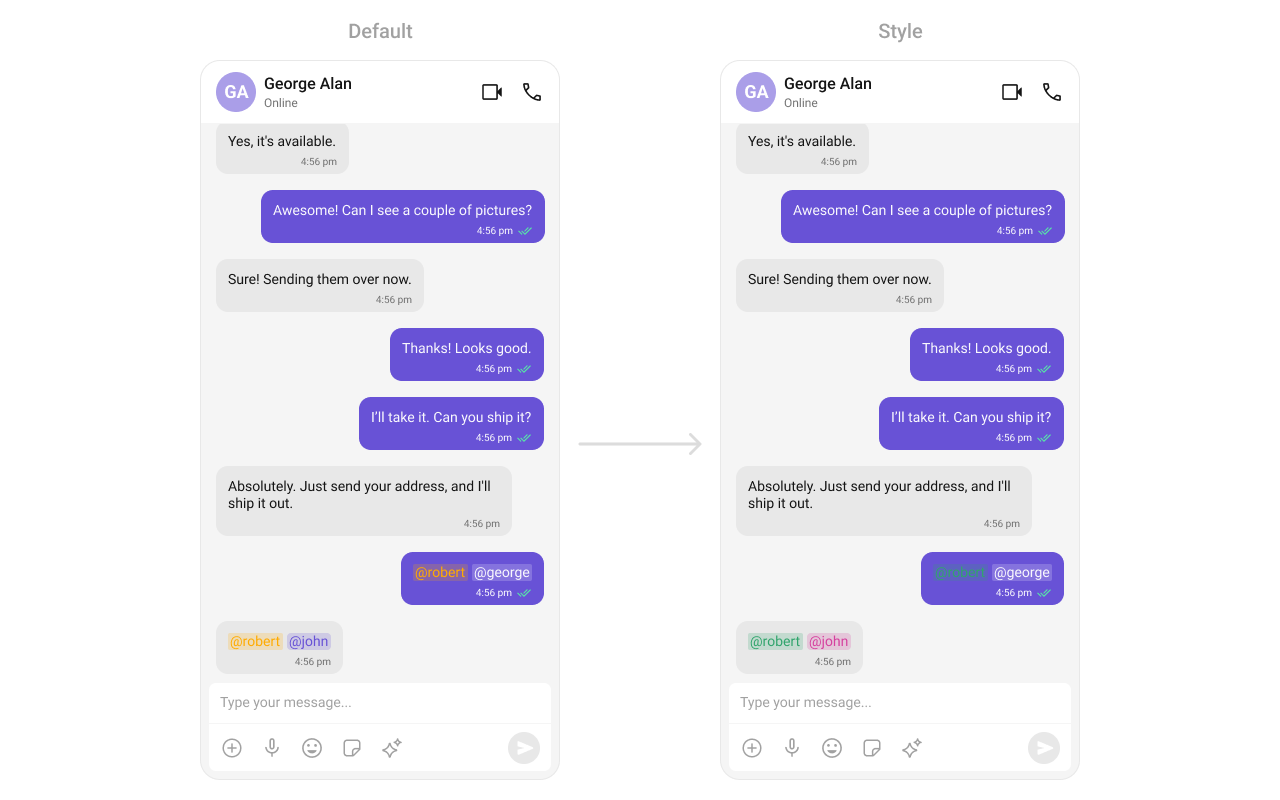
Assigns the list of text formatters. If the provided list is not null, it sets the list. Otherwise, it assigns the default text formatters retrieved from the data source. To configure the existing Mentions look and feel check out [MentionsFormatter Guide](/ui-kit/android/mentions-formatter-guide) **Example**
```html theme={null}
```
```java theme={null}
cometChatMessageList.setStyle(R.style.CustomCometChatMessageListStyle);
```
```kotlin theme={null}
cometChatMessageList.setStyle(R.style.CustomCometChatMessageListStyle);
```
To know more such attributes, visit the [attributes file](https://github.com/cometchat/cometchat-uikit-android/blob/v5/chatuikit/src/main/res/values/attr_cometchat_message_list.xml).
### Functionality
These are a set of small functional customizations that allow you to fine-tune the overall experience of the component. With these, you can change text, set custom icons, and toggle the visibility of UI elements.
```java theme={null}
CometChatMessageList cometChatMessageList = findViewById(R.id.message_list);
cometChatMessageList.setUser(user);
cometChatMessageList.hideError(true);
cometChatMessageList.hideReceipt(true);
```
```kotlin theme={null}
val cometChatMessageList = findViewById(R.id.message_list)
cometChatMessageList.setUser(user)
cometChatMessageList.hideError(true)
cometChatMessageList.hideReceipt(true)
```
Below is a list of customizations along with corresponding code snippets
| Property | Description | Code |
| --------------------------------------------- | -------------------------------------------------------------------------------------------------------------------------- | ------------------------------------------------------------------------------------------------------------------------ |
| **setUser** | Used to pass user object of which header specific details will be shown | `.setUser(user);` |
| **setGroup** | Used to pass group object of which header specific details will be shown | `.setGroup(Group);` |
| **setAlignment** | used to set the alignmet of messages in CometChatMessageList. It can be either **leftAligned** or **standard** | `.setAlignment(UIKitConstants.MessageListAlignment);` |
| **setErrorStateVisibility** | used to toggle visibility of error state in MessageList | `.setErrorStateVisibility(View.GONE);` |
| **disableSoundForMessages** | used to enable/disable sound for incoming/outgoing messages , default false | `.disableSoundForMessages(false);` |
| **setCustomSoundForMessages** | used to set custom sound for outgoing message | `.setCustomSoundForMessages(@RawRes resource);` |
| **setAvatarVisibility** | used to toggle visibility for avatar | `.setAvatarVisibility(View.GONE);` |
| **scrollToBottomOnNewMessage** | should scroll to bottom on new message? , by default false | `.scrollToBottomOnNewMessage(true);` |
| **setReceiptsVisibility** | Used to control visibility of read receipts without disabling the functionality of marking messages as read and delivered. | `.setReceiptsVisibility(View.GONE);` |
| **setQuickReactions** | The list of quick reactions to be set.This list will replace the predefined set of reactions | `.setQuickReactions(Arrays.asList("👻","😈","🙀","🤡","❤️");` |
| **setStickyDateVisibility** | used to toggle visibility for sticky header | `.setStickyDateVisibility(View.GONE);` |
| **replyInThreadOptionVisibility** | used to toggle visibility for thread option | `.replyInThreadOptionVisibility(View.GONE);` |
| **translateMessageOptionVisibility** | used to toggle visibility for translate option | `.translateMessageOptionVisibility(View.GONE);` |
| **editMessageOptionVisibility** | used to toggle visibility for edit option | `.editMessageOptionVisibility(View.GONE);` |
| **deleteMessageOptionVisibility** | used to toggle visibility for delete option | `.deleteMessageOptionVisibility(View.GONE);` |
| **setMessageReactionOptionVisibility** | used to toggle visibility for reaction option | `.setMessageReactionOptionVisibility(View.GONE);` |
| **messagePrivatelyOptionVisibility** | used to toggle visibility for private option | `.messagePrivatelyOptionVisibility(View.GONE);` |
| **copyMessageOptionVisibility** | used to toggle visibility for copy option | `.copyMessageOptionVisibility(View.GONE);` |
| **messageInfoOptionVisibility** | used to toggle visibility for info option | `.messageInfoOptionVisibility(View.GONE);` |
| **groupActionMessageVisibility** | used to toggle visibility for action message option | `.groupActionMessageVisibility(View.GONE);` |
| **enableConversationStarters** | Controls whether conversation starters are generated in new conversations | `.enableConversationStarters(true);` |
| **setEnableConversationSummary** | Controls whether conversation summaries are enabled for the conversation list. | `.setEnableConversationSummary(true);` |
| **setUnreadMessageThreshold** | Sets the threshold for unread messages, determining when a message is marked as unread. | .setUnreadMessageThreshold(10); |
| **setSwipeToReplyEnabled** | Controls whether the swipe-to-reply functionality is enabled or disabled for messages. | .setSwipeToReplyEnabled(true); |
| **enableSmartReplies** | Enables smart replies for quick responses | `.enableSmartReplies(true);` |
| **smartRepliesKeywords** | Defines specific keywords in an incoming message that will trigger Smart Replies. | `.setAISmartRepliesKeywords(Arrays.asList("hello", "hi", "how are you", "good morning", "good evening", "good night"));` |
| **smartRepliesDelayDuration** | Sets the delay time before Smart Replies are fetched and displayed after a message is received. | `.smartRepliesDelayDuration(5000);` |
| **setAiAssistantSuggestedMessagesVisibility** | used to toggle visibility for suggested messages in case of chats with AI Assistants | `.setAiAssistantSuggestedMessagesVisibility(View.GONE);` |
| **setAIAssistantEmptyStateVisibility** | used to toggle visibility for empty chat greeting view in case of chats with AI Assistants | `.setAIAssistantEmptyStateVisibility(View.GONE);` |
| **refreshStyle** | used to refresh the style of message list | `.refreshStyle();` |
| **generateConversationSummary** | Triggers the generation of a conversation summary by fetching it from the ViewModel. | .generateConversationSummary(); |
| **setReplyOptionVisibility** | Sets the visibility of the “Reply to Message” option in the message actions menu. | .setReplyOptionVisibility(View\.VISIBLE); |
| setReportOptionVisibility | Sets the visibility of the “Report” option in the message actions menu. | .setReportOptionVisibility(View\.VISIBLE); |
***
### Advance
For advanced-level customization, you can set custom views to the component. This lets you tailor each aspect of the component to fit your exact needs and application aesthetics. You can create and define your views, layouts, and UI elements and then incorporate those into the component.
#### SetTemplate
[CometChatMessageTemplate](/ui-kit/android/message-template) is a pre-defined structure for creating message views that can be used as a starting point or blueprint for creating message views often known as message bubbles. For more information, you can refer to [CometChatMessageTemplate](/ui-kit/android/message-template).
#### setFlagReasonLocalization
Sets custom localization for flag reasons in the flag message popup.
```java theme={null}
HashMap localizationMap = new HashMap<>();
localizationMap.put("suicidal", R.string.suicidal);
binding.messageList.setFlagReasonLocalization(localizationMap);
```
```kotlin theme={null}
val localizationMap = HashMap()
localizationMap["suicidal"] = R.string.suicidal
binding.messageList.setFlagReasonLocalization(localizationMap)
```
***
#### setDateFormat
Specifies a custom format for displaying sticky date separators in the chat.
Use Cases:
* Customize date formats to match regional preferences.
* Use relative formats like "Yesterday" instead of full dates.
* Highlight weekend conversations with different styles.
```java theme={null}
messageList.setDateFormat(new SimpleDateFormat("MMM dd, yyyy",Locale.getDefault()));
```
```kotlin theme={null}
messageList.setDateFormat(SimpleDateFormat("MMM dd, yyyy",Locale.getDefault()))
```
***
#### setDateTimeFormatter
By providing a custom implementation of the DateTimeFormatterCallback, you can configure how time and date values are displayed. This ensures consistent formatting for labels such as "Today", "Yesterday", "X minutes ago", and more.
Each method in the interface corresponds to a specific case:
`time(long timestamp)` → Custom full timestamp format
`today(long timestamp)` → Called when a message is from today
`yesterday(long timestamp)` → Called for yesterday’s messages
`lastWeek(long timestamp)` → Messages from the past week
`otherDays(long timestamp)` → Older messages
`minute(long timestamp)` / `hour(long timestamp)` → Exact time unit
`minutes(long diffInMinutesFromNow, long timestamp)` → e.g., "5 minutes ago"
`hours(long diffInHourFromNow, long timestamp)` → e.g., "2 hours ago"
```java theme={null}
import java.text.SimpleDateFormat;
import java.util.Date;
import java.util.Locale;
cometchatMessageList.setDateTimeFormatter(new DateTimeFormatterCallback() {
private final SimpleDateFormat fullTimeFormatter = new SimpleDateFormat("hh:mm a", Locale.getDefault());
private final SimpleDateFormat dateFormatter = new SimpleDateFormat("dd MMM yyyy", Locale.getDefault());
@Override
public String time(long timestamp) {
return fullTimeFormatter.format(new Date(timestamp));
}
@Override
public String today(long timestamp) {
return "Today";
}
@Override
public String yesterday(long timestamp) {
return "Yesterday";
}
@Override
public String lastWeek(long timestamp) {
return "Last Week";
}
@Override
public String otherDays(long timestamp) {
return dateFormatter.format(new Date(timestamp));
}
@Override
public String minutes(long diffInMinutesFromNow, long timestamp) {
return diffInMinutesFromNow + " mins ago";
}
@Override
public String hours(long diffInHourFromNow, long timestamp) {
return diffInHourFromNow + " hrs ago";
}
});
```
```kotlin theme={null}
import java.text.SimpleDateFormat
import java.util.*
cometchatMessageList.setDateTimeFormatterCallback(object : DateTimeFormatterCallback {
private val fullTimeFormatter = SimpleDateFormat("hh:mm a", Locale.getDefault())
private val dateFormatter = SimpleDateFormat("dd MMM yyyy", Locale.getDefault())
override fun time(timestamp: Long): String {
return fullTimeFormatter.format(Date(timestamp))
}
override fun today(timestamp: Long): String {
return "Today"
}
override fun yesterday(timestamp: Long): String {
return "Yesterday"
}
override fun lastWeek(timestamp: Long): String {
return "Last Week"
}
override fun otherDays(timestamp: Long): String {
return dateFormatter.format(Date(timestamp))
}
override fun minutes(diffInMinutesFromNow: Long, timestamp: Long): String {
return "$diffInMinutesFromNow mins ago"
}
override fun hours(diffInHourFromNow: Long, timestamp: Long): String {
return "$diffInHourFromNow hrs ago"
}
});
```
***
#### setTimeFormat
Defines the format in which time appears for each message bubble.
Use Cases:
* Use 12-hour or 24-hour formats based on user preference.
* Display relative time ("Just now", "5 min ago").
* Add AM/PM indicators for clarity.
```java theme={null}
messageList.setTimeFormat(new SimpleDateFormat("hh:mm a",Locale.getDefault()));
```
```kotlin theme={null}
messageList.setTimeFormat(SimpleDateFormat("hh:mm a",Locale.getDefault()))
```
***
#### setLoadingView
Customizes the loading indicator when messages are being fetched.
Use Cases:
* Show a spinner or skeleton loader for smooth UX.
* Display a "Fetching messages..." text.
```java theme={null}
cometchatMessageList.setLoadingView(R.layout.your_loading_view);
```
```kotlin theme={null}
cometchatMessageList.loadingView = R.layout.your_loading_view
```
***
#### setEmptyView
Defines a custom view to be displayed when no messages are available.
Use Cases:
* Show a friendly message like "No messages yet. Start the conversation!".
```java theme={null}
cometchatMessageList.setEmptyView(R.layout.your_empty_view);
```
```kotlin theme={null}
cometchatMessageList.emptyView = R.layout.your_empty_view
```
***
#### setErrorView
Custom error state view displayed when fetching messages fails.
Use Cases:
* Show a retry button when an error occurs.
* Display a friendly message like "Couldn't load messages. Check your connection.".
```java theme={null}
cometchatMessageList.setErrorView(R.layout.your_empty_view);
```
```kotlin theme={null}
cometchatMessageList.errorView = R.layout.your_error_view
```
***
#### setAIAssistantEmptyChatGreetingView
Custom empty state view displayed in case of chats with AI Assistants.
Use Cases:
* Show an empty state view for chats with AI Assistants.
* Display a friendly message like "Hey, I am your AI Assistant".
```java theme={null}
cometchatMessageList.setAIAssistantEmptyChatGreetingView(R.layout.ai_assistant_empty_view);
```
```kotlin theme={null}
cometchatMessageList.setAIAssistantEmptyChatGreetingView(R.layout.ai_assistant_empty_view)
```
***
#### setAIAssistantSuggestedMessages
Sets the list of suggested messages for AI Assistant chats, allowing you to define which predefined queries or prompts are displayed to users.
Use Cases:
* Display a list of suggested messages for users to interact with the AI Assistant.
* Provide quick prompts or queries to help users start a conversation with the AI.
```java theme={null}
List aiSuggestedMessages = new ArrayList<>();
aiSuggestedMessages.add("How can I help you today?");
aiSuggestedMessages.add("Tell me more about your issue.");
aiSuggestedMessages.add("Can you provide more details?");
aiSuggestedMessages.add("What would you like to achieve?");
cometchatMessageList.setAIAssistantSuggestedMessages(aiSuggestedMessages);
```
```kotlin theme={null}
val aiSuggestedMessages = mutableListOf()
aiSuggestedMessages.add("How can I help you today?")
aiSuggestedMessages.add("Tell me more about your issue.")
aiSuggestedMessages.add("Can you provide more details?")
aiSuggestedMessages.add("What would you like to achieve?")
cometchatMessageList.setAIAssistantSuggestedMessages(aiSuggestedMessages)
```
***
#### setAiAssistantTools
Sets the available tools for the AI assistant by accepting a `HashMap` containing tool names as keys and their corresponding `ToolCallListener` as values. This allows you to define and manage the tools that the AI assistant can utilize during interactions.
Use Cases:
* Dynamically update UI elements based on tool actions.
* Enable contextual actions based on user interactions with AI tools.
```java theme={null}
HashMap toolCallListenerMap = new HashMap<>();
toolCallListenerMap.put("toolName", new ToolCallListener() {
@Override
public void call(String args) {
cometchatMessageList.setStyle(R.style.CustomCometChatMessageListStyle);
cometchatMessageList.refreshStyle();
}
});
cometchatMessageList.setAiAssistantTools(toolCallListenerMap);
```
```kotlin theme={null}
val toolCallListenerMap = HashMap()
toolCallListenerMap["toolName"] = ToolCallListener { args ->
cometchatMessageList.setStyle(R.style.CustomCometChatMessageListStyle)
cometchatMessageList.refreshStyle()
}
cometchatMessageList.setAiAssistantTools(toolCallListenerMap)
```
***
#### setStreamingSpeed
Sets the streaming speed for AI Assistant responses in ms, allowing you to control how quickly the AI's replies are displayed to the user.
Use Cases:
* Manipulate the speed of AI responses to enhance user experience.
```java theme={null}
cometchatMessageList.setStreamingSpeed(100);
```
```kotlin theme={null}
cometchatMessageList.setStreamingSpeed(100)
```
***
#### setTextFormatters
Assigns the list of text formatters. If the provided list is not null, it sets the list. Otherwise, it assigns the default text formatters retrieved from the data source. To configure the existing Mentions look and feel check out [MentionsFormatter Guide](/ui-kit/android/mentions-formatter-guide) **Example**
 ```xml themes.xml theme={null}
```
```java theme={null}
// Initialize CometChatMentionsFormatter
CometChatMentionsFormatter mentionFormatter = new CometChatMentionsFormatter(context);
//set style to customize bubble mention text
mentionFormatter.setOutgoingBubbleMentionTextStyle(context, R.style.CustomOutgoingMessageBubbleMentionStyle);
mentionFormatter.setIncomingBubbleMentionTextStyle(context, R.style.CustomIncomingMessageBubbleMentionStyle);
// This can be passed as an array of formatter in CometChatMessageList by using setTextFormatters method.
List textFormatters = new ArrayList<>();
textFormatters.add(mentionFormatter);
messageList.setTextFormatters(textFormatters);
```
```kotlin theme={null}
// Initialize CometChatMentionsFormatter
val mentionFormatter = CometChatMentionsFormatter(context)
//set style to customize bubble mention text
mentionFormatter.setOutgoingBubbleMentionTextStyle(context, R.style.CustomOutgoingMessageBubbleMentionStyle)
mentionFormatter.setIncomingBubbleMentionTextStyle(context, R.style.CustomIncomingMessageBubbleMentionStyle)
// This can be passed as an array of formatter in CometChatMessageList by using setTextFormatters method.
val textFormatters: MutableList = ArrayList()
textFormatters.add(mentionFormatter)
messageList.setTextFormatters(textFormatters)
```
#### setHeaderView
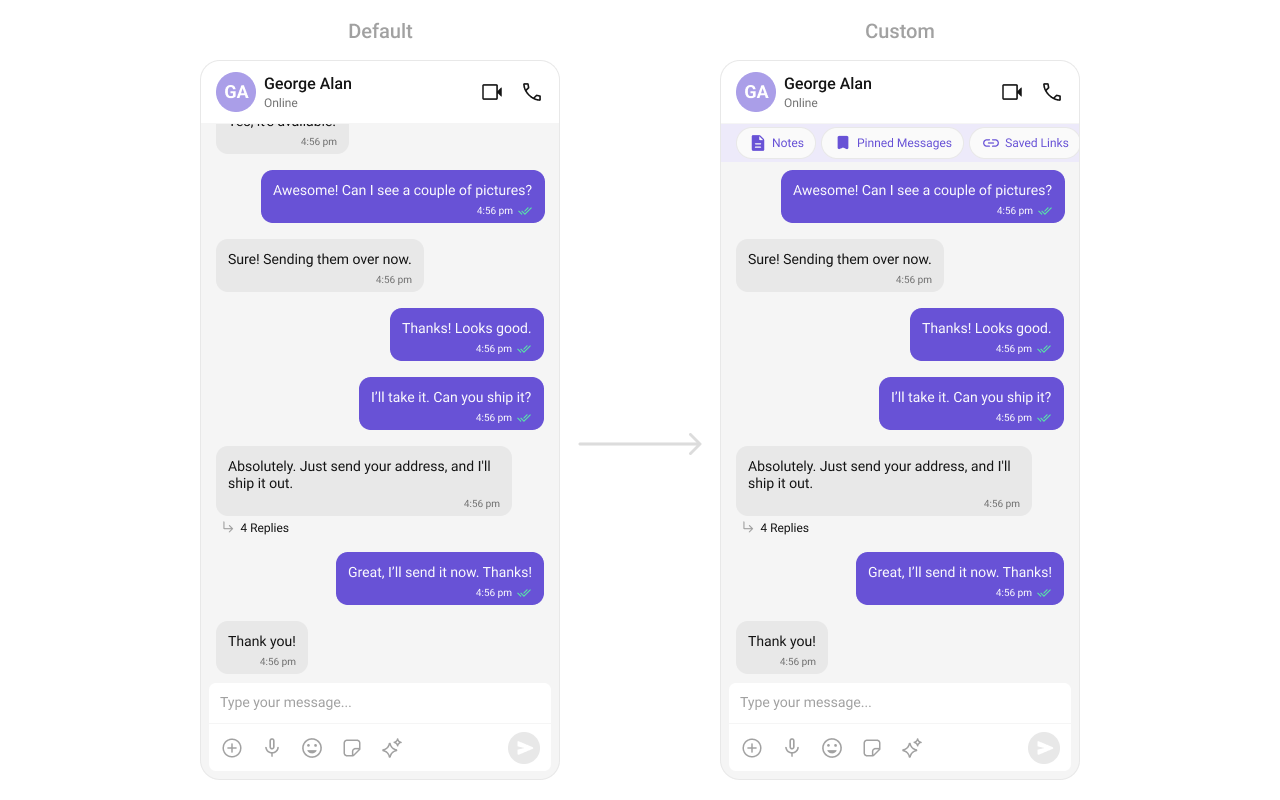
This method allows you to set a custom header view for the message list. By providing a View object, you can customize the appearance and content of the header displayed at the top of the message list.
Use Cases:
* Add a custom branding/logo to the chat.
* Display chat status ("John is typing...").
* Show last seen status.
```java theme={null}
cometChatMessageList.setHeaderView(view);
```
```kotlin theme={null}
cometChatMessageList.setHeaderView(view)
```
**Example**
```xml themes.xml theme={null}
```
```java theme={null}
// Initialize CometChatMentionsFormatter
CometChatMentionsFormatter mentionFormatter = new CometChatMentionsFormatter(context);
//set style to customize bubble mention text
mentionFormatter.setOutgoingBubbleMentionTextStyle(context, R.style.CustomOutgoingMessageBubbleMentionStyle);
mentionFormatter.setIncomingBubbleMentionTextStyle(context, R.style.CustomIncomingMessageBubbleMentionStyle);
// This can be passed as an array of formatter in CometChatMessageList by using setTextFormatters method.
List textFormatters = new ArrayList<>();
textFormatters.add(mentionFormatter);
messageList.setTextFormatters(textFormatters);
```
```kotlin theme={null}
// Initialize CometChatMentionsFormatter
val mentionFormatter = CometChatMentionsFormatter(context)
//set style to customize bubble mention text
mentionFormatter.setOutgoingBubbleMentionTextStyle(context, R.style.CustomOutgoingMessageBubbleMentionStyle)
mentionFormatter.setIncomingBubbleMentionTextStyle(context, R.style.CustomIncomingMessageBubbleMentionStyle)
// This can be passed as an array of formatter in CometChatMessageList by using setTextFormatters method.
val textFormatters: MutableList = ArrayList()
textFormatters.add(mentionFormatter)
messageList.setTextFormatters(textFormatters)
```
#### setHeaderView
This method allows you to set a custom header view for the message list. By providing a View object, you can customize the appearance and content of the header displayed at the top of the message list.
Use Cases:
* Add a custom branding/logo to the chat.
* Display chat status ("John is typing...").
* Show last seen status.
```java theme={null}
cometChatMessageList.setHeaderView(view);
```
```kotlin theme={null}
cometChatMessageList.setHeaderView(view)
```
**Example**
 ```html custom_header_layout.xml theme={null}
```
```java theme={null}
cometChatMessageList.setHeaderView(View.inflate(getContext(), R.layout.custom_header_layout, null));
```
```kotlin theme={null}
cometChatMessageList.setHeaderView(View.inflate(context, R.layout.custom_header_layout, null))
```
***
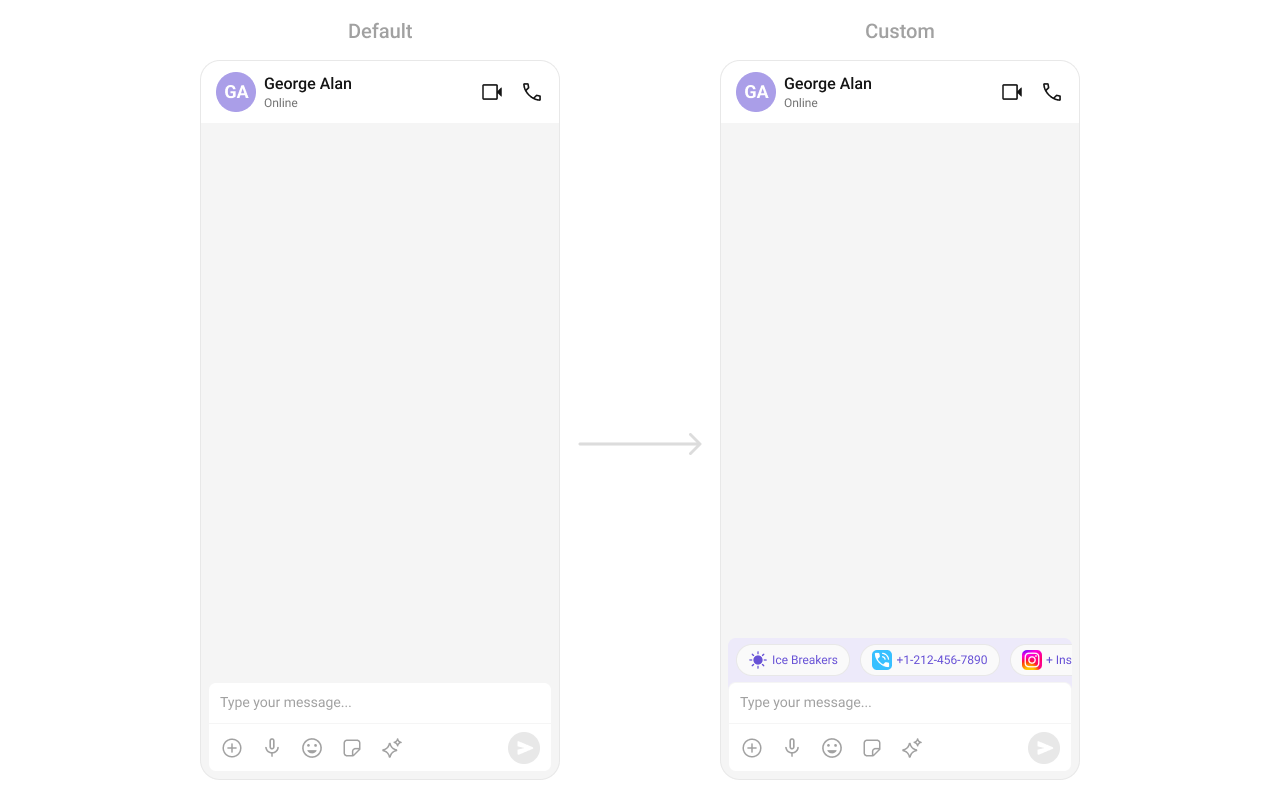
#### setFooterView
This method allows you to set a custom footer view for the message list. By providing a View object, you can customize the appearance and content of the footer displayed at the bottom of the message list.
Use Cases:
* Add quick reply buttons.
* Display typing indicators ("John is typing...").
* Show a disclaimer or privacy notice.
```java theme={null}
cometChatMessageList.setFooterView(view);
```
```kotlin theme={null}
cometChatMessageList.setFooterView(view)
```
**Example**
```html custom_header_layout.xml theme={null}
```
```java theme={null}
cometChatMessageList.setHeaderView(View.inflate(getContext(), R.layout.custom_header_layout, null));
```
```kotlin theme={null}
cometChatMessageList.setHeaderView(View.inflate(context, R.layout.custom_header_layout, null))
```
***
#### setFooterView
This method allows you to set a custom footer view for the message list. By providing a View object, you can customize the appearance and content of the footer displayed at the bottom of the message list.
Use Cases:
* Add quick reply buttons.
* Display typing indicators ("John is typing...").
* Show a disclaimer or privacy notice.
```java theme={null}
cometChatMessageList.setFooterView(view);
```
```kotlin theme={null}
cometChatMessageList.setFooterView(view)
```
**Example**
 ```xml custom_footer_layout.xml theme={null}
```
```java theme={null}
cometChatMessageList.setFooterView(View.inflate(getContext(), R.layout.custom_footer_layout, null));
```
```kotlin theme={null}
cometChatMessageList.setFooterView(View.inflate(context, R.layout.custom_footer_layout, null))
```
```xml custom_footer_layout.xml theme={null}
```
```java theme={null}
cometChatMessageList.setFooterView(View.inflate(getContext(), R.layout.custom_footer_layout, null));
```
```kotlin theme={null}
cometChatMessageList.setFooterView(View.inflate(context, R.layout.custom_footer_layout, null))
```