> ## Documentation Index
> Fetch the complete documentation index at: https://cometchat-22654f5b-feature-react-native-sdk-quotedmessage-a.mintlify.site/llms.txt
> Use this file to discover all available pages before exploring further.
# Message Template
## Overview
A MessageTemplate provides you with the capability to define and customize both the structure and the behavior of the [MessageBubble](/ui-kit/android/message-bubble-styling#message-bubbles). It acts as a schema or design blueprint for the creation of a variety of [MessageBubble](/ui-kit/android/message-bubble-styling#message-bubbles) components, allowing you to manage the appearance and interactions of [MessageBubble](/ui-kit/android/message-bubble-styling#message-bubbles) within your application effectively and consistently.
### Structure
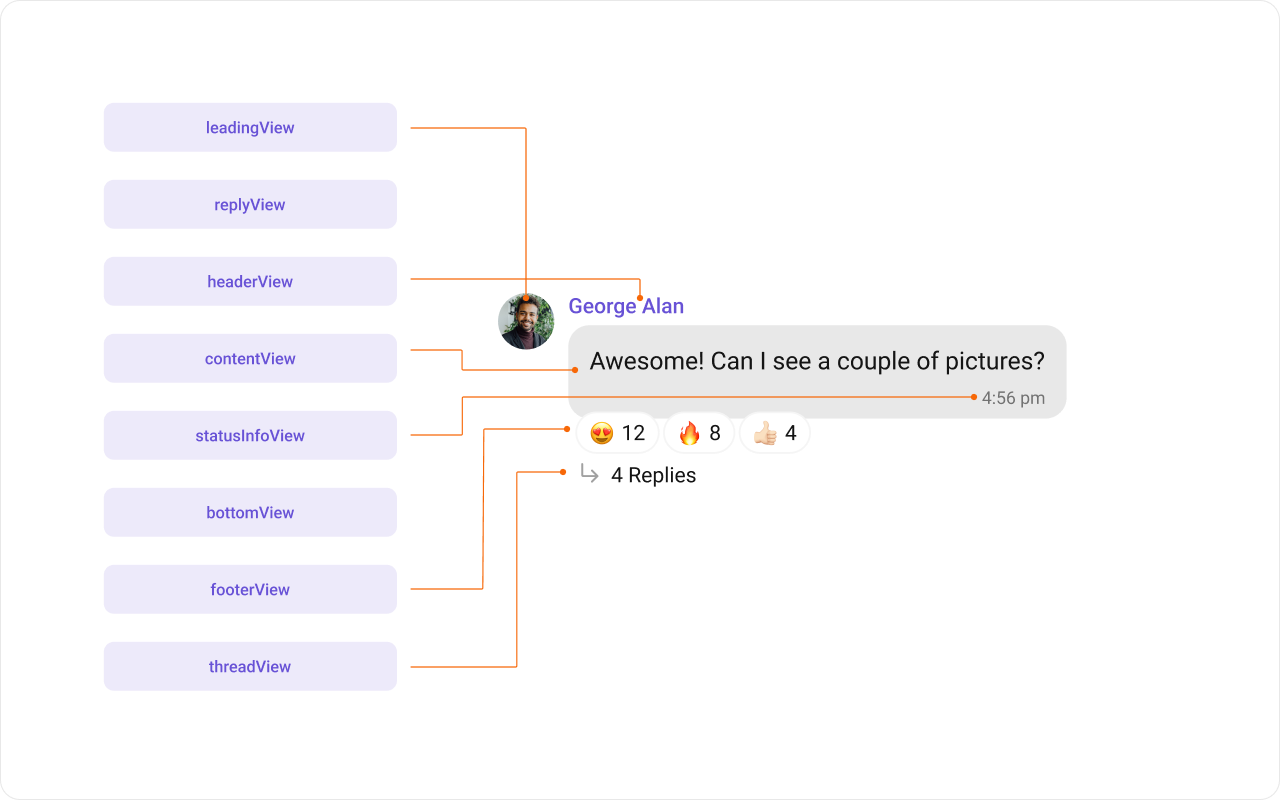 The MessageBubble structure can typically be broken down into the following views:
1. **Leading view**: This is where the sender's avatar is displayed. It's typically on the left of the MessageBubble for messages from others and on the right for messages from the current user.
2. **Header view**: This displays the sender's name and is especially useful in group chats where multiple users are sending messages.
3. **Content view**: This is the core of the MessageBubble where the message content (text, images, videos, etc.) is displayed.
4. **Bottom view**: This view can be used to extend the MessageBubble with additional elements, such as link previews or a 'load more' button for long messages. It's typically placed beneath the Content view.
5. **Footer view**: This is where the timestamp of the message and its delivery or read status are displayed. It's located at the bottom of the MessageBubble.
### Properties
MessageTemplate provides you with methods that allow you to alter various properties of the MessageBubble. These properties include aspects such as the `type` and `category` of a message, the appearance and behavior of the header, content, and footer sections of the message bubble,
1. **Type**
Using `setType()` you can set the type of CometChatMessage, This will map your MessageTemplate to the corresponding CometChatMessage. You can set the MessageTemplate Type using the following code snippet.
```swift theme={null}
messageTemplate.setType(UIKitConstants.MessageType.CUSTOM);
```
2. **Category**
Using `.setCategory()` you can set the category of a MessageTemplate. This will create a MessageTemplate with the specified category and link it with a CometChatMessage of the same category.
Please refer to our guide on [Message Categories](/sdk/android/message-structure-and-hierarchy) for a deeper understanding of message categories.
```swift theme={null}
messageTemplate.setCategory(UIKitConstants.MessageCategory.CUSTOM);
```
3. **Header View**
The .`setHeaderView()` method allows you to assign a custom header view to the MessageBubble. By default, it is configured to display the sender's name.
```typescript theme={null}
messageTemplate.setHeaderView(new MessagesViewHolderListener() {
@Override
public View createView(Context context, CometChatMessageBubble messageBubble, UIKitConstants.MessageBubbleAlignment alignment) {
return null;
}
@Override
public void bindView(Context context,
View createdView,
BaseMessage message,
UIKitConstants.MessageBubbleAlignment alignment,
RecyclerView.ViewHolder holder,
List messageList,
int position) {
}
});
```
4. **Content View**
The `.setContentView()` method allows you to assign a custom content view to the MessageBubble. By default, it displays the [Text Bubble](/ui-kit/android/message-bubble-styling#text-bubble), [Image Bubble](/ui-kit/android/message-bubble-styling#image-bubble), [File Bubble](/ui-kit/android/message-bubble-styling#file-bubble), [Audio Bubble](/ui-kit/android/message-bubble-styling#audio-bubble), or [Video Bubble](/ui-kit/android/message-bubble-styling#video-bubble), depending on the message type.
```typescript theme={null}
messageTemplate.setContentView(new MessagesViewHolderListener() {
@Override
public View createView(Context context, CometChatMessageBubble messageBubble, UIKitConstants.MessageBubbleAlignment alignment) {
return null;
}
@Override
public void bindView(Context context,
View createdView,
BaseMessage message,
UIKitConstants.MessageBubbleAlignment alignment,
RecyclerView.ViewHolder holder,
List messageList,
int position) {
}
});
```
5. **Footer View**
The `.setFooterView()` method allows you to assign a custom Footer view to the MessageBubble. By default, it displays the receipt and timestamp.
```typescript theme={null}
messageTemplate.setFooterView(new MessagesViewHolderListener() {
@Override
public View createView(Context context, CometChatMessageBubble messageBubble, UIKitConstants.MessageBubbleAlignment alignment) {
return null;
}
@Override
public void bindView(Context context,
View createdView,
BaseMessage message,
UIKitConstants.MessageBubbleAlignment alignment,
RecyclerView.ViewHolder holder,
List messageList,
int position) {
}
});
```
6. **Bottom View**
The `.setBottomView()` method allows you to assign a custom Bottom view to the MessageBubble.By defuault is has buttons such as link previews or a 'load more' button for long messages.
```typescript theme={null}
messageTemplate.setBottomView(new MessagesViewHolderListener() {
@Override
public View createView(Context context, CometChatMessageBubble messageBubble, UIKitConstants.MessageBubbleAlignment alignment) {
return null;
}
@Override
public void bindView(Context context,
View createdView,
BaseMessage message,
UIKitConstants.MessageBubbleAlignment alignment,
RecyclerView.ViewHolder holder,
List messageList,
int position) {
}
});
```
7. **Bubble View**
The `.setBubbleView()` method allows you to assign a custom Bubble view to the MessageBubble. By default, headerView, contentView, and footerView together form a message bubble.
```typescript theme={null}
messageTemplate.setBubbleView(new MessagesViewHolderListener() {
@Override
public View createView(Context context, CometChatMessageBubble messageBubble, UIKitConstants.MessageBubbleAlignment alignment) {
return null;
}
@Override
public void bindView(Context context,
View createdView,
BaseMessage message,
UIKitConstants.MessageBubbleAlignment alignment,
RecyclerView.ViewHolder holder,
List messageList,
int position) {
}
});
```
8. **Options**
The `.setOptions()` lets you set the list of actions that a user can perform on a message. This includes actions like reacting to, editing, or deleting a message.
```csharp theme={null}
messageTemplate.setOptions((context, baseMessage, group) -> Collections.emptyList());
```
## Customization
Let's dive into how you can use the [properties](#properties) of MessageTemplate to customize an existing template or add a new one to the [MessageList](/ui-kit/android/message-list) component.
The First step is to fetch the list of existing templates when you want to modify or add to them. This can be done using the getAllMessageTemplates() method from the DataSource of the CometChatUIKit class.
```swift theme={null}
List messageTemplates = CometChatUIKit.getDataSource().getAllMessageTemplates(messagelist.getAddtionalParameters());
```
### Existing Templates
You will need to first get the MessageTemplate object for the type of message you want to customize. You will be customizing the TextMessage Bubble here. The code snippet to get the Text MessageTemplate is as follows.
```java theme={null}
List messageTemplates = CometChatUIKit.getDataSource().getAllMessageTemplates(messagelist.getAddtionalParameters());
for(CometChatMessageTemplate template : messageTemplates){
if(template.getType().equals(UIKitConstants.MessageType.TEXT)){
// Code to customize text message template
}
}
```
```kotlin theme={null}
val messageTemplates: List = CometChatUIKit.dataSource.messageTemplates(messagelist.getAddtionalParameters())
for (template in messageTemplates) {
if (template.type == UIKitConstants.MessageType.TEXT) {
// Code to customize text message template
}
}
```
You will be using [MessageList](/ui-kit/android/message-list) Component for example here so to apply Template to MessageList you will need to use `setTemplates` method.
You can apply MessageTemplates to MessagesList Component using the following code snippet.
```java theme={null}
List messageTemplates = CometChatUIKit.getDataSource(getMessageTemplates());
for(CometChatMessageTemplate template : messageTemplates){
Log.e(TAG, "messageTemplate: Type = "+template.getType());
if(template.getType().equals(UIKitConstants.MessageType.TEXT)){
// Code to customize text message template
}
}
messageList.setTemplates(messageTemplates);
```
```kotlin theme={null}
val messageTemplates = CometChatUI.getAllMessageTemplates()
for (template in messageTemplates) {
Log.e(TAG, "messageTemplate: Type = ${template.type}")
if (template.type == UIKitConstants.MessageType.TEXT) {
// Code to customize text message template
}
}
messageList.setTemplates(messageTemplates)
```
#### Header view
The `.setHeaderView()` method of MessageTemplate allows you to add custom views to the header of your message bubbles. In the example below, we will add a custom layout `custom_txt_header_layout.xml` to the header view of every text message in the MessageList.
The MessageBubble structure can typically be broken down into the following views:
1. **Leading view**: This is where the sender's avatar is displayed. It's typically on the left of the MessageBubble for messages from others and on the right for messages from the current user.
2. **Header view**: This displays the sender's name and is especially useful in group chats where multiple users are sending messages.
3. **Content view**: This is the core of the MessageBubble where the message content (text, images, videos, etc.) is displayed.
4. **Bottom view**: This view can be used to extend the MessageBubble with additional elements, such as link previews or a 'load more' button for long messages. It's typically placed beneath the Content view.
5. **Footer view**: This is where the timestamp of the message and its delivery or read status are displayed. It's located at the bottom of the MessageBubble.
### Properties
MessageTemplate provides you with methods that allow you to alter various properties of the MessageBubble. These properties include aspects such as the `type` and `category` of a message, the appearance and behavior of the header, content, and footer sections of the message bubble,
1. **Type**
Using `setType()` you can set the type of CometChatMessage, This will map your MessageTemplate to the corresponding CometChatMessage. You can set the MessageTemplate Type using the following code snippet.
```swift theme={null}
messageTemplate.setType(UIKitConstants.MessageType.CUSTOM);
```
2. **Category**
Using `.setCategory()` you can set the category of a MessageTemplate. This will create a MessageTemplate with the specified category and link it with a CometChatMessage of the same category.
Please refer to our guide on [Message Categories](/sdk/android/message-structure-and-hierarchy) for a deeper understanding of message categories.
```swift theme={null}
messageTemplate.setCategory(UIKitConstants.MessageCategory.CUSTOM);
```
3. **Header View**
The .`setHeaderView()` method allows you to assign a custom header view to the MessageBubble. By default, it is configured to display the sender's name.
```typescript theme={null}
messageTemplate.setHeaderView(new MessagesViewHolderListener() {
@Override
public View createView(Context context, CometChatMessageBubble messageBubble, UIKitConstants.MessageBubbleAlignment alignment) {
return null;
}
@Override
public void bindView(Context context,
View createdView,
BaseMessage message,
UIKitConstants.MessageBubbleAlignment alignment,
RecyclerView.ViewHolder holder,
List messageList,
int position) {
}
});
```
4. **Content View**
The `.setContentView()` method allows you to assign a custom content view to the MessageBubble. By default, it displays the [Text Bubble](/ui-kit/android/message-bubble-styling#text-bubble), [Image Bubble](/ui-kit/android/message-bubble-styling#image-bubble), [File Bubble](/ui-kit/android/message-bubble-styling#file-bubble), [Audio Bubble](/ui-kit/android/message-bubble-styling#audio-bubble), or [Video Bubble](/ui-kit/android/message-bubble-styling#video-bubble), depending on the message type.
```typescript theme={null}
messageTemplate.setContentView(new MessagesViewHolderListener() {
@Override
public View createView(Context context, CometChatMessageBubble messageBubble, UIKitConstants.MessageBubbleAlignment alignment) {
return null;
}
@Override
public void bindView(Context context,
View createdView,
BaseMessage message,
UIKitConstants.MessageBubbleAlignment alignment,
RecyclerView.ViewHolder holder,
List messageList,
int position) {
}
});
```
5. **Footer View**
The `.setFooterView()` method allows you to assign a custom Footer view to the MessageBubble. By default, it displays the receipt and timestamp.
```typescript theme={null}
messageTemplate.setFooterView(new MessagesViewHolderListener() {
@Override
public View createView(Context context, CometChatMessageBubble messageBubble, UIKitConstants.MessageBubbleAlignment alignment) {
return null;
}
@Override
public void bindView(Context context,
View createdView,
BaseMessage message,
UIKitConstants.MessageBubbleAlignment alignment,
RecyclerView.ViewHolder holder,
List messageList,
int position) {
}
});
```
6. **Bottom View**
The `.setBottomView()` method allows you to assign a custom Bottom view to the MessageBubble.By defuault is has buttons such as link previews or a 'load more' button for long messages.
```typescript theme={null}
messageTemplate.setBottomView(new MessagesViewHolderListener() {
@Override
public View createView(Context context, CometChatMessageBubble messageBubble, UIKitConstants.MessageBubbleAlignment alignment) {
return null;
}
@Override
public void bindView(Context context,
View createdView,
BaseMessage message,
UIKitConstants.MessageBubbleAlignment alignment,
RecyclerView.ViewHolder holder,
List messageList,
int position) {
}
});
```
7. **Bubble View**
The `.setBubbleView()` method allows you to assign a custom Bubble view to the MessageBubble. By default, headerView, contentView, and footerView together form a message bubble.
```typescript theme={null}
messageTemplate.setBubbleView(new MessagesViewHolderListener() {
@Override
public View createView(Context context, CometChatMessageBubble messageBubble, UIKitConstants.MessageBubbleAlignment alignment) {
return null;
}
@Override
public void bindView(Context context,
View createdView,
BaseMessage message,
UIKitConstants.MessageBubbleAlignment alignment,
RecyclerView.ViewHolder holder,
List messageList,
int position) {
}
});
```
8. **Options**
The `.setOptions()` lets you set the list of actions that a user can perform on a message. This includes actions like reacting to, editing, or deleting a message.
```csharp theme={null}
messageTemplate.setOptions((context, baseMessage, group) -> Collections.emptyList());
```
## Customization
Let's dive into how you can use the [properties](#properties) of MessageTemplate to customize an existing template or add a new one to the [MessageList](/ui-kit/android/message-list) component.
The First step is to fetch the list of existing templates when you want to modify or add to them. This can be done using the getAllMessageTemplates() method from the DataSource of the CometChatUIKit class.
```swift theme={null}
List messageTemplates = CometChatUIKit.getDataSource().getAllMessageTemplates(messagelist.getAddtionalParameters());
```
### Existing Templates
You will need to first get the MessageTemplate object for the type of message you want to customize. You will be customizing the TextMessage Bubble here. The code snippet to get the Text MessageTemplate is as follows.
```java theme={null}
List messageTemplates = CometChatUIKit.getDataSource().getAllMessageTemplates(messagelist.getAddtionalParameters());
for(CometChatMessageTemplate template : messageTemplates){
if(template.getType().equals(UIKitConstants.MessageType.TEXT)){
// Code to customize text message template
}
}
```
```kotlin theme={null}
val messageTemplates: List = CometChatUIKit.dataSource.messageTemplates(messagelist.getAddtionalParameters())
for (template in messageTemplates) {
if (template.type == UIKitConstants.MessageType.TEXT) {
// Code to customize text message template
}
}
```
You will be using [MessageList](/ui-kit/android/message-list) Component for example here so to apply Template to MessageList you will need to use `setTemplates` method.
You can apply MessageTemplates to MessagesList Component using the following code snippet.
```java theme={null}
List messageTemplates = CometChatUIKit.getDataSource(getMessageTemplates());
for(CometChatMessageTemplate template : messageTemplates){
Log.e(TAG, "messageTemplate: Type = "+template.getType());
if(template.getType().equals(UIKitConstants.MessageType.TEXT)){
// Code to customize text message template
}
}
messageList.setTemplates(messageTemplates);
```
```kotlin theme={null}
val messageTemplates = CometChatUI.getAllMessageTemplates()
for (template in messageTemplates) {
Log.e(TAG, "messageTemplate: Type = ${template.type}")
if (template.type == UIKitConstants.MessageType.TEXT) {
// Code to customize text message template
}
}
messageList.setTemplates(messageTemplates)
```
#### Header view
The `.setHeaderView()` method of MessageTemplate allows you to add custom views to the header of your message bubbles. In the example below, we will add a custom layout `custom_txt_header_layout.xml` to the header view of every text message in the MessageList.
 ```xml message_template_header_view.xml theme={null}
```
```java theme={null}
template.setHeaderView(new MessagesViewHolderListener() {
@Override
public View createView(Context context, CometChatMessageBubble messageBubble, UIKitConstants.MessageBubbleAlignment alignment) {
return LayoutInflater.from(context).inflate(R.layout.message_template_header_view, null);
}
@Override
public void bindView(Context context,
View createdView,
BaseMessage message,
UIKitConstants.MessageBubbleAlignment alignment,
RecyclerView.ViewHolder holder,
List messageList,
int position) {
TextView textView = createdView.findViewById(R.id.name_with_status);
textView.setText(message.getSender().getName() + " • " + "\uD83D\uDDD3\uFE0F In meeting");
}
});
```
```kotlin theme={null}
template.setHeaderView(object : MessagesViewHolderListener {
override fun createView(
context: Context,
cometChatMessageBubble: CometChatMessageBubble,
messageBubbleAlignment: UIKitConstants.MessageBubbleAlignment
): View {
return layoutInflater.inflate(R.layout.message_template_header_view, null)
}
override fun bindView(
context: Context,
view: View,
baseMessage: BaseMessage,
messageBubbleAlignment: UIKitConstants.MessageBubbleAlignment,
viewHolder: RecyclerView.ViewHolder,
list: List,
i: Int
) {
val textView = view.findViewById(R.id.name_with_status)
textView.setText(message.getSender().getName() + " • " + "\uD83D\uDDD3\uFE0F In meeting")
}
})
```
In this code, The createView() method inflates the 'image\_bubble\_content\_view\.xml' as the header view for every message. The bindView() method allows you to bind your custom view, which will be called every time a ViewHolder for that message type is bound.
#### Content view
The `.setContentView()` method of MessageTemplate allows you to add a custom view to the content of your message bubbles. In the example below, we will add a custom layout `custom_message_content_layout.xml` to the content view of every text message in the MessageList.
```xml message_template_header_view.xml theme={null}
```
```java theme={null}
template.setHeaderView(new MessagesViewHolderListener() {
@Override
public View createView(Context context, CometChatMessageBubble messageBubble, UIKitConstants.MessageBubbleAlignment alignment) {
return LayoutInflater.from(context).inflate(R.layout.message_template_header_view, null);
}
@Override
public void bindView(Context context,
View createdView,
BaseMessage message,
UIKitConstants.MessageBubbleAlignment alignment,
RecyclerView.ViewHolder holder,
List messageList,
int position) {
TextView textView = createdView.findViewById(R.id.name_with_status);
textView.setText(message.getSender().getName() + " • " + "\uD83D\uDDD3\uFE0F In meeting");
}
});
```
```kotlin theme={null}
template.setHeaderView(object : MessagesViewHolderListener {
override fun createView(
context: Context,
cometChatMessageBubble: CometChatMessageBubble,
messageBubbleAlignment: UIKitConstants.MessageBubbleAlignment
): View {
return layoutInflater.inflate(R.layout.message_template_header_view, null)
}
override fun bindView(
context: Context,
view: View,
baseMessage: BaseMessage,
messageBubbleAlignment: UIKitConstants.MessageBubbleAlignment,
viewHolder: RecyclerView.ViewHolder,
list: List,
i: Int
) {
val textView = view.findViewById(R.id.name_with_status)
textView.setText(message.getSender().getName() + " • " + "\uD83D\uDDD3\uFE0F In meeting")
}
})
```
In this code, The createView() method inflates the 'image\_bubble\_content\_view\.xml' as the header view for every message. The bindView() method allows you to bind your custom view, which will be called every time a ViewHolder for that message type is bound.
#### Content view
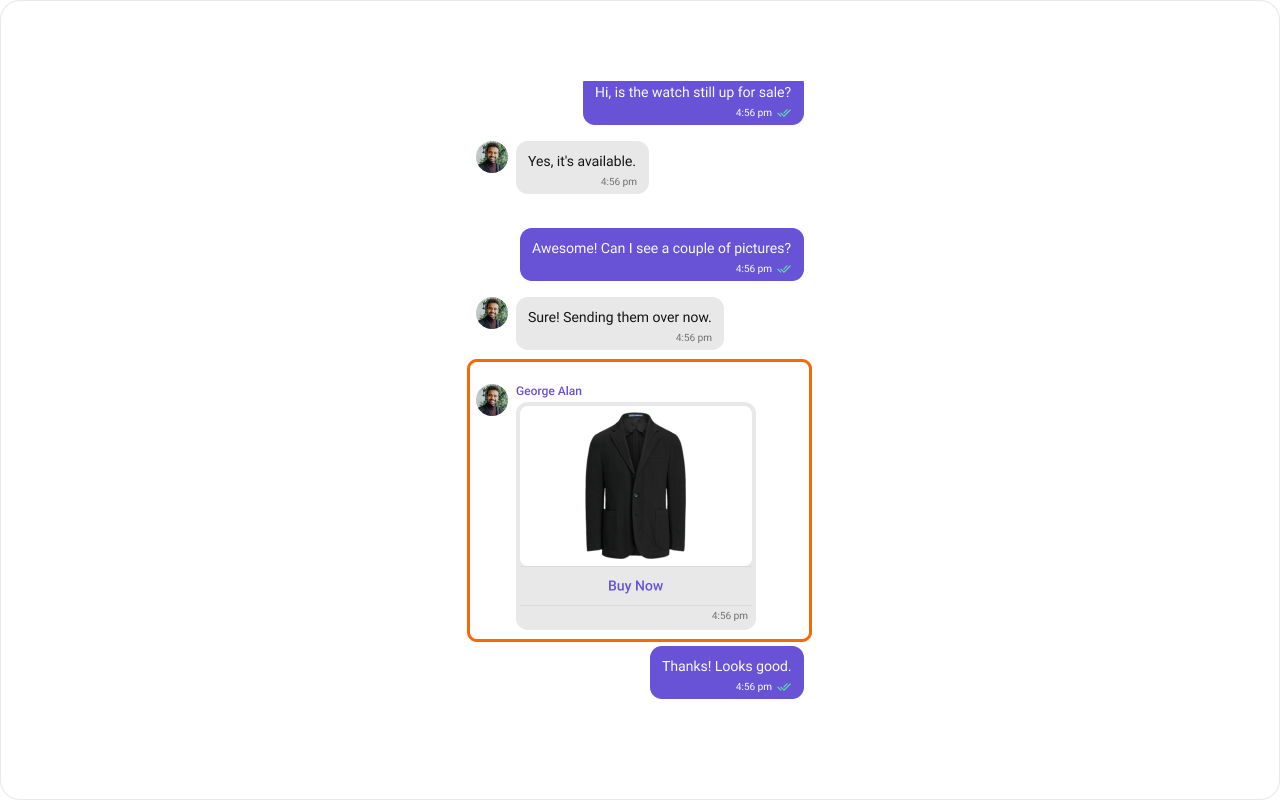
The `.setContentView()` method of MessageTemplate allows you to add a custom view to the content of your message bubbles. In the example below, we will add a custom layout `custom_message_content_layout.xml` to the content view of every text message in the MessageList.
 ```xml image_bubble_content_view.xml theme={null}
```
```java theme={null}
List templates = ChatConfigurator.getDataSource().getMessageTemplates(messageList.getAdditionParameter());
for (CometChatMessageTemplate template : templates) {
if (template.getType().equals(UIKitConstants.MessageType.IMAGE)) {
template.setContentView(new MessagesViewHolderListener() {
@Override
public View createView(Context context,
CometChatMessageBubble cometChatMessageBubble,
UIKitConstants.MessageBubbleAlignment messageBubbleAlignment) {
return LayoutInflater.from(context).inflate(R.layout.image_bubble_content_view, null);
}
@Override
public void bindView(Context context,
View view,
BaseMessage baseMessage,
UIKitConstants.MessageBubbleAlignment messageBubbleAlignment,
RecyclerView.ViewHolder viewHolder,
List list,
int i) {
if (view != null) {
int deleteStyle;
int bubbleStyle;
if (messageBubbleAlignment == UIKitConstants.MessageBubbleAlignment.RIGHT) {
deleteStyle = com.cometchat.chatuikit.R.style.CometChatIncomingMessageDeleteStyle;
bubbleStyle = com.cometchat.chatuikit.R.style.CometChatIncomingImageMessageBubbleStyle;
} else {
deleteStyle = com.cometchat.chatuikit.R.style.CometChatOutgoingDeleteBubbleStyle;
bubbleStyle = com.cometchat.chatuikit.R.style.CometChatOutgoingImageBubbleStyle;
}
LinearLayout linearLayout = view.findViewById(R.id.image_bubble_container);
CometChatImageBubble cometchatImageBubble = view.findViewById(R.id.imageBubble);
CometChatDeleteBubble deletedBubble = view.findViewById(com.cometchat.chatuikit.R.id.cometchat_delete_text_bubble);
MediaMessage mediaMessage = (MediaMessage) baseMessage;
if (mediaMessage.getDeletedAt() == 0) {
cometchatImageBubble.setStyle(bubbleStyle);
deletedBubble.setVisibility(View.GONE);
cometchatImageBubble.setVisibility(View.VISIBLE);
Attachment attachment = mediaMessage.getAttachment();
File file = Utils.getFileFromLocalPath(mediaMessage);
cometchatImageBubble.setImageUrl(file,
attachment != null ? attachment.getFileUrl() : "",
attachment != null ? attachment
.getFileExtension()
.equalsIgnoreCase("gif") : Utils.isGifFile(file));
} else {
linearLayout.setVisibility(View.GONE);
deletedBubble.setVisibility(View.VISIBLE);
deletedBubble.setStyle(deleteStyle);
}
}
}
});
break;
}
}
messageList.setTemplates(templates);
```
```kotlin theme={null}
val templates = ChatConfigurator.getDataSource().getMessageTemplates(messageList.additionParameter)
for (template in templates) {
if (template.type == UIKitConstants.MessageType.IMAGE) {
template.setContentView(object : MessagesViewHolderListener() {
override fun createView(
context: Context,
cometChatMessageBubble: CometChatMessageBubble,
messageBubbleAlignment: UIKitConstants.MessageBubbleAlignment
): View {
return LayoutInflater.from(context).inflate(R.layout.image_bubble_content_view, null)
}
override fun bindView(
context: Context,
view: View,
baseMessage: BaseMessage,
messageBubbleAlignment: UIKitConstants.MessageBubbleAlignment,
viewHolder: RecyclerView.ViewHolder,
list: List,
i: Int
) {
if (view != null) {
val deleteStyle: Int
val bubbleStyle: Int
if (messageBubbleAlignment == UIKitConstants.MessageBubbleAlignment.RIGHT) {
deleteStyle = com.cometchat.chatuikit.R.style.CometChatIncomingMessageDeleteStyle
bubbleStyle = com.cometchat.chatuikit.R.style.CometChatIncomingImageMessageBubbleStyle
} else {
deleteStyle = com.cometchat.chatuikit.R.style.CometChatOutgoingDeleteBubbleStyle
bubbleStyle = com.cometchat.chatuikit.R.style.CometChatOutgoingImageBubbleStyle
}
val linearLayout = view.findViewById(R.id.image_bubble_container)
val cometchatImageBubble = view.findViewById(R.id.imageBubble)
val deletedBubble = view.findViewById(com.cometchat.chatuikit.R.id.cometchat_delete_text_bubble)
val mediaMessage = baseMessage as MediaMessage
if (mediaMessage.deletedAt == 0L) {
cometchatImageBubble.style = bubbleStyle
deletedBubble.visibility = View.GONE
cometchatImageBubble.visibility = View.VISIBLE
val attachment = mediaMessage.attachment
val file = Utils.getFileFromLocalPath(mediaMessage)
cometchatImageBubble.setImageUrl(
file,
if (attachment != null) attachment.fileUrl else "",
attachment?.fileExtension?.equals("gif", ignoreCase = true) ?: Utils.isGifFile(file)
)
} else {
linearLayout.visibility = View.GONE
deletedBubble.visibility = View.VISIBLE
deletedBubble.style = deleteStyle
}
}
}
})
break
}
}
messageList.setTemplates(templates)
```
In this code, The createView() method inflates the 'image\_bubble\_content\_view\.xml' as the content view for every message. The bindView() method allows you to bind your custom view, which will be called every time a ViewHolder for that message type is bound.
#### Status info view
The `.setStatusInfoView()` method of MessageTemplate allows you to add a custom status info to your message bubbles. In the example below, we will add a custom layout `status_info_layout.xml` to the footerview and empty layout to the status info view view of every text message in the MessageList.
```xml image_bubble_content_view.xml theme={null}
```
```java theme={null}
List templates = ChatConfigurator.getDataSource().getMessageTemplates(messageList.getAdditionParameter());
for (CometChatMessageTemplate template : templates) {
if (template.getType().equals(UIKitConstants.MessageType.IMAGE)) {
template.setContentView(new MessagesViewHolderListener() {
@Override
public View createView(Context context,
CometChatMessageBubble cometChatMessageBubble,
UIKitConstants.MessageBubbleAlignment messageBubbleAlignment) {
return LayoutInflater.from(context).inflate(R.layout.image_bubble_content_view, null);
}
@Override
public void bindView(Context context,
View view,
BaseMessage baseMessage,
UIKitConstants.MessageBubbleAlignment messageBubbleAlignment,
RecyclerView.ViewHolder viewHolder,
List list,
int i) {
if (view != null) {
int deleteStyle;
int bubbleStyle;
if (messageBubbleAlignment == UIKitConstants.MessageBubbleAlignment.RIGHT) {
deleteStyle = com.cometchat.chatuikit.R.style.CometChatIncomingMessageDeleteStyle;
bubbleStyle = com.cometchat.chatuikit.R.style.CometChatIncomingImageMessageBubbleStyle;
} else {
deleteStyle = com.cometchat.chatuikit.R.style.CometChatOutgoingDeleteBubbleStyle;
bubbleStyle = com.cometchat.chatuikit.R.style.CometChatOutgoingImageBubbleStyle;
}
LinearLayout linearLayout = view.findViewById(R.id.image_bubble_container);
CometChatImageBubble cometchatImageBubble = view.findViewById(R.id.imageBubble);
CometChatDeleteBubble deletedBubble = view.findViewById(com.cometchat.chatuikit.R.id.cometchat_delete_text_bubble);
MediaMessage mediaMessage = (MediaMessage) baseMessage;
if (mediaMessage.getDeletedAt() == 0) {
cometchatImageBubble.setStyle(bubbleStyle);
deletedBubble.setVisibility(View.GONE);
cometchatImageBubble.setVisibility(View.VISIBLE);
Attachment attachment = mediaMessage.getAttachment();
File file = Utils.getFileFromLocalPath(mediaMessage);
cometchatImageBubble.setImageUrl(file,
attachment != null ? attachment.getFileUrl() : "",
attachment != null ? attachment
.getFileExtension()
.equalsIgnoreCase("gif") : Utils.isGifFile(file));
} else {
linearLayout.setVisibility(View.GONE);
deletedBubble.setVisibility(View.VISIBLE);
deletedBubble.setStyle(deleteStyle);
}
}
}
});
break;
}
}
messageList.setTemplates(templates);
```
```kotlin theme={null}
val templates = ChatConfigurator.getDataSource().getMessageTemplates(messageList.additionParameter)
for (template in templates) {
if (template.type == UIKitConstants.MessageType.IMAGE) {
template.setContentView(object : MessagesViewHolderListener() {
override fun createView(
context: Context,
cometChatMessageBubble: CometChatMessageBubble,
messageBubbleAlignment: UIKitConstants.MessageBubbleAlignment
): View {
return LayoutInflater.from(context).inflate(R.layout.image_bubble_content_view, null)
}
override fun bindView(
context: Context,
view: View,
baseMessage: BaseMessage,
messageBubbleAlignment: UIKitConstants.MessageBubbleAlignment,
viewHolder: RecyclerView.ViewHolder,
list: List,
i: Int
) {
if (view != null) {
val deleteStyle: Int
val bubbleStyle: Int
if (messageBubbleAlignment == UIKitConstants.MessageBubbleAlignment.RIGHT) {
deleteStyle = com.cometchat.chatuikit.R.style.CometChatIncomingMessageDeleteStyle
bubbleStyle = com.cometchat.chatuikit.R.style.CometChatIncomingImageMessageBubbleStyle
} else {
deleteStyle = com.cometchat.chatuikit.R.style.CometChatOutgoingDeleteBubbleStyle
bubbleStyle = com.cometchat.chatuikit.R.style.CometChatOutgoingImageBubbleStyle
}
val linearLayout = view.findViewById(R.id.image_bubble_container)
val cometchatImageBubble = view.findViewById(R.id.imageBubble)
val deletedBubble = view.findViewById(com.cometchat.chatuikit.R.id.cometchat_delete_text_bubble)
val mediaMessage = baseMessage as MediaMessage
if (mediaMessage.deletedAt == 0L) {
cometchatImageBubble.style = bubbleStyle
deletedBubble.visibility = View.GONE
cometchatImageBubble.visibility = View.VISIBLE
val attachment = mediaMessage.attachment
val file = Utils.getFileFromLocalPath(mediaMessage)
cometchatImageBubble.setImageUrl(
file,
if (attachment != null) attachment.fileUrl else "",
attachment?.fileExtension?.equals("gif", ignoreCase = true) ?: Utils.isGifFile(file)
)
} else {
linearLayout.visibility = View.GONE
deletedBubble.visibility = View.VISIBLE
deletedBubble.style = deleteStyle
}
}
}
})
break
}
}
messageList.setTemplates(templates)
```
In this code, The createView() method inflates the 'image\_bubble\_content\_view\.xml' as the content view for every message. The bindView() method allows you to bind your custom view, which will be called every time a ViewHolder for that message type is bound.
#### Status info view
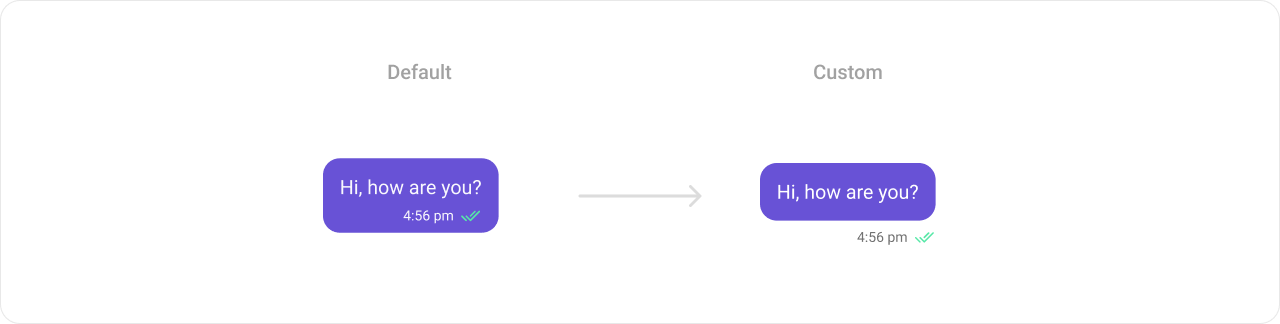
The `.setStatusInfoView()` method of MessageTemplate allows you to add a custom status info to your message bubbles. In the example below, we will add a custom layout `status_info_layout.xml` to the footerview and empty layout to the status info view view of every text message in the MessageList.
 ```xml status_info_layout.xml theme={null}
```
```java theme={null}
List templates = ChatConfigurator.getDataSource().getMessageTemplates(messageList.getAdditionParameter());
for (CometChatMessageTemplate template : templates) {
if (template.getType().equals(UIKitConstants.MessageType.TEXT)) {
template.setStatusInfoView(new MessagesViewHolderListener() {
@Override
public View createView(Context context,
CometChatMessageBubble cometChatMessageBubble,
UIKitConstants.MessageBubbleAlignment messageBubbleAlignment) {
View view = new View(context);
LinearLayout.LayoutParams layoutParams = new LinearLayout.LayoutParams(
context.getResources().getDimensionPixelSize(com.cometchat.chatuikit.R.dimen.cometchat_1dp),
context.getResources().getDimensionPixelSize(com.cometchat.chatuikit.R.dimen.cometchat_12dp));
view.setLayoutParams(layoutParams);
return view;
}
@Override
public void bindView(Context context,
View view,
BaseMessage baseMessage,
UIKitConstants.MessageBubbleAlignment messageBubbleAlignment,
RecyclerView.ViewHolder viewHolder,
List list,
int i) {
}
});
template.setFooterView(new MessagesViewHolderListener() {
@Override
public View createView(Context context,
CometChatMessageBubble cometChatMessageBubble,
UIKitConstants.MessageBubbleAlignment messageBubbleAlignment) {
return LayoutInflater.from(context).inflate(R.layout.status_info_layout, null);
}
@Override
public void bindView(Context context,
View createdView,
BaseMessage baseMessage,
UIKitConstants.MessageBubbleAlignment messageBubbleAlignment,
RecyclerView.ViewHolder viewHolder,
List list,
int i) {
TextView tvTime = createdView.findViewById(R.id.time);
CometChatMessageReceipt receipt = createdView.findViewById(R.id.receipt);
if (messageBubbleAlignment.equals(UIKitConstants.MessageBubbleAlignment.RIGHT)) {
receipt.setVisibility(View.VISIBLE);
receipt.setMessageReceipt(MessageReceiptUtils.MessageReceipt(baseMessage));
} else {
receipt.setVisibility(View.GONE);
}
tvTime.setText(new SimpleDateFormat("hh:mm a").format(baseMessage.getSentAt() * 1000));
}
});
break;
}
}
messageList.setTemplates(templates);
```
```kotlin theme={null}
val templates = ChatConfigurator.getDataSource().getMessageTemplates(messageList.additionParameter)
for (template in templates) {
if (template.type == UIKitConstants.MessageType.TEXT) {
template.setStatusInfoView(object : MessagesViewHolderListener() {
override fun createView(
context: Context,
cometChatMessageBubble: CometChatMessageBubble,
messageBubbleAlignment: UIKitConstants.MessageBubbleAlignment
): View {
val view = View(context)
val layoutParams = LinearLayout.LayoutParams(
context.resources.getDimensionPixelSize(com.cometchat.chatuikit.R.dimen.cometchat_1dp),
context.resources.getDimensionPixelSize(com.cometchat.chatuikit.R.dimen.cometchat_12dp)
)
view.layoutParams = layoutParams
return view
}
override fun bindView(
context: Context,
view: View,
baseMessage: BaseMessage,
messageBubbleAlignment: UIKitConstants.MessageBubbleAlignment,
viewHolder: RecyclerView.ViewHolder,
list: List,
i: Int
) {
}
})
template.setFooterView(object : MessagesViewHolderListener() {
override fun createView(
context: Context,
cometChatMessageBubble: CometChatMessageBubble,
messageBubbleAlignment: UIKitConstants.MessageBubbleAlignment
): View {
return LayoutInflater.from(context).inflate(R.layout.status_info_layout, null)
}
override fun bindView(
context: Context,
createdView: View,
baseMessage: BaseMessage,
messageBubbleAlignment: UIKitConstants.MessageBubbleAlignment,
viewHolder: RecyclerView.ViewHolder,
list: List,
i: Int
) {
val tvTime = createdView.findViewById(R.id.time)
val receipt = createdView.findViewById(R.id.receipt)
if (messageBubbleAlignment == UIKitConstants.MessageBubbleAlignment.RIGHT) {
receipt.visibility = View.VISIBLE
receipt.setMessageReceipt(MessageReceiptUtils.MessageReceipt(baseMessage))
} else {
receipt.visibility = View.GONE
}
tvTime.text = SimpleDateFormat("hh:mm a").format(baseMessage.sentAt * 1000)
}
})
break
}
}
messageList.setTemplates(templates)
```
In this code, The createView() method inflates the `status_info_layout.xml` as the footer info view for every message. The bindView() method allows you to bind your custom view, which will be called every time a ViewHolder for that message type is bound.
#### Bottom View
The `.setBottomView()` method of MessageTemplate allows you to add a custom button view to your message bubbles. In the example below, we will add a custom layout `custom_message_bottom_layout.xml` to the bottom view of every text message in the MessageList.
```xml status_info_layout.xml theme={null}
```
```java theme={null}
List templates = ChatConfigurator.getDataSource().getMessageTemplates(messageList.getAdditionParameter());
for (CometChatMessageTemplate template : templates) {
if (template.getType().equals(UIKitConstants.MessageType.TEXT)) {
template.setStatusInfoView(new MessagesViewHolderListener() {
@Override
public View createView(Context context,
CometChatMessageBubble cometChatMessageBubble,
UIKitConstants.MessageBubbleAlignment messageBubbleAlignment) {
View view = new View(context);
LinearLayout.LayoutParams layoutParams = new LinearLayout.LayoutParams(
context.getResources().getDimensionPixelSize(com.cometchat.chatuikit.R.dimen.cometchat_1dp),
context.getResources().getDimensionPixelSize(com.cometchat.chatuikit.R.dimen.cometchat_12dp));
view.setLayoutParams(layoutParams);
return view;
}
@Override
public void bindView(Context context,
View view,
BaseMessage baseMessage,
UIKitConstants.MessageBubbleAlignment messageBubbleAlignment,
RecyclerView.ViewHolder viewHolder,
List list,
int i) {
}
});
template.setFooterView(new MessagesViewHolderListener() {
@Override
public View createView(Context context,
CometChatMessageBubble cometChatMessageBubble,
UIKitConstants.MessageBubbleAlignment messageBubbleAlignment) {
return LayoutInflater.from(context).inflate(R.layout.status_info_layout, null);
}
@Override
public void bindView(Context context,
View createdView,
BaseMessage baseMessage,
UIKitConstants.MessageBubbleAlignment messageBubbleAlignment,
RecyclerView.ViewHolder viewHolder,
List list,
int i) {
TextView tvTime = createdView.findViewById(R.id.time);
CometChatMessageReceipt receipt = createdView.findViewById(R.id.receipt);
if (messageBubbleAlignment.equals(UIKitConstants.MessageBubbleAlignment.RIGHT)) {
receipt.setVisibility(View.VISIBLE);
receipt.setMessageReceipt(MessageReceiptUtils.MessageReceipt(baseMessage));
} else {
receipt.setVisibility(View.GONE);
}
tvTime.setText(new SimpleDateFormat("hh:mm a").format(baseMessage.getSentAt() * 1000));
}
});
break;
}
}
messageList.setTemplates(templates);
```
```kotlin theme={null}
val templates = ChatConfigurator.getDataSource().getMessageTemplates(messageList.additionParameter)
for (template in templates) {
if (template.type == UIKitConstants.MessageType.TEXT) {
template.setStatusInfoView(object : MessagesViewHolderListener() {
override fun createView(
context: Context,
cometChatMessageBubble: CometChatMessageBubble,
messageBubbleAlignment: UIKitConstants.MessageBubbleAlignment
): View {
val view = View(context)
val layoutParams = LinearLayout.LayoutParams(
context.resources.getDimensionPixelSize(com.cometchat.chatuikit.R.dimen.cometchat_1dp),
context.resources.getDimensionPixelSize(com.cometchat.chatuikit.R.dimen.cometchat_12dp)
)
view.layoutParams = layoutParams
return view
}
override fun bindView(
context: Context,
view: View,
baseMessage: BaseMessage,
messageBubbleAlignment: UIKitConstants.MessageBubbleAlignment,
viewHolder: RecyclerView.ViewHolder,
list: List,
i: Int
) {
}
})
template.setFooterView(object : MessagesViewHolderListener() {
override fun createView(
context: Context,
cometChatMessageBubble: CometChatMessageBubble,
messageBubbleAlignment: UIKitConstants.MessageBubbleAlignment
): View {
return LayoutInflater.from(context).inflate(R.layout.status_info_layout, null)
}
override fun bindView(
context: Context,
createdView: View,
baseMessage: BaseMessage,
messageBubbleAlignment: UIKitConstants.MessageBubbleAlignment,
viewHolder: RecyclerView.ViewHolder,
list: List,
i: Int
) {
val tvTime = createdView.findViewById(R.id.time)
val receipt = createdView.findViewById(R.id.receipt)
if (messageBubbleAlignment == UIKitConstants.MessageBubbleAlignment.RIGHT) {
receipt.visibility = View.VISIBLE
receipt.setMessageReceipt(MessageReceiptUtils.MessageReceipt(baseMessage))
} else {
receipt.visibility = View.GONE
}
tvTime.text = SimpleDateFormat("hh:mm a").format(baseMessage.sentAt * 1000)
}
})
break
}
}
messageList.setTemplates(templates)
```
In this code, The createView() method inflates the `status_info_layout.xml` as the footer info view for every message. The bindView() method allows you to bind your custom view, which will be called every time a ViewHolder for that message type is bound.
#### Bottom View
The `.setBottomView()` method of MessageTemplate allows you to add a custom button view to your message bubbles. In the example below, we will add a custom layout `custom_message_bottom_layout.xml` to the bottom view of every text message in the MessageList.
 ```xml message_template_bottom_view.xml theme={null}
```
```java theme={null}
template.setBottomView(new MessagesViewHolderListener() {
@Override
public View createView(Context context, CometChatMessageBubble messageBubble, UIKitConstants.MessageBubbleAlignment alignment) {
return LayoutInflater.from(context).inflate(R.layout.message_template_bottom_view, null);
}
@Override
public void bindView(Context context,
View createdView,
BaseMessage message,
UIKitConstants.MessageBubbleAlignment alignment,
RecyclerView.ViewHolder holder,
List messageList,
int position) {
createdView.setVisibility(View.GONE);
if (baseMessage.getMetadata() != null && MessageReceiptUtils.MessageReceipt(baseMessage).equals(Receipt.ERROR)) {
createdView.setVisibility(View.VISIBLE);
}
}
});
```
```kotlin theme={null}
template.setBottomView(object : MessagesViewHolderListener {
override fun createView(
context: Context,
cometChatMessageBubble: CometChatMessageBubble,
messageBubbleAlignment: UIKitConstants.MessageBubbleAlignment
): View {
return LayoutInflater.from(context).inflate(R.layout.message_template_bottom_view, null)
}
override fun bindView(
context: Context,
view: View,
baseMessage: BaseMessage,
messageBubbleAlignment: UIKitConstants.MessageBubbleAlignment,
viewHolder: RecyclerView.ViewHolder,
list: List,
i: Int
) {
createdView.setVisibility(View.GONE);
if (baseMessage.getMetadata() != null && MessageReceiptUtils.MessageReceipt(baseMessage).equals(Receipt.ERROR)) {
createdView.setVisibility(View.VISIBLE);
}
}
})
```
In this code, The createView() method inflates the 'custom\_message\_bottom\_layout.xml' as the bottom view for every message. The bindView() method allows you to bind your custom view, which will be called every time a ViewHolder for that message type is bound.
#### Footer View
The `.setFooterView()` method of MessageTemplate allows you to add a footer view to your message bubbles. In the example below, we will add a custom layout custom\_menu\_layout.xml to the bottom view of every text message in the MessageList.
```xml message_template_bottom_view.xml theme={null}
```
```java theme={null}
template.setBottomView(new MessagesViewHolderListener() {
@Override
public View createView(Context context, CometChatMessageBubble messageBubble, UIKitConstants.MessageBubbleAlignment alignment) {
return LayoutInflater.from(context).inflate(R.layout.message_template_bottom_view, null);
}
@Override
public void bindView(Context context,
View createdView,
BaseMessage message,
UIKitConstants.MessageBubbleAlignment alignment,
RecyclerView.ViewHolder holder,
List messageList,
int position) {
createdView.setVisibility(View.GONE);
if (baseMessage.getMetadata() != null && MessageReceiptUtils.MessageReceipt(baseMessage).equals(Receipt.ERROR)) {
createdView.setVisibility(View.VISIBLE);
}
}
});
```
```kotlin theme={null}
template.setBottomView(object : MessagesViewHolderListener {
override fun createView(
context: Context,
cometChatMessageBubble: CometChatMessageBubble,
messageBubbleAlignment: UIKitConstants.MessageBubbleAlignment
): View {
return LayoutInflater.from(context).inflate(R.layout.message_template_bottom_view, null)
}
override fun bindView(
context: Context,
view: View,
baseMessage: BaseMessage,
messageBubbleAlignment: UIKitConstants.MessageBubbleAlignment,
viewHolder: RecyclerView.ViewHolder,
list: List,
i: Int
) {
createdView.setVisibility(View.GONE);
if (baseMessage.getMetadata() != null && MessageReceiptUtils.MessageReceipt(baseMessage).equals(Receipt.ERROR)) {
createdView.setVisibility(View.VISIBLE);
}
}
})
```
In this code, The createView() method inflates the 'custom\_message\_bottom\_layout.xml' as the bottom view for every message. The bindView() method allows you to bind your custom view, which will be called every time a ViewHolder for that message type is bound.
#### Footer View
The `.setFooterView()` method of MessageTemplate allows you to add a footer view to your message bubbles. In the example below, we will add a custom layout custom\_menu\_layout.xml to the bottom view of every text message in the MessageList.
 ```html theme={null}
```
```java theme={null}
template.setFooterView(new MessagesViewHolderListener() {
@Override
public View createView(Context context, CometChatMessageBubble messageBubble, UIKitConstants.MessageBubbleAlignment alignment) {
return LayoutInflater.from(context).inflate(R.layout.message_template_footer_view, null);
}
@Override
public void bindView(Context context,
View createdView,
BaseMessage message,
UIKitConstants.MessageBubbleAlignment alignment,
RecyclerView.ViewHolder holder,
List messageList,
int position) {
CometChatMessageReaction messageReaction = createdView.findViewById(R.id.cometchat_reaction_view);
LinearLayout reactionLayout = createdView.findViewById(R.id.cometchat_reaction_layout_parent_container);
if (alignment.equals(UIKitConstants.MessageBubbleAlignment.RIGHT))
reactionLayout.setBackgroundColor(CometChatTheme.getPrimaryColor(context));
else
reactionLayout.setBackgroundColor(CometChatTheme.getNeutralColor300(context));
messageReaction.setStyle(com.cometchat.chatuikit.R.style.CometChatReactionStyle);
messageReaction.bindReactionsToMessage(message, 4);
}
});
```
```kotlin theme={null}
template.setFooterView(object : MessagesViewHolderListener() {
override fun createView(context: Context, messageBubble: CometChatMessageBubble, alignment: MessageBubbleAlignment): View {
return LayoutInflater.from(context).inflate(R.layout.message_template_footer_view, null)
}
override fun bindView(
context: Context,
createdView: View,
message: BaseMessage,
alignment: MessageBubbleAlignment,
holder: RecyclerView.ViewHolder,
messageList: List,
position: Int
) {
val messageReaction = createdView.findViewById(R.id.cometchat_reaction_view)
val reactionLayout = createdView.findViewById(R.id.cometchat_reaction_layout_parent_container)
if (alignment == MessageBubbleAlignment.RIGHT) reactionLayout.setBackgroundColor(CometChatTheme.getPrimaryColor(context))
else reactionLayout.setBackgroundColor(CometChatTheme.getNeutralColor300(context))
messageReaction.setStyle(R.style.CometChatReactionStyle)
messageReaction.bindReactionsToMessage(message, 4)
}
})
```
In this code, The createView() method inflates the 'custom\_menu\_layout.xml' as the footer view for every message. The bindView() method allows you to bind your custom view, which will be called every time a ViewHolder for that message type is bound.
#### Bubble View
The` .setBubbleView()` method of MessageTemplate allows you to add a bubble view to your message bubbles. In the example below, we will add a custom layout custom\_message\_content\_layout.xml to the bubble view of every text message in the MessageList.
```html theme={null}
```
```java theme={null}
template.setFooterView(new MessagesViewHolderListener() {
@Override
public View createView(Context context, CometChatMessageBubble messageBubble, UIKitConstants.MessageBubbleAlignment alignment) {
return LayoutInflater.from(context).inflate(R.layout.message_template_footer_view, null);
}
@Override
public void bindView(Context context,
View createdView,
BaseMessage message,
UIKitConstants.MessageBubbleAlignment alignment,
RecyclerView.ViewHolder holder,
List messageList,
int position) {
CometChatMessageReaction messageReaction = createdView.findViewById(R.id.cometchat_reaction_view);
LinearLayout reactionLayout = createdView.findViewById(R.id.cometchat_reaction_layout_parent_container);
if (alignment.equals(UIKitConstants.MessageBubbleAlignment.RIGHT))
reactionLayout.setBackgroundColor(CometChatTheme.getPrimaryColor(context));
else
reactionLayout.setBackgroundColor(CometChatTheme.getNeutralColor300(context));
messageReaction.setStyle(com.cometchat.chatuikit.R.style.CometChatReactionStyle);
messageReaction.bindReactionsToMessage(message, 4);
}
});
```
```kotlin theme={null}
template.setFooterView(object : MessagesViewHolderListener() {
override fun createView(context: Context, messageBubble: CometChatMessageBubble, alignment: MessageBubbleAlignment): View {
return LayoutInflater.from(context).inflate(R.layout.message_template_footer_view, null)
}
override fun bindView(
context: Context,
createdView: View,
message: BaseMessage,
alignment: MessageBubbleAlignment,
holder: RecyclerView.ViewHolder,
messageList: List,
position: Int
) {
val messageReaction = createdView.findViewById(R.id.cometchat_reaction_view)
val reactionLayout = createdView.findViewById(R.id.cometchat_reaction_layout_parent_container)
if (alignment == MessageBubbleAlignment.RIGHT) reactionLayout.setBackgroundColor(CometChatTheme.getPrimaryColor(context))
else reactionLayout.setBackgroundColor(CometChatTheme.getNeutralColor300(context))
messageReaction.setStyle(R.style.CometChatReactionStyle)
messageReaction.bindReactionsToMessage(message, 4)
}
})
```
In this code, The createView() method inflates the 'custom\_menu\_layout.xml' as the footer view for every message. The bindView() method allows you to bind your custom view, which will be called every time a ViewHolder for that message type is bound.
#### Bubble View
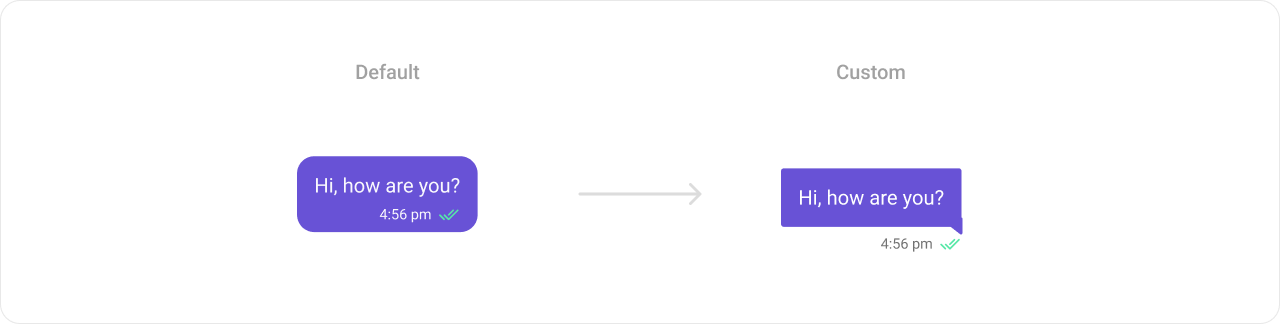
The` .setBubbleView()` method of MessageTemplate allows you to add a bubble view to your message bubbles. In the example below, we will add a custom layout custom\_message\_content\_layout.xml to the bubble view of every text message in the MessageList.
 drawable/left\_bubble\_bg
```html theme={null}
```
drawable/right\_bubble\_bg
```html theme={null}
```
```html theme={null}
```
```html theme={null}
```
```java theme={null}
template.setBubbleView(new MessagesViewHolderListener() {
@Override
public View createView(Context context,
CometChatMessageBubble messageBubble,
UIKitConstants.MessageBubbleAlignment alignment) {
if (alignment.equals(UIKitConstants.MessageBubbleAlignment.LEFT))
return LayoutInflater.from(context).inflate(R.layout.incoming_text_bubble_view, null);
else
return LayoutInflater.from(context).inflate(R.layout.outgoing_text_bubble_view, null);
}
@Override
public void bindView(Context context,
View createdView,
BaseMessage message,
UIKitConstants.MessageBubbleAlignment alignment,
RecyclerView.ViewHolder holder,
List messageList,
int position) {
TextView textView = createdView.findViewById(R.id.text_message);
TextView tvTime = createdView.findViewById(R.id.time);
if (alignment.equals(UIKitConstants.MessageBubbleAlignment.RIGHT)) {
CometChatMessageReceipt receipt = createdView.findViewById(R.id.receipt);
receipt.setMessageReceipt(MessageReceiptUtils.MessageReceipt(message));
}
TextMessage textMessage = (TextMessage) message;
tvTime.setText(new SimpleDateFormat("hh:mm a").format(textMessage.getSentAt() * 1000));
textView.setText(textMessage.getText());
}
});
```
```kotlin theme={null}
template.setBubbleView(object : MessagesViewHolderListener() {
override fun createView(
context: Context,
messageBubble: CometChatMessageBubble,
alignment: MessageBubbleAlignment
): View {
return if (alignment == MessageBubbleAlignment.LEFT) LayoutInflater.from(context).inflate(R.layout.incoming_text_bubble_view, null)
else LayoutInflater.from(context).inflate(R.layout.outgoing_text_bubble_view, null)
}
override fun bindView(
context: Context,
createdView: View,
message: BaseMessage,
alignment: MessageBubbleAlignment,
holder: RecyclerView.ViewHolder,
messageList: List,
position: Int
) {
val textView = createdView.findViewById(R.id.text_message)
val tvTime = createdView.findViewById(R.id.time)
if (alignment == MessageBubbleAlignment.RIGHT) {
val receipt = createdView.findViewById(R.id.receipt)
receipt.setMessageReceipt(MessageReceiptUtils.MessageReceipt(message))
}
val textMessage = message as TextMessage
tvTime.text = SimpleDateFormat("hh:mm a").format(textMessage.sentAt * 1000)
textView.text = textMessage.text
}
})
```
#### Options List
The `.setOptions()` method in the MessageTemplate allows you to customize the options that appear in the action sheet when a message is long-pressed. By default, CometChat UI Kit provides a set of options like "Reply", "Forward", "Edit", and "Delete".
However, if you wish to override or modify these options, you can use the `.setOptions()` method and pass a list of `CometChatMessageOption`. This list of options will replace the default set.
drawable/left\_bubble\_bg
```html theme={null}
```
drawable/right\_bubble\_bg
```html theme={null}
```
```html theme={null}
```
```html theme={null}
```
```java theme={null}
template.setBubbleView(new MessagesViewHolderListener() {
@Override
public View createView(Context context,
CometChatMessageBubble messageBubble,
UIKitConstants.MessageBubbleAlignment alignment) {
if (alignment.equals(UIKitConstants.MessageBubbleAlignment.LEFT))
return LayoutInflater.from(context).inflate(R.layout.incoming_text_bubble_view, null);
else
return LayoutInflater.from(context).inflate(R.layout.outgoing_text_bubble_view, null);
}
@Override
public void bindView(Context context,
View createdView,
BaseMessage message,
UIKitConstants.MessageBubbleAlignment alignment,
RecyclerView.ViewHolder holder,
List messageList,
int position) {
TextView textView = createdView.findViewById(R.id.text_message);
TextView tvTime = createdView.findViewById(R.id.time);
if (alignment.equals(UIKitConstants.MessageBubbleAlignment.RIGHT)) {
CometChatMessageReceipt receipt = createdView.findViewById(R.id.receipt);
receipt.setMessageReceipt(MessageReceiptUtils.MessageReceipt(message));
}
TextMessage textMessage = (TextMessage) message;
tvTime.setText(new SimpleDateFormat("hh:mm a").format(textMessage.getSentAt() * 1000));
textView.setText(textMessage.getText());
}
});
```
```kotlin theme={null}
template.setBubbleView(object : MessagesViewHolderListener() {
override fun createView(
context: Context,
messageBubble: CometChatMessageBubble,
alignment: MessageBubbleAlignment
): View {
return if (alignment == MessageBubbleAlignment.LEFT) LayoutInflater.from(context).inflate(R.layout.incoming_text_bubble_view, null)
else LayoutInflater.from(context).inflate(R.layout.outgoing_text_bubble_view, null)
}
override fun bindView(
context: Context,
createdView: View,
message: BaseMessage,
alignment: MessageBubbleAlignment,
holder: RecyclerView.ViewHolder,
messageList: List,
position: Int
) {
val textView = createdView.findViewById(R.id.text_message)
val tvTime = createdView.findViewById(R.id.time)
if (alignment == MessageBubbleAlignment.RIGHT) {
val receipt = createdView.findViewById(R.id.receipt)
receipt.setMessageReceipt(MessageReceiptUtils.MessageReceipt(message))
}
val textMessage = message as TextMessage
tvTime.text = SimpleDateFormat("hh:mm a").format(textMessage.sentAt * 1000)
textView.text = textMessage.text
}
})
```
#### Options List
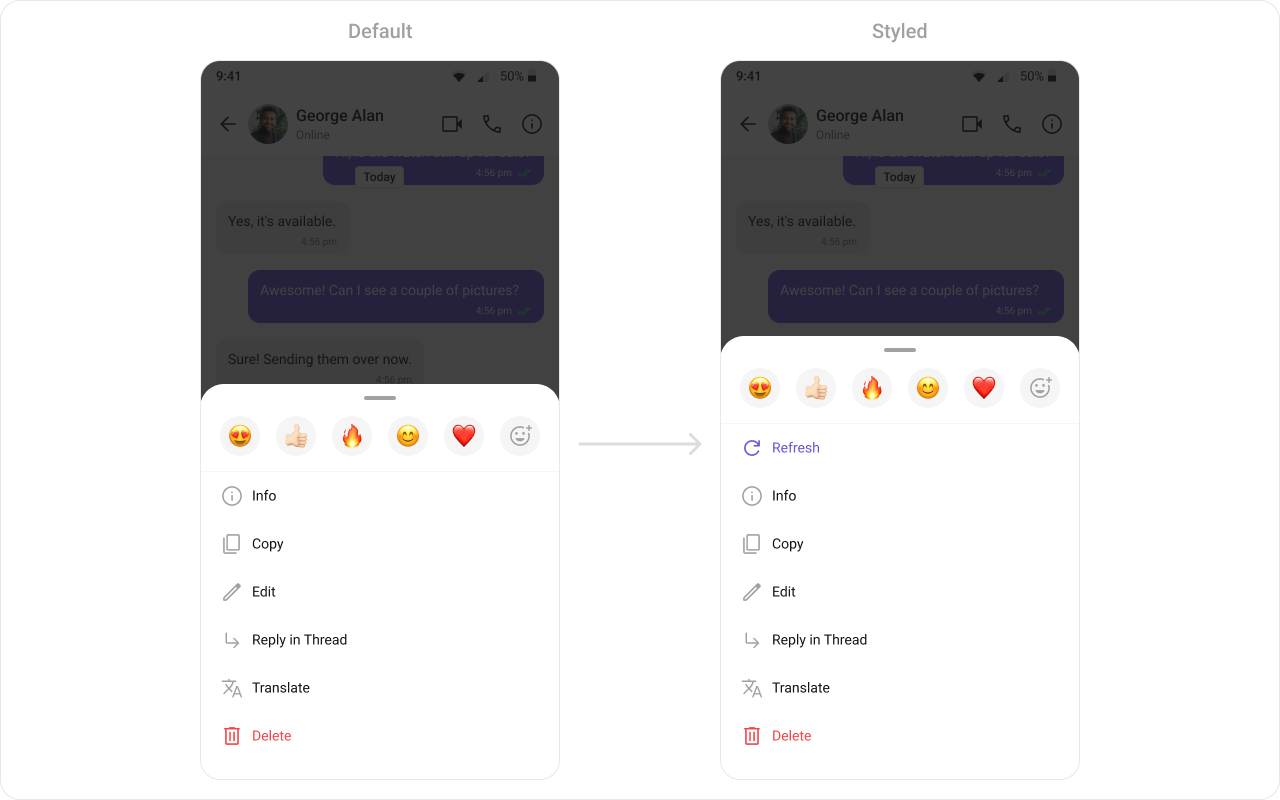
The `.setOptions()` method in the MessageTemplate allows you to customize the options that appear in the action sheet when a message is long-pressed. By default, CometChat UI Kit provides a set of options like "Reply", "Forward", "Edit", and "Delete".
However, if you wish to override or modify these options, you can use the `.setOptions()` method and pass a list of `CometChatMessageOption`. This list of options will replace the default set.
 ```java theme={null}
List messageTemplates = ChatConfigurator
.getDataSource()
.getMessageTemplates(messageList.getAdditionParameter());
for (CometChatMessageTemplate messageTemplate : messageTemplates) {
messageTemplate.setOptions((context, baseMessage, group) -> {
CometChatMessageOption refreshOption =
new CometChatMessageOption("REFRESH",
"Refresh",
R.drawable.ic_refresh,
() -> Toast.makeText(context, "Refresh clicked", Toast.LENGTH_SHORT).show());
List options = new ArrayList<>();
options.add(refreshOption);
options.addAll(CometChatUIKit.getDataSource().getMessageOptions(context, baseMessage, group));
return options;
});
}
messageList.setTemplates(messageTemplates);
```
```kotlin theme={null}
val messageTemplates = ChatConfigurator
.getDataSource()
.getMessageTemplates(messageList.additionParameter)
for (messageTemplate in messageTemplates) {
messageTemplate.setOptions { context: Context?, baseMessage: BaseMessage?, group: Group? ->
val refreshOption =
CometChatMessageOption(
"REFRESH",
"Refresh",
android.R.drawable.ic_refresh
) { Toast.makeText(context, "Refresh clicked", Toast.LENGTH_SHORT).show() }
val options: MutableList =
ArrayList()
options.add(refreshOption)
options.addAll(CometChatUIKit.getDataSource().getMessageOptions(context, baseMessage, group))
options
}
}
messageList.setTemplates(messageTemplates)
```
### New Templates
You can create an entirely new template for custom messages is one of the powerful features of CometChat's MessageTemplate.
```java theme={null}
List messageTemplates = ChatConfigurator
.getDataSource()
.getMessageTemplates(messageList.getAdditionParameter());
for (CometChatMessageTemplate messageTemplate : messageTemplates) {
messageTemplate.setOptions((context, baseMessage, group) -> {
CometChatMessageOption refreshOption =
new CometChatMessageOption("REFRESH",
"Refresh",
R.drawable.ic_refresh,
() -> Toast.makeText(context, "Refresh clicked", Toast.LENGTH_SHORT).show());
List options = new ArrayList<>();
options.add(refreshOption);
options.addAll(CometChatUIKit.getDataSource().getMessageOptions(context, baseMessage, group));
return options;
});
}
messageList.setTemplates(messageTemplates);
```
```kotlin theme={null}
val messageTemplates = ChatConfigurator
.getDataSource()
.getMessageTemplates(messageList.additionParameter)
for (messageTemplate in messageTemplates) {
messageTemplate.setOptions { context: Context?, baseMessage: BaseMessage?, group: Group? ->
val refreshOption =
CometChatMessageOption(
"REFRESH",
"Refresh",
android.R.drawable.ic_refresh
) { Toast.makeText(context, "Refresh clicked", Toast.LENGTH_SHORT).show() }
val options: MutableList =
ArrayList()
options.add(refreshOption)
options.addAll(CometChatUIKit.getDataSource().getMessageOptions(context, baseMessage, group))
options
}
}
messageList.setTemplates(messageTemplates)
```
### New Templates
You can create an entirely new template for custom messages is one of the powerful features of CometChat's MessageTemplate.
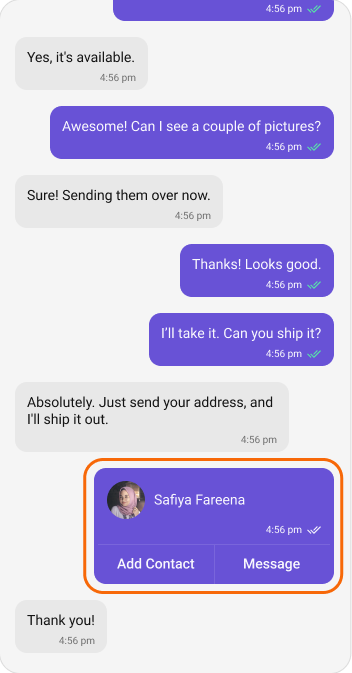 First, let's see how to send a custom message:
```java theme={null}
JSONObject jsonObject = new JSONObject();
try {
jsonObject.put("contact_name", "John Doe");
jsonObject.put("contact_avatar", "https://img.freepik.com/free-vector/blue-circle-with-white-user_78370-4707.jpg?semt=ais_hybrid");
jsonObject.put("contact_number", "+91 1234567890");
} catch (Exception e) {
e.printStackTrace();
}
CustomMessage customMessage = new CustomMessage(user != null ? user.getUid() : group.getGuid(),
user != null ? CometChatConstants.RECEIVER_TYPE_USER : CometChatConstants.RECEIVER_TYPE_GROUP,
"card",
jsonObject);
CometChatUIKit.sendCustomMessage(customMessage, new CometChat.CallbackListener() {
@Override
public void onSuccess(CustomMessage customMessage) {
}
@Override
public void onError(CometChatException e) {
}
});
```
```kotlin theme={null}
val jsonObject = JSONObject()
try {
jsonObject.put("contact_name", "John Doe")
jsonObject.put("contact_avatar", "https://img.freepik.com/free-vector/blue-circle-with-white-user_78370-4707.jpg?semt=ais_hybrid")
jsonObject.put("contact_number", "+91 1234567890")
} catch (e: Exception) {
e.printStackTrace()
}
val customMessage = CustomMessage(
if (user != null) user!!.uid else group.getGuid(),
if (user != null) CometChatConstants.RECEIVER_TYPE_USER else CometChatConstants.RECEIVER_TYPE_GROUP,
"card",
jsonObject
)
CometChatUIKit.sendCustomMessage(customMessage, object : CallbackListener() {
override fun onSuccess(customMessage: CustomMessage?) {
}
override fun onError(e: CometChatException?) {
}
})
```
Now, we'll create a new MessageTemplate to render this custom message in the MessageList:
```xml contact_card.xml theme={null}
```
```java theme={null}
List messageTemplates = ChatConfigurator
.getDataSource()
.getMessageTemplates(messageList.getAdditionParameter());
CometChatMessageTemplate contactTemplate = new CometChatMessageTemplate();
contactTemplate.setType("card");
contactTemplate.setCategory(UIKitConstants.MessageCategory.CUSTOM);
contactTemplate.setBubbleView(new MessagesViewHolderListener() {
@Override
public View createView(Context context,
CometChatMessageBubble cometChatMessageBubble,
UIKitConstants.MessageBubbleAlignment messageBubbleAlignment) {
return LayoutInflater.from(context).inflate(R.layout.contact_card, null);
}
@Override
public void bindView(Context context,
View view,
BaseMessage baseMessage,
UIKitConstants.MessageBubbleAlignment alignment,
RecyclerView.ViewHolder viewHolder,
List list,
int i) {
LinearLayout.LayoutParams layoutParams = new LinearLayout.LayoutParams(LinearLayout.LayoutParams.WRAP_CONTENT,
LinearLayout.LayoutParams.WRAP_CONTENT);
view.setLayoutParams(layoutParams);
CometChatAvatar avatar = view.findViewById(R.id.avatar);
TextView name = view.findViewById(R.id.contactName);
TextView time = view.findViewById(R.id.time);
CometChatMessageReceipt receipt = view.findViewById(R.id.receipt);
CustomMessage customMessage = (CustomMessage) baseMessage;
JSONObject jsonObject = customMessage.getCustomData();
try {
name.setText(jsonObject.getString("contact_name"));
avatar.setAvatar(jsonObject.getString("contact_avatar"));
} catch (Exception e) {
e.printStackTrace();
}
if (alignment.equals(UIKitConstants.MessageBubbleAlignment.RIGHT)) {
receipt.setVisibility(View.VISIBLE);
receipt.setMessageReceipt(MessageReceiptUtils.MessageReceipt(baseMessage));
} else {
receipt.setVisibility(View.GONE);
}
time.setText(new SimpleDateFormat("hh:mm a").format(baseMessage.getSentAt() * 1000));
}
});
messageTemplates.add(contactTemplate);
messageList.setTemplates(messageTemplates);
```
```kotlin theme={null}
val contactTemplate = CometChatMessageTemplate()
contactTemplate.setType("card")
contactTemplate.setCategory(UIKitConstants.MessageCategory.CUSTOM)
contactTemplate.setBubbleView(object : MessagesViewHolderListener() {
override fun createView(
context: Context,
cometChatMessageBubble: CometChatMessageBubble,
messageBubbleAlignment: UIKitConstants.MessageBubbleAlignment
): View {
return LayoutInflater.from(context).inflate(R.layout.contact_card, null)
}
override fun bindView(
context: Context,
view: View,
baseMessage: BaseMessage,
alignment: UIKitConstants.MessageBubbleAlignment,
viewHolder: RecyclerView.ViewHolder,
list: List,
i: Int
) {
val layoutParams = LinearLayout.LayoutParams(
LinearLayout.LayoutParams.WRAP_CONTENT,
LinearLayout.LayoutParams.WRAP_CONTENT
)
view.layoutParams = layoutParams
val avatar = view.findViewById(R.id.avatar)
val name = view.findViewById(R.id.contactName)
val time = view.findViewById(R.id.time)
val receipt = view.findViewById(R.id.receipt)
val customMessage = baseMessage as CustomMessage
val jsonObject = customMessage.customData
try {
name.text = jsonObject.getString("contact_name")
avatar.avatar = jsonObject.getString("contact_avatar")
} catch (e: Exception) {
e.printStackTrace()
}
if (alignment == UIKitConstants.MessageBubbleAlignment.RIGHT) {
receipt.visibility = View.VISIBLE
receipt.setMessageReceipt(MessageReceiptUtils.MessageReceipt(baseMessage))
} else {
receipt.visibility = View.GONE
}
time.text = SimpleDateFormat("hh:mm a").format(baseMessage.getSentAt() * 1000)
}
})
messageTemplates.add(contactTemplate)
messageList.setTemplates(messageTemplates)
```
In this code, replace "customType" with the same type as your custom message, and define your custom view in the setContentView() method.
This way, your custom message will be rendered in the MessageList using the custom view defined in your new MessageTemplate.
First, let's see how to send a custom message:
```java theme={null}
JSONObject jsonObject = new JSONObject();
try {
jsonObject.put("contact_name", "John Doe");
jsonObject.put("contact_avatar", "https://img.freepik.com/free-vector/blue-circle-with-white-user_78370-4707.jpg?semt=ais_hybrid");
jsonObject.put("contact_number", "+91 1234567890");
} catch (Exception e) {
e.printStackTrace();
}
CustomMessage customMessage = new CustomMessage(user != null ? user.getUid() : group.getGuid(),
user != null ? CometChatConstants.RECEIVER_TYPE_USER : CometChatConstants.RECEIVER_TYPE_GROUP,
"card",
jsonObject);
CometChatUIKit.sendCustomMessage(customMessage, new CometChat.CallbackListener() {
@Override
public void onSuccess(CustomMessage customMessage) {
}
@Override
public void onError(CometChatException e) {
}
});
```
```kotlin theme={null}
val jsonObject = JSONObject()
try {
jsonObject.put("contact_name", "John Doe")
jsonObject.put("contact_avatar", "https://img.freepik.com/free-vector/blue-circle-with-white-user_78370-4707.jpg?semt=ais_hybrid")
jsonObject.put("contact_number", "+91 1234567890")
} catch (e: Exception) {
e.printStackTrace()
}
val customMessage = CustomMessage(
if (user != null) user!!.uid else group.getGuid(),
if (user != null) CometChatConstants.RECEIVER_TYPE_USER else CometChatConstants.RECEIVER_TYPE_GROUP,
"card",
jsonObject
)
CometChatUIKit.sendCustomMessage(customMessage, object : CallbackListener() {
override fun onSuccess(customMessage: CustomMessage?) {
}
override fun onError(e: CometChatException?) {
}
})
```
Now, we'll create a new MessageTemplate to render this custom message in the MessageList:
```xml contact_card.xml theme={null}
```
```java theme={null}
List messageTemplates = ChatConfigurator
.getDataSource()
.getMessageTemplates(messageList.getAdditionParameter());
CometChatMessageTemplate contactTemplate = new CometChatMessageTemplate();
contactTemplate.setType("card");
contactTemplate.setCategory(UIKitConstants.MessageCategory.CUSTOM);
contactTemplate.setBubbleView(new MessagesViewHolderListener() {
@Override
public View createView(Context context,
CometChatMessageBubble cometChatMessageBubble,
UIKitConstants.MessageBubbleAlignment messageBubbleAlignment) {
return LayoutInflater.from(context).inflate(R.layout.contact_card, null);
}
@Override
public void bindView(Context context,
View view,
BaseMessage baseMessage,
UIKitConstants.MessageBubbleAlignment alignment,
RecyclerView.ViewHolder viewHolder,
List list,
int i) {
LinearLayout.LayoutParams layoutParams = new LinearLayout.LayoutParams(LinearLayout.LayoutParams.WRAP_CONTENT,
LinearLayout.LayoutParams.WRAP_CONTENT);
view.setLayoutParams(layoutParams);
CometChatAvatar avatar = view.findViewById(R.id.avatar);
TextView name = view.findViewById(R.id.contactName);
TextView time = view.findViewById(R.id.time);
CometChatMessageReceipt receipt = view.findViewById(R.id.receipt);
CustomMessage customMessage = (CustomMessage) baseMessage;
JSONObject jsonObject = customMessage.getCustomData();
try {
name.setText(jsonObject.getString("contact_name"));
avatar.setAvatar(jsonObject.getString("contact_avatar"));
} catch (Exception e) {
e.printStackTrace();
}
if (alignment.equals(UIKitConstants.MessageBubbleAlignment.RIGHT)) {
receipt.setVisibility(View.VISIBLE);
receipt.setMessageReceipt(MessageReceiptUtils.MessageReceipt(baseMessage));
} else {
receipt.setVisibility(View.GONE);
}
time.setText(new SimpleDateFormat("hh:mm a").format(baseMessage.getSentAt() * 1000));
}
});
messageTemplates.add(contactTemplate);
messageList.setTemplates(messageTemplates);
```
```kotlin theme={null}
val contactTemplate = CometChatMessageTemplate()
contactTemplate.setType("card")
contactTemplate.setCategory(UIKitConstants.MessageCategory.CUSTOM)
contactTemplate.setBubbleView(object : MessagesViewHolderListener() {
override fun createView(
context: Context,
cometChatMessageBubble: CometChatMessageBubble,
messageBubbleAlignment: UIKitConstants.MessageBubbleAlignment
): View {
return LayoutInflater.from(context).inflate(R.layout.contact_card, null)
}
override fun bindView(
context: Context,
view: View,
baseMessage: BaseMessage,
alignment: UIKitConstants.MessageBubbleAlignment,
viewHolder: RecyclerView.ViewHolder,
list: List,
i: Int
) {
val layoutParams = LinearLayout.LayoutParams(
LinearLayout.LayoutParams.WRAP_CONTENT,
LinearLayout.LayoutParams.WRAP_CONTENT
)
view.layoutParams = layoutParams
val avatar = view.findViewById(R.id.avatar)
val name = view.findViewById(R.id.contactName)
val time = view.findViewById(R.id.time)
val receipt = view.findViewById(R.id.receipt)
val customMessage = baseMessage as CustomMessage
val jsonObject = customMessage.customData
try {
name.text = jsonObject.getString("contact_name")
avatar.avatar = jsonObject.getString("contact_avatar")
} catch (e: Exception) {
e.printStackTrace()
}
if (alignment == UIKitConstants.MessageBubbleAlignment.RIGHT) {
receipt.visibility = View.VISIBLE
receipt.setMessageReceipt(MessageReceiptUtils.MessageReceipt(baseMessage))
} else {
receipt.visibility = View.GONE
}
time.text = SimpleDateFormat("hh:mm a").format(baseMessage.getSentAt() * 1000)
}
})
messageTemplates.add(contactTemplate)
messageList.setTemplates(messageTemplates)
```
In this code, replace "customType" with the same type as your custom message, and define your custom view in the setContentView() method.
This way, your custom message will be rendered in the MessageList using the custom view defined in your new MessageTemplate.