> ## Documentation Index
> Fetch the complete documentation index at: https://cometchat-22654f5b-feature-react-native-sdk-quotedmessage-a.mintlify.site/llms.txt
> Use this file to discover all available pages before exploring further.
# Search
## Overview
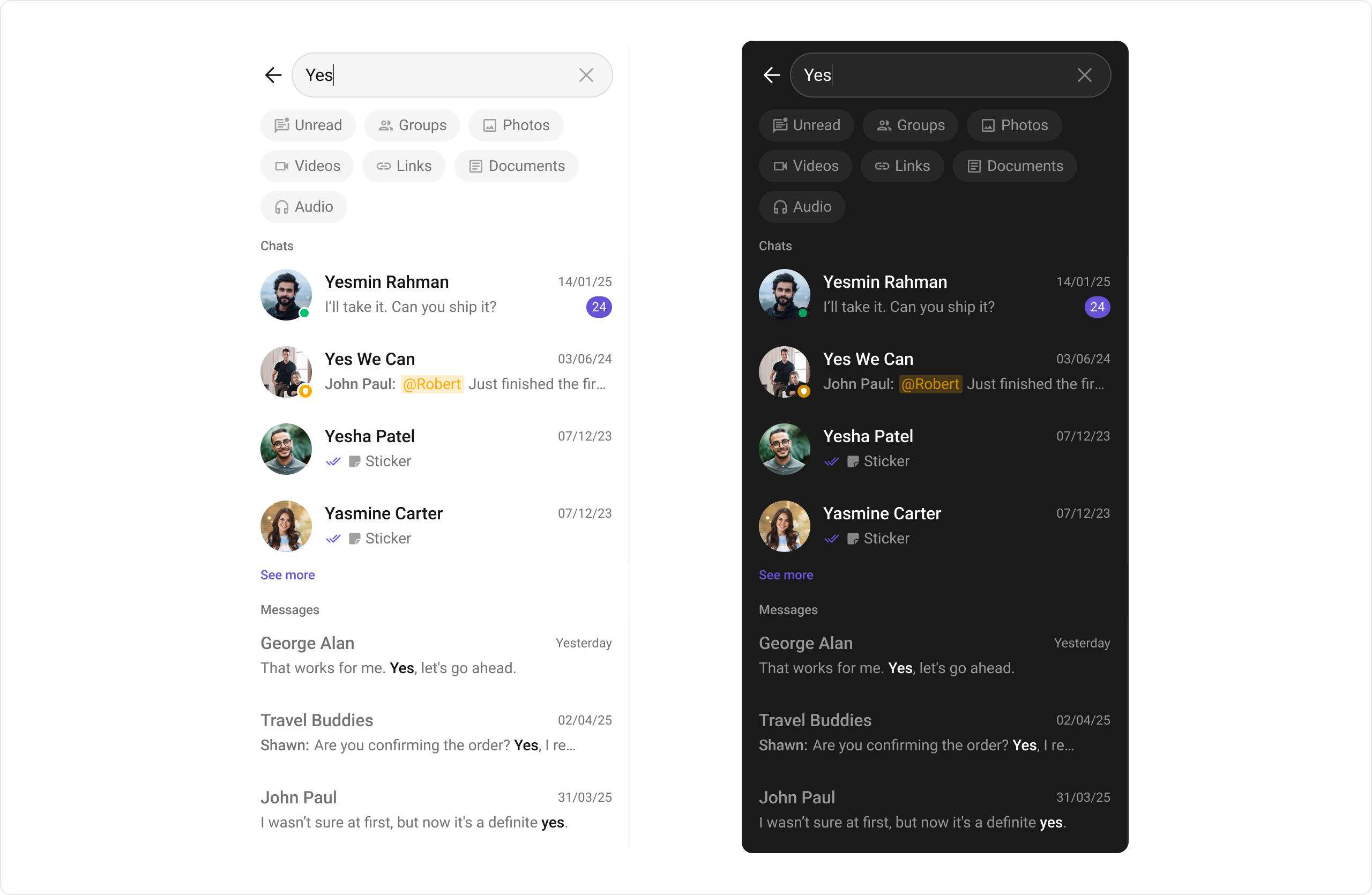
The `CometChatSearch` component is a powerful and customizable search interface that allows users to search across conversations and messages in real time. It supports a wide variety of filters, scopes, and customization options. `CometChatSearch` helps users find messages, conversations, media, and more through an intuitive and filterable search experience. It can be embedded in multiple contexts — as part of the conversation list, message header, or as a full-screen search experience.
 ***
## Usage
### Integration
`CometChatSearch`, as a composite Component, offers flexible integration options, allowing it to be launched directly via button clicks or any user-triggered action.
The following code snippet exemplifies how you can seamlessly integrate the GroupMembers component into your application.
```xml theme={null}
```
If you're defining the Group members within the XML code, you'll need to extract them and set them on the Group object using the appropriate method.
```java theme={null}
public class SearchActivity extends AppCompatActivity {
private ActivitySearchBinding binding;
@Override
protected void onCreate(Bundle savedInstanceState) {
super.onCreate(savedInstanceState);
binding = ActivitySearchBinding.inflate(getLayoutInflater());
setContentView(binding.getRoot());
}
}
```
```kotlin theme={null}
class SearchActivity : AppCompatActivity() {
private lateinit var binding: ActivitySearchBinding
override fun onCreate(savedInstanceState: Bundle?) {
super.onCreate(savedInstanceState)
binding = ActivitySearchBinding.inflate(layoutInflater)
setContentView(binding.root)
}
}
```
***
### Actions
[Actions](/ui-kit/android/components-overview#actions) dictate how a component functions. They are divided into two types: Predefined and User-defined. You can override either type, allowing you to tailor the behavior of the component to fit your specific needs.
#### 1. setOnConversationClicked
`setOnConversationClicked` is triggered when you click on a Conversation from the search result. The `onConversationClicked` action doesn't have a predefined behavior. You can override this action using the following code snippet.
```java SearchActivity.java theme={null}
binding.cometchatSearch.setOnConversationClicked((view, position, conversation) -> {
Log.d(TAG, "onCreate: Conversation Clicked !");
});
```
```kotlin SearchActivity.kt theme={null}
binding.cometchatSearch.setOnConversationClicked { view, position, conversation ->
Log.i(TAG, "onCreate: Conversation Clicked !")
}
```
***
#### 2. setOnMessageClicked
`setOnMessageClicked` is triggered when you click on a Message from the search result. The `onMessageClicked` action doesn't have a predefined behavior. You can override this action using the following code snippet.
```java SearchActivity.java theme={null}
binding.cometchatSearch.setOnMessageClicked((view, position, baseMessage) -> {
Log.d(TAG, "onCreate: Message Clicked !");
});
```
```kotlin SearchActivity.kt theme={null}
binding.cometchatSearch.setOnMessageClicked { view, position, baseMessage ->
Log.i(TAG, "onCreate: Message Clicked !")
}
```
***
#### 3. setOnBackPressListener
'setOnBackPressListener' is triggered when you click on the back button of the search component.
```java SearchActivity.java theme={null}
binding.cometchatSearch.setOnBackPressListener {
Log.i(TAG, "onCreate: Back Pressed !")
}
```
```kotlin SearchActivity.kt theme={null}
binding.cometchatSearch.setOnBackPressListener(()-> {
Log.d(TAG, "onCreate: Back Pressed !");
});
```
***
#### 4. setOnError
This action doesn't change the behavior of the component but rather listens for any errors that occur in the Search component.
```java SearchActivity.java theme={null}
binding.cometchatSearch.setOnError((e -> {
Log.e(TAG, "onCreate: ", e);
// Handle Error
}));
```
```kotlin SearchActivity.kt theme={null}
binding.cometchatSearch.onError = OnError {
Log.i(TAG, "onCreate: Error Occurred ! ${it.message}")
}
```
***
#### 5. setOnEmpty
This action doesn't change the behavior of the component but rather listens for the empty state of the Search component.
```java SearchActivity.java theme={null}
binding.cometchatSearch.setOnEmpty(()-> {
Log.d(TAG, "onCreate: Empty Result !");
});
```
```kotlin SearchActivity.kt theme={null}
binding.cometchatSearch.onEmpty = OnEmpty {
Log.i(TAG, "onCreate: No Results Found !")
}
```
### Filters
#### 1. ConversationsRequestBuilder
You can set the `ConversationsRequestBuilder` in the Search Component to filter the search result. You can modify the builder as per your specific requirements with multiple options available to know more refer to [ConversationRequestBuilder](/sdk/android/retrieve-conversations).
```java SearchActivity.java theme={null}
binding.cometchatSearch.setConversationsRequestBuilder(
new ConversationsRequest.ConversationsRequestBuilder().setLimit(10)
);
```
```kotlin SearchActivity.kt theme={null}
binding.cometchatSearch.setConversationsRequestBuilder(
ConversationsRequest.ConversationsRequestBuilder().setLimit(10)
)
```
***
#### 2. MessagesRequestBuilder
You can set the `MessagesRequestBuilder` in the Search Component to filter the search result. You can modify the builder as per your specific requirements with multiple options available to know more refer to [MessagesRequestBuilder](/sdk/android/additional-message-filtering).
```java SearchActivity.java theme={null}
binding.cometchatSearch.setMessagesRequestBuilder(
new MessagesRequest.MessagesRequestBuilder().setLimit(5)
);
```
```kotlin SearchActivity.kt theme={null}
binding.cometchatSearch.setMessagesRequestBuilder(
MessagesRequest.MessagesRequestBuilder().setLimit(5)
)
```
***
### Events
[Events](/ui-kit/android/components-overview#events) are emitted by a `Component`. By using event you can extend existing functionality. Being global events, they can be applied in multiple locations and are capable of being added or removed.
The `CometChatSearch` component does not produce any events.
***
## Customization
To fit your app's design requirements, you can customize the appearance of the `CometChatSearch` component. We provide exposed methods that allow you to modify the experience and behavior according to your specific needs.
### Style
Using Style you can customize the look and feel of the component in your app, These parameters typically control elements such as the color, size, shape, and fonts used within the component.
***
## Usage
### Integration
`CometChatSearch`, as a composite Component, offers flexible integration options, allowing it to be launched directly via button clicks or any user-triggered action.
The following code snippet exemplifies how you can seamlessly integrate the GroupMembers component into your application.
```xml theme={null}
```
If you're defining the Group members within the XML code, you'll need to extract them and set them on the Group object using the appropriate method.
```java theme={null}
public class SearchActivity extends AppCompatActivity {
private ActivitySearchBinding binding;
@Override
protected void onCreate(Bundle savedInstanceState) {
super.onCreate(savedInstanceState);
binding = ActivitySearchBinding.inflate(getLayoutInflater());
setContentView(binding.getRoot());
}
}
```
```kotlin theme={null}
class SearchActivity : AppCompatActivity() {
private lateinit var binding: ActivitySearchBinding
override fun onCreate(savedInstanceState: Bundle?) {
super.onCreate(savedInstanceState)
binding = ActivitySearchBinding.inflate(layoutInflater)
setContentView(binding.root)
}
}
```
***
### Actions
[Actions](/ui-kit/android/components-overview#actions) dictate how a component functions. They are divided into two types: Predefined and User-defined. You can override either type, allowing you to tailor the behavior of the component to fit your specific needs.
#### 1. setOnConversationClicked
`setOnConversationClicked` is triggered when you click on a Conversation from the search result. The `onConversationClicked` action doesn't have a predefined behavior. You can override this action using the following code snippet.
```java SearchActivity.java theme={null}
binding.cometchatSearch.setOnConversationClicked((view, position, conversation) -> {
Log.d(TAG, "onCreate: Conversation Clicked !");
});
```
```kotlin SearchActivity.kt theme={null}
binding.cometchatSearch.setOnConversationClicked { view, position, conversation ->
Log.i(TAG, "onCreate: Conversation Clicked !")
}
```
***
#### 2. setOnMessageClicked
`setOnMessageClicked` is triggered when you click on a Message from the search result. The `onMessageClicked` action doesn't have a predefined behavior. You can override this action using the following code snippet.
```java SearchActivity.java theme={null}
binding.cometchatSearch.setOnMessageClicked((view, position, baseMessage) -> {
Log.d(TAG, "onCreate: Message Clicked !");
});
```
```kotlin SearchActivity.kt theme={null}
binding.cometchatSearch.setOnMessageClicked { view, position, baseMessage ->
Log.i(TAG, "onCreate: Message Clicked !")
}
```
***
#### 3. setOnBackPressListener
'setOnBackPressListener' is triggered when you click on the back button of the search component.
```java SearchActivity.java theme={null}
binding.cometchatSearch.setOnBackPressListener {
Log.i(TAG, "onCreate: Back Pressed !")
}
```
```kotlin SearchActivity.kt theme={null}
binding.cometchatSearch.setOnBackPressListener(()-> {
Log.d(TAG, "onCreate: Back Pressed !");
});
```
***
#### 4. setOnError
This action doesn't change the behavior of the component but rather listens for any errors that occur in the Search component.
```java SearchActivity.java theme={null}
binding.cometchatSearch.setOnError((e -> {
Log.e(TAG, "onCreate: ", e);
// Handle Error
}));
```
```kotlin SearchActivity.kt theme={null}
binding.cometchatSearch.onError = OnError {
Log.i(TAG, "onCreate: Error Occurred ! ${it.message}")
}
```
***
#### 5. setOnEmpty
This action doesn't change the behavior of the component but rather listens for the empty state of the Search component.
```java SearchActivity.java theme={null}
binding.cometchatSearch.setOnEmpty(()-> {
Log.d(TAG, "onCreate: Empty Result !");
});
```
```kotlin SearchActivity.kt theme={null}
binding.cometchatSearch.onEmpty = OnEmpty {
Log.i(TAG, "onCreate: No Results Found !")
}
```
### Filters
#### 1. ConversationsRequestBuilder
You can set the `ConversationsRequestBuilder` in the Search Component to filter the search result. You can modify the builder as per your specific requirements with multiple options available to know more refer to [ConversationRequestBuilder](/sdk/android/retrieve-conversations).
```java SearchActivity.java theme={null}
binding.cometchatSearch.setConversationsRequestBuilder(
new ConversationsRequest.ConversationsRequestBuilder().setLimit(10)
);
```
```kotlin SearchActivity.kt theme={null}
binding.cometchatSearch.setConversationsRequestBuilder(
ConversationsRequest.ConversationsRequestBuilder().setLimit(10)
)
```
***
#### 2. MessagesRequestBuilder
You can set the `MessagesRequestBuilder` in the Search Component to filter the search result. You can modify the builder as per your specific requirements with multiple options available to know more refer to [MessagesRequestBuilder](/sdk/android/additional-message-filtering).
```java SearchActivity.java theme={null}
binding.cometchatSearch.setMessagesRequestBuilder(
new MessagesRequest.MessagesRequestBuilder().setLimit(5)
);
```
```kotlin SearchActivity.kt theme={null}
binding.cometchatSearch.setMessagesRequestBuilder(
MessagesRequest.MessagesRequestBuilder().setLimit(5)
)
```
***
### Events
[Events](/ui-kit/android/components-overview#events) are emitted by a `Component`. By using event you can extend existing functionality. Being global events, they can be applied in multiple locations and are capable of being added or removed.
The `CometChatSearch` component does not produce any events.
***
## Customization
To fit your app's design requirements, you can customize the appearance of the `CometChatSearch` component. We provide exposed methods that allow you to modify the experience and behavior according to your specific needs.
### Style
Using Style you can customize the look and feel of the component in your app, These parameters typically control elements such as the color, size, shape, and fonts used within the component.
 ```xml themes.xml theme={null}
```
```java theme={null}
binding.cometchatSearch.setStyle(R.style.CustomSearchStyle)
```
```kotlin theme={null}
binding.cometchatSearch.setStyle(R.style.CustomSearchStyle)
```
***
To know more such attributes, visit the [attributes file](https://github.com/cometchat/cometchat-uikit-android/blob/v5/chatuikit/src/main/res/values/attr_cometchat_search.xml).
### Functionality
These are a set of small functional customizations that allow you to fine-tune the overall experience of the component. With these, you can toggle the visibility of UI elements.
Below is a list of customizations along with corresponding code snippets
| Property | Description | Code |
| ------------------------- | ----------------------------------------------------------------------------------- | -------------------------------------------------------------------------- |
| **User** | The UID of the user in whose conversation the search will be performed. | `.setUid(String uid)` |
| **Group** | The GUID of the group in whose conversation the search will be performed. | `.setGuid(String guid)` |
| **Hide User Status** | Hides the user's online/offline status indicator. | `.setHideUserStatus(boolean bool)` |
| **Hide Group Type** | Hides the group type icon in conversation leading view. | `.setHideGroupType(boolean hide)` |
| **Search Filters** | List of filters to be rendered in the Search component. | `.setSearchFilters(List filters)` |
| **Initial Search Filter** | The filter which will be active by default on load. | `.setInitialSearchFilter(UIKitConstants.SearchFilter initialSearchFilter)` |
| **Search In** | List of entities in which the search should be performed. | `.setSearchIn(List scopes)` |
| **Initial View** | Custom view to be shown when CometChat Search is rendered & no search is performed. | `.setInitialView(@LayoutRes int initialView)` |
| **Loading View** | A custom component to display during the loading state. | `.setLoadingView(View loadingView)` |
| **Empty View** | A custom component to display when there are no conversations available. | `.setEmptyView(@LayoutRes int emptyView)` |
| **Error View** | A custom component to display when an error occurs. | `.setErrorView(View errorView)` |
### Advanced
For advanced-level customization, you can set custom views to the component. This lets you tailor each aspect of the component to fit your exact needs and application aesthetics. You can create and define your views, layouts, and UI elements and then incorporate those into the component.
***
#### ConversationItemView
With this function, you can assign a custom list item view to an conversation in the search result. For more information, refer to the [itemView](/ui-kit/android/conversations#itemview) prop of the `CometChatConversations` component.
#### ConversationLeadingView
With this function, you can assign a custom leading view of an conversation in the search result. For more information, refer to the [leadingView](/ui-kit/android/conversations#leadingview) prop of the `CometChatConversations` component.
#### ConversationTitleView
With this function, you can assign a custom title view to an conversation in the search result. For more information, refer to the [titleView](/ui-kit/android/conversations#titleview) prop of the `CometChatConversations` component.
#### ConversationSubtitleView
With this function, you can assign a custom subtitle view to an conversation in the search result. For more information, refer to the [subtitleView](/ui-kit/android/conversations#subtitleview) prop of the `CometChatConversations` component.
#### ConversationTrailingView
With this function, you can assign a custom trailing view to an conversation in the search result. For more information, refer to the [trailingView](/ui-kit/android/conversations#trailingview) prop of the `CometChatConversations` component.
#### MessageItemView
With message item view functions, you can assign custom views to different types of messages in the search result. For more information, refer to the [itemView](/ui-kit/android/messages#itemview) prop of the `CometChatMessages` component.
Here's how you can override the default message item view with a custom one for text messages:
```xml theme={null}
```
```java theme={null}
binding.cometchatSearch.setTextMessageItemView(new MessagesSearchViewHolderListener() {
@Override
public View createView(Context context, View listItem) {
// Inflate the custom message item view
LayoutInflater layoutInflater = (LayoutInflater) context.getSystemService(Context.LAYOUT_INFLATER_SERVICE);
return layoutInflater.inflate(R.layout.custom_message_item_view, null);
}
@Override
public void bindView(Context context, View createdView, TextMessage message, RecyclerView.ViewHolder holder, List messagesList, int position) {
// Find the TextView elements
android.widget.TextView titleTv = createdView.findViewById(R.id.tv_sender_name);
android.widget.TextView messageTv = createdView.findViewById(R.id.tv_message);
// Bind the message data to the views
if (message != null) {
titleTv.setText(message.getSender().getName());
messageTv.setText(message.getText());
}
}
});
```
```kotlin theme={null}
binding.cometchatSearch.setTextMessageItemView(object : MessagesSearchViewHolderListener() {
override fun createView(
context: Context?,
listItem: View?
): View? {
return layoutInflater.inflate(R.layout.custom_message_item_view, null)
}
override fun bindView(
context: Context?,
createdView: View?,
message: TextMessage?,
holder: RecyclerView.ViewHolder?,
messagesList: List?,
position: Int
) {
val titleTv = createdView?.findViewById(R.id.tv_sender_name)
val messageTv = createdView?.findViewById(R.id.tv_message)
titleTv?.text = message?.sender?.name
messageTv?.text = message?.text
}
})
```
It should look like this in the app:
```xml themes.xml theme={null}
```
```java theme={null}
binding.cometchatSearch.setStyle(R.style.CustomSearchStyle)
```
```kotlin theme={null}
binding.cometchatSearch.setStyle(R.style.CustomSearchStyle)
```
***
To know more such attributes, visit the [attributes file](https://github.com/cometchat/cometchat-uikit-android/blob/v5/chatuikit/src/main/res/values/attr_cometchat_search.xml).
### Functionality
These are a set of small functional customizations that allow you to fine-tune the overall experience of the component. With these, you can toggle the visibility of UI elements.
Below is a list of customizations along with corresponding code snippets
| Property | Description | Code |
| ------------------------- | ----------------------------------------------------------------------------------- | -------------------------------------------------------------------------- |
| **User** | The UID of the user in whose conversation the search will be performed. | `.setUid(String uid)` |
| **Group** | The GUID of the group in whose conversation the search will be performed. | `.setGuid(String guid)` |
| **Hide User Status** | Hides the user's online/offline status indicator. | `.setHideUserStatus(boolean bool)` |
| **Hide Group Type** | Hides the group type icon in conversation leading view. | `.setHideGroupType(boolean hide)` |
| **Search Filters** | List of filters to be rendered in the Search component. | `.setSearchFilters(List filters)` |
| **Initial Search Filter** | The filter which will be active by default on load. | `.setInitialSearchFilter(UIKitConstants.SearchFilter initialSearchFilter)` |
| **Search In** | List of entities in which the search should be performed. | `.setSearchIn(List scopes)` |
| **Initial View** | Custom view to be shown when CometChat Search is rendered & no search is performed. | `.setInitialView(@LayoutRes int initialView)` |
| **Loading View** | A custom component to display during the loading state. | `.setLoadingView(View loadingView)` |
| **Empty View** | A custom component to display when there are no conversations available. | `.setEmptyView(@LayoutRes int emptyView)` |
| **Error View** | A custom component to display when an error occurs. | `.setErrorView(View errorView)` |
### Advanced
For advanced-level customization, you can set custom views to the component. This lets you tailor each aspect of the component to fit your exact needs and application aesthetics. You can create and define your views, layouts, and UI elements and then incorporate those into the component.
***
#### ConversationItemView
With this function, you can assign a custom list item view to an conversation in the search result. For more information, refer to the [itemView](/ui-kit/android/conversations#itemview) prop of the `CometChatConversations` component.
#### ConversationLeadingView
With this function, you can assign a custom leading view of an conversation in the search result. For more information, refer to the [leadingView](/ui-kit/android/conversations#leadingview) prop of the `CometChatConversations` component.
#### ConversationTitleView
With this function, you can assign a custom title view to an conversation in the search result. For more information, refer to the [titleView](/ui-kit/android/conversations#titleview) prop of the `CometChatConversations` component.
#### ConversationSubtitleView
With this function, you can assign a custom subtitle view to an conversation in the search result. For more information, refer to the [subtitleView](/ui-kit/android/conversations#subtitleview) prop of the `CometChatConversations` component.
#### ConversationTrailingView
With this function, you can assign a custom trailing view to an conversation in the search result. For more information, refer to the [trailingView](/ui-kit/android/conversations#trailingview) prop of the `CometChatConversations` component.
#### MessageItemView
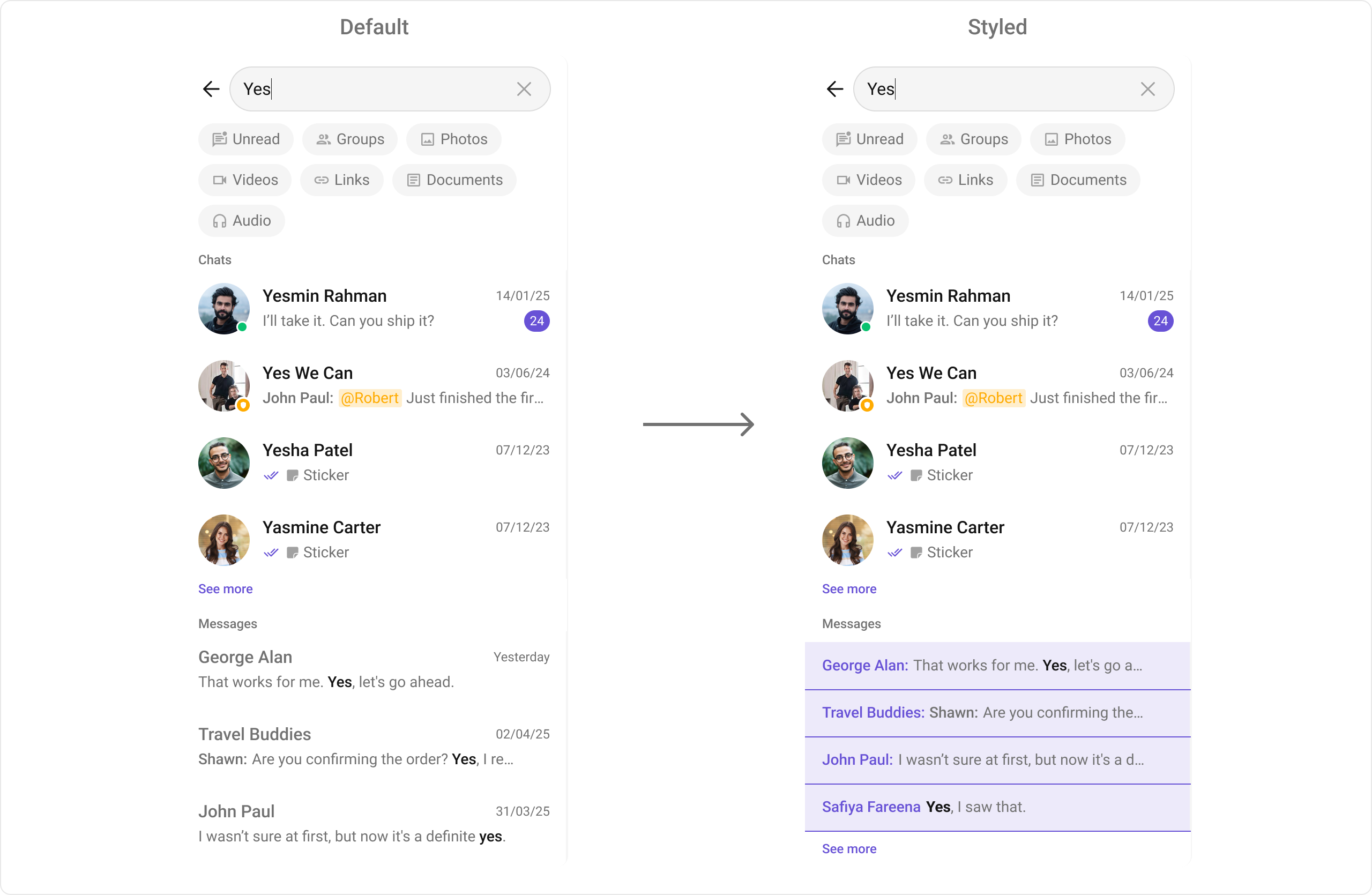
With message item view functions, you can assign custom views to different types of messages in the search result. For more information, refer to the [itemView](/ui-kit/android/messages#itemview) prop of the `CometChatMessages` component.
Here's how you can override the default message item view with a custom one for text messages:
```xml theme={null}
```
```java theme={null}
binding.cometchatSearch.setTextMessageItemView(new MessagesSearchViewHolderListener() {
@Override
public View createView(Context context, View listItem) {
// Inflate the custom message item view
LayoutInflater layoutInflater = (LayoutInflater) context.getSystemService(Context.LAYOUT_INFLATER_SERVICE);
return layoutInflater.inflate(R.layout.custom_message_item_view, null);
}
@Override
public void bindView(Context context, View createdView, TextMessage message, RecyclerView.ViewHolder holder, List messagesList, int position) {
// Find the TextView elements
android.widget.TextView titleTv = createdView.findViewById(R.id.tv_sender_name);
android.widget.TextView messageTv = createdView.findViewById(R.id.tv_message);
// Bind the message data to the views
if (message != null) {
titleTv.setText(message.getSender().getName());
messageTv.setText(message.getText());
}
}
});
```
```kotlin theme={null}
binding.cometchatSearch.setTextMessageItemView(object : MessagesSearchViewHolderListener() {
override fun createView(
context: Context?,
listItem: View?
): View? {
return layoutInflater.inflate(R.layout.custom_message_item_view, null)
}
override fun bindView(
context: Context?,
createdView: View?,
message: TextMessage?,
holder: RecyclerView.ViewHolder?,
messagesList: List?,
position: Int
) {
val titleTv = createdView?.findViewById(R.id.tv_sender_name)
val messageTv = createdView?.findViewById(R.id.tv_message)
titleTv?.text = message?.sender?.name
messageTv?.text = message?.text
}
})
```
It should look like this in the app:
 Bellow is the list of message item view functions available for customization:
| Function | Message Type |
| ------------------------------ | ---------------- |
| **setTextMessageItemView** | Text Message |
| **setImageMessageItemView** | Image Message |
| **setVideoMessageItemView** | Video Message |
| **setAudioMessageItemView** | Audio Message |
| **setDocumentMessageItemView** | Document Message |
| **setLinkMessageItemView** | Link Message |
#### DateTime Formatters
#### setDateTimeFormatter
By providing a custom implementation of the DateTimeFormatterCallback, you can configure how time and date values are displayed. This ensures consistent formatting for labels such as "Today", "Yesterday", "X minutes ago", and more.
Each method in the interface corresponds to a specific case:
`time(long timestamp)` → Custom full timestamp format
`today(long timestamp)` → Called when a message is from today
`yesterday(long timestamp)` → Called for yesterday’s messages
`lastWeek(long timestamp)` → Messages from the past week
`otherDays(long timestamp)` → Older messages
`minute(long timestamp)` / `hour(long timestamp)` → Exact time unit
`minutes(long diffInMinutesFromNow, long timestamp)` → e.g., "5 minutes ago"
`hours(long diffInHourFromNow, long timestamp)` → e.g., "2 hours ago"
```java theme={null}
import java.text.SimpleDateFormat;
import java.util.Date;
import java.util.Locale;
cometChatSearch.setDateTimeFormatter(new DateTimeFormatterCallback() {
private final SimpleDateFormat fullTimeFormatter = new SimpleDateFormat("hh:mm a", Locale.getDefault());
private final SimpleDateFormat dateFormatter = new SimpleDateFormat("dd MMM yyyy", Locale.getDefault());
@Override
public String time(long timestamp) {
return fullTimeFormatter.format(new Date(timestamp));
}
@Override
public String today(long timestamp) {
return "Today";
}
@Override
public String yesterday(long timestamp) {
return "Yesterday";
}
@Override
public String lastWeek(long timestamp) {
return "Last Week";
}
@Override
public String otherDays(long timestamp) {
return dateFormatter.format(new Date(timestamp));
}
@Override
public String minutes(long diffInMinutesFromNow, long timestamp) {
return diffInMinutesFromNow + " mins ago";
}
@Override
public String hours(long diffInHourFromNow, long timestamp) {
return diffInHourFromNow + " hrs ago";
}
});
```
```kotlin theme={null}
import java.text.SimpleDateFormat
import java.util.*
cometChatSearch.setDateTimeFormatterCallback(object : DateTimeFormatterCallback {
private val fullTimeFormatter = SimpleDateFormat("hh:mm a", Locale.getDefault())
private val dateFormatter = SimpleDateFormat("dd MMM yyyy", Locale.getDefault())
override fun time(timestamp: Long): String {
return fullTimeFormatter.format(Date(timestamp))
}
override fun today(timestamp: Long): String {
return "Today"
}
override fun yesterday(timestamp: Long): String {
return "Yesterday"
}
override fun lastWeek(timestamp: Long): String {
return "Last Week"
}
override fun otherDays(timestamp: Long): String {
return dateFormatter.format(Date(timestamp))
}
override fun minutes(diffInMinutesFromNow: Long, timestamp: Long): String {
return "$diffInMinutesFromNow mins ago"
}
override fun hours(diffInHourFromNow: Long, timestamp: Long): String {
return "$diffInHourFromNow hrs ago"
}
});
```
***
#### Text Formatters
#### setTextFormatters
This method enables developers to define and apply text formatters that dynamically modify or transform message content before rendering it in the UI. Text formatters can be used for purposes such as:
* Automatically converting URLs into clickable links
* Applying Markdown or rich text styling
* Replacing certain words or patterns with emojis or predefined text
* Censoring specific words for moderation
By utilizing this method, developers can enhance readability, usability, and compliance with content guidelines. [MentionsFormatter Guide](/ui-kit/android/mentions-formatter-guide)
Bellow is the list of message item view functions available for customization:
| Function | Message Type |
| ------------------------------ | ---------------- |
| **setTextMessageItemView** | Text Message |
| **setImageMessageItemView** | Image Message |
| **setVideoMessageItemView** | Video Message |
| **setAudioMessageItemView** | Audio Message |
| **setDocumentMessageItemView** | Document Message |
| **setLinkMessageItemView** | Link Message |
#### DateTime Formatters
#### setDateTimeFormatter
By providing a custom implementation of the DateTimeFormatterCallback, you can configure how time and date values are displayed. This ensures consistent formatting for labels such as "Today", "Yesterday", "X minutes ago", and more.
Each method in the interface corresponds to a specific case:
`time(long timestamp)` → Custom full timestamp format
`today(long timestamp)` → Called when a message is from today
`yesterday(long timestamp)` → Called for yesterday’s messages
`lastWeek(long timestamp)` → Messages from the past week
`otherDays(long timestamp)` → Older messages
`minute(long timestamp)` / `hour(long timestamp)` → Exact time unit
`minutes(long diffInMinutesFromNow, long timestamp)` → e.g., "5 minutes ago"
`hours(long diffInHourFromNow, long timestamp)` → e.g., "2 hours ago"
```java theme={null}
import java.text.SimpleDateFormat;
import java.util.Date;
import java.util.Locale;
cometChatSearch.setDateTimeFormatter(new DateTimeFormatterCallback() {
private final SimpleDateFormat fullTimeFormatter = new SimpleDateFormat("hh:mm a", Locale.getDefault());
private final SimpleDateFormat dateFormatter = new SimpleDateFormat("dd MMM yyyy", Locale.getDefault());
@Override
public String time(long timestamp) {
return fullTimeFormatter.format(new Date(timestamp));
}
@Override
public String today(long timestamp) {
return "Today";
}
@Override
public String yesterday(long timestamp) {
return "Yesterday";
}
@Override
public String lastWeek(long timestamp) {
return "Last Week";
}
@Override
public String otherDays(long timestamp) {
return dateFormatter.format(new Date(timestamp));
}
@Override
public String minutes(long diffInMinutesFromNow, long timestamp) {
return diffInMinutesFromNow + " mins ago";
}
@Override
public String hours(long diffInHourFromNow, long timestamp) {
return diffInHourFromNow + " hrs ago";
}
});
```
```kotlin theme={null}
import java.text.SimpleDateFormat
import java.util.*
cometChatSearch.setDateTimeFormatterCallback(object : DateTimeFormatterCallback {
private val fullTimeFormatter = SimpleDateFormat("hh:mm a", Locale.getDefault())
private val dateFormatter = SimpleDateFormat("dd MMM yyyy", Locale.getDefault())
override fun time(timestamp: Long): String {
return fullTimeFormatter.format(Date(timestamp))
}
override fun today(timestamp: Long): String {
return "Today"
}
override fun yesterday(timestamp: Long): String {
return "Yesterday"
}
override fun lastWeek(timestamp: Long): String {
return "Last Week"
}
override fun otherDays(timestamp: Long): String {
return dateFormatter.format(Date(timestamp))
}
override fun minutes(diffInMinutesFromNow: Long, timestamp: Long): String {
return "$diffInMinutesFromNow mins ago"
}
override fun hours(diffInHourFromNow: Long, timestamp: Long): String {
return "$diffInHourFromNow hrs ago"
}
});
```
***
#### Text Formatters
#### setTextFormatters
This method enables developers to define and apply text formatters that dynamically modify or transform message content before rendering it in the UI. Text formatters can be used for purposes such as:
* Automatically converting URLs into clickable links
* Applying Markdown or rich text styling
* Replacing certain words or patterns with emojis or predefined text
* Censoring specific words for moderation
By utilizing this method, developers can enhance readability, usability, and compliance with content guidelines. [MentionsFormatter Guide](/ui-kit/android/mentions-formatter-guide)