> ## Documentation Index
> Fetch the complete documentation index at: https://cometchat-22654f5b-feature-react-native-sdk-quotedmessage-a.mintlify.site/llms.txt
> Use this file to discover all available pages before exploring further.
# AI Agent Integration
Enable intelligent conversational AI capabilities in your Android app using CometChat UIKit v5 with AI Agent integration:
* **AI Assistant Chat History**
* **Chat History Management**
* **Contextual Responses**
* **Agent Detection**
* **Seamless Handoffs**
Transform your chat experience with AI-powered assistance that provides intelligent responses and offers seamless integration with your existing chat infrastructure.
## Overview
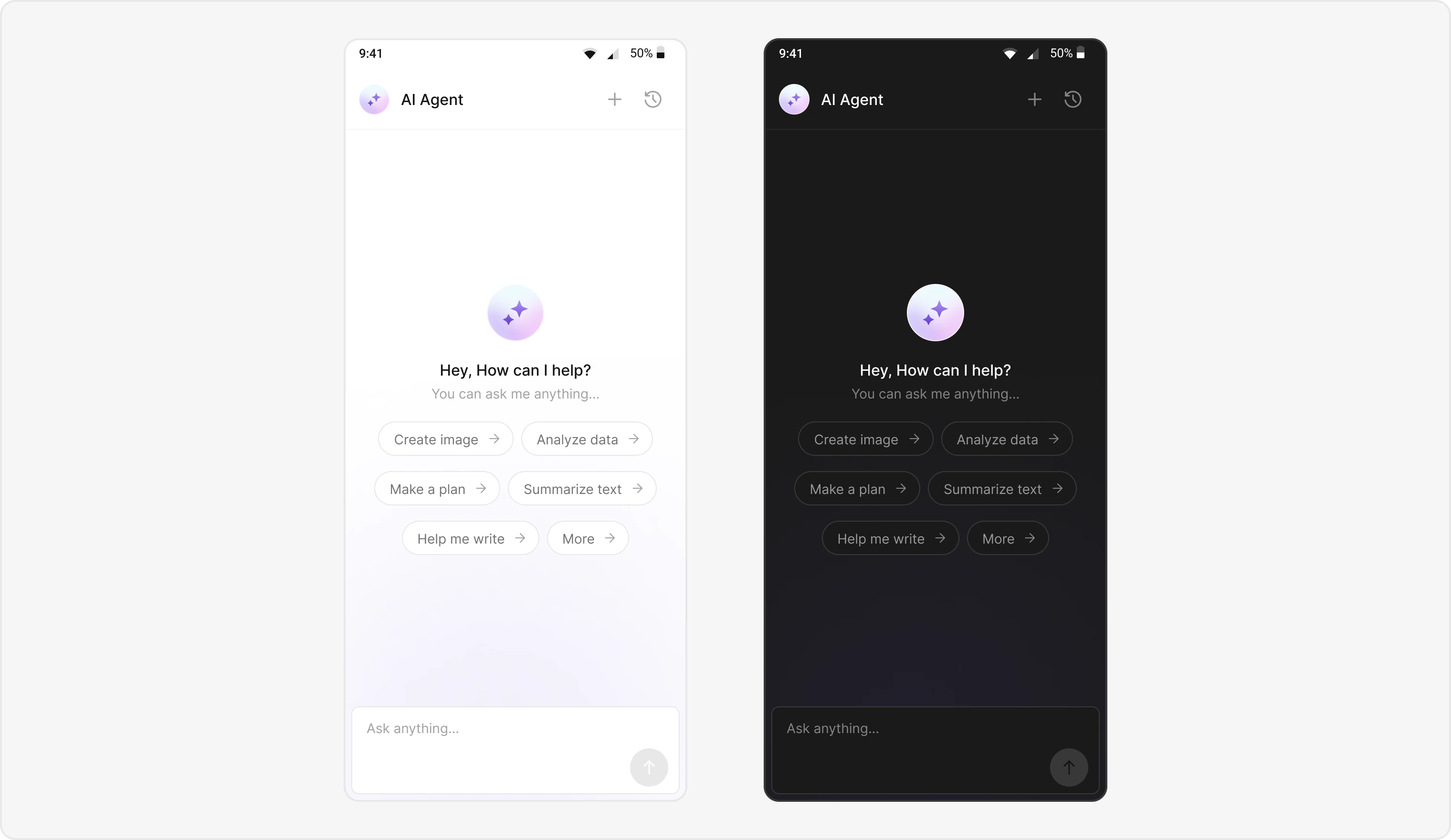
Users can interact with AI agents through a dedicated chat interface that:
* Provides intelligent responses based on conversation context.
* Maintains chat history for continuity.
* Seamlessly integrates with your existing user chat system.
The AI Agent chat interface provides a familiar messaging experience enhanced with AI capabilities, accessible through your main chat flow or as a standalone feature.
 ## Prerequisites
* **CometChat UIKit for Flutter** installed via `pubspec.yaml`
* CometChat initialized with `App ID`, `Region`, and `Auth Key`
* Message chat enabled in your CometChat app
* Navigation set up between message and user/group screens
* Internet permissions
## Components
| Component/Class | Role |
| --------------------------------- | ------------------------------------------ |
| `CometChatMessageHeader` | Manages message interactions and state |
| `CometChatMessageList` | Displays a list of messages |
| `CometChatMessageComposer` | Composes and sends new messages |
| `CometChatAIAssistantChatHistory` | Displays previous AI conversation history. |
## Integration Steps
### Step 1 - Screen Setup
Create a screen for AI Assistant chat using `CometChatMessageHeader`, `CometChatMessageList`, and `CometChatMessageComposer`.
```dart theme={null}
import 'package:flutter/material.dart';
import 'package:cometchat_chat_uikit/cometchat_chat_uikit.dart';
import 'package:cometchat_chat_uikit/cometchat_chat_uikit.dart' as cc;
class AIAssistantChatScreen extends StatefulWidget {
final User? user;
final Group? group;
final BaseMessage? parentMessage;
final bool? isHistory;
const AIAssistantChatScreen(
{Key? key, this.user, this.group, this.parentMessage, this.isHistory})
: super(key: key);
@override
State createState() => _AIAssistantChatScreenState();
}
class _AIAssistantChatScreenState extends State {
late CometChatColorPalette colorPalette;
late CometChatTypography typography;
late CometChatSpacing spacing;
@override
void initState() {
super.initState();
}
@override
void didChangeDependencies() {
super.didChangeDependencies();
typography = CometChatThemeHelper.getTypography(context);
colorPalette = CometChatThemeHelper.getColorPalette(context);
spacing = CometChatThemeHelper.getSpacing(context);
}
bool isUserAgentic() {
return widget.user?.role == AIConstants.aiRole;
}
@override
Widget build(BuildContext context) {
final ccColor = CometChatThemeHelper.getColorPalette(context);
return Scaffold(
backgroundColor: ccColor.background1,
appBar: CometChatMessageHeader(
user: widget.user,
group: widget.group,
messageHeaderStyle: CometChatMessageHeaderStyle(
backgroundColor:
(isUserAgentic()) ? ccColor.background1 : null,
border: (isUserAgentic())
? Border(
bottom: BorderSide(
color: ccColor.borderLight ?? Colors.transparent,
width: 1.0,
),
)
: null,
statusIndicatorStyle: CometChatStatusIndicatorStyle(
backgroundColor: colorPalette.transparent,
borderRadius: BorderRadius.zero,
border: Border.all(
width: 0,
color: colorPalette.transparent ?? Colors.transparent,
),
),
),
onBack: () {
FocusManager.instance.primaryFocus?.unfocus();
Navigator.of(context).pop();
},
chatHistoryButtonClick: () {
Navigator.push(
context,
MaterialPageRoute(
builder: (context) => CometChatAIAssistantChatHistory(
user: widget.user,
group: widget.group,
onNewChatButtonClicked: () {
onNewChatClicked(true);
},
onMessageClicked: (message) {
if (message != null) {
Navigator.of(context)
..pop()
..pop();
Navigator.push(
context,
MaterialPageRoute(
builder: (context) => AIAssistantChatScreen(
user: widget.user,
group: widget.group,
parentMessage: message,
isHistory: true,
),
),
);
}
},
onClose: () {
Navigator.of(context).pop();
},
),
),
);
},
newChatButtonClick: () {
onNewChatClicked(false);
},
),
resizeToAvoidBottomInset: true,
body: Container(
color: ccColor.background3,
child: Column(
children: [
Expanded(
child: GestureDetector(
onTap: () => FocusScope.of(context).unfocus(),
child: getMessageList(
user: widget.user,
group: widget.group,
context: context,
parentMessage: widget.parentMessage,
),
),
),
getComposer(),
],
),
),
);
;
}
Widget getComposer() {
bool agentic = isUserAgentic();
return CometChatMessageComposer(
user: widget.user,
group: widget.group,
disableMentions: (agentic) ? true : false,
placeholderText:
(agentic) ? "${cc.Translations.of(context).askAnything}..." : null,
parentMessageId: widget.parentMessage?.id ?? 0,
messageComposerStyle: CometChatMessageComposerStyle(
dividerColor: agentic ? Colors.transparent : null,
dividerHeight: agentic ? 0 : null,
backgroundColor: agentic ? colorPalette.background1 : null,
),
);
}
onNewChatClicked(bool isHistory) async {
if (isHistory) {
Navigator.of(context).pop();
}
Navigator.pushReplacement(
context,
MaterialPageRoute(
builder: (context) => AIAssistantChatScreen(
user: widget.user,
group: widget.group,
),
),
);
}
Widget getMessageList({
User? user,
Group? group,
context,
BaseMessage? parentMessage,
}) {
MessagesRequestBuilder? requestBuilder = MessagesRequestBuilder();
if (widget.isHistory != null &&
widget.isHistory == true &&
parentMessage != null &&
isUserAgentic()) {
requestBuilder = MessagesRequestBuilder()
..parentMessageId = parentMessage.id
..withParent = true
..hideReplies = true;
}
return CometChatMessageList(
user: user,
group: group,
hideReplyInThreadOption: (isUserAgentic()) ? true : false,
hideThreadView: true,
messagesRequestBuilder: requestBuilder,
style: CometChatMessageListStyle(
backgroundColor: (isUserAgentic()) ? colorPalette.background3 : null,
outgoingMessageBubbleStyle: CometChatOutgoingMessageBubbleStyle(
textBubbleStyle: CometChatTextBubbleStyle(
backgroundColor:
(isUserAgentic()) ? colorPalette.background4 : null,
textColor: (isUserAgentic()) ? colorPalette.textPrimary : null,
messageBubbleDateStyle: CometChatDateStyle(
textColor: (isUserAgentic()) ? colorPalette.neutral600 : null,
),
),
messageBubbleDateStyle: CometChatDateStyle(
textColor: (isUserAgentic()) ? colorPalette.textPrimary : null,
),
),
),
);
}
}
```
### Step 2 - Chat History Screen
Create a screen for AI Assistant chat history using CometChatAIAssistantChatHistory.
Add the following code inside your widget to navigate to the chat history screen when the user taps a button or icon.
```dart theme={null}
chatHistoryButtonClick: () {
Navigator.push(
context,
MaterialPageRoute(
builder: (context) => CometChatAIAssistantChatHistory(
user: widget.user,
group: widget.group,
onNewChatButtonClicked: () {
onNewChatClicked(true);
},
onMessageClicked: (message) {
if (message != null) {
Navigator.of(context)
..pop() // Close ChatHistory
..pop(); // Close current AI screen
Navigator.push(
context,
MaterialPageRoute(
builder: (context) => AIAssistantChatScreen(
user: widget.user,
group: widget.group,
parentMessage: message,
isHistory: true,
),
),
);
}
},
onClose: () {
Navigator.of(context).pop();
},
),
),
);
},
```
This integration opens the AI Assistant Chat History screen, allowing users to:
* Browse their previous AI chat sessions.
* Resume a previous conversation (onMessageClicked).
* Start a new chat session (onNewChatButtonClicked).
* Close the chat history view (onClose).
### Step 3 - Custom Styles
Define custom styles for AI chat bubbles and the composer by using a ThemeExtension (CometChatAiAssistantBubbleStyle).
```dart theme={null}
import 'package:flutter/material.dart';
import 'package:cometchat_chat_uikit/cometchat_chat_uikit.dart';
void main() {
runApp(const MyApp());
}
class MyApp extends StatelessWidget {
const MyApp({super.key});
@override
Widget build(BuildContext context) {
return MaterialApp(
title: 'AI Chat Demo',
theme: ThemeData(
// Add your custom AI Assistant bubble styles here
extensions: [
CometChatAiAssistantBubbleStyle(
backgroundColor: Colors.transparent,
border: Border.all(color: Colors.blueAccent, width: 1),
textColor: const Color(0xFF141414),
textStyle: const TextStyle(
fontFamily: 'TimesNewRoman', // Add this in pubspec.yaml under fonts
),
),
],
),
home: const AIAssistantChatScreen(),
);
}
}
```
## Implementation Flow Summary
| Step | Action |
| :--- | :---------------------------------------------------------------------- |
| 1 | User selects AI agent from chat list |
| 2 | `AIAssistantChatScreen` launches |
| 3 | Parse User data and detect agent chat (Role of user must be "@agentic") |
| 4 | Initialize UI with AI-specific styling |
| 6 | Configure chat history and navigation |
| 7 | Launch chat with AI agent |
## Customization Options
* **Custom AI Assistant Empty Chat View:** Customize the empty state view using `emptyStateView`.
* **Streaming Speed:** Adjust AI response streaming speed via `streamingSpeed`.
* **AI Assistant Suggested Messages:** Create custom list of suggested messages and set quick prompts using `suggestedMessages`.
* **AI Assistant Tools:** Set tools for the AI agent using `setAiAssistantTools` callback.
## Feature Matrix
| Feature | Implementation | UI Component |
| :----------- | :-------------------------------- | :------------------ |
| AI Chat | `AIAssistantChatScreen` | Full chat screen |
| Chat History | `CometChatAIAssistantChatHistory` | Chat history screen |
## Prerequisites
* **CometChat UIKit for Flutter** installed via `pubspec.yaml`
* CometChat initialized with `App ID`, `Region`, and `Auth Key`
* Message chat enabled in your CometChat app
* Navigation set up between message and user/group screens
* Internet permissions
## Components
| Component/Class | Role |
| --------------------------------- | ------------------------------------------ |
| `CometChatMessageHeader` | Manages message interactions and state |
| `CometChatMessageList` | Displays a list of messages |
| `CometChatMessageComposer` | Composes and sends new messages |
| `CometChatAIAssistantChatHistory` | Displays previous AI conversation history. |
## Integration Steps
### Step 1 - Screen Setup
Create a screen for AI Assistant chat using `CometChatMessageHeader`, `CometChatMessageList`, and `CometChatMessageComposer`.
```dart theme={null}
import 'package:flutter/material.dart';
import 'package:cometchat_chat_uikit/cometchat_chat_uikit.dart';
import 'package:cometchat_chat_uikit/cometchat_chat_uikit.dart' as cc;
class AIAssistantChatScreen extends StatefulWidget {
final User? user;
final Group? group;
final BaseMessage? parentMessage;
final bool? isHistory;
const AIAssistantChatScreen(
{Key? key, this.user, this.group, this.parentMessage, this.isHistory})
: super(key: key);
@override
State createState() => _AIAssistantChatScreenState();
}
class _AIAssistantChatScreenState extends State {
late CometChatColorPalette colorPalette;
late CometChatTypography typography;
late CometChatSpacing spacing;
@override
void initState() {
super.initState();
}
@override
void didChangeDependencies() {
super.didChangeDependencies();
typography = CometChatThemeHelper.getTypography(context);
colorPalette = CometChatThemeHelper.getColorPalette(context);
spacing = CometChatThemeHelper.getSpacing(context);
}
bool isUserAgentic() {
return widget.user?.role == AIConstants.aiRole;
}
@override
Widget build(BuildContext context) {
final ccColor = CometChatThemeHelper.getColorPalette(context);
return Scaffold(
backgroundColor: ccColor.background1,
appBar: CometChatMessageHeader(
user: widget.user,
group: widget.group,
messageHeaderStyle: CometChatMessageHeaderStyle(
backgroundColor:
(isUserAgentic()) ? ccColor.background1 : null,
border: (isUserAgentic())
? Border(
bottom: BorderSide(
color: ccColor.borderLight ?? Colors.transparent,
width: 1.0,
),
)
: null,
statusIndicatorStyle: CometChatStatusIndicatorStyle(
backgroundColor: colorPalette.transparent,
borderRadius: BorderRadius.zero,
border: Border.all(
width: 0,
color: colorPalette.transparent ?? Colors.transparent,
),
),
),
onBack: () {
FocusManager.instance.primaryFocus?.unfocus();
Navigator.of(context).pop();
},
chatHistoryButtonClick: () {
Navigator.push(
context,
MaterialPageRoute(
builder: (context) => CometChatAIAssistantChatHistory(
user: widget.user,
group: widget.group,
onNewChatButtonClicked: () {
onNewChatClicked(true);
},
onMessageClicked: (message) {
if (message != null) {
Navigator.of(context)
..pop()
..pop();
Navigator.push(
context,
MaterialPageRoute(
builder: (context) => AIAssistantChatScreen(
user: widget.user,
group: widget.group,
parentMessage: message,
isHistory: true,
),
),
);
}
},
onClose: () {
Navigator.of(context).pop();
},
),
),
);
},
newChatButtonClick: () {
onNewChatClicked(false);
},
),
resizeToAvoidBottomInset: true,
body: Container(
color: ccColor.background3,
child: Column(
children: [
Expanded(
child: GestureDetector(
onTap: () => FocusScope.of(context).unfocus(),
child: getMessageList(
user: widget.user,
group: widget.group,
context: context,
parentMessage: widget.parentMessage,
),
),
),
getComposer(),
],
),
),
);
;
}
Widget getComposer() {
bool agentic = isUserAgentic();
return CometChatMessageComposer(
user: widget.user,
group: widget.group,
disableMentions: (agentic) ? true : false,
placeholderText:
(agentic) ? "${cc.Translations.of(context).askAnything}..." : null,
parentMessageId: widget.parentMessage?.id ?? 0,
messageComposerStyle: CometChatMessageComposerStyle(
dividerColor: agentic ? Colors.transparent : null,
dividerHeight: agentic ? 0 : null,
backgroundColor: agentic ? colorPalette.background1 : null,
),
);
}
onNewChatClicked(bool isHistory) async {
if (isHistory) {
Navigator.of(context).pop();
}
Navigator.pushReplacement(
context,
MaterialPageRoute(
builder: (context) => AIAssistantChatScreen(
user: widget.user,
group: widget.group,
),
),
);
}
Widget getMessageList({
User? user,
Group? group,
context,
BaseMessage? parentMessage,
}) {
MessagesRequestBuilder? requestBuilder = MessagesRequestBuilder();
if (widget.isHistory != null &&
widget.isHistory == true &&
parentMessage != null &&
isUserAgentic()) {
requestBuilder = MessagesRequestBuilder()
..parentMessageId = parentMessage.id
..withParent = true
..hideReplies = true;
}
return CometChatMessageList(
user: user,
group: group,
hideReplyInThreadOption: (isUserAgentic()) ? true : false,
hideThreadView: true,
messagesRequestBuilder: requestBuilder,
style: CometChatMessageListStyle(
backgroundColor: (isUserAgentic()) ? colorPalette.background3 : null,
outgoingMessageBubbleStyle: CometChatOutgoingMessageBubbleStyle(
textBubbleStyle: CometChatTextBubbleStyle(
backgroundColor:
(isUserAgentic()) ? colorPalette.background4 : null,
textColor: (isUserAgentic()) ? colorPalette.textPrimary : null,
messageBubbleDateStyle: CometChatDateStyle(
textColor: (isUserAgentic()) ? colorPalette.neutral600 : null,
),
),
messageBubbleDateStyle: CometChatDateStyle(
textColor: (isUserAgentic()) ? colorPalette.textPrimary : null,
),
),
),
);
}
}
```
### Step 2 - Chat History Screen
Create a screen for AI Assistant chat history using CometChatAIAssistantChatHistory.
Add the following code inside your widget to navigate to the chat history screen when the user taps a button or icon.
```dart theme={null}
chatHistoryButtonClick: () {
Navigator.push(
context,
MaterialPageRoute(
builder: (context) => CometChatAIAssistantChatHistory(
user: widget.user,
group: widget.group,
onNewChatButtonClicked: () {
onNewChatClicked(true);
},
onMessageClicked: (message) {
if (message != null) {
Navigator.of(context)
..pop() // Close ChatHistory
..pop(); // Close current AI screen
Navigator.push(
context,
MaterialPageRoute(
builder: (context) => AIAssistantChatScreen(
user: widget.user,
group: widget.group,
parentMessage: message,
isHistory: true,
),
),
);
}
},
onClose: () {
Navigator.of(context).pop();
},
),
),
);
},
```
This integration opens the AI Assistant Chat History screen, allowing users to:
* Browse their previous AI chat sessions.
* Resume a previous conversation (onMessageClicked).
* Start a new chat session (onNewChatButtonClicked).
* Close the chat history view (onClose).
### Step 3 - Custom Styles
Define custom styles for AI chat bubbles and the composer by using a ThemeExtension (CometChatAiAssistantBubbleStyle).
```dart theme={null}
import 'package:flutter/material.dart';
import 'package:cometchat_chat_uikit/cometchat_chat_uikit.dart';
void main() {
runApp(const MyApp());
}
class MyApp extends StatelessWidget {
const MyApp({super.key});
@override
Widget build(BuildContext context) {
return MaterialApp(
title: 'AI Chat Demo',
theme: ThemeData(
// Add your custom AI Assistant bubble styles here
extensions: [
CometChatAiAssistantBubbleStyle(
backgroundColor: Colors.transparent,
border: Border.all(color: Colors.blueAccent, width: 1),
textColor: const Color(0xFF141414),
textStyle: const TextStyle(
fontFamily: 'TimesNewRoman', // Add this in pubspec.yaml under fonts
),
),
],
),
home: const AIAssistantChatScreen(),
);
}
}
```
## Implementation Flow Summary
| Step | Action |
| :--- | :---------------------------------------------------------------------- |
| 1 | User selects AI agent from chat list |
| 2 | `AIAssistantChatScreen` launches |
| 3 | Parse User data and detect agent chat (Role of user must be "@agentic") |
| 4 | Initialize UI with AI-specific styling |
| 6 | Configure chat history and navigation |
| 7 | Launch chat with AI agent |
## Customization Options
* **Custom AI Assistant Empty Chat View:** Customize the empty state view using `emptyStateView`.
* **Streaming Speed:** Adjust AI response streaming speed via `streamingSpeed`.
* **AI Assistant Suggested Messages:** Create custom list of suggested messages and set quick prompts using `suggestedMessages`.
* **AI Assistant Tools:** Set tools for the AI agent using `setAiAssistantTools` callback.
## Feature Matrix
| Feature | Implementation | UI Component |
| :----------- | :-------------------------------- | :------------------ |
| AI Chat | `AIAssistantChatScreen` | Full chat screen |
| Chat History | `CometChatAIAssistantChatHistory` | Chat history screen |