> ## Documentation Index
> Fetch the complete documentation index at: https://cometchat-22654f5b-feature-react-native-sdk-quotedmessage-a.mintlify.site/llms.txt
> Use this file to discover all available pages before exploring further.
# AI Agent Integration
Enable intelligent conversational AI capabilities in your iOS app using CometChat UIKit v5 with AI Agent integration:
* **AI Assistant Chat History**
* **Chat History Management**
* **Contextual Responses**
* **Agent Detection**
* **Seamless Handoffs**
Transform your chat experience with AI-powered assistance that provides intelligent responses and offers seamless integration with your existing chat infrastructure.
## Overview
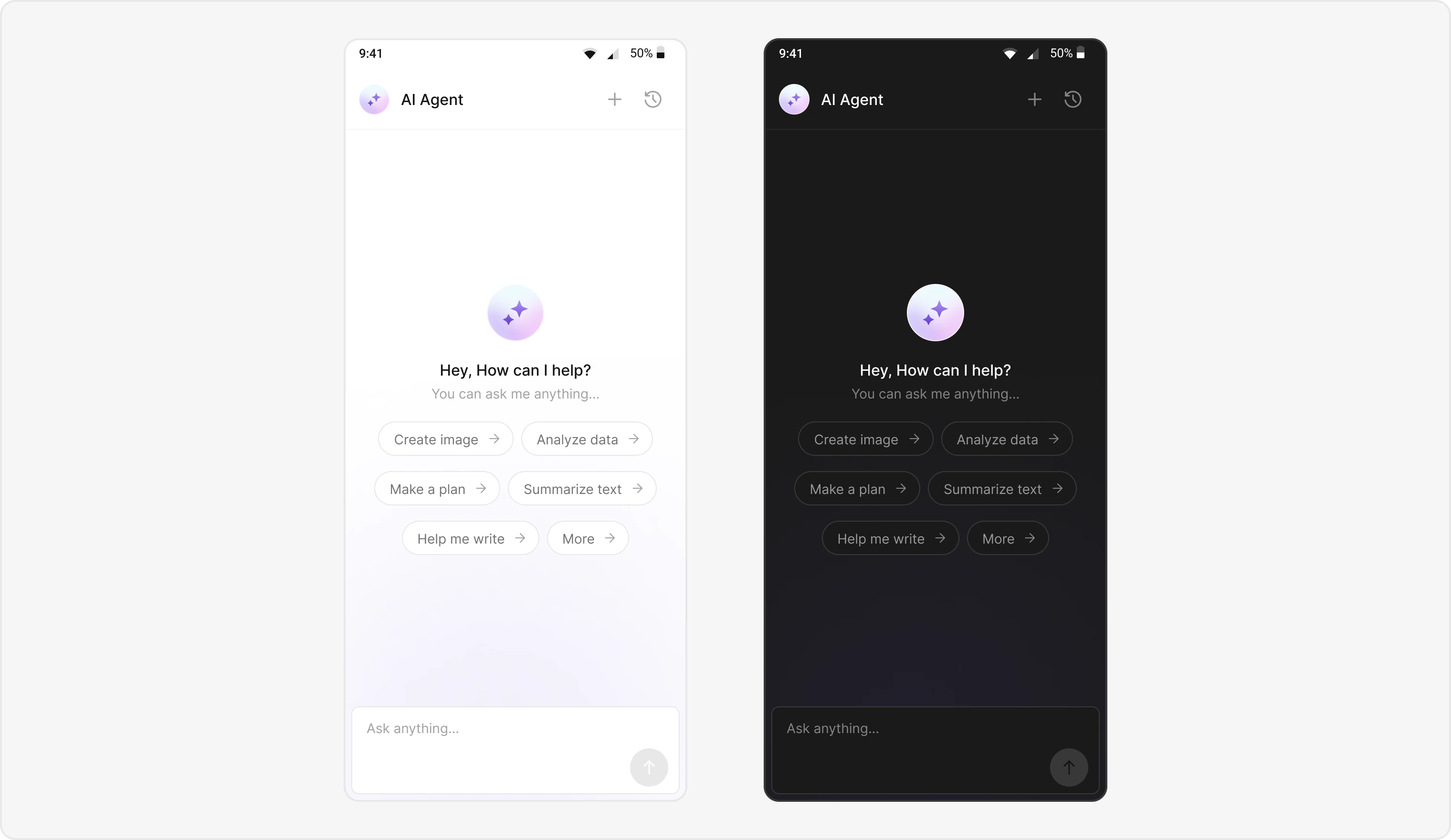
Users can interact with AI agents through a dedicated chat interface that:
* Provides intelligent responses based on conversation context.
* Maintains chat history for continuity.
* Seamlessly integrates with your existing user chat system.
The AI Agent chat interface provides a familiar messaging experience enhanced with AI capabilities, accessible through your main chat flow or as a standalone feature.
 ## Prerequisites
* **CometChat UIKit for iOS** installed via CocoaPods or Swift Package Manager
* CometChat initialized with `App ID`, `Region`, and `Auth Key`
* Message chat enabled in your CometChat app
* Navigation set up between message and user/group screens
* Internet permissions
## Components
| Component/Class | Role |
| --------------------------------- | ----------------------------------------- |
| `CometChatMessageHeader` | Manages message interactions and state |
| `CometChatMessageList` | Displays a list of messages |
| `CometChatMessageComposer` | Composes and sends new messages |
| `CometChatAIAssistantChatHistory` | Displays previous AI conversation history |
***
## Integration Steps
### Step 1 - Screen Setup
Create a screen for AI Assistant chat using `CometChatMessageHeader`, `CometChatMessageList`, and `CometChatMessageComposer`.
```swift theme={null}
import UIKit
import CometChatUIKit
class AIAssistantChatViewController: UIViewController {
var user: User?
var group: Group?
var parentMessage: BaseMessage?
var isHistory: Bool = false
override func viewDidLoad() {
super.viewDidLoad()
setupUI()
}
func setupUI() {
let messageHeader = CometChatMessageHeader()
messageHeader.user = user
messageHeader.group = group
messageHeader.onBack = { [weak self] in
self?.navigationController?.popViewController(animated: true)
}
messageHeader.chatHistoryButtonClick = { [weak self] in
self?.openChatHistory()
}
view.addSubview(messageHeader)
let messageList = CometChatMessageList()
messageList.user = user
messageList.group = group
messageList.hideThreadView = true
view.addSubview(messageList)
let composer = CometChatMessageComposer()
composer.user = user
composer.group = group
view.addSubview(composer)
}
func openChatHistory() {
let chatHistoryVC = CometChatAIAssistantChatHistory()
chatHistoryVC.user = user
chatHistoryVC.group = group
chatHistoryVC.onNewChatButtonClicked = {
self.startNewChat()
}
chatHistoryVC.onMessageClicked = { [weak self] message in
guard let self = self else { return }
self.parentMessage = message
self.isHistory = true
self.navigationController?.pushViewController(
AIAssistantChatViewController(),
animated: true
)
}
chatHistoryVC.onClose = {
self.navigationController?.popViewController(animated: true)
}
navigationController?.pushViewController(chatHistoryVC, animated: true)
}
func startNewChat() {
navigationController?.pushViewController(
AIAssistantChatViewController(),
animated: true
)
}
}
```
### Step 2 - Chat History Screen
Create a screen for AI Assistant chat history using `CometChatAIAssistantChatHistory`.
Features Implemented::
* Browse their previous AI chat sessions.
* Resume a previous conversation (onMessageClicked).
* Start a new chat session (onNewChatButtonClicked).
* Close the chat history view (onClose).
### Step 3 - Custom Styles
Define custom styles for AI chat bubbles and the composer using `CometChatAiAssistantBubbleStyle`.
```swift theme={null}
import UIKit
import CometChatUIKit
let aiBubbleStyle = AiAssistantBubbleStyle()
aiBubbleStyle.backgroundColor = .clear
aiBubbleStyle.border = Border(width: 1, color: .systemBlue)
aiBubbleStyle.textColor = UIColor(named: "TextPrimary")
aiBubbleStyle.textStyle = UIFont(name: "TimesNewRoman", size: 14)
CometChatAiAssistantBubble.style = aiBubbleStyle
```
***
## Implementation Flow Summary
| Step | Action |
| :--- | :-------------------------------------------------------------- |
| 1 | User selects AI agent from chat list |
| 2 | `AIAssistantChatViewController` launches |
| 3 | Parse User data and detect agent chat (Role must be `@agentic`) |
| 4 | Initialize UI with AI-specific styling |
| 5 | Configure chat history and navigation |
| 6 | Launch chat with AI agent |
***
## Customization Options
* **Custom AI Assistant Empty Chat View:** Customize using `emptyStateView`.
* **Streaming Speed:** Adjust AI response streaming speed with `streamingSpeed`.
* **AI Assistant Suggested Messages:** Set quick prompts using `suggestedMessages`.
* **AI Assistant Tools:** Set AI agent tools using `setAiAssistantTools` callback.
***
## Feature Matrix
| Feature | Implementation | UI Component |
| :----------- | :-------------------------------- | :------------------ |
| AI Chat | `AIAssistantChatViewController` | Full chat screen |
| Chat History | `CometChatAIAssistantChatHistory` | Chat history screen |
## Prerequisites
* **CometChat UIKit for iOS** installed via CocoaPods or Swift Package Manager
* CometChat initialized with `App ID`, `Region`, and `Auth Key`
* Message chat enabled in your CometChat app
* Navigation set up between message and user/group screens
* Internet permissions
## Components
| Component/Class | Role |
| --------------------------------- | ----------------------------------------- |
| `CometChatMessageHeader` | Manages message interactions and state |
| `CometChatMessageList` | Displays a list of messages |
| `CometChatMessageComposer` | Composes and sends new messages |
| `CometChatAIAssistantChatHistory` | Displays previous AI conversation history |
***
## Integration Steps
### Step 1 - Screen Setup
Create a screen for AI Assistant chat using `CometChatMessageHeader`, `CometChatMessageList`, and `CometChatMessageComposer`.
```swift theme={null}
import UIKit
import CometChatUIKit
class AIAssistantChatViewController: UIViewController {
var user: User?
var group: Group?
var parentMessage: BaseMessage?
var isHistory: Bool = false
override func viewDidLoad() {
super.viewDidLoad()
setupUI()
}
func setupUI() {
let messageHeader = CometChatMessageHeader()
messageHeader.user = user
messageHeader.group = group
messageHeader.onBack = { [weak self] in
self?.navigationController?.popViewController(animated: true)
}
messageHeader.chatHistoryButtonClick = { [weak self] in
self?.openChatHistory()
}
view.addSubview(messageHeader)
let messageList = CometChatMessageList()
messageList.user = user
messageList.group = group
messageList.hideThreadView = true
view.addSubview(messageList)
let composer = CometChatMessageComposer()
composer.user = user
composer.group = group
view.addSubview(composer)
}
func openChatHistory() {
let chatHistoryVC = CometChatAIAssistantChatHistory()
chatHistoryVC.user = user
chatHistoryVC.group = group
chatHistoryVC.onNewChatButtonClicked = {
self.startNewChat()
}
chatHistoryVC.onMessageClicked = { [weak self] message in
guard let self = self else { return }
self.parentMessage = message
self.isHistory = true
self.navigationController?.pushViewController(
AIAssistantChatViewController(),
animated: true
)
}
chatHistoryVC.onClose = {
self.navigationController?.popViewController(animated: true)
}
navigationController?.pushViewController(chatHistoryVC, animated: true)
}
func startNewChat() {
navigationController?.pushViewController(
AIAssistantChatViewController(),
animated: true
)
}
}
```
### Step 2 - Chat History Screen
Create a screen for AI Assistant chat history using `CometChatAIAssistantChatHistory`.
Features Implemented::
* Browse their previous AI chat sessions.
* Resume a previous conversation (onMessageClicked).
* Start a new chat session (onNewChatButtonClicked).
* Close the chat history view (onClose).
### Step 3 - Custom Styles
Define custom styles for AI chat bubbles and the composer using `CometChatAiAssistantBubbleStyle`.
```swift theme={null}
import UIKit
import CometChatUIKit
let aiBubbleStyle = AiAssistantBubbleStyle()
aiBubbleStyle.backgroundColor = .clear
aiBubbleStyle.border = Border(width: 1, color: .systemBlue)
aiBubbleStyle.textColor = UIColor(named: "TextPrimary")
aiBubbleStyle.textStyle = UIFont(name: "TimesNewRoman", size: 14)
CometChatAiAssistantBubble.style = aiBubbleStyle
```
***
## Implementation Flow Summary
| Step | Action |
| :--- | :-------------------------------------------------------------- |
| 1 | User selects AI agent from chat list |
| 2 | `AIAssistantChatViewController` launches |
| 3 | Parse User data and detect agent chat (Role must be `@agentic`) |
| 4 | Initialize UI with AI-specific styling |
| 5 | Configure chat history and navigation |
| 6 | Launch chat with AI agent |
***
## Customization Options
* **Custom AI Assistant Empty Chat View:** Customize using `emptyStateView`.
* **Streaming Speed:** Adjust AI response streaming speed with `streamingSpeed`.
* **AI Assistant Suggested Messages:** Set quick prompts using `suggestedMessages`.
* **AI Assistant Tools:** Set AI agent tools using `setAiAssistantTools` callback.
***
## Feature Matrix
| Feature | Implementation | UI Component |
| :----------- | :-------------------------------- | :------------------ |
| AI Chat | `AIAssistantChatViewController` | Full chat screen |
| Chat History | `CometChatAIAssistantChatHistory` | Chat history screen |