> ## Documentation Index
> Fetch the complete documentation index at: https://cometchat-22654f5b-feature-react-native-sdk-quotedmessage-a.mintlify.site/llms.txt
> Use this file to discover all available pages before exploring further.
# Building A Tab Based Messaging UI In iOS
This guide walks you through creating a **tab-based messaging interface** in your **iOS application** using **CometChat UI Kit for iOS**. The UI includes tabs for **Chats**, **Calls**, **Users**, and **Groups**, offering an organized and fluid experience.
***
## **User Interface Preview**
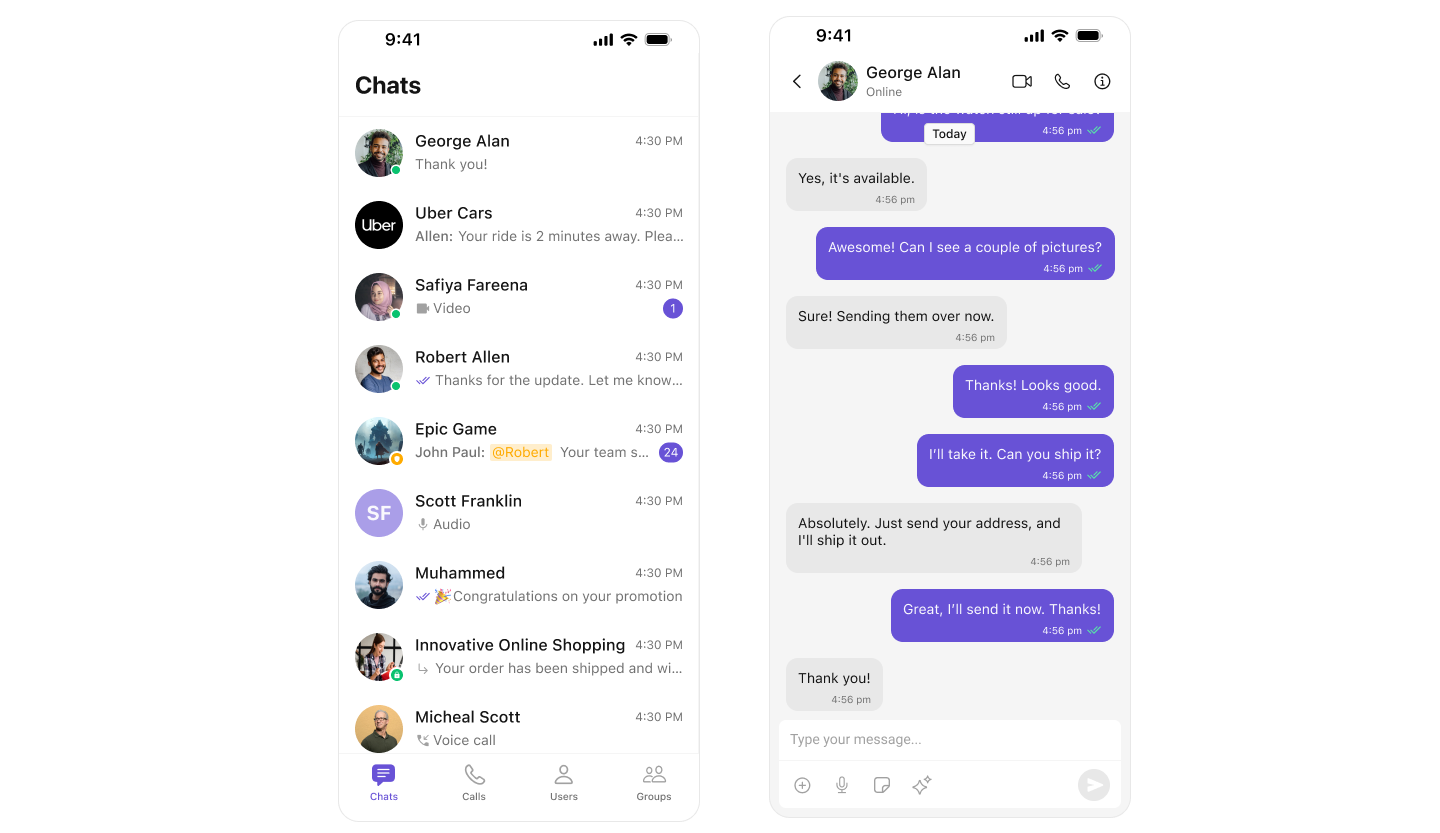 This layout contains:
1. **Conversations** – Lists all recent chats.
2. **Calls** – Displays call logs.
3. **Users** – Lists available users.
4. **Groups** – Lists available groups.
***
## **Step-by-Step Guide**
### **Step 1: Initialize UIKit in `SceneDelegate.swift`**
Ensure UIKit is initialized and the user is logged in before presenting the tabbed view.
```swift SceneDelegate.swift highlight={5-7} lines theme={null}
func scene(_ scene: UIScene, willConnectTo session: UISceneSession, options connectionOptions: UIScene.ConnectionOptions) {
guard let windowScene = (scene as? UIWindowScene) else { return }
let uikitSettings = UIKitSettings()
.set(appID: "<#Enter Your App ID Here#>")
.set(region: "<#Enter Your Region Code Here#>")
.set(authKey: "<#Enter Your AuthKey Here#>")
.subscribePresenceForAllUsers()
.build()
CometChatUIKit.init(uiKitSettings: uikitSettings) { result in
switch result {
case .success:
CometChatUIKit.login(uid: "cometchat-uid-1") { loginResult in
switch loginResult {
case .success:
DispatchQueue.main.async {
self.setupTabbedView(windowScene: windowScene)
}
default:
break
}
}
default:
break
}
}
}
```
***
### **Step 2: Setup Tab Bar**
Create a method to display the tab layout.
```swift SceneDelegate.swift lines theme={null}
func setupTabbedView(windowScene: UIWindowScene) {
// Create the main Tab Bar Controller
let tabBarController = UITabBarController()
tabBarController.tabBar.backgroundColor = .white
// MARK: - Conversations Tab
let conversationsVC = CometChatConversations()
let conversationsNav = UINavigationController(rootViewController: conversationsVC)
conversationsVC.tabBarItem = UITabBarItem(
title: "CHATS",
image: UIImage(systemName: "message.fill"),
tag: 0
)
// Handle item click inside conversation list
conversationsVC.set(onItemClick: { [weak conversationsNav] conversation, indexPath in
let messagesVC = MessagesVC()
messagesVC.group = conversation.conversationWith as? Group
messagesVC.user = conversation.conversationWith as? CometChatSDK.User
messagesVC.hidesBottomBarWhenPushed = true
conversationsNav?.pushViewController(messagesVC, animated: true)
})
// MARK: - Call Logs Tab
let callLogsVC = CometChatCallLogs()
let callLogsNav = UINavigationController(rootViewController: callLogsVC)
callLogsVC.tabBarItem = UITabBarItem(
title: "CALLS",
image: UIImage(systemName: "phone.fill"),
tag: 1
)
// MARK: - Users Tab
let usersVC = CometChatUsers()
let usersNav = UINavigationController(rootViewController: usersVC)
usersVC.tabBarItem = UITabBarItem(
title: "USERS",
image: UIImage(systemName: "person.2.fill"),
tag: 2
)
// MARK: - Groups Tab
let groupsVC = CometChatGroups()
let groupsNav = UINavigationController(rootViewController: groupsVC)
groupsVC.tabBarItem = UITabBarItem(
title: "GROUPS",
image: UIImage(systemName: "person.3.fill"),
tag: 3
)
// Assign all navigation controllers to the Tab Bar
tabBarController.viewControllers = [
conversationsNav,
callLogsNav,
usersNav,
groupsNav
]
// Ensures layout includes space for opaque bars like the navigation bar
tabBarController.extendedLayoutIncludesOpaqueBars = true
// Setup and display main window with tabBarController as root
window = UIWindow(windowScene: windowScene)
window?.rootViewController = tabBarController
window?.makeKeyAndVisible()
}
```
***
### **Step 3: Create `MessagesVC.swift`**
This view controller handles chat between users or within groups.
```swift MessagesVC.swift lines theme={null}
import UIKit
import CometChatSDK
import CometChatUIKitSwift
/// A view controller that displays a chat interface using CometChat components
class MessagesVC: UIViewController {
// MARK: - Properties
/// The user entity for one-on-one chats
var user: User?
/// The group entity for group chats
var group: Group?
// MARK: - UI Components
/// Header view displaying user/group information
private lazy var headerView: CometChatMessageHeader = {
let view = CometChatMessageHeader()
view.translatesAutoresizingMaskIntoConstraints = false
// Configure for the appropriate conversation type
if let user = user {
view.set(user: user)
} else if let group = group {
view.set(group: group)
}
view.set(controller: self)
return view
}()
/// Message input composer view
private lazy var composerView: CometChatMessageComposer = {
let composer = CometChatMessageComposer()
composer.translatesAutoresizingMaskIntoConstraints = false
// Configure for the appropriate conversation type
if let user = user {
composer.set(user: user)
} else if let group = group {
composer.set(group: group)
}
composer.set(controller: self)
return composer
}()
/// List view displaying chat messages
private lazy var messageListView: CometChatMessageList = {
let listView = CometChatMessageList()
listView.translatesAutoresizingMaskIntoConstraints = false
// Configure for the appropriate conversation type
if let user = user {
listView.set(user: user)
} else if let group = group {
listView.set(group: group)
}
listView.set(controller: self)
return listView
}()
// MARK: - Lifecycle Methods
override func viewDidLoad() {
super.viewDidLoad()
configureView()
setupLayout()
}
override func viewWillDisappear(_ animated: Bool) {
super.viewWillDisappear(animated)
navigationController?.setNavigationBarHidden(false, animated: true)
}
// MARK: - Private Methods
/// Configure basic view properties
private func configureView() {
view.backgroundColor = .systemBackground
navigationController?.setNavigationBarHidden(true, animated: false)
}
/// Set up view hierarchy and constraints
private func setupLayout() {
// Add subviews to the view hierarchy
[headerView, messageListView, composerView].forEach { view.addSubview($0) }
// Set up constraints
NSLayoutConstraint.activate([
// Header view constraints
headerView.topAnchor.constraint(equalTo: view.safeAreaLayoutGuide.topAnchor),
headerView.leadingAnchor.constraint(equalTo: view.leadingAnchor),
headerView.trailingAnchor.constraint(equalTo: view.trailingAnchor),
headerView.heightAnchor.constraint(equalToConstant: 50),
// Message list view constraints
messageListView.topAnchor.constraint(equalTo: headerView.bottomAnchor),
messageListView.leadingAnchor.constraint(equalTo: view.leadingAnchor),
messageListView.trailingAnchor.constraint(equalTo: view.trailingAnchor),
messageListView.bottomAnchor.constraint(equalTo: composerView.topAnchor),
// Composer view constraints
composerView.leadingAnchor.constraint(equalTo: view.leadingAnchor),
composerView.trailingAnchor.constraint(equalTo: view.trailingAnchor),
composerView.bottomAnchor.constraint(equalTo: view.safeAreaLayoutGuide.bottomAnchor)
])
}
}
```
***
## **Next Steps**
### **Enhance the User Experience**
* **[Advanced Customizations](/ui-kit/ios/theme-introduction)** – Personalize the chat UI to align with your brand.
***
This layout contains:
1. **Conversations** – Lists all recent chats.
2. **Calls** – Displays call logs.
3. **Users** – Lists available users.
4. **Groups** – Lists available groups.
***
## **Step-by-Step Guide**
### **Step 1: Initialize UIKit in `SceneDelegate.swift`**
Ensure UIKit is initialized and the user is logged in before presenting the tabbed view.
```swift SceneDelegate.swift highlight={5-7} lines theme={null}
func scene(_ scene: UIScene, willConnectTo session: UISceneSession, options connectionOptions: UIScene.ConnectionOptions) {
guard let windowScene = (scene as? UIWindowScene) else { return }
let uikitSettings = UIKitSettings()
.set(appID: "<#Enter Your App ID Here#>")
.set(region: "<#Enter Your Region Code Here#>")
.set(authKey: "<#Enter Your AuthKey Here#>")
.subscribePresenceForAllUsers()
.build()
CometChatUIKit.init(uiKitSettings: uikitSettings) { result in
switch result {
case .success:
CometChatUIKit.login(uid: "cometchat-uid-1") { loginResult in
switch loginResult {
case .success:
DispatchQueue.main.async {
self.setupTabbedView(windowScene: windowScene)
}
default:
break
}
}
default:
break
}
}
}
```
***
### **Step 2: Setup Tab Bar**
Create a method to display the tab layout.
```swift SceneDelegate.swift lines theme={null}
func setupTabbedView(windowScene: UIWindowScene) {
// Create the main Tab Bar Controller
let tabBarController = UITabBarController()
tabBarController.tabBar.backgroundColor = .white
// MARK: - Conversations Tab
let conversationsVC = CometChatConversations()
let conversationsNav = UINavigationController(rootViewController: conversationsVC)
conversationsVC.tabBarItem = UITabBarItem(
title: "CHATS",
image: UIImage(systemName: "message.fill"),
tag: 0
)
// Handle item click inside conversation list
conversationsVC.set(onItemClick: { [weak conversationsNav] conversation, indexPath in
let messagesVC = MessagesVC()
messagesVC.group = conversation.conversationWith as? Group
messagesVC.user = conversation.conversationWith as? CometChatSDK.User
messagesVC.hidesBottomBarWhenPushed = true
conversationsNav?.pushViewController(messagesVC, animated: true)
})
// MARK: - Call Logs Tab
let callLogsVC = CometChatCallLogs()
let callLogsNav = UINavigationController(rootViewController: callLogsVC)
callLogsVC.tabBarItem = UITabBarItem(
title: "CALLS",
image: UIImage(systemName: "phone.fill"),
tag: 1
)
// MARK: - Users Tab
let usersVC = CometChatUsers()
let usersNav = UINavigationController(rootViewController: usersVC)
usersVC.tabBarItem = UITabBarItem(
title: "USERS",
image: UIImage(systemName: "person.2.fill"),
tag: 2
)
// MARK: - Groups Tab
let groupsVC = CometChatGroups()
let groupsNav = UINavigationController(rootViewController: groupsVC)
groupsVC.tabBarItem = UITabBarItem(
title: "GROUPS",
image: UIImage(systemName: "person.3.fill"),
tag: 3
)
// Assign all navigation controllers to the Tab Bar
tabBarController.viewControllers = [
conversationsNav,
callLogsNav,
usersNav,
groupsNav
]
// Ensures layout includes space for opaque bars like the navigation bar
tabBarController.extendedLayoutIncludesOpaqueBars = true
// Setup and display main window with tabBarController as root
window = UIWindow(windowScene: windowScene)
window?.rootViewController = tabBarController
window?.makeKeyAndVisible()
}
```
***
### **Step 3: Create `MessagesVC.swift`**
This view controller handles chat between users or within groups.
```swift MessagesVC.swift lines theme={null}
import UIKit
import CometChatSDK
import CometChatUIKitSwift
/// A view controller that displays a chat interface using CometChat components
class MessagesVC: UIViewController {
// MARK: - Properties
/// The user entity for one-on-one chats
var user: User?
/// The group entity for group chats
var group: Group?
// MARK: - UI Components
/// Header view displaying user/group information
private lazy var headerView: CometChatMessageHeader = {
let view = CometChatMessageHeader()
view.translatesAutoresizingMaskIntoConstraints = false
// Configure for the appropriate conversation type
if let user = user {
view.set(user: user)
} else if let group = group {
view.set(group: group)
}
view.set(controller: self)
return view
}()
/// Message input composer view
private lazy var composerView: CometChatMessageComposer = {
let composer = CometChatMessageComposer()
composer.translatesAutoresizingMaskIntoConstraints = false
// Configure for the appropriate conversation type
if let user = user {
composer.set(user: user)
} else if let group = group {
composer.set(group: group)
}
composer.set(controller: self)
return composer
}()
/// List view displaying chat messages
private lazy var messageListView: CometChatMessageList = {
let listView = CometChatMessageList()
listView.translatesAutoresizingMaskIntoConstraints = false
// Configure for the appropriate conversation type
if let user = user {
listView.set(user: user)
} else if let group = group {
listView.set(group: group)
}
listView.set(controller: self)
return listView
}()
// MARK: - Lifecycle Methods
override func viewDidLoad() {
super.viewDidLoad()
configureView()
setupLayout()
}
override func viewWillDisappear(_ animated: Bool) {
super.viewWillDisappear(animated)
navigationController?.setNavigationBarHidden(false, animated: true)
}
// MARK: - Private Methods
/// Configure basic view properties
private func configureView() {
view.backgroundColor = .systemBackground
navigationController?.setNavigationBarHidden(true, animated: false)
}
/// Set up view hierarchy and constraints
private func setupLayout() {
// Add subviews to the view hierarchy
[headerView, messageListView, composerView].forEach { view.addSubview($0) }
// Set up constraints
NSLayoutConstraint.activate([
// Header view constraints
headerView.topAnchor.constraint(equalTo: view.safeAreaLayoutGuide.topAnchor),
headerView.leadingAnchor.constraint(equalTo: view.leadingAnchor),
headerView.trailingAnchor.constraint(equalTo: view.trailingAnchor),
headerView.heightAnchor.constraint(equalToConstant: 50),
// Message list view constraints
messageListView.topAnchor.constraint(equalTo: headerView.bottomAnchor),
messageListView.leadingAnchor.constraint(equalTo: view.leadingAnchor),
messageListView.trailingAnchor.constraint(equalTo: view.trailingAnchor),
messageListView.bottomAnchor.constraint(equalTo: composerView.topAnchor),
// Composer view constraints
composerView.leadingAnchor.constraint(equalTo: view.leadingAnchor),
composerView.trailingAnchor.constraint(equalTo: view.trailingAnchor),
composerView.bottomAnchor.constraint(equalTo: view.safeAreaLayoutGuide.bottomAnchor)
])
}
}
```
***
## **Next Steps**
### **Enhance the User Experience**
* **[Advanced Customizations](/ui-kit/ios/theme-introduction)** – Personalize the chat UI to align with your brand.
***