> ## Documentation Index
> Fetch the complete documentation index at: https://cometchat-22654f5b-feature-react-native-sdk-quotedmessage-a.mintlify.site/llms.txt
> Use this file to discover all available pages before exploring further.
# Message Composer
## Overview
MessageComposer is a [Component](/ui-kit/react-native/components-overview#components) that enables users to write and send a variety of messages, including text, image, video, and custom messages.
Features such as **Live Reaction**, **Attachments**, and **Message Editing** are also supported by it.
 ## Usage
### Integration
The following code snippet illustrates how you can directly incorporate the `CometChatMessageComposer` component into your app.
```tsx theme={null}
import { CometChatMessageComposer } from "@cometchat/chat-uikit-react-native";
//code
return ;
```
### Actions
[Actions](/ui-kit/react-native/components-overview#actions) dictate how a component functions. They are divided into two types: Predefined and User-defined. You can override either type, allowing you to tailor the behavior of the component to fit your specific needs.
##### onSendButtonPress
The `onSendButtonPress` event gets activated when the send message button is clicked. It has a predefined function of sending messages entered in the composer `EditText`. However, you can overide this action with the following code snippet.
```tsx theme={null}
import { CometChatMessageComposer } from "@cometchat/chat-uikit-react-native";
//code
const onSendButtonPressHandler = (message: CometChat.BaseMessage) => {
//code
};
return (
);
```
##### onError
This action doesn't change the behavior of the component but rather listens for any errors that occur in the `CometChatMessageComposer` component.
```tsx theme={null}
import { CometChatMessageComposer } from "@cometchat/chat-uikit-react-native";
//code
const onError = (error: CometChat.CometChatException) => {
//handle error
};
return (
);
```
##### onTextChange
Function triggered whenever the message input's text value changes, enabling dynamic text handling.
```tsx theme={null}
import { CometChatMessageComposer } from "@cometchat/chat-uikit-react-native";
//code
const onTextChange = (text: string) => {
//code
};
return (
);
```
***
### Filters
MessageComposer component does not have any available filters.
***
### Events
[Events](/ui-kit/react-native/components-overview#events) are emitted by a `Component`. By using event you can extend existing functionality. Being global events, they can be applied in Multiple Locations and are capable of being Added or Removed.
The list of events emitted by the Messages component is as follows.
| Event | Description |
| ------------------------- | ------------------------------------------------------------------------------------------------------------------------------------------------- |
| **ccMessageSent** | Triggers whenever a loggedIn user sends any message, it will have two states such as: `inprogress`, `success` & `error` |
| **ccMessageEdited** | Triggers whenever a loggedIn user edits any message from the list of messages. It will have two states such as: `inprogress`, `success` & `error` |
| **ccMessageLiveReaction** | Triggers whenever a loggedIn clicks on live reaction |
Adding `CometChatMessageEvents` Listener's
```js theme={null}
import { CometChatUIEventHandler } from "@cometchat/chat-uikit-react-native";
CometChatUIEventHandler.addMessageListener("MESSAGE_LISTENER_ID", {
ccMessageSent: (item) => {
//code
},
});
CometChatUIEventHandler.addMessageListener("MESSAGE_LISTENER_ID", {
ccMessageEdited: (item) => {
//code
},
});
CometChatUIEventHandler.addMessageListener("MESSAGE_LISTENER_ID", {
ccMessageLiveReaction: (item) => {
//code
},
});
```
***
Removing `CometChatMessageEvents` Listener's
```js theme={null}
import { CometChatUIEventHandler } from "@cometchat/chat-uikit-react-native";
CometChatUIEventHandler.removeMessageListener("MESSAGE_LISTENER_ID");
```
***
## Customization
To fit your app's design requirements, you can customize the appearance of the MessageComposer component. We provide exposed methods that allow you to modify the experience and behavior according to your specific needs.
### Style
Using Style you can customize the look and feel of the component in your app, These parameters typically control elements such as the color, size, shape, and fonts used within the component.
## Usage
### Integration
The following code snippet illustrates how you can directly incorporate the `CometChatMessageComposer` component into your app.
```tsx theme={null}
import { CometChatMessageComposer } from "@cometchat/chat-uikit-react-native";
//code
return ;
```
### Actions
[Actions](/ui-kit/react-native/components-overview#actions) dictate how a component functions. They are divided into two types: Predefined and User-defined. You can override either type, allowing you to tailor the behavior of the component to fit your specific needs.
##### onSendButtonPress
The `onSendButtonPress` event gets activated when the send message button is clicked. It has a predefined function of sending messages entered in the composer `EditText`. However, you can overide this action with the following code snippet.
```tsx theme={null}
import { CometChatMessageComposer } from "@cometchat/chat-uikit-react-native";
//code
const onSendButtonPressHandler = (message: CometChat.BaseMessage) => {
//code
};
return (
);
```
##### onError
This action doesn't change the behavior of the component but rather listens for any errors that occur in the `CometChatMessageComposer` component.
```tsx theme={null}
import { CometChatMessageComposer } from "@cometchat/chat-uikit-react-native";
//code
const onError = (error: CometChat.CometChatException) => {
//handle error
};
return (
);
```
##### onTextChange
Function triggered whenever the message input's text value changes, enabling dynamic text handling.
```tsx theme={null}
import { CometChatMessageComposer } from "@cometchat/chat-uikit-react-native";
//code
const onTextChange = (text: string) => {
//code
};
return (
);
```
***
### Filters
MessageComposer component does not have any available filters.
***
### Events
[Events](/ui-kit/react-native/components-overview#events) are emitted by a `Component`. By using event you can extend existing functionality. Being global events, they can be applied in Multiple Locations and are capable of being Added or Removed.
The list of events emitted by the Messages component is as follows.
| Event | Description |
| ------------------------- | ------------------------------------------------------------------------------------------------------------------------------------------------- |
| **ccMessageSent** | Triggers whenever a loggedIn user sends any message, it will have two states such as: `inprogress`, `success` & `error` |
| **ccMessageEdited** | Triggers whenever a loggedIn user edits any message from the list of messages. It will have two states such as: `inprogress`, `success` & `error` |
| **ccMessageLiveReaction** | Triggers whenever a loggedIn clicks on live reaction |
Adding `CometChatMessageEvents` Listener's
```js theme={null}
import { CometChatUIEventHandler } from "@cometchat/chat-uikit-react-native";
CometChatUIEventHandler.addMessageListener("MESSAGE_LISTENER_ID", {
ccMessageSent: (item) => {
//code
},
});
CometChatUIEventHandler.addMessageListener("MESSAGE_LISTENER_ID", {
ccMessageEdited: (item) => {
//code
},
});
CometChatUIEventHandler.addMessageListener("MESSAGE_LISTENER_ID", {
ccMessageLiveReaction: (item) => {
//code
},
});
```
***
Removing `CometChatMessageEvents` Listener's
```js theme={null}
import { CometChatUIEventHandler } from "@cometchat/chat-uikit-react-native";
CometChatUIEventHandler.removeMessageListener("MESSAGE_LISTENER_ID");
```
***
## Customization
To fit your app's design requirements, you can customize the appearance of the MessageComposer component. We provide exposed methods that allow you to modify the experience and behavior according to your specific needs.
### Style
Using Style you can customize the look and feel of the component in your app, These parameters typically control elements such as the color, size, shape, and fonts used within the component.
 ***
### Functionality
These are a set of small functional customizations that allow you to fine-tune the overall experience of the component. With these, you can change text, set custom icons, and toggle the visibility of UI elements.
Below is a list of customizations along with corresponding code snippets
| Property | Description | Code |
| ------------------------------------- | ----------------------------------------------------------------------------------------------------------------------------------------------------------------------------------------------------------------------------------------------- | ---------------------------------------------------------------- |
| **user** | Used to pass user object of which header specific details will be show | `user={chatUser}` |
| **group** | Used to pass group object of which header specific details will be shown | `group={chatGroup}` |
| **disableTypingEvents** | Used to disable/enable typing events , default false | `disableTypingEvents={true}` |
| **disableSoundForOutgoingMessages** | Used to toggle sound for outgoing messages | `disableSoundForOutgoingMessages={true}` |
| **initialComposertext** | Used to set predefined text | `initialComposertext="Your custom text"` |
| **customSoundForOutgoingMessage** | Used to give custom sounds to outgoing messages | `customSoundForOutgoingMessage="your custom sound for messages"` |
| **hideVoiceRecordingButton** | used to hide the voice recording option. | `hideVoiceRecording={true}` |
| **hideCameraOption** | toggle visibility of camera option from the attachment options. | `hideCameraOption={true}` |
| **hideImageAttachmentOption** | toggle visibility of image attachment options. | `hideImageAttachmentOption={true}` |
| **hideVideoAttachmentOption** | toggle visibility of video attachment options. | `hideVideoAttachmentOption={true}` |
| **hideAudioAttachmentOption** | toggle visibility of audio attachment options. | `hideAudioAttachmentOption={true}` |
| **hideFileAttachmentOption** | toggle visibility of file attachment options. | `hideFileAttachmentOption={true}` |
| **hidePollsAttachmentOption** | toggle visibility of file polls attachment options. | `hidePollsAttachmentOption={true}` |
| **hideCollaborativeDocumentOption** | toggle visibility of file Collaborative Document Option. | `hideCollaborativeDocumentOption={true}` |
| **hideCollaborativeWhiteboardOption** | toggle visibility of file Collaborative Whiteboard Option. | `hideCollaborativeWhiteboardOption={true}` |
| **hideAttachmentButton** | toggle visibility of hide attachment option. | `hideAttachmentButton={true}` |
| **hideStickersButton** | toggle visibility of hide stickers option. | `hideStickersButton={true}` |
| **hideSendButton** | toggle visibility of send button option. | `hideSendButton={true}` |
| **hideAuxiliaryButtons** | toggle visibility of Auxiliary button option. | `hideAuxiliaryButtons={true}` |
| **disableMentions** | Sets whether mentions in text should be disabled. Processes the text formatters If there are text formatters available and the disableMentions flag is set to true, it removes any formatters that are instances of CometChatMentionsFormatter. | `disableMentions={true}` |
***
### Advanced
For advanced-level customization, you can set custom views to the component. This lets you tailor each aspect of the component to fit your exact needs and application aesthetics. You can create and define your views, layouts, and UI elements and then incorporate those into the component.
***
#### TextFormatters
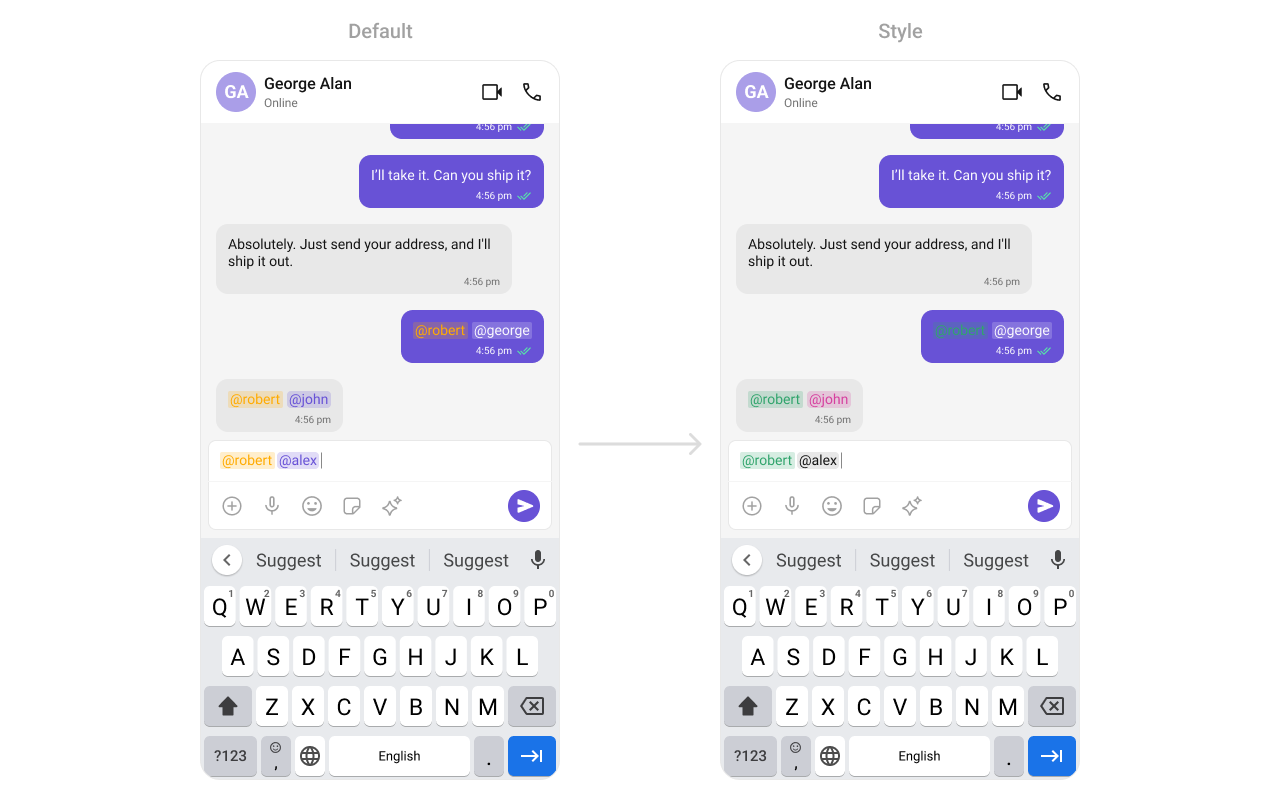
Assigns the list of text formatters. If the provided list is not null, it sets the list. Otherwise, it assigns the default text formatters retrieved from the data source. To configure the existing Mentions look and feel check out [CometChatMentionsFormatter](/ui-kit/react-native/mentions-formatter-guide)
```tsx theme={null}
import {
CometChatMessageComposer,
CometChatTextFormatter,
CometChatMentionsFormatter,
} from "@cometchat/chat-uikit-react-native";
import { CometChat } from "@cometchat/chat-sdk-react-native";
//code
const getTextFomatters = () => {
const textFormatters: CometChatTextFormatter[] = [];
const mentionsFormatter = new CometChatMentionsFormatter();
mentionsFormatter.setMentionsStyle({
textStyle: {
color: "#D6409F",
},
selfTextStyle: {
color: "#30A46C",
},
});
textFormatters.push(mentionsFormatter);
return textFormatters;
};
return (
);
```
**Example**
***
### Functionality
These are a set of small functional customizations that allow you to fine-tune the overall experience of the component. With these, you can change text, set custom icons, and toggle the visibility of UI elements.
Below is a list of customizations along with corresponding code snippets
| Property | Description | Code |
| ------------------------------------- | ----------------------------------------------------------------------------------------------------------------------------------------------------------------------------------------------------------------------------------------------- | ---------------------------------------------------------------- |
| **user** | Used to pass user object of which header specific details will be show | `user={chatUser}` |
| **group** | Used to pass group object of which header specific details will be shown | `group={chatGroup}` |
| **disableTypingEvents** | Used to disable/enable typing events , default false | `disableTypingEvents={true}` |
| **disableSoundForOutgoingMessages** | Used to toggle sound for outgoing messages | `disableSoundForOutgoingMessages={true}` |
| **initialComposertext** | Used to set predefined text | `initialComposertext="Your custom text"` |
| **customSoundForOutgoingMessage** | Used to give custom sounds to outgoing messages | `customSoundForOutgoingMessage="your custom sound for messages"` |
| **hideVoiceRecordingButton** | used to hide the voice recording option. | `hideVoiceRecording={true}` |
| **hideCameraOption** | toggle visibility of camera option from the attachment options. | `hideCameraOption={true}` |
| **hideImageAttachmentOption** | toggle visibility of image attachment options. | `hideImageAttachmentOption={true}` |
| **hideVideoAttachmentOption** | toggle visibility of video attachment options. | `hideVideoAttachmentOption={true}` |
| **hideAudioAttachmentOption** | toggle visibility of audio attachment options. | `hideAudioAttachmentOption={true}` |
| **hideFileAttachmentOption** | toggle visibility of file attachment options. | `hideFileAttachmentOption={true}` |
| **hidePollsAttachmentOption** | toggle visibility of file polls attachment options. | `hidePollsAttachmentOption={true}` |
| **hideCollaborativeDocumentOption** | toggle visibility of file Collaborative Document Option. | `hideCollaborativeDocumentOption={true}` |
| **hideCollaborativeWhiteboardOption** | toggle visibility of file Collaborative Whiteboard Option. | `hideCollaborativeWhiteboardOption={true}` |
| **hideAttachmentButton** | toggle visibility of hide attachment option. | `hideAttachmentButton={true}` |
| **hideStickersButton** | toggle visibility of hide stickers option. | `hideStickersButton={true}` |
| **hideSendButton** | toggle visibility of send button option. | `hideSendButton={true}` |
| **hideAuxiliaryButtons** | toggle visibility of Auxiliary button option. | `hideAuxiliaryButtons={true}` |
| **disableMentions** | Sets whether mentions in text should be disabled. Processes the text formatters If there are text formatters available and the disableMentions flag is set to true, it removes any formatters that are instances of CometChatMentionsFormatter. | `disableMentions={true}` |
***
### Advanced
For advanced-level customization, you can set custom views to the component. This lets you tailor each aspect of the component to fit your exact needs and application aesthetics. You can create and define your views, layouts, and UI elements and then incorporate those into the component.
***
#### TextFormatters
Assigns the list of text formatters. If the provided list is not null, it sets the list. Otherwise, it assigns the default text formatters retrieved from the data source. To configure the existing Mentions look and feel check out [CometChatMentionsFormatter](/ui-kit/react-native/mentions-formatter-guide)
```tsx theme={null}
import {
CometChatMessageComposer,
CometChatTextFormatter,
CometChatMentionsFormatter,
} from "@cometchat/chat-uikit-react-native";
import { CometChat } from "@cometchat/chat-sdk-react-native";
//code
const getTextFomatters = () => {
const textFormatters: CometChatTextFormatter[] = [];
const mentionsFormatter = new CometChatMentionsFormatter();
mentionsFormatter.setMentionsStyle({
textStyle: {
color: "#D6409F",
},
selfTextStyle: {
color: "#30A46C",
},
});
textFormatters.push(mentionsFormatter);
return textFormatters;
};
return (
);
```
**Example**
 #### AttachmentOptions
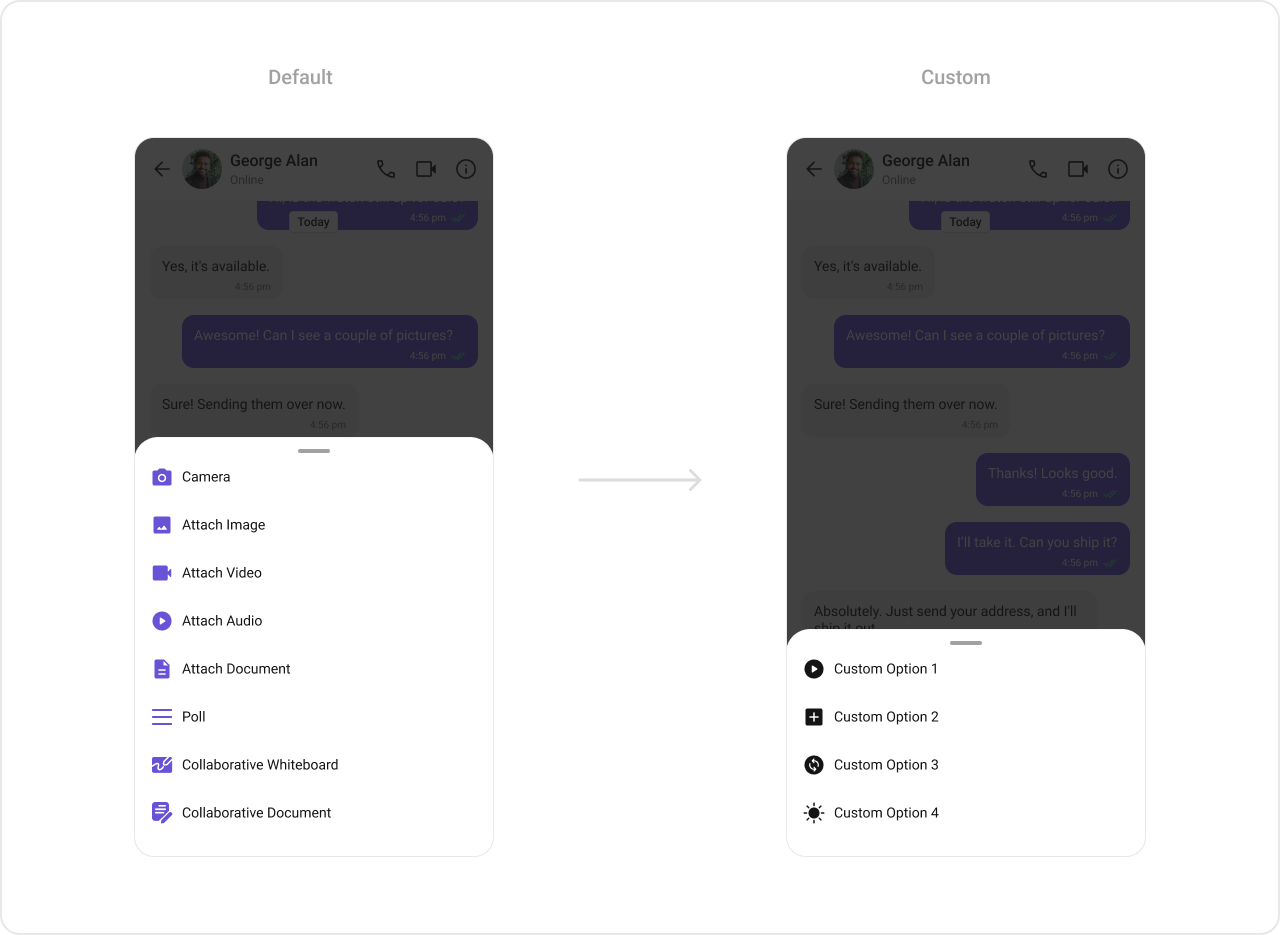
By using `attachmentOptions`, you can set a list of custom `MessageComposerActions` for the MessageComposer Component. This will override the existing list of `MessageComposerActions`.
```tsx theme={null}
import {
CometChatMessageComposer,
CometChatTextFormatter,
CometChatMentionsFormatter,
} from "@cometchat/chat-uikit-react-native";
import { CometChat } from "@cometchat/chat-sdk-react-native";
//code
const getCustomAttachmentOptions = ({
user,
group,
composerId,
}: {
user?: CometChat.User;
group?: CometChat.Group;
composerId: Map;
}): CometChatMessageComposerAction[] => {
let attachmentOptions: CometChatMessageComposerAction[] = [];
attachmentOptions.push({
id: "location",
icon: LocationIcon,
title: "Share Location",
style: { iconStyle: { tintColor: "grey" } },
onPress: () => {
//handleOnPress
},
});
return attachmentOptions;
};
return (
);
```
**Example**
#### AttachmentOptions
By using `attachmentOptions`, you can set a list of custom `MessageComposerActions` for the MessageComposer Component. This will override the existing list of `MessageComposerActions`.
```tsx theme={null}
import {
CometChatMessageComposer,
CometChatTextFormatter,
CometChatMentionsFormatter,
} from "@cometchat/chat-uikit-react-native";
import { CometChat } from "@cometchat/chat-sdk-react-native";
//code
const getCustomAttachmentOptions = ({
user,
group,
composerId,
}: {
user?: CometChat.User;
group?: CometChat.Group;
composerId: Map;
}): CometChatMessageComposerAction[] => {
let attachmentOptions: CometChatMessageComposerAction[] = [];
attachmentOptions.push({
id: "location",
icon: LocationIcon,
title: "Share Location",
style: { iconStyle: { tintColor: "grey" } },
onPress: () => {
//handleOnPress
},
});
return attachmentOptions;
};
return (
);
```
**Example**
 ***
#### AuxiliaryButtonView
You can insert a custom view into the MessageComposer component to add additional functionality using the following method.
```tsx theme={null}
import { CometChat } from "@cometchat/chat-sdk-react-native";
import { CometChatMessageComposer } from "@cometchat/chat-uikit-react-native";
//code
const styles = StyleSheet.create({
button: {
height: 25,
width: 25,
borderRadius: 0,
backgroundColor: "transparent",
},
image: {
height: 23,
width: 24,
tintColor: "#7E57C2",
},
});
const customAuxiliaryButtonView = ({
user,
group,
composerId,
}: {
user?: CometChat.User,
group?: CometChat.Group,
composerId: string | number,
}): JSX.Element => {
return (
{
/* code */
}}
>
);
};
return (
);
```
Please note that the MessageComposer Component utilizes the AuxiliaryButton to provide sticker functionality. Overriding the AuxiliaryButton will subsequently replace the sticker functionality.
**Example**
***
#### AuxiliaryButtonView
You can insert a custom view into the MessageComposer component to add additional functionality using the following method.
```tsx theme={null}
import { CometChat } from "@cometchat/chat-sdk-react-native";
import { CometChatMessageComposer } from "@cometchat/chat-uikit-react-native";
//code
const styles = StyleSheet.create({
button: {
height: 25,
width: 25,
borderRadius: 0,
backgroundColor: "transparent",
},
image: {
height: 23,
width: 24,
tintColor: "#7E57C2",
},
});
const customAuxiliaryButtonView = ({
user,
group,
composerId,
}: {
user?: CometChat.User,
group?: CometChat.Group,
composerId: string | number,
}): JSX.Element => {
return (
{
/* code */
}}
>
);
};
return (
);
```
Please note that the MessageComposer Component utilizes the AuxiliaryButton to provide sticker functionality. Overriding the AuxiliaryButton will subsequently replace the sticker functionality.
**Example**
 ***
#### SendButtonView
You can set a custom view in place of the already existing send button view. Using the following method.
```tsx theme={null}
import { CometChat } from "@cometchat/chat-sdk-react-native";
import { CometChatMessageComposer } from "@cometchat/chat-uikit-react-native";
//code
const styles = StyleSheet.create({
button: {
height: 25,
width: 25,
borderRadius: 0,
backgroundColor: "transparent",
},
image: {
height: 23,
width: 24,
tintColor: "#7E57C2",
},
});
const customSendButtonView = ({
user,
group,
composerId,
}: {
user?: CometChat.User,
group?: CometChat.Group,
composerId: string | number,
}): JSX.Element => {
return (
{
/* code */
}}
>
);
};
return (
);
```
**Example**
***
#### SendButtonView
You can set a custom view in place of the already existing send button view. Using the following method.
```tsx theme={null}
import { CometChat } from "@cometchat/chat-sdk-react-native";
import { CometChatMessageComposer } from "@cometchat/chat-uikit-react-native";
//code
const styles = StyleSheet.create({
button: {
height: 25,
width: 25,
borderRadius: 0,
backgroundColor: "transparent",
},
image: {
height: 23,
width: 24,
tintColor: "#7E57C2",
},
});
const customSendButtonView = ({
user,
group,
composerId,
}: {
user?: CometChat.User,
group?: CometChat.Group,
composerId: string | number,
}): JSX.Element => {
return (
{
/* code */
}}
>
);
};
return (
);
```
**Example**
 ***
#### HeaderView
You can set custom headerView to the MessageComposer component using the following method
```tsx theme={null}
import { CometChat } from "@cometchat/chat-sdk-react-native";
import { CometChatMessageComposer } from "@cometchat/chat-uikit-react-native";
//code
const viewStyle: StyleProp = {
flexDirection: "row",
alignItems: "flex-start",
justifyContent: "center",
padding: 5,
borderColor: "black",
borderWidth: 1,
backgroundColor: "white",
borderRadius: 10,
margin: 2,
marginLeft: 7.4,
height: 30,
width: "95.5%",
};
const customHeaderView = ({
user,
group,
}: {
user?: CometChat.User,
group?: CometChat.Group,
}) => {
return (
Chat Bot
);
};
return (
);
```
**Example**
***
#### HeaderView
You can set custom headerView to the MessageComposer component using the following method
```tsx theme={null}
import { CometChat } from "@cometchat/chat-sdk-react-native";
import { CometChatMessageComposer } from "@cometchat/chat-uikit-react-native";
//code
const viewStyle: StyleProp = {
flexDirection: "row",
alignItems: "flex-start",
justifyContent: "center",
padding: 5,
borderColor: "black",
borderWidth: 1,
backgroundColor: "white",
borderRadius: 10,
margin: 2,
marginLeft: 7.4,
height: 30,
width: "95.5%",
};
const customHeaderView = ({
user,
group,
}: {
user?: CometChat.User,
group?: CometChat.Group,
}) => {
return (
Chat Bot
);
};
return (
);
```
**Example**
