> ## Documentation Index
> Fetch the complete documentation index at: https://cometchat-22654f5b-feature-react-native-sdk-quotedmessage-a.mintlify.site/llms.txt
> Use this file to discover all available pages before exploring further.
# AI Assistant Chat
## Overview
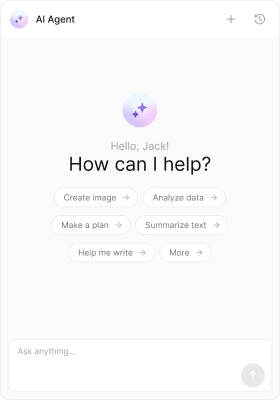
`CometChatAIAssistantChat` is a composite component that assembles the message header, message list, and message composer to provide an AI agent chat experience. It supports streaming responses, quick starter suggestions, "New Chat" to reset context, and a chat history sidebar.
 ```tsx theme={null}
import React from "react";
import { CometChat } from "@cometchat/chat-sdk-javascript";
import { CometChatAIAssistantChat } from "@cometchat/chat-uikit-react";
export function AIAssistantChatDemo() {
const [agent, setAgent] = React.useState();
React.useEffect(() => {
// Replace with your assistant UID
CometChat.getUser("assistant_uid").then((u) => setAgent(u));
}, []);
if (!agent) return null;
return(
<>
);
}
```
```tsx theme={null}
import { AIAssistantChatDemo } from "./AIAssistantChatDemo";
export default function App() {
return (
);
}
```
A `CometChat.User` (the AI agent) is required to start the assistant chat.
***
## Actions
[Actions](/ui-kit/react/components-overview#actions) control how a component behaves. You can hook into the following callbacks:
##### 1. onBackButtonClicked
Called when the header back button is clicked (visible when `showBackButton` is true).
```tsx theme={null}
import React from "react";
import { CometChat } from "@cometchat/chat-sdk-javascript";
import { CometChatAIAssistantChat } from "@cometchat/chat-uikit-react";
export function AIAssistantChatDemo() {
const [agent, setAgent] = React.useState();
React.useEffect(() => {
CometChat.getUser("assistant_uid").then((u) => setAgent(u));
}, []);
const handleBack = () => {
// your custom action
};
if (!agent) return null;
return (
);
}
```
```jsx theme={null}
import React from "react";
import { CometChat } from "@cometchat/chat-sdk-javascript";
import { CometChatAIAssistantChat } from "@cometchat/chat-uikit-react";
export function AIAssistantChatDemo() {
const [agent, setAgent] = React.useState(null);
React.useEffect(() => {
CometChat.getUser("assistant_uid").then((u) => setAgent(u));
}, []);
const handleBack = () => {
// your custom action
};
if (!agent) return null;
return (
);
}
```
##### 2. onCloseButtonClicked
Called when the header close button is clicked (visible when `showCloseButton` is true).
```tsx theme={null}
import React from "react";
import { CometChat } from "@cometchat/chat-sdk-javascript";
import { CometChatAIAssistantChat } from "@cometchat/chat-uikit-react";
export function AIAssistantChatDemo() {
const [agent, setAgent] = React.useState();
React.useEffect(() => {
CometChat.getUser("assistant_uid").then((u) => setAgent(u));
}, []);
const handleClose = () => {
// your custom action
};
if (!agent) return null;
return (
);
}
```
```jsx theme={null}
import React from "react";
import { CometChat } from "@cometchat/chat-sdk-javascript";
import { CometChatAIAssistantChat } from "@cometchat/chat-uikit-react";
export function AIAssistantChatDemo() {
const [agent, setAgent] = React.useState(null);
React.useEffect(() => {
CometChat.getUser("assistant_uid").then((u) => setAgent(u));
}, []);
const handleClose = () => {
// your custom action
};
if (!agent) return null;
return (
);
}
```
##### 3. onSendButtonClick
Called when the composer send button is clicked.
```tsx theme={null}
import React from "react";
import { CometChat } from "@cometchat/chat-sdk-javascript";
import { CometChatAIAssistantChat } from "@cometchat/chat-uikit-react";
export function AIAssistantChatDemo() {
const [agent, setAgent] = React.useState();
React.useEffect(() => {
CometChat.getUser("assistant_uid").then((u) => setAgent(u));
}, []);
const handleSendButton = () => {
// your custom action
};
if (!agent) return null;
return (
);
}
```
```jsx theme={null}
import React from "react";
import { CometChat } from "@cometchat/chat-sdk-javascript";
import { CometChatAIAssistantChat } from "@cometchat/chat-uikit-react";
export function AIAssistantChatDemo() {
const [agent, setAgent] = React.useState(null);
React.useEffect(() => {
CometChat.getUser("assistant_uid").then((u) => setAgent(u));
}, []);
const handleSendButton = () => {
// your custom action
};
if (!agent) return null;
return (
);
}
```
##### 4. onError
Listen to errors from the underlying header, list, or composer.
```tsx theme={null}
import React from "react";
import { CometChat } from "@cometchat/chat-sdk-javascript";
import { CometChatAIAssistantChat } from "@cometchat/chat-uikit-react";
export function AIAssistantChatDemo() {
const [agent, setAgent] = React.useState();
React.useEffect(() => {
CometChat.getUser("assistant_uid").then((u) => setAgent(u));
}, []);
const handleError = (error: CometChat.CometChatException) => {
// your error handling
};
if (!agent) return null;
return (
);
}
```
```jsx theme={null}
import React from "react";
import { CometChat } from "@cometchat/chat-sdk-javascript";
import { CometChatAIAssistantChat } from "@cometchat/chat-uikit-react";
export function AIAssistantChatDemo() {
const [agent, setAgent] = React.useState(null);
React.useEffect(() => {
CometChat.getUser("assistant_uid").then((u) => setAgent(u));
}, []);
const handleError = (error: CometChat.CometChatException) => {
// your error handling
};
if (!agent) return null;
return (
)
}
```
***
## Customization
To fit your app’s design requirements, you can customize the appearance of the Assistant Chat component. We provide exposed properties that allow you to modify the experience and behavior according to your specific needs.
### Style
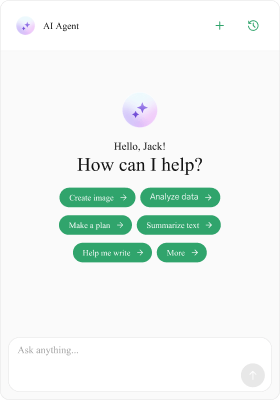
You can set the css of the Assistant Chat Component to customize the styling.
```tsx theme={null}
import React from "react";
import { CometChat } from "@cometchat/chat-sdk-javascript";
import { CometChatAIAssistantChat } from "@cometchat/chat-uikit-react";
export function AIAssistantChatDemo() {
const [agent, setAgent] = React.useState();
React.useEffect(() => {
// Replace with your assistant UID
CometChat.getUser("assistant_uid").then((u) => setAgent(u));
}, []);
if (!agent) return null;
return(
<>
);
}
```
```tsx theme={null}
import { AIAssistantChatDemo } from "./AIAssistantChatDemo";
export default function App() {
return (
);
}
```
A `CometChat.User` (the AI agent) is required to start the assistant chat.
***
## Actions
[Actions](/ui-kit/react/components-overview#actions) control how a component behaves. You can hook into the following callbacks:
##### 1. onBackButtonClicked
Called when the header back button is clicked (visible when `showBackButton` is true).
```tsx theme={null}
import React from "react";
import { CometChat } from "@cometchat/chat-sdk-javascript";
import { CometChatAIAssistantChat } from "@cometchat/chat-uikit-react";
export function AIAssistantChatDemo() {
const [agent, setAgent] = React.useState();
React.useEffect(() => {
CometChat.getUser("assistant_uid").then((u) => setAgent(u));
}, []);
const handleBack = () => {
// your custom action
};
if (!agent) return null;
return (
);
}
```
```jsx theme={null}
import React from "react";
import { CometChat } from "@cometchat/chat-sdk-javascript";
import { CometChatAIAssistantChat } from "@cometchat/chat-uikit-react";
export function AIAssistantChatDemo() {
const [agent, setAgent] = React.useState(null);
React.useEffect(() => {
CometChat.getUser("assistant_uid").then((u) => setAgent(u));
}, []);
const handleBack = () => {
// your custom action
};
if (!agent) return null;
return (
);
}
```
##### 2. onCloseButtonClicked
Called when the header close button is clicked (visible when `showCloseButton` is true).
```tsx theme={null}
import React from "react";
import { CometChat } from "@cometchat/chat-sdk-javascript";
import { CometChatAIAssistantChat } from "@cometchat/chat-uikit-react";
export function AIAssistantChatDemo() {
const [agent, setAgent] = React.useState();
React.useEffect(() => {
CometChat.getUser("assistant_uid").then((u) => setAgent(u));
}, []);
const handleClose = () => {
// your custom action
};
if (!agent) return null;
return (
);
}
```
```jsx theme={null}
import React from "react";
import { CometChat } from "@cometchat/chat-sdk-javascript";
import { CometChatAIAssistantChat } from "@cometchat/chat-uikit-react";
export function AIAssistantChatDemo() {
const [agent, setAgent] = React.useState(null);
React.useEffect(() => {
CometChat.getUser("assistant_uid").then((u) => setAgent(u));
}, []);
const handleClose = () => {
// your custom action
};
if (!agent) return null;
return (
);
}
```
##### 3. onSendButtonClick
Called when the composer send button is clicked.
```tsx theme={null}
import React from "react";
import { CometChat } from "@cometchat/chat-sdk-javascript";
import { CometChatAIAssistantChat } from "@cometchat/chat-uikit-react";
export function AIAssistantChatDemo() {
const [agent, setAgent] = React.useState();
React.useEffect(() => {
CometChat.getUser("assistant_uid").then((u) => setAgent(u));
}, []);
const handleSendButton = () => {
// your custom action
};
if (!agent) return null;
return (
);
}
```
```jsx theme={null}
import React from "react";
import { CometChat } from "@cometchat/chat-sdk-javascript";
import { CometChatAIAssistantChat } from "@cometchat/chat-uikit-react";
export function AIAssistantChatDemo() {
const [agent, setAgent] = React.useState(null);
React.useEffect(() => {
CometChat.getUser("assistant_uid").then((u) => setAgent(u));
}, []);
const handleSendButton = () => {
// your custom action
};
if (!agent) return null;
return (
);
}
```
##### 4. onError
Listen to errors from the underlying header, list, or composer.
```tsx theme={null}
import React from "react";
import { CometChat } from "@cometchat/chat-sdk-javascript";
import { CometChatAIAssistantChat } from "@cometchat/chat-uikit-react";
export function AIAssistantChatDemo() {
const [agent, setAgent] = React.useState();
React.useEffect(() => {
CometChat.getUser("assistant_uid").then((u) => setAgent(u));
}, []);
const handleError = (error: CometChat.CometChatException) => {
// your error handling
};
if (!agent) return null;
return (
);
}
```
```jsx theme={null}
import React from "react";
import { CometChat } from "@cometchat/chat-sdk-javascript";
import { CometChatAIAssistantChat } from "@cometchat/chat-uikit-react";
export function AIAssistantChatDemo() {
const [agent, setAgent] = React.useState(null);
React.useEffect(() => {
CometChat.getUser("assistant_uid").then((u) => setAgent(u));
}, []);
const handleError = (error: CometChat.CometChatException) => {
// your error handling
};
if (!agent) return null;
return (
)
}
```
***
## Customization
To fit your app’s design requirements, you can customize the appearance of the Assistant Chat component. We provide exposed properties that allow you to modify the experience and behavior according to your specific needs.
### Style
You can set the css of the Assistant Chat Component to customize the styling.
 ```tsx theme={null}
import React from "react";
import { CometChat } from "@cometchat/chat-sdk-javascript";
import { CometChatAIAssistantChat } from "@cometchat/chat-uikit-react";
export function AIAssistantChatDemo = () => {
const [agent, setAgent] = React.useState();
React.useEffect(() => {
CometChat.getUser("assistant_uid").then((u) => setAgent(u));
}, []);
if (!agent) return null;
return (
```tsx theme={null}
import React from "react";
import { CometChat } from "@cometchat/chat-sdk-javascript";
import { CometChatAIAssistantChat } from "@cometchat/chat-uikit-react";
export function AIAssistantChatDemo = () => {
const [agent, setAgent] = React.useState();
React.useEffect(() => {
CometChat.getUser("assistant_uid").then((u) => setAgent(u));
}, []);
if (!agent) return null;
return (
);
}
```
```jsx theme={null}
import React from "react";
import { CometChat } from "@cometchat/chat-sdk-javascript";
import { CometChatAIAssistantChat } from "@cometchat/chat-uikit-react";
export function AIAssistantChatDemo = () => {
const [agent, setAgent] = React.useState(null);
React.useEffect(() => {
CometChat.getUser("assistant_uid").then((u) => setAgent(u));
}, []);
if (!agent) return null;
return (
);
}
```
```css theme={null}
.cometchat-ai-assistant-chat
.cometchat-ai-assistant-chat__suggested-message-pill {
background: #30a46c;
color: #ffffff;
text-align: center;
font-family: "Times New Roman";
font-size: 9px;
font-style: normal;
font-weight: 400;
line-height: 120%;
}
.cometchat-ai-assistant-chat
.cometchat-ai-assistant-chat__suggested-message-pill
.cometchat-ai-assistant-chat__suggested-message-icon {
background: #ffffff;
width: 9.55px;
height: 9.55px;
}
.cometchat-ai-assistant-chat
.cometchat-ai-assistant-chat__header-auxiliary-view
.cometchat-button
.cometchat-button__icon-default {
background: #30a46c;
}
```
### Functionality
These props tailor the experience. Most message options (copy/edit/delete/react, receipts, date separators, etc.) are disabled by default for assistant chats.
```tsx theme={null}
import React from "react";
import { CometChat } from "@cometchat/chat-sdk-javascript";
import { CometChatAIAssistantChat } from "@cometchat/chat-uikit-react";
export function AIAssistantChatDemo = () => {
const [agent, setAgent] = React.useState();
React.useEffect(() => {
CometChat.getUser("assistant_uid").then((u) => setAgent(u));
}, []);
if (!agent) return null;
// Example: Set streaming speed to 30 characters per second
// and show close button
// You can also customize suggestions, empty state, etc.
return (
)
}
```
```jsx theme={null}
import React from "react";
import { CometChat } from "@cometchat/chat-sdk-javascript";
import { CometChatAIAssistantChat } from "@cometchat/chat-uikit-react";
export function AIAssistantChatDemo = () => {
const [agent, setAgent] = React.useState(null);
React.useEffect(() => {
CometChat.getUser("assistant_uid").then((u) => setAgent(u));
}, []);
if (!agent) return null;
// Example: Set streaming speed to 30 characters per second
// and show close button
// You can also customize suggestions, empty state, etc.
return (
);
}
```
***
| Property | Description | Example |
| --------------------------- | ------------------------------------------------------------------------ | ----------------------------------------- |
| `user` | Required `CometChat.User` representing the AI agent. | `user={agent}` |
| `streamingSpeed` | Characters-per-second speed for streaming replies. Default `30`. | `streamingSpeed={50}` |
| `suggestedMessages` | Array of quick prompts for the empty state. | `suggestedMessages=["Help", "Summarize"]` |
| `hideSuggestedMessages` | Hide the suggestions section. | `hideSuggestedMessages={true}` |
| `hideNewChat` | Hide the New Chat button in header. | `hideNewChat={true}` |
| `hideChatHistory` | Hide the History button/sidebar. | `hideChatHistory={true}` |
| `showBackButton` | Show back button in header. | `showBackButton` |
| `showCloseButton` | Show close button in header. | `showCloseButton` |
| `onBackButtonClicked` | Back button handler. | `onBackButtonClicked={() => {}}` |
| `onCloseButtonClicked` | Close button handler. | `onCloseButtonClicked={() => {}}` |
| `onSendButtonClick` | Send button handler. | `onSendButtonClick={() => {}}` |
| `onError` | Error handler. | `onError={handleError}` |
| `emptyView` | Custom empty state for the list. | `emptyView={}` |
| `loadingView` | Custom loading view. | `loadingView={}` |
| `errorView` | Custom error view. | `errorView={}` |
| `emptyChatGreetingView` | Custom empty title (default uses metadata.greetingMessage or user name). | `emptyChatGreetingView={}` |
| `emptyChatIntroMessageView` | Custom empty subtitle (default uses metadata.introductoryMessage). | `emptyChatIntroMessageView={}` |
| `emptyChatImageView` | Custom empty image. | `emptyChatImageView={![]() }` |
| `aiAssistantTools` | Provide tool/function handlers for the assistant. | `aiAssistantTools={tools}` |
### Advanced
#### Header Views
Customize header sections using the following props: `headerItemView`, `headerTitleView`, `headerSubtitleView`, `headerLeadingView`, `headerTrailingView`, and `headerAuxiliaryButtonView`. These customizations are done in the similar way as the [Message Header](/ui-kit/react/message-header#advanced) component.
The header’s "New Chat" and "History" buttons are built-in. You can override them by providing a custom `headerAuxiliaryButtonView`.
#### Assistant Tools
Pass an instance of `CometChatAIAssistantTools` to enable tool/function calls during assistant replies.
```tsx theme={null}
import React from "react";
import { CometChat } from "@cometchat/chat-sdk-javascript";
import { CometChatAIAssistantChat } from "@cometchat/chat-uikit-react";
import { CometChatAIAssistantTools } from "@cometchat/chat-uikit-react";
export function AIAssistantChatDemo = () => {
const [agent, setAgent] = React.useState();
React.useEffect(() => {
CometChat.getUser("assistant_uid").then((u) => setAgent(u));
}, []);
const tools = new CometChatAIAssistantTools({
getCurrentWeather: ({ location }: { location: string }) => {
// call your backend or a public API
console.log("Fetching weather for", location);
},
createTicket: ({ title }: { title: string }) => {
// open your internal ticketing flow
console.log("Create ticket:", title);
},
});
if (!agent) return null;
return (
);
```
```jsx theme={null}
import React from "react";
import { CometChat } from "@cometchat/chat-sdk-javascript";
import { CometChatAIAssistantChat } from "@cometchat/chat-uikit-react";
import { CometChatAIAssistantTools } from "@cometchat/chat-uikit-react";
export function AIAssistantChatDemo = () => {
const [agent, setAgent] = React.useState(null);
React.useEffect(() => {
CometChat.getUser("assistant_uid").then((u) => setAgent(u));
}, []);
const tools = new CometChatAIAssistantTools({
getCurrentWeather: ({ location }: { location: string }) => {
// call your backend or a public API
console.log("Fetching weather for", location);
},
createTicket: ({ title }: { title: string }) => {
// open your internal ticketing flow
console.log("Create ticket:", title);
},
});
if (!agent) return null;
return (
);
}
```
#### Empty Chat Image View
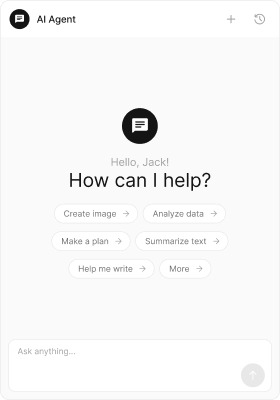
Provide a custom image for the empty state using `emptyChatImageView`.
}` |
| `aiAssistantTools` | Provide tool/function handlers for the assistant. | `aiAssistantTools={tools}` |
### Advanced
#### Header Views
Customize header sections using the following props: `headerItemView`, `headerTitleView`, `headerSubtitleView`, `headerLeadingView`, `headerTrailingView`, and `headerAuxiliaryButtonView`. These customizations are done in the similar way as the [Message Header](/ui-kit/react/message-header#advanced) component.
The header’s "New Chat" and "History" buttons are built-in. You can override them by providing a custom `headerAuxiliaryButtonView`.
#### Assistant Tools
Pass an instance of `CometChatAIAssistantTools` to enable tool/function calls during assistant replies.
```tsx theme={null}
import React from "react";
import { CometChat } from "@cometchat/chat-sdk-javascript";
import { CometChatAIAssistantChat } from "@cometchat/chat-uikit-react";
import { CometChatAIAssistantTools } from "@cometchat/chat-uikit-react";
export function AIAssistantChatDemo = () => {
const [agent, setAgent] = React.useState();
React.useEffect(() => {
CometChat.getUser("assistant_uid").then((u) => setAgent(u));
}, []);
const tools = new CometChatAIAssistantTools({
getCurrentWeather: ({ location }: { location: string }) => {
// call your backend or a public API
console.log("Fetching weather for", location);
},
createTicket: ({ title }: { title: string }) => {
// open your internal ticketing flow
console.log("Create ticket:", title);
},
});
if (!agent) return null;
return (
);
```
```jsx theme={null}
import React from "react";
import { CometChat } from "@cometchat/chat-sdk-javascript";
import { CometChatAIAssistantChat } from "@cometchat/chat-uikit-react";
import { CometChatAIAssistantTools } from "@cometchat/chat-uikit-react";
export function AIAssistantChatDemo = () => {
const [agent, setAgent] = React.useState(null);
React.useEffect(() => {
CometChat.getUser("assistant_uid").then((u) => setAgent(u));
}, []);
const tools = new CometChatAIAssistantTools({
getCurrentWeather: ({ location }: { location: string }) => {
// call your backend or a public API
console.log("Fetching weather for", location);
},
createTicket: ({ title }: { title: string }) => {
// open your internal ticketing flow
console.log("Create ticket:", title);
},
});
if (!agent) return null;
return (
);
}
```
#### Empty Chat Image View
Provide a custom image for the empty state using `emptyChatImageView`.
 ```tsx theme={null}
import React from "react";
import { CometChat } from "@cometchat/chat-sdk-javascript";
import { CometChatAIAssistantChat } from "@cometchat/chat-uikit-react";
export function AIAssistantChatDemo() {
const [agent, setAgent] = React.useState();
React.useEffect(() => {
CometChat.getUser("assistant_uid").then((u) => setAgent(u));
}, []);
if (!agent) return null;
return (
}
/>
);
}
```
```jsx theme={null}
import React from "react";
import { CometChat } from "@cometchat/chat-sdk-javascript";
import { CometChatAIAssistantChat } from "@cometchat/chat-uikit-react";
export function AIAssistantChatDemo() {
const [agent, setAgent] = React.useState(null);
React.useEffect(() => {
CometChat.getUser("assistant_uid").then((u) => setAgent(u));
}, []);
if (!agent) return null;
return (
}
/>
)
}
```
#### Empty Chat Greeting View
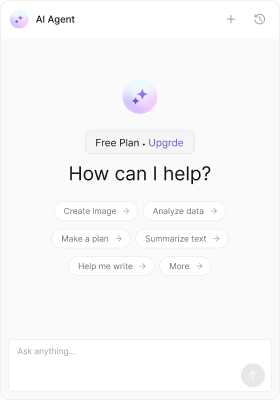
Override the empty state greeting message view using the `emptyChatGreetingView` prop.
```tsx theme={null}
import React from "react";
import { CometChat } from "@cometchat/chat-sdk-javascript";
import { CometChatAIAssistantChat } from "@cometchat/chat-uikit-react";
export function AIAssistantChatDemo() {
const [agent, setAgent] = React.useState();
React.useEffect(() => {
CometChat.getUser("assistant_uid").then((u) => setAgent(u));
}, []);
if (!agent) return null;
return (
}
/>
);
}
```
```jsx theme={null}
import React from "react";
import { CometChat } from "@cometchat/chat-sdk-javascript";
import { CometChatAIAssistantChat } from "@cometchat/chat-uikit-react";
export function AIAssistantChatDemo() {
const [agent, setAgent] = React.useState(null);
React.useEffect(() => {
CometChat.getUser("assistant_uid").then((u) => setAgent(u));
}, []);
if (!agent) return null;
return (
}
/>
)
}
```
#### Empty Chat Greeting View
Override the empty state greeting message view using the `emptyChatGreetingView` prop.
 ```tsx theme={null}
import React from "react";
import { CometChat } from "@cometchat/chat-sdk-javascript";
import { CometChatAIAssistantChat } from "@cometchat/chat-uikit-react";
export function AIAssistantChatDemo() {
const [agent, setAgent] = React.useState();
React.useEffect(() => {
CometChat.getUser("assistant_uid").then((u) => setAgent(u));
}, []);
if (!agent) return null;
return (
Free Plan .
Upgrade
}
/>
);
}
```
```jsx theme={null}
import React from "react";
import { CometChat } from "@cometchat/chat-sdk-javascript";
import { CometChatAIAssistantChat } from "@cometchat/chat-uikit-react";
export function AIAssistantChatDemo() {
const [agent, setAgent] = React.useState(null);
React.useEffect(() => {
CometChat.getUser("assistant_uid").then((u) => setAgent(u));
}, []);
if (!agent) return null;
return (
Free Plan .
Upgrade
}
/>
)
}
```
```css theme={null}
.cometchat-ai-assistant-chat__empty-chat-greeting {
display: flex;
padding: 8px 20px;
justify-content: center;
align-items: center;
gap: 8px;
flex: 1 0 0;
align-self: stretch;
border-radius: 6px;
border: 1px solid #e8e8e8;
background: #f5f5f5;
width: fit-content;
align-self: center;
}
.cometchat-ai-assistant-chat__empty-chat-greeting .upgrade-button {
color: #6852d6;
}
```
#### Empty Chat Intro Message View
You can override the empty chat intro message view using the `emptyChatIntroMessageView` prop.
```tsx theme={null}
import React from "react";
import { CometChat } from "@cometchat/chat-sdk-javascript";
import { CometChatAIAssistantChat } from "@cometchat/chat-uikit-react";
export function AIAssistantChatDemo() {
const [agent, setAgent] = React.useState();
React.useEffect(() => {
CometChat.getUser("assistant_uid").then((u) => setAgent(u));
}, []);
if (!agent) return null;
return (
Free Plan .
Upgrade
}
/>
);
}
```
```jsx theme={null}
import React from "react";
import { CometChat } from "@cometchat/chat-sdk-javascript";
import { CometChatAIAssistantChat } from "@cometchat/chat-uikit-react";
export function AIAssistantChatDemo() {
const [agent, setAgent] = React.useState(null);
React.useEffect(() => {
CometChat.getUser("assistant_uid").then((u) => setAgent(u));
}, []);
if (!agent) return null;
return (
Free Plan .
Upgrade
}
/>
)
}
```
```css theme={null}
.cometchat-ai-assistant-chat__empty-chat-greeting {
display: flex;
padding: 8px 20px;
justify-content: center;
align-items: center;
gap: 8px;
flex: 1 0 0;
align-self: stretch;
border-radius: 6px;
border: 1px solid #e8e8e8;
background: #f5f5f5;
width: fit-content;
align-self: center;
}
.cometchat-ai-assistant-chat__empty-chat-greeting .upgrade-button {
color: #6852d6;
}
```
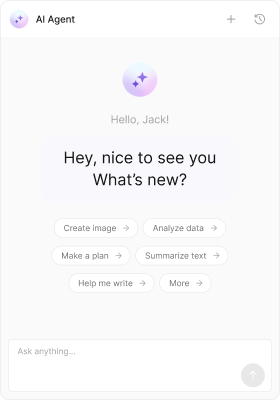
#### Empty Chat Intro Message View
You can override the empty chat intro message view using the `emptyChatIntroMessageView` prop.
 ```tsx theme={null}
import React from "react";
import { CometChat } from "@cometchat/chat-sdk-javascript";
import { CometChatAIAssistantChat } from "@cometchat/chat-uikit-react";
export function AIAssistantChatDemo() {
const [agent, setAgent] = React.useState();
React.useEffect(() => {
CometChat.getUser("assistant_uid").then((u) => setAgent(u));
}, []);
if (!agent) return null;
return (
Hey, nice to see you What’s new?
}
/>
);
}
```
```jsx theme={null}
import React from "react";
import { CometChat } from "@cometchat/chat-sdk-javascript";
import { CometChatAIAssistantChat } from "@cometchat/chat-uikit-react";
export function AIAssistantChatDemo() {
const [agent, setAgent] = React.useState(null);
React.useEffect(() => {
CometChat.getUser("assistant_uid").then((u) => setAgent(u));
}, []);
if (!agent) return null;
return (
Hey, nice to see you What’s new?
}
/>
);
}
```
```css theme={null}
.cometchat-ai-assistant-chat__empty-chat-intro {
display: flex;
padding: 12px;
justify-content: center;
align-items: center;
gap: 10px;
border-radius: 12px;
background: #f9f8fd;
width: 172px;
color: #141414;
text-align: center;
font-family: Inter;
font-size: 16px;
font-style: normal;
font-weight: 400;
line-height: 140%;
margin: 10px 0;
}
```
#### Templates
[CometChatMessageTemplate](/ui-kit/react/message-template) is a pre-defined structure for creating message views that can be used as a starting point or blueprint for creating message views often known as message bubbles. For more information, you can refer to [CometChatMessageTemplate](/ui-kit/react/message-template).
You can set message Templates to AIAssistantChat by using the following code snippet.
```ts theme={null}
import React from "react";
import { CometChat } from "@cometchat/chat-sdk-javascript";
import {
CometChatAIAssistantChat,
ChatConfigurator
} from "@cometchat/chat-uikit-react";
export function AIAssistantChatDemo() {
const [chatUser, setChatUser] = React.useState();
React.useEffect(() => {
CometChat.getUser("uid").then((user) => {
setChatUser(user);
});
}, []);
const getTemplates = () => {
let templates = ChatConfigurator.getDataSource().getAllMessageTemplates();
templates.map((data) => {
data.footerView = (message) => {}; //custom view here
});
return templates;
};
return chatUser ? (
```tsx theme={null}
import React from "react";
import { CometChat } from "@cometchat/chat-sdk-javascript";
import { CometChatAIAssistantChat } from "@cometchat/chat-uikit-react";
export function AIAssistantChatDemo() {
const [agent, setAgent] = React.useState();
React.useEffect(() => {
CometChat.getUser("assistant_uid").then((u) => setAgent(u));
}, []);
if (!agent) return null;
return (
Hey, nice to see you What’s new?
}
/>
);
}
```
```jsx theme={null}
import React from "react";
import { CometChat } from "@cometchat/chat-sdk-javascript";
import { CometChatAIAssistantChat } from "@cometchat/chat-uikit-react";
export function AIAssistantChatDemo() {
const [agent, setAgent] = React.useState(null);
React.useEffect(() => {
CometChat.getUser("assistant_uid").then((u) => setAgent(u));
}, []);
if (!agent) return null;
return (
Hey, nice to see you What’s new?
}
/>
);
}
```
```css theme={null}
.cometchat-ai-assistant-chat__empty-chat-intro {
display: flex;
padding: 12px;
justify-content: center;
align-items: center;
gap: 10px;
border-radius: 12px;
background: #f9f8fd;
width: 172px;
color: #141414;
text-align: center;
font-family: Inter;
font-size: 16px;
font-style: normal;
font-weight: 400;
line-height: 140%;
margin: 10px 0;
}
```
#### Templates
[CometChatMessageTemplate](/ui-kit/react/message-template) is a pre-defined structure for creating message views that can be used as a starting point or blueprint for creating message views often known as message bubbles. For more information, you can refer to [CometChatMessageTemplate](/ui-kit/react/message-template).
You can set message Templates to AIAssistantChat by using the following code snippet.
```ts theme={null}
import React from "react";
import { CometChat } from "@cometchat/chat-sdk-javascript";
import {
CometChatAIAssistantChat,
ChatConfigurator
} from "@cometchat/chat-uikit-react";
export function AIAssistantChatDemo() {
const [chatUser, setChatUser] = React.useState();
React.useEffect(() => {
CometChat.getUser("uid").then((user) => {
setChatUser(user);
});
}, []);
const getTemplates = () => {
let templates = ChatConfigurator.getDataSource().getAllMessageTemplates();
templates.map((data) => {
data.footerView = (message) => {}; //custom view here
});
return templates;
};
return chatUser ? (
) : null;
}
```
```js theme={null}
import React from "react";
import { CometChat } from "@cometchat/chat-sdk-javascript";
import {
CometChatAIAssistantChat,
ChatConfigurator
} from "@cometchat/chat-uikit-react";
export function AIAssistantChatDemo() {
const [chatUser, setChatUser] = React.useState(null);
React.useEffect(() => {
CometChat.getUser("uid").then((user) => {
setChatUser(user);
});
}, []);
const getTemplates = () => {
let templates = ChatConfigurator.getDataSource().getAllMessageTemplates();
templates.map((data) => {
data.footerView = (message) => {}; //custom view here
});
return templates;
};
return chatUser ? (
) : null;
}
```
***