> ## Documentation Index
> Fetch the complete documentation index at: https://cometchat-22654f5b-feature-react-native-sdk-quotedmessage-a.mintlify.site/llms.txt
> Use this file to discover all available pages before exploring further.
# Building a One-to-One/Group Chat in Astro
The One‑to‑One/Group chat layout focuses on a single conversation, ideal for support chats and private messaging. This guide uses Astro with React islands and the CometChat React UI Kit.
***
## User Interface Preview
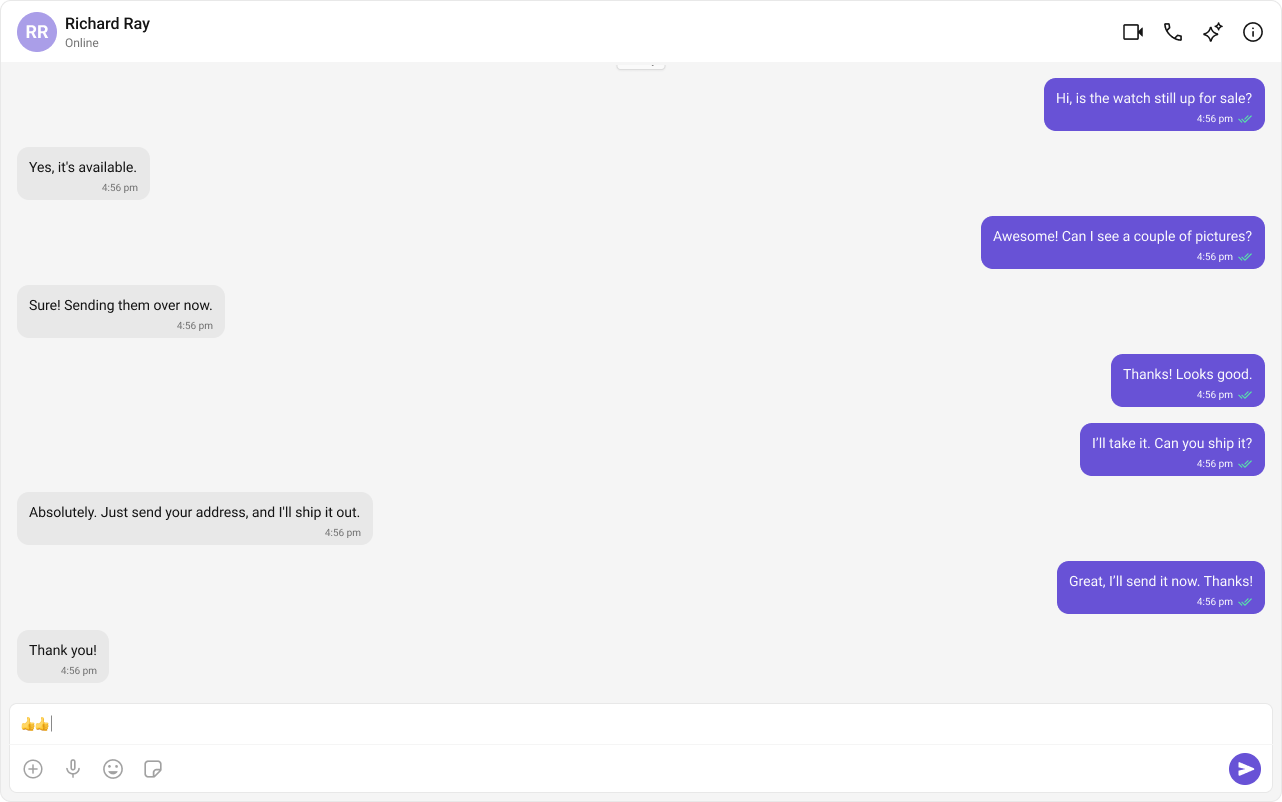 **Key Components**
1. Chat Header – recipient details and status
2. Message View – history and live messages
3. Message Composer – text, media, attachments
***
## Prerequisites
* Astro project with React integration
* CometChat credentials in `.env`
```bash theme={null}
npm create astro@latest
cd
npm install
```
If you already have the sample `astro-one-to-one-chat` project, open it instead.
```bash theme={null}
npx astro add react
npm i @cometchat/chat-uikit-react react react-dom
```
Add required environment variables to `.env`:
```bash theme={null}
PUBLIC_COMETCHAT_APP_ID=your_app_id
PUBLIC_COMETCHAT_REGION=your_region
PUBLIC_COMETCHAT_AUTH_KEY=your_auth_key
# Login user and the peer for one-to-one
PUBLIC_COMETCHAT_LOGIN_UID=cometchat-uid-3
PUBLIC_COMETCHAT_TARGET_UID=cometchat-uid-1
```
Use Auth Tokens in production instead of Auth Keys.
Create `src/lib/cometchat-init.js` used by the island to initialize the UI Kit and handle login.
```javascript src/lib/cometchat-init.js theme={null}
import { CometChatUIKit, UIKitSettingsBuilder } from "@cometchat/chat-uikit-react";
const APP_ID = import.meta.env.PUBLIC_COMETCHAT_APP_ID;
const REGION = import.meta.env.PUBLIC_COMETCHAT_REGION;
const AUTH_KEY = import.meta.env.PUBLIC_COMETCHAT_AUTH_KEY;
export async function initCometChat() {
if (!APP_ID || !REGION || !AUTH_KEY) {
throw new Error("Missing PUBLIC_COMETCHAT_* env vars.");
}
const settings = new UIKitSettingsBuilder()
.setAppId(APP_ID)
.setRegion(REGION)
.setAuthKey(AUTH_KEY) // use Auth Tokens in prod
.subscribePresenceForAllUsers()
.build();
await CometChatUIKit.init(settings);
}
export async function ensureLogin(uid) {
const existing = await CometChatUIKit.getLoggedinUser();
if (!existing) await CometChatUIKit.login(uid);
}
```
This component initializes CometChat, logs in the desired user, and loads a single peer (user or group) to chat with.
```javascript src/components/OneToOneChat.jsx theme={null}
import { useEffect, useState } from "react";
import {
CometChatUIKit,
CometChatMessageHeader,
CometChatMessageList,
CometChatMessageComposer,
} from "@cometchat/chat-uikit-react";
import "@cometchat/chat-uikit-react/css-variables.css";
import { initCometChat, ensureLogin } from "../lib/cometchat-init.js";
// current user + peer
const LOGIN_UID = import.meta.env.PUBLIC_COMETCHAT_LOGIN_UID; // e.g., cometchat-uid-3
const TARGET_UID = import.meta.env.PUBLIC_COMETCHAT_TARGET_UID; // e.g., cometchat-uid-1
export default function OneToOneChat() {
const [phase, setPhase] = useState("boot"); // boot | ready | error
const [errorMsg, setErrorMsg] = useState("");
const [peer, setPeer] = useState(null); // CometChat.User
useEffect(() => {
let cancelled = false;
(async () => {
try {
if (!LOGIN_UID || !TARGET_UID) {
throw new Error("Missing PUBLIC_COMETCHAT_LOGIN_UID or PUBLIC_COMETCHAT_TARGET_UID.");
}
// 1) Initialize CometChat
await initCometChat();
// 2) Handle user switching - logout if different user
try {
const currentUser = await CometChatUIKit.getLoggedinUser();
if (currentUser && currentUser.uid !== LOGIN_UID) {
await CometChatUIKit.logout();
}
} catch (error) {
// No existing user session
}
// 3) Ensure logged in as correct user
await ensureLogin(LOGIN_UID);
// 4) Fetch the peer user
const { CometChat } = await import("@cometchat/chat-sdk-javascript");
const u = await CometChat.getUser(TARGET_UID);
if (!cancelled) {
setPeer(u);
setPhase("ready");
}
} catch (e) {
if (!cancelled) {
setErrorMsg(String(e?.message || e));
setPhase("error");
}
}
})();
return () => { cancelled = true; };
}, [LOGIN_UID, TARGET_UID]); // Re-run when these change
if (phase === "boot") return (
);
if (phase === "error") return (
);
if (!peer) return
**Key Components**
1. Chat Header – recipient details and status
2. Message View – history and live messages
3. Message Composer – text, media, attachments
***
## Prerequisites
* Astro project with React integration
* CometChat credentials in `.env`
```bash theme={null}
npm create astro@latest
cd
npm install
```
If you already have the sample `astro-one-to-one-chat` project, open it instead.
```bash theme={null}
npx astro add react
npm i @cometchat/chat-uikit-react react react-dom
```
Add required environment variables to `.env`:
```bash theme={null}
PUBLIC_COMETCHAT_APP_ID=your_app_id
PUBLIC_COMETCHAT_REGION=your_region
PUBLIC_COMETCHAT_AUTH_KEY=your_auth_key
# Login user and the peer for one-to-one
PUBLIC_COMETCHAT_LOGIN_UID=cometchat-uid-3
PUBLIC_COMETCHAT_TARGET_UID=cometchat-uid-1
```
Use Auth Tokens in production instead of Auth Keys.
Create `src/lib/cometchat-init.js` used by the island to initialize the UI Kit and handle login.
```javascript src/lib/cometchat-init.js theme={null}
import { CometChatUIKit, UIKitSettingsBuilder } from "@cometchat/chat-uikit-react";
const APP_ID = import.meta.env.PUBLIC_COMETCHAT_APP_ID;
const REGION = import.meta.env.PUBLIC_COMETCHAT_REGION;
const AUTH_KEY = import.meta.env.PUBLIC_COMETCHAT_AUTH_KEY;
export async function initCometChat() {
if (!APP_ID || !REGION || !AUTH_KEY) {
throw new Error("Missing PUBLIC_COMETCHAT_* env vars.");
}
const settings = new UIKitSettingsBuilder()
.setAppId(APP_ID)
.setRegion(REGION)
.setAuthKey(AUTH_KEY) // use Auth Tokens in prod
.subscribePresenceForAllUsers()
.build();
await CometChatUIKit.init(settings);
}
export async function ensureLogin(uid) {
const existing = await CometChatUIKit.getLoggedinUser();
if (!existing) await CometChatUIKit.login(uid);
}
```
This component initializes CometChat, logs in the desired user, and loads a single peer (user or group) to chat with.
```javascript src/components/OneToOneChat.jsx theme={null}
import { useEffect, useState } from "react";
import {
CometChatUIKit,
CometChatMessageHeader,
CometChatMessageList,
CometChatMessageComposer,
} from "@cometchat/chat-uikit-react";
import "@cometchat/chat-uikit-react/css-variables.css";
import { initCometChat, ensureLogin } from "../lib/cometchat-init.js";
// current user + peer
const LOGIN_UID = import.meta.env.PUBLIC_COMETCHAT_LOGIN_UID; // e.g., cometchat-uid-3
const TARGET_UID = import.meta.env.PUBLIC_COMETCHAT_TARGET_UID; // e.g., cometchat-uid-1
export default function OneToOneChat() {
const [phase, setPhase] = useState("boot"); // boot | ready | error
const [errorMsg, setErrorMsg] = useState("");
const [peer, setPeer] = useState(null); // CometChat.User
useEffect(() => {
let cancelled = false;
(async () => {
try {
if (!LOGIN_UID || !TARGET_UID) {
throw new Error("Missing PUBLIC_COMETCHAT_LOGIN_UID or PUBLIC_COMETCHAT_TARGET_UID.");
}
// 1) Initialize CometChat
await initCometChat();
// 2) Handle user switching - logout if different user
try {
const currentUser = await CometChatUIKit.getLoggedinUser();
if (currentUser && currentUser.uid !== LOGIN_UID) {
await CometChatUIKit.logout();
}
} catch (error) {
// No existing user session
}
// 3) Ensure logged in as correct user
await ensureLogin(LOGIN_UID);
// 4) Fetch the peer user
const { CometChat } = await import("@cometchat/chat-sdk-javascript");
const u = await CometChat.getUser(TARGET_UID);
if (!cancelled) {
setPeer(u);
setPhase("ready");
}
} catch (e) {
if (!cancelled) {
setErrorMsg(String(e?.message || e));
setPhase("error");
}
}
})();
return () => { cancelled = true; };
}, [LOGIN_UID, TARGET_UID]); // Re-run when these change
if (phase === "boot") return (
);
if (phase === "error") return (
);
if (!peer) return Invalid target user.
;
return (
);
}
```
Import the island and styles, then hydrate on the client.
```astro src/pages/index.astro theme={null}
---
import OneToOneChat from "../components/OneToOneChat.jsx";
import "../styles/globals.css"; // your existing base CSS (optional, recommended)
import "../styles/one-to-one.css"; // the file from this setup
---
One-to-One Chat
```
```bash theme={null}
npm run dev
```
Set `PUBLIC_COMETCHAT_LOGIN_UID` and `PUBLIC_COMETCHAT_TARGET_UID` then verify messages appear for the selected peer.
***
## Switch to Group Chat
To load a group instead of a user, fetch it with the SDK and pass it to the UI Kit components.
```javascript theme={null}
const { CometChat } = await import("@cometchat/chat-sdk-javascript");
const group = await CometChat.getGroup("YOUR_GROUP_ID");
// Then render header, list, composer with group prop instead of user
```
When switching between user and group, keep only one of `user` or `group` props set at a time.
***
## Troubleshooting
Ensure the component is rendered as a React island (`client:only=\"react\"`).
Verify `.env` contains `PUBLIC_COMETCHAT_APP_ID`, `PUBLIC_COMETCHAT_REGION`, `PUBLIC_COMETCHAT_AUTH_KEY`, and both `PUBLIC_COMETCHAT_LOGIN_UID` and `PUBLIC_COMETCHAT_TARGET_UID`.
The island logs out if a different user session is active, then logs in with `PUBLIC_COMETCHAT_LOGIN_UID`.
***
## Next Steps
* Add typing indicators and read receipts
* Apply theming and component overrides
* Extend to conversations list + messages or tabbed layout
You can reuse `src/lib/cometchat-init.js` across different chat experiences and swap the island component.