> ## Documentation Index
> Fetch the complete documentation index at: https://cometchat-22654f5b-feature-react-native-sdk-quotedmessage-a.mintlify.site/llms.txt
> Use this file to discover all available pages before exploring further.

# Building a Messaging UI with Tabs, Sidebar, and Message View in Astro

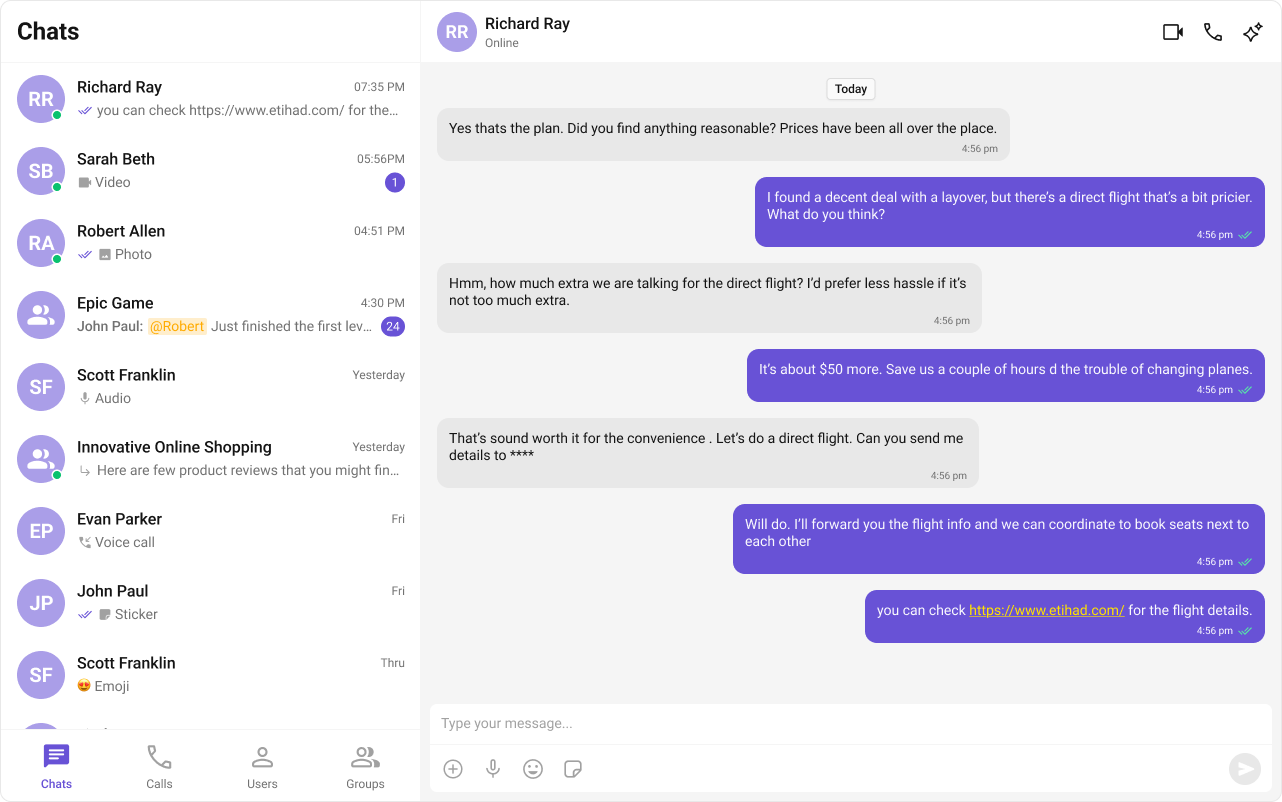
This guide shows how to build a tab‑based messaging UI in Astro using the CometChat React UI Kit. The interface includes sections for Chats, Calls, Users, and Groups with a message panel.

***

## User Interface Preview

<Frame>
  <img src="https://mintcdn.com/cometchat-22654f5b/8ODUflBxloB1jkgP/images/010808a2-multi_tab_ui_web_screens-4c6055da929b73c11d7d45b0112fd5fc.png?fit=max&auto=format&n=8ODUflBxloB1jkgP&q=85&s=1454a2402166c9939b57d59a834f2e32" alt="Tabbed UI with chats, calls, users, and groups" />
</Frame>

Layout structure:

1. Sidebar – conversations, users, groups, or call logs
2. Messages – header, list, and composer
3. Tabs – switch between Chats, Calls, Users, and Groups

***

## Prerequisites

* Astro project with React integration
* CometChat credentials in `.env`

<Steps>
  <Step title="Create or open an Astro project">
    ```bash theme={null}
    npm create astro@latest
    cd <my-astro-app>
    npm install
    ```

    <Info>
      If you already have the sample `astro-tab-based-chat` project, open it instead.
    </Info>
  </Step>

  <Step title="Add React and install CometChat UI Kit">
    ```bash theme={null}
    npx astro add react
    npm i @cometchat/chat-uikit-react react react-dom
    ```

    Add required environment variables to `.env`:

    ```bash theme={null}
    PUBLIC_COMETCHAT_APP_ID=your_app_id
    PUBLIC_COMETCHAT_REGION=your_region
    PUBLIC_COMETCHAT_AUTH_KEY=your_auth_key
    # Login UID for tabbed example
    PUBLIC_COMETCHAT_LOGIN_UID=cometchat-uid-3
    ```

    <Warning>
      Use Auth Tokens in production instead of Auth Keys.
    </Warning>
  </Step>

  <Step title="Initialize CometChat (src/lib/cometchat-init.js)">
    Create `src/lib/cometchat-init.js` to initialize the UI Kit and provide a helper for login.

    ```javascript src/lib/cometchat-init.js theme={null}
    import { CometChatUIKit, UIKitSettingsBuilder } from "@cometchat/chat-uikit-react";

    const APP_ID   = import.meta.env.PUBLIC_COMETCHAT_APP_ID;
    const REGION   = import.meta.env.PUBLIC_COMETCHAT_REGION;
    const AUTH_KEY = import.meta.env.PUBLIC_COMETCHAT_AUTH_KEY;

    export async function initCometChat() {
      if (!APP_ID || !REGION || !AUTH_KEY) {
        throw new Error("Missing PUBLIC_COMETCHAT_* env vars.");
      }

      const settings = new UIKitSettingsBuilder()
        .setAppId(APP_ID)
        .setRegion(REGION)
        .setAuthKey(AUTH_KEY) // use Auth Tokens in prod
        .subscribePresenceForAllUsers()
        .build();

      await CometChatUIKit.init(settings);
    }

    export async function ensureLogin(uid) {
      const existing = await CometChatUIKit.getLoggedinUser();
      if (!existing) await CometChatUIKit.login(uid);
    }
    ```
  </Step>

  <Step title="Create the Tabs component (src/components/CometChatTabs.jsx)">
    A simple bottom tab bar used to switch between sections.

    ```javascript src/components/CometChatTabs.jsx theme={null}
    import { useState } from "react";
    // CSS styling is handled by tabs-layout.css imported in the main page

    const chatsIcon  = "/assets/chats.svg";
    const callsIcon  = "/assets/calls.svg";
    const usersIcon  = "/assets/users.svg";
    const groupsIcon = "/assets/groups.svg";

    export default function CometChatTabs({ activeTab = "chats", onTabClicked = () => {} }) {
      const [hover, setHover] = useState("");

      const items = [
        { name: "CHATS",  icon: chatsIcon  },
        { name: "CALLS",  icon: callsIcon  },
        { name: "USERS",  icon: usersIcon  },
        { name: "GROUPS", icon: groupsIcon },
      ];

      return (
        <div className="cometchat-tab-component">
          {items.map((t) => {
            const key = t.name.toLowerCase();
            const active = activeTab === key || hover === key;
            return (
              <div
                key={t.name}
                className="cometchat-tab-component__tab"
                onClick={() => onTabClicked({ name: t.name })}
                onMouseEnter={() => setHover(key)}
                onMouseLeave={() => setHover("")}
              >
                {/* if icons not present, this still renders a label-only tab */}
                {t.icon ? (
                  <div
                    className={
                      "cometchat-tab-component__tab-icon " +
                      (active ? "cometchat-tab-component__tab-icon-active" : "")
                    }
                    style={{
                      WebkitMaskImage: `url(${t.icon})`,
                      maskImage: `url(${t.icon})`,
                    }}
                  />
                ) : null}
                <div
                  className={
                    "cometchat-tab-component__tab-text " +
                    (active ? "cometchat-tab-component__tab-text-active" : "")
                  }
                >
                  {t.name}
                </div>
              </div>
            );
          })}
        </div>
      );
    }
    ```
  </Step>

  <Step title="Build the React island (src/components/TabbedChat.jsx)">
    This component renders the sidebar list based on the active tab and shows the message panel on the right.

    ```javascript src/components/TabbedChat.jsx theme={null}
    import { useEffect, useState } from "react";
    import {
      CometChatUIKit,
      CometChatConversations,
      CometChatUsers,
      CometChatGroups,
      CometChatCallLogs,
      CometChatMessageHeader,
      CometChatMessageList,
      CometChatMessageComposer,
    } from "@cometchat/chat-uikit-react";
    import "@cometchat/chat-uikit-react/css-variables.css";
    import CometChatTabs from "./CometChatTabs.jsx";
    import { initCometChat } from "../lib/cometchat-init.js";

    const LOGIN_UID = import.meta.env.PUBLIC_COMETCHAT_LOGIN_UID; // UID of the user to log in as

    export default function TabbedChat() {
      const [phase, setPhase] = useState("boot"); // boot | ready | error
      const [errorMsg, setErrorMsg] = useState("");

      const [activeTab, setActiveTab] = useState("chats"); // chats | calls | users | groups

      const [selectedUser, setSelectedUser]   = useState(null);
      const [selectedGroup, setSelectedGroup] = useState(null);

      useEffect(() => {
        let cancelled = false;
        (async () => {
          try {
            // Use the centralized init function
            await initCometChat();

            // Check if current logged-in user matches the desired UID
            let me = await CometChatUIKit.getLoggedinUser();
            if (!me || me.getUid() !== LOGIN_UID) {
              // Logout current user if different UID, then login with correct UID
              if (me) {
                await CometChatUIKit.logout();
              }
              me = await CometChatUIKit.login(LOGIN_UID);
            }

            if (!cancelled) setPhase("ready");
          } catch (e) {
            console.error("TabbedChat init error:", e);
            if (!cancelled) {
              setErrorMsg(String(e?.message || e));
              setPhase("error");
            }
          }
        })();

        return () => { cancelled = true; };
      }, [LOGIN_UID]); // Add LOGIN_UID as dependency so effect runs when UID changes

      const handleSelect = (item) => {
        // item can be Conversation, User, Group, or Call
        const maybeConv = item?.getConversationWith ? item.getConversationWith() : null;
        const picked = maybeConv || item;

        if (picked?.getUid) {
          setSelectedUser(picked);
          setSelectedGroup(null);
          setActiveTab("chats"); // keep in chats context
        } else if (picked?.getGuid) {
          setSelectedGroup(picked);
          setSelectedUser(null);
          setActiveTab("chats"); // show messages in same area
        } else {
          // For calls tab, we don’t open message panel
          setSelectedUser(null);
          setSelectedGroup(null);
        }
      };

      if (phase === "boot")  return <div style={{ padding: 16 }}>Loading…</div>;
      if (phase === "error") return <div style={{ padding: 16, color: "crimson" }}><b>CometChat error:</b> {errorMsg}</div>;

      return (
        <div className="cc-tabbed">
          {/* LEFT: Sidebar */}
          <div className="cc-tabbed__sidebar">
            <div className="cc-tabbed__list">
              {activeTab === "chats" && (
                <CometChatConversations onItemClick={handleSelect} />
              )}

              {activeTab === "calls" && (
                <CometChatCallLogs
                  onItemClick={(call) => {
                    // If you integrate Calls SDK later, you can open call details here
                    console.log("Call log clicked:", call);
                  }}
                />
              )}

              {activeTab === "users" && (
                <CometChatUsers
                  onItemClick={(user) => handleSelect(user)}
                />
              )}

              {activeTab === "groups" && (
                <CometChatGroups
                  onItemClick={(group) => handleSelect(group)}
                />
              )}
            </div>

            {/* Tabs bar at bottom */}
            <CometChatTabs
              activeTab={activeTab}
              onTabClicked={(t) => setActiveTab(t.name.toLowerCase())}
            />
          </div>

          {/* RIGHT: Messages panel (appears for chats/users/groups) */}
          <div className="cc-tabbed__main">
            {activeTab === "calls" ? (
              <div className="cc-tabbed__empty">Select a call log</div>
            ) : selectedUser || selectedGroup ? (
              <>
                <CometChatMessageHeader user={selectedUser} group={selectedGroup} />
                <div className="cc-tabbed__list-slot">
                  <CometChatMessageList user={selectedUser} group={selectedGroup} />
                </div>
                <CometChatMessageComposer user={selectedUser} group={selectedGroup} />
              </>
            ) : (
              <div className="cc-tabbed__empty">Select a conversation to start</div>
            )}
          </div>
        </div>
      );
    }
    ```
  </Step>

  <Step title="Render the page (src/pages/index.astro)">
    Import the island and styles, then hydrate on the client.

    ```astro src/pages/index.astro theme={null}
    ---
    import TabbedChat from "../components/TabbedChat.jsx";
    import "../styles/tabs-layout.css";   // the CSS from this setup
    // (optional) also import your existing globals.css if you have one
    import "../styles/globals.css";
    ---

    <html lang="en">
      <head>
        <meta charset="utf-8" />
        <title>Tabbed Messaging UI</title>
        <meta name="viewport" content="width=device-width, initial-scale=1" />
      </head>
      <body>
        <!-- Client-only; CometChat needs browser APIs -->
        <TabbedChat client:only="react" />
      </body>
    </html>
    ```
  </Step>

  <Step title="Run and verify">
    ```bash theme={null}
    npm run dev
    ```

    <Check>
      Log in using `PUBLIC_COMETCHAT_LOGIN_UID`, switch tabs, and open a conversation to send messages.
    </Check>
  </Step>
</Steps>

***

## Troubleshooting

<AccordionGroup>
  <Accordion title="Tabs not switching or empty lists">
    Ensure `CometChatTabs` is wired via `onTabClicked` and that the active tab state drives which list is rendered.
  </Accordion>

  <Accordion title="Missing credentials">
    Verify `.env` contains `PUBLIC_COMETCHAT_APP_ID`, `PUBLIC_COMETCHAT_REGION`, `PUBLIC_COMETCHAT_AUTH_KEY`, and `PUBLIC_COMETCHAT_LOGIN_UID`.
  </Accordion>

  <Accordion title="No messages on right panel">
    The message panel shows only for Chats, Users, or Groups. Calls tab does not open a message panel.
  </Accordion>
</AccordionGroup>

***

## Next Steps

* Add call handling with CometChat Calls SDK
* Apply theming and component overrides
* Extend with unread badges and notifications

<Tip>
  You can reuse `src/lib/cometchat-init.js` and swap the island component to build other experiences.
</Tip>