> ## Documentation Index
> Fetch the complete documentation index at: https://cometchat-22654f5b-feature-react-native-sdk-quotedmessage-a.mintlify.site/llms.txt
> Use this file to discover all available pages before exploring further.
# CometChat UI Kit For React
The **CometChat UI Kit** for React is a powerful solution designed to seamlessly integrate chat functionality into applications. It provides a robust set of **prebuilt UI components** that are **modular, customizable, and highly scalable**, allowing developers to accelerate their development process with minimal effort.
***
## **Why Choose CometChat UI Kit?**
* **Rapid Integration** – Prebuilt UI components for faster deployment.
* **Customizable & Flexible** – Modify the UI to align with your brand’s identity.
* **Cross-Platform Compatibility** – Works seamlessly across various React-based frameworks.
* **Scalable & Reliable** – Built on CometChat's **robust chat infrastructure** for enterprise-grade performance.
***
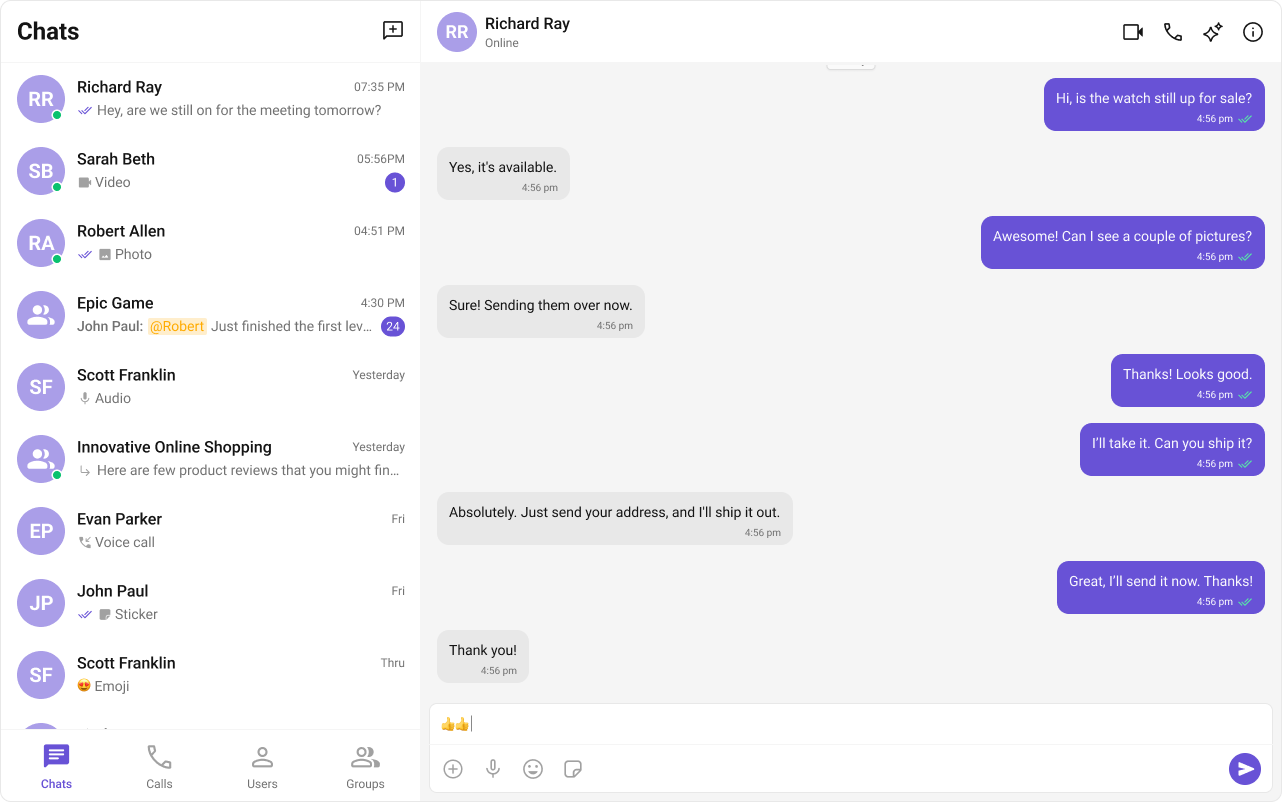
## **User Interface Preview**
***
## **Try Live Demo**
**Experience the CometChat UI Kit in action:**
> **Tip:** You can **fork** the sandbox, insert your **CometChat credentials** (App ID, Region, Auth Key) in the code, and immediately preview how the UI and messages respond in real time.
***
## **Integration**
A collection of individual components—like conversation lists, message lists, message composer, etc.—each with built-in chat logic so you can customize every element.
**How It Works**
* Import the components you need from our UI Kits.
* Arrange them in your desired layout, applying styling or customization as needed.
* You don’t need to rewrite the SDK calls yourself—each component already integrates with CometChat logic.
**Why It’s Great**
* **Flexible Design** – You control the final UI arrangement.
* **No Extra Overhead** – Implement only the features you need.
* **Modular** – Use exactly what you want, when you want.
} href="/ui-kit/react/react-js-integration" horizontal />
} href="/ui-kit/react/builder-integration-nextjs" horizontal />
} href="/ui-kit/react/builder-integration-react-router" horizontal />
***
## **Next Steps for Developers**
1. **Learn the Basics** – [Key Concepts](/fundamentals/key-concepts).
2. **Pick a Framework** – React.js or Next.js or React Router.
3. **Follow the Setup Guide** –
* **UI Components** – [React.js](/ui-kit/react/react-js-integration) or [Next.js](/ui-kit/react/next-js-integration) or [React Router](/ui-kit/react/react-router-integration).
4. **Customize UI** – Adjust [styles, themes](/ui-kit/react/theme), and [components](/ui-kit/react/components-overview).
5. **Test & Deploy** – Run tests and launch your chat app.
***
## **Helpful Resources**
Explore these essential resources to gain a deeper understanding of **CometChat UI Kits** and streamline your integration process.
Fully functional sample applications to accelerate your development.
View on GitHub
Access the complete UI Kit source code on GitHub.
View on GitHub
UI design resources for customization and prototyping.
View on Figma
***
## **Need Help?**
If you need assistance, check out:
* [Developer Community](http://community.cometchat.com/)
* [Support Portal](https://help.cometchat.com/hc/en-us/requests/new)
 ***
## **Try Live Demo**
**Experience the CometChat UI Kit in action:**
***
## **Try Live Demo**
**Experience the CometChat UI Kit in action:**