> ## Documentation Index
> Fetch the complete documentation index at: https://cometchat-22654f5b-feature-react-native-sdk-quotedmessage-a.mintlify.site/llms.txt
> Use this file to discover all available pages before exploring further.

# Building A Conversation List + Message View

The **Conversation List + Message View** layout offers a seamless **two-panel chat interface**, commonly used in modern messaging applications like **WhatsApp Web, Slack, and Microsoft Teams**.

This design enables users to switch between conversations effortlessly while keeping the chat window open, ensuring a **smooth, real-time messaging experience**.

[<img src="https://mintcdn.com/cometchat-22654f5b-feature-react-native-sdk-quotedmessage-a/R-mrzo_AxVZMXils/images/30d34521-play-codesandbox.svg?fit=max&auto=format&n=R-mrzo_AxVZMXils&q=85&s=719f2f667589e0991584e435e7936741" width="165" height="32" data-path="images/30d34521-play-codesandbox.svg" />](https://link.cometchat.com/react-conversation-list-message)

> **Tip:** You can **fork** the sandbox, insert your **CometChat credentials** (App ID, Region, Auth Key.) in the code, and immediately preview how the UI and messages respond in real time.

***

## **User Interface Overview**
<Frame>
  <img src="https://mintcdn.com/cometchat-22654f5b-feature-react-native-sdk-quotedmessage-a/yDKVamMkf61gj3YR/images/e6411d13-chat_experience_sidebar_message-35c431d8bf694e5690e4e0f3a74165af.png?fit=max&auto=format&n=yDKVamMkf61gj3YR&q=85&s=88eee0c31093fa6085af41cb0aff08ab" width="1282" height="802" data-path="images/e6411d13-chat_experience_sidebar_message-35c431d8bf694e5690e4e0f3a74165af.png" />
</Frame>

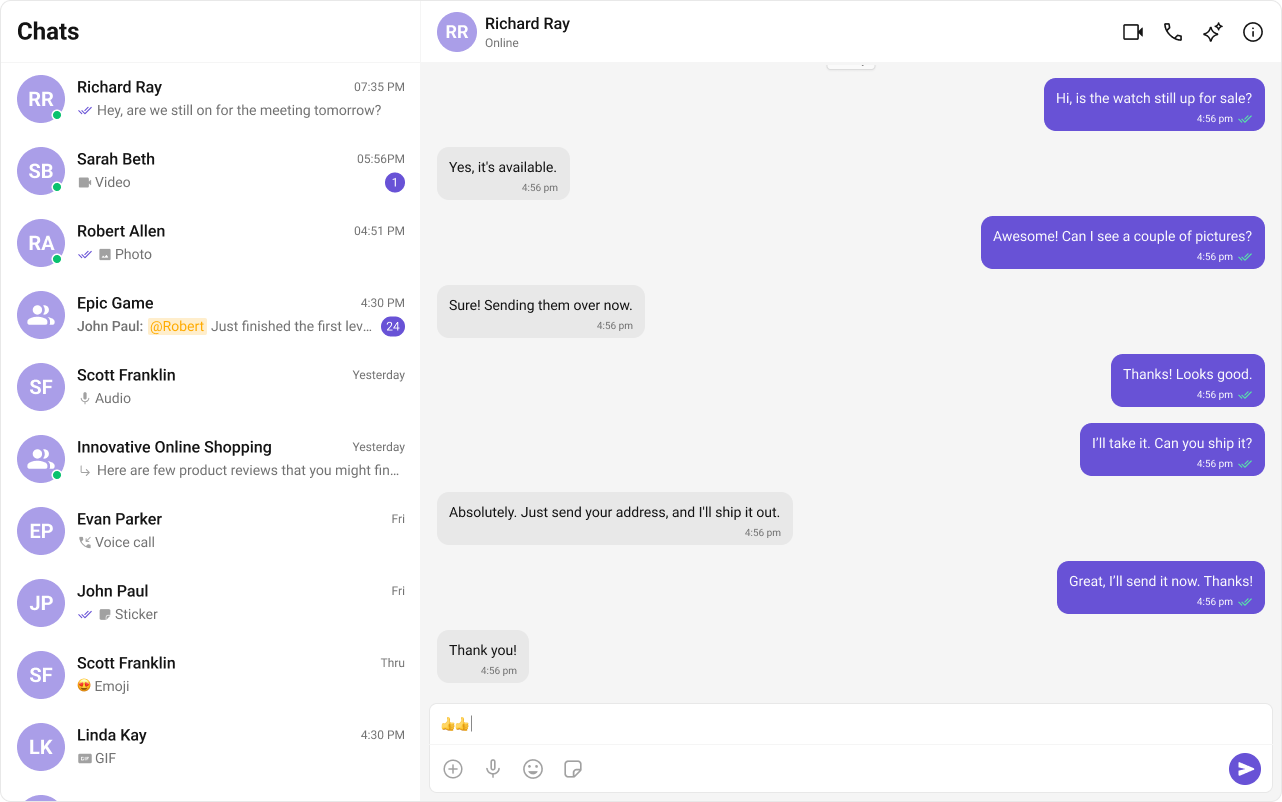
This layout is structured into three key sections:

1. **Sidebar (Conversation List)** – Displays active conversations, including users and groups.
2. **Message View** – Shows chat messages for the selected conversation in real-time.
3. **Message Composer** – Provides an input field for typing and sending messages, along with support for media, emojis, and reactions.

***

## **Step-by-Step Guide**

### **Step 1: Create Sidebar**

Let's create the `Sidebar` component which will render different conversations.

#### **Folder Structure**

Create a `CometChatSelector` folder inside your `src` directory and add the following files:

```
src/
│── CometChatSelector/
│   ├── CometChatSelector.tsx
│   ├── CometChatSelector.css
```

<Tabs>
  <Tab title="TypeScript">
    ```tsx CometChatSelector.tsx theme={null}
    import { useEffect, useState } from "react";
    import {
      Conversation,
      Group,
      User,
      CometChat,
    } from "@cometchat/chat-sdk-javascript";
    import {
      CometChatConversations,
      CometChatUIKitLoginListener,
    } from "@cometchat/chat-uikit-react";
    import "./CometChatSelector.css";

    // Define the props for the CometChatSelector component
    interface SelectorProps {
      onSelectorItemClicked?: (
        input: User | Group | Conversation,
        type: string
      ) => void;
      onHide?: () => void;
      onNewChatClicked?: () => void;
    }

    // CometChatSelector component
    export const CometChatSelector = (props: SelectorProps) => {
      // Destructure props with a default function for onSelectorItemClicked
      const { onSelectorItemClicked = () => {} } = props;

      // State to store the logged-in user
      const [loggedInUser, setLoggedInUser] = useState<CometChat.User | null>();

      // State to track the currently selected item (it can be a Conversation, User, or Group)
      const [activeItem, setActiveItem] = useState<
        CometChat.Conversation | CometChat.User | CometChat.Group | undefined
      >();

      // useEffect hook to fetch and set the logged-in user
      useEffect(() => {
        const loggedInUser = CometChatUIKitLoginListener.getLoggedInUser();
        setLoggedInUser(loggedInUser);
      }, [loggedInUser]); // Dependency on loggedInUser causes unnecessary re-renders

      return (
        <>
          {/* Render chat conversations if a user is logged in */}
          {loggedInUser && (
            <>
              <CometChatConversations
                activeConversation={
                  activeItem instanceof CometChat.Conversation
                    ? activeItem
                    : undefined
                }
                onItemClick={(e) => {
                  setActiveItem(e); // Update the active item when an item is clicked
                  onSelectorItemClicked(e, "updateSelectedItem"); // Notify parent component
                }}
              />
            </>
          )}

        </>
      );
    };
    ```
  </Tab>

  <Tab title="CSS">
    ```css CometChatSelector.css theme={null}
    /* Styles for the menu icon in the conversation header */
    .selector-wrapper .cometchat-conversations .cometchat-list__header-menu .cometchat-button__icon {
        background: var(--cometchat-icon-color-primary);
    }

    /* Change background color of the menu icon on hover */
    .cometchat-conversations .cometchat-list__header-menu .cometchat-button__icon:hover {
        background: var(--cometchat-icon-color-highlight);
    }

    /* Remove the right border from the search bar */
    .cometchat-list__header-search-bar {
        border-right: none;
    }

    /* Aligns submenu list items to the left */
    .cometchat .cometchat-menu-list__sub-menu-list-item {
        text-align: left;
    }

    /* Adjust the width and positioning of the conversation menu list */
    .cometchat .cometchat-conversations .cometchat-menu-list__sub-menu-list {
        width: 212px;
        top: 40px !important;
        left: 172px !important;
    }

    /* Styles for the logged-in user section */
    #logged-in-user {
        border-bottom: 2px solid var(--cometchat-border-color-default, #E8E8E8);
    }

    /* Disable cursor interaction for menu items inside logged-in user section */
    #logged-in-user .cometchat-menu-list__sub-menu-item-title,
    #logged-in-user .cometchat-menu-list__sub-menu-list-item {
        cursor: default;
    }

    /* Background color for the logout button icon */
    .cometchat-menu-list__sub-menu-list-item-icon-log-out {
        background-color: var(--cometchat-error-color, #F44649);
    }

    /* Text color for the logout menu item */
    .cometchat-menu-list__sub-menu-item-title-log-out {
        color: var(--cometchat-error-color, #F44649);
    }

    /* Enable pointer cursor for menu items inside the chat menu */
    .chat-menu .cometchat .cometchat-menu-list__sub-menu-item-title {
        cursor: pointer;
    }

    /* Remove box-shadow from submenu in the chat menu */
    .chat-menu .cometchat .cometchat-menu-list__sub-menu {
        box-shadow: none;
    }

    /* Styles for the submenu icon inside the chat menu */
    .chat-menu .cometchat .cometchat-menu-list__sub-menu-icon {
        background-color: var(--cometchat-icon-color-primary, #141414);
        width: 24px;
        height: 24px;
    }

    /* Styling for the chat selector container */
    .cometchat-selector {
        display: flex;
        width: 100%;
        padding: 0px 8px;
        align-items: flex-start;
        gap: 8px;
        border-top: 1px solid var(--cometchat-border-color-light, #F5F5F5);
        border-right: 1px solid var(--cometchat-border-color-light, #F5F5F5);
        background: var(--cometchat-background-color-01, #FFF);
    }

    /* Styling for each tab inside the chat selector */
    .cometchat-selector__tab {
        display: flex;
        padding: 12px 0px 10px 0px;
        flex-direction: column;
        justify-content: center;
        align-items: center;
        gap: 4px;
        flex: 1 0 0;
        min-height: 48px;
    }

    /* Styles for the active tab icon */
    .cometchat-selector__tab-icon-active {
        display: flex;
        width: 32px;
        height: 32px;
        justify-content: center;
        align-items: center;
        -webkit-mask-size: contain;
        mask-size: contain;
        cursor: default;
        background: var(--cometchat-icon-color-highlight);
        -webkit-mask: url('./assets/chats.svg') no-repeat center;
        mask: url('./assets/chats.svg') no-repeat center;
    }

    /* Styles for the active tab text */
    .cometchat-selector__tab-text-active {
        text-align: center;
        font: var(--cometchat-font-caption1-medium, 500 12px Roboto);
        cursor: default;
        color: var(--cometchat-text-color-highlight);
    }
    ```
  </Tab>
</Tabs>

### **Step 2: Update App**

Now we will update the `App.tsx` & `App.css` files to import these new components as below,

<Tabs>
  <Tab title="TypeScript">
    ```tsx App.tsx theme={null}
    import { useState } from "react";
    import {
      CometChatMessageComposer,
      CometChatMessageHeader,
      CometChatMessageList,
    } from "@cometchat/chat-uikit-react";
    import { CometChat } from "@cometchat/chat-sdk-javascript";
    import { CometChatSelector } from "./CometChatSelector/CometChatSelector";
    import "./App.css";
    import '@cometchat/chat-uikit-react/css-variables.css';

    function App() {
      // State to track the currently selected user
      const [selectedUser, setSelectedUser] = useState<CometChat.User | undefined>(undefined);

      // State to track the currently selected group
      const [selectedGroup, setSelectedGroup] = useState<CometChat.Group | undefined>(undefined);

      return (
        <div className="conversations-with-messages">
          {/* Sidebar for selecting conversations */}
          <div className="conversations-wrapper">
            <CometChatSelector
              onSelectorItemClicked={(activeItem) => {
                let item = activeItem;

                // If the selected item is a conversation, extract the user/group from it
                if (activeItem instanceof CometChat.Conversation) {
                  item = activeItem.getConversationWith();
                }

                // Determine if the selected item is a User or a Group and update the state accordingly
                if (item instanceof CometChat.User) {
                  setSelectedUser(item as CometChat.User);
                  setSelectedGroup(undefined); // Ensure no group is selected
                } else if (item instanceof CometChat.Group) {
                  setSelectedUser(undefined); // Ensure no user is selected
                  setSelectedGroup(item as CometChat.Group);
                } else {
                  setSelectedUser(undefined);
                  setSelectedGroup(undefined); // Reset if selection is invalid
                }
              }}
            />
          </div>

          {/* If a user or group is selected, display the chat interface */}
          {selectedUser || selectedGroup ? (
            <div className="messages-wrapper">
              {/* Header displaying user/group details */}
              <CometChatMessageHeader user={selectedUser} group={selectedGroup} />
              
              {/* List of messages for the selected user/group */}
              <CometChatMessageList user={selectedUser} group={selectedGroup} />
              
              {/* Message input composer */}
              <CometChatMessageComposer user={selectedUser} group={selectedGroup} />
            </div>
          ) : (
            // Default message when no conversation is selected
            <div className="empty-conversation">Select Conversation to start</div>
          )}
        </div>
      );
    };

    export default App;
    ```
  </Tab>

  <Tab title="CSS">
    ```css App.css theme={null}
    /* Root container settings */
    #root {
      text-align: center;
      width: 100vw; /* Full viewport width */
      height: 100vh; /* Full viewport height */
      background-color: #282c34; /* Dark background */
    }

    /* Layout container for conversations and messages */
    .conversations-with-messages {
      display: flex;
      height: 100%;
      width: 100%;
      flex-direction: row; /* Horizontal layout */
    }

    /* Sidebar container for the conversation list */
    .conversations-wrapper {
      height: 100vh;
      width: 480px; /* Fixed width for the sidebar */
      overflow: hidden;
      display: flex;
      flex-direction: column;
    }

    /* Prevent scrolling inside the conversation list */
    .conversations-wrapper > .cometchat {
      overflow: hidden;
    }

    /* Main chat messages container */
    .messages-wrapper {
      width: 100%;
      height: 100%;
      display: flex;
      flex-direction: column;
    }

    /* Styles for the placeholder when no conversation is selected */
    .empty-conversation {
      height: 100vh;
      width: 100%;
      display: flex;
      justify-content: center;
      align-items: center;
      background: var(--cometchat-background-color-03, #F5F5F5); /* Light gray background */
      color: var(--cometchat-text-color-secondary, #727272); /* Secondary text color */
      font: var(--cometchat-font-body-regular, 400 14px Roboto);
    }

    /* Remove border-radius for the message composer input */
    .cometchat .cometchat-message-composer {
      border-radius: 0px;
    }
    ```
  </Tab>
</Tabs>

### **Step 3: Run the project**

```powershell theme={null}
npm start
```

***

## **Next Steps**

### **Enhance the User Experience**

* **[Advanced Customizations](/ui-kit/react/theme)** – Personalize the chat UI to align with your brand.

***
