

User Interface Preview
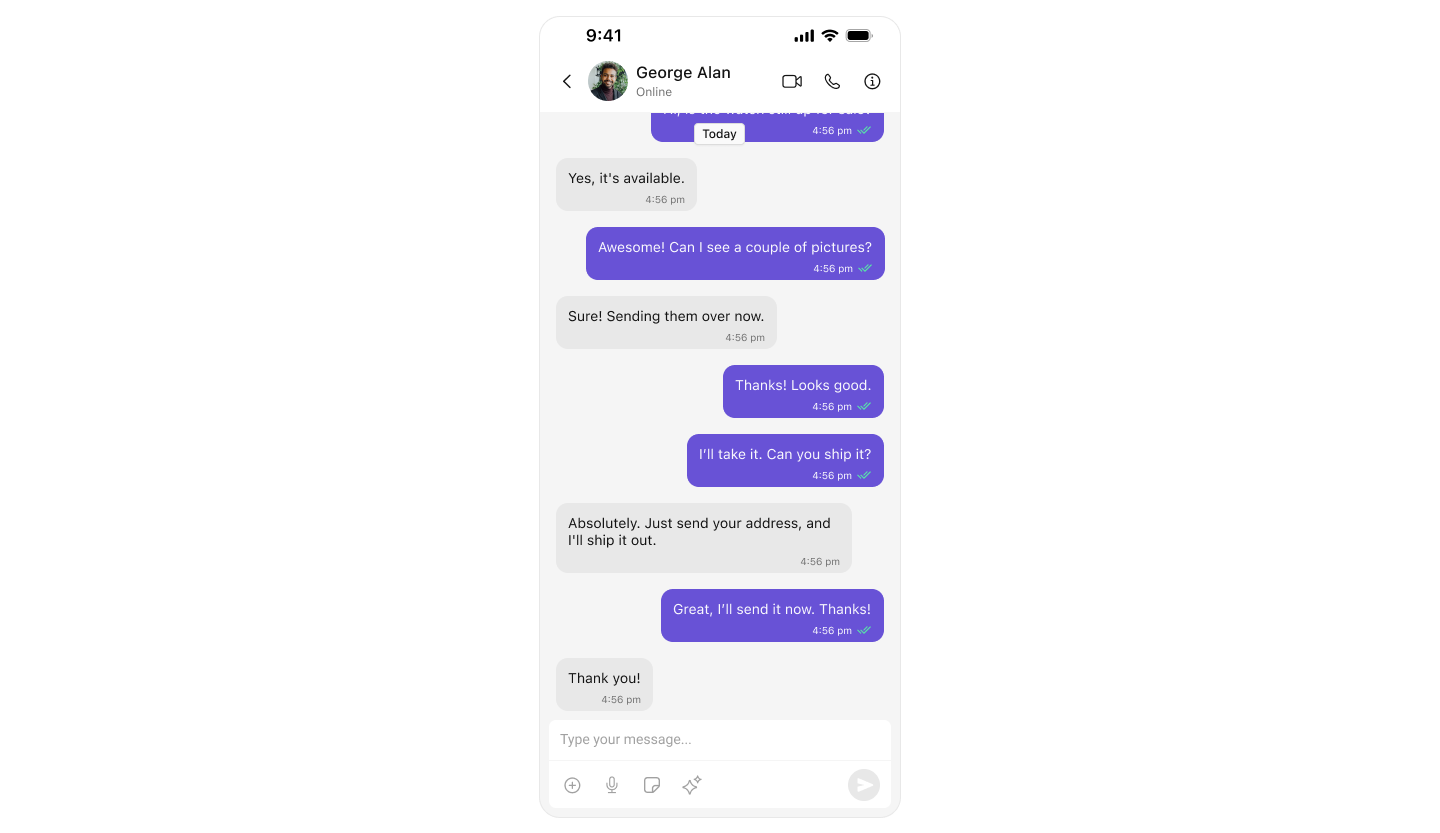
Key Components
- Chat Header – Displays recipient details and optional call/video call buttons.
- Message View – Shows real-time chat history.
- Message Input Box – Enables users to send messages, media, and reactions.
Step-by-Step Guide
Step 1: Setup SceneDelegate.swift
Ensure UI Kit is initialized and the user is logged in before presenting the message view.SceneDelegate.swift
import UIKit
import CometChatUIKitSwift
import CometChatSDK
import CometChatCallsSDK

class SceneDelegate: UIResponder, UIWindowSceneDelegate {

    var window: UIWindow?

    func scene(_ scene: UIScene, willConnectTo session: UISceneSession, options connectionOptions: UIScene.ConnectionOptions) {

        guard let windowScene = (scene as? UIWindowScene) else { return }

        let uikitSettings = UIKitSettings()
            .set(appID: "<#Enter Your App ID Here#>")
            .set(region: "<#Enter Your Region Code Here#>")
            .set(authKey: "<#Enter Your AuthKey Here#>")
            .subscribePresenceForAllUsers()
            .build()

        CometChatUIKit.init(uiKitSettings: uikitSettings) { result in
            switch result {
            case .success:
                debugPrint("CometChat UI Kit initialization succeeded")

                let uid = "cometchat-uid-1"

                CometChatUIKit.login(uid: uid) { loginResult in
                    switch loginResult {
                    case .success:
                        debugPrint("CometChat UI Kit login succeeded")

                        DispatchQueue.main.async { [weak self] in
                            guard let self = self else { return }
                            self.setUpOneOneOrGroupConversation(windowScene: windowScene, uid: "cometchat-uid-2")
                        }

                    case .onError(let error):
                        debugPrint("Login failed: \(error.description)")
                    @unknown default: break
                    }
                }

            case .failure(let error):
                debugPrint("Initialization failed: \(error.localizedDescription)")
            }
        }
    }

    func setUpOneOneOrGroupConversation(windowScene: UIWindowScene, uid : String) {
        CometChat.getUser(UID: uid) { user in

            DispatchQueue.main.async {
                let messagesVC = MessagesVC()
                let navController = UINavigationController(rootViewController: messagesVC)
                messagesVC.user = user
                self.window = UIWindow(windowScene: windowScene)
                self.window?.rootViewController = navController
                self.window?.makeKeyAndVisible()
            }
        } onError: { error in

        }

    }

}
Step 2: Create MessagesVC.swift
This view controller handles chat between users or within groups.MessagesVC.swift
import UIKit
import CometChatSDK
import CometChatUIKitSwift

/// A view controller that displays a chat interface using CometChat components
class MessagesVC: UIViewController {

    // MARK: - Properties

    /// The user entity for one-on-one chats
    var user: User?

    /// The group entity for group chats
    var group: Group?

    // MARK: - UI Components

    /// Header view displaying user/group information
    private lazy var headerView: CometChatMessageHeader = {
        let view = CometChatMessageHeader()
        view.translatesAutoresizingMaskIntoConstraints = false
        // Configure for the appropriate conversation type
        if let user = user {
            view.set(user: user)
        } else if let group = group {
            view.set(group: group)
        }
        view.set(controller: self)
        return view
    }()

    /// Message input composer view
    private lazy var composerView: CometChatMessageComposer = {
        let composer = CometChatMessageComposer()
        composer.translatesAutoresizingMaskIntoConstraints = false
        // Configure for the appropriate conversation type
        if let user = user {
            composer.set(user: user)
        } else if let group = group {
            composer.set(group: group)
        }
        composer.set(controller: self)
        return composer
    }()

    /// List view displaying chat messages
    private lazy var messageListView: CometChatMessageList = {
        let listView = CometChatMessageList()
        listView.translatesAutoresizingMaskIntoConstraints = false
        // Configure for the appropriate conversation type
        if let user = user {
            listView.set(user: user)
        } else if let group = group {
            listView.set(group: group)
        }
        listView.set(controller: self)
        return listView
    }()

    // MARK: - Lifecycle Methods

    override func viewDidLoad() {
        super.viewDidLoad()
        configureView()
        setupLayout()
    }

    override func viewWillDisappear(_ animated: Bool) {
        super.viewWillDisappear(animated)
        navigationController?.setNavigationBarHidden(false, animated: true)
    }

    // MARK: - Private Methods

    /// Configure basic view properties
    private func configureView() {
        view.backgroundColor = .systemBackground
        navigationController?.setNavigationBarHidden(true, animated: false)
    }

    /// Set up view hierarchy and constraints
    private func setupLayout() {
        // Add subviews to the view hierarchy
        [headerView, messageListView, composerView].forEach { view.addSubview($0) }

        // Set up constraints
        NSLayoutConstraint.activate([
            // Header view constraints
            headerView.topAnchor.constraint(equalTo: view.safeAreaLayoutGuide.topAnchor),
            headerView.leadingAnchor.constraint(equalTo: view.leadingAnchor),
            headerView.trailingAnchor.constraint(equalTo: view.trailingAnchor),
            headerView.heightAnchor.constraint(equalToConstant: 50),

            // Message list view constraints
            messageListView.topAnchor.constraint(equalTo: headerView.bottomAnchor),
            messageListView.leadingAnchor.constraint(equalTo: view.leadingAnchor),
            messageListView.trailingAnchor.constraint(equalTo: view.trailingAnchor),
            messageListView.bottomAnchor.constraint(equalTo: composerView.topAnchor),

            // Composer view constraints
            composerView.leadingAnchor.constraint(equalTo: view.leadingAnchor),
            composerView.trailingAnchor.constraint(equalTo: view.trailingAnchor),
            composerView.bottomAnchor.constraint(equalTo: view.safeAreaLayoutGuide.bottomAnchor)
        ])
    }
}
Next Steps
Enhance the User Experience
- Advanced Customizations – Personalize the chat UI to align with your brand.